
Error C80003FA

Frizvane

Banned
Local time
11:19 PM
Messages
9
Location
Manila, Philippines
Hi, please help me out with my problem. My problem is I installed Windows 7 64bit. I want to get some updates from Microsoft but everytime I go to the Windows Updates at Control Panel I'm getting this Error Code C80003FA. Right now, I haven't installed any AntiVirus software on my rig.

Here is the reference picture:

1-6.jpg
 

My Computer

OS
Windows 7 Ultimate 64-bit Party OS
CPU
AMD Phenom II X4 B40
Motherboard
MSI 785GM-E65
Memory
4GB (Dual) DDR3-1333 G.Skill Rip Jaws (F3-10666CL7D-4GBRH)
PSU
Tacens Supero 500W
Case
Duke 08
Cooling
Ice Blade Pro (Push-Pull)

My Computer

Computer Manufacturer/Model Number
Dell and Custom
OS
Systems 1 and 2: Windows 7 Enterprise x64, Win 8 Developer
CPU
System 1: i7 [email protected], System 2: AMD FX-4100 Zambezi 3.6G
Motherboard
System 1:Dell 06NWYK System 2: ASUS M5A97 AM3+
Memory
System 1: 8GB System 2: 8GB
Graphics Card(s)
System 1: ATI FirePro V4800 System 2: Radeon HD 6850
Sound Card
System 1: onboard System 2: onboard
Monitor(s) Displays
System1: Viewsonic HDMI 24"
Screen Resolution
System 1: 1920x1080 System 2: 1920x1080
Hard Drives
System 1: Mirrored .5B drives System 2: Seagate Barracuda ST1000DM003 1TB 7200 RPM 64MB Cache SATA 6.0Gb/s
Case
System 1: Dell System 2: Cooler Master
Internet Speed
10 MBPS
Hi Lemur, I have tried everything from the link that you posted from the normal troubleshooting steps to advanced troubleshooting steps and I'm still getting the same error code. :( I believe I have a good internet connection, then why am I getting this error code?
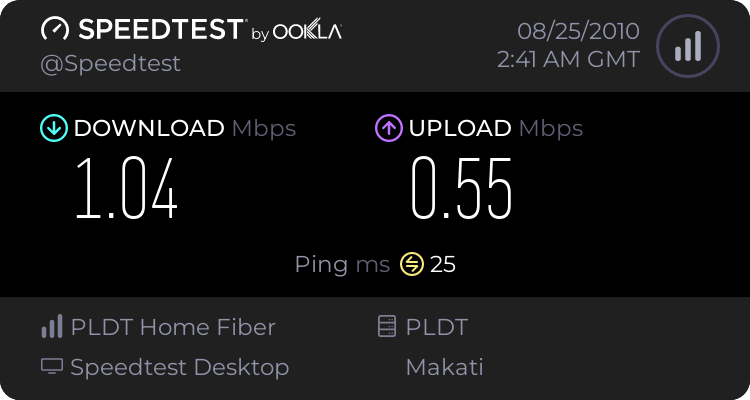
Here's the actual speed of my internet.

926979551.png
 

My Computer

OS
Windows 7 Ultimate 64-bit Party OS
CPU
AMD Phenom II X4 B40
Motherboard
MSI 785GM-E65
Memory
4GB (Dual) DDR3-1333 G.Skill Rip Jaws (F3-10666CL7D-4GBRH)
PSU
Tacens Supero 500W
Case
Duke 08
Cooling
Ice Blade Pro (Push-Pull)

My Computer

Computer Manufacturer/Model Number
Custom made
OS
Windows 7 Professional x64 PL
CPU
AMD Athlon 4450e
Motherboard
Giga-Byte GA-MA69G-S3H
Memory
GoodRam DDR2 2x2048MB (FSB 800MHz)
Graphics Card(s)
nVidia GeForce 9600GT (G94-300) 1024 MB
Monitor(s) Displays
SAMSUNG SyncMaster HS2P301688
Hard Drives
Seagate ST3750330AS 750GB
PSU
Corsair 550W
Cooling
AeroCool ExtremeEngine 3T
Flavius, the update already ran earlier. But it was stuck on the screen that says checking for updates. I've waited for 2 hours and it was still checking for updates so I restarted my computer. And when I went to the Windows Update again, I had the same error. Is that suppose to take for more than 2 hours? :confused:
 

My Computer

OS
Windows 7 Ultimate 64-bit Party OS
CPU
AMD Phenom II X4 B40
Motherboard
MSI 785GM-E65
Memory
4GB (Dual) DDR3-1333 G.Skill Rip Jaws (F3-10666CL7D-4GBRH)
PSU
Tacens Supero 500W
Case
Duke 08
Cooling
Ice Blade Pro (Push-Pull)
Is that suppose to take for more than 2 hours? :confused:

IMO it doesn't make sense wait so long.Disable Windows Update and run Live Care as I said before (scan everything)
 

My Computer

Computer Manufacturer/Model Number
Custom made
OS
Windows 7 Professional x64 PL
CPU
AMD Athlon 4450e
Motherboard
Giga-Byte GA-MA69G-S3H
Memory
GoodRam DDR2 2x2048MB (FSB 800MHz)
Graphics Card(s)
nVidia GeForce 9600GT (G94-300) 1024 MB
Monitor(s) Displays
SAMSUNG SyncMaster HS2P301688
Hard Drives
Seagate ST3750330AS 750GB
PSU
Corsair 550W
Cooling
AeroCool ExtremeEngine 3T
I've already downgraded to Windows 7 32bit. The problem here was there is an issue with motherboard, it doesn't support Windows 7 64bit. That's why I'm not getting any updates at all. When I downgraded, I have an updates already. Do I need to download all of the updates? I feel like my PC this time is running slow, right now or there are specific updates that I don't need to download?
 

My Computer

OS
Windows 7 Ultimate 64-bit Party OS
CPU
AMD Phenom II X4 B40
Motherboard
MSI 785GM-E65
Memory
4GB (Dual) DDR3-1333 G.Skill Rip Jaws (F3-10666CL7D-4GBRH)
PSU
Tacens Supero 500W
Case
Duke 08
Cooling
Ice Blade Pro (Push-Pull)
This error is due to a faulty memory.

You can run a memtest for 10h, and if you see 5 or more errors you can ask a RAM replacement.

Memtest is embed with the ubuntu or lubuntu iso file.

You just need to create a flash drive with linuxliveusb.com, and boot on it.

If you don't see the memtest menu, press the down arrow multiple time so the live usb won't launch.
 
Last edited:

My Computer

Computer type
PC/Desktop
OS
XP pro 32 bit (shame on me)
Back
Top