Error code = 0x490 due to power cut, now Windows completely missing!

Rona88

New member
Local time
8:42 AM
Messages
12
Hello everyone,

I have a problem I attempted to solve by following a tutorial but was unsuccesful.

My computer was installing windows updates when the power went out. From that moment, when restarted, it offer me a choice of
1. attempting startup repair
2. loading windows as if nothing happened.

When I tried 2. it would be stuck on loading windows logo until I restarted.

I tried Startup Repair and got 'Windows cannot repair this computer automatically'.

Startup Repair
Diagnosis and repair details:

Root cause found:
--------------------
Boot sector for system disk partition is corrupt.

Repair action: Boot sector repair
Result: Failed. Error code = 0x490
Time taken = 182568 ms
-----------------------
-----------------------

After this I googled 0x490 error and followed these instructions:

- I opened Command Prompt and entered 'BootRec.exe/fixmbr'

It said that operation was performed successfully however since I did this the computer cannot find an operating system at all!

When I restart it says Operating system missing.

After this I boot from Win DVD and open Command Prompt

I have since attempted this command 'bootrec.exe/fixboot' separately on all 3 partitions of the disk (while only that partition active).

After that I tried 'BootRec.exe/Scanos'.

In all 3 cases the massage I get is:
Total identified Windows installations: 0

This makes it impossible to try RebuildBcd.

I have also attempted running startup repair 3 times on each partition, unsuccessfully.

What can I do?

Thanks very much.
 

My Computer

Computer type
PC/Desktop
Computer Manufacturer/Model Number
Custom
OS
Windows 7 x32
CPU
Intel Pentium Dual CPU 1.8 GHz
Memory
2 GB
Hard Drives
Western Digital ATA Device 931 GB
From win 7 installation disk at command prompt run chkdsk /r
I would also run sfc /scannow.
Then try startup repair.
 
Last edited:

My Computers

System One System Two

  • Computer type
    PC/Desktop
    Computer Manufacturer/Model Number
    custom build
    OS
    Windows 7 HP 64
    CPU
    i5 6600K - 800MHz to 4200MHz
    Motherboard
    GA-Z170-HD3P
    Memory
    4+4G GSkill DDR4 3000
    Graphics Card(s)
    IG - Intel 530
    Monitor(s) Displays
    Samsung 226BW
    Screen Resolution
    1680x1050
    Hard Drives
    (1) -1 SM951 – 128GB M.2 AHCI PCIe SSD drive for Windows 7 and Lubuntu
    (2) -1 WD SATA 3 - 1T for Data
    (3) -1 WD SATA 3 - 1T for backup
    PSU
    Thermaltake 450W TR2 gold
    Keyboard
    Old and good Chicony mechanical keyboard
    Mouse
    Logitech mX performance - 9 buttons (had to disable some)
    Internet Speed
    500Mb/s
    Browser
    Firefox 64
    Other Info
    TinyWall firewall
  • Computer type
    Laptop
    System Manufacturer/Model Number
    Asus Q550LF
    OS
    Windows 7 Pro
    CPU
    i7-4500U 800MHz to 3.0GHz
    Motherboard
    Asus Q550LF
    Memory
    (4+4)G DDR3 1600
    Graphics Card(s)
    IG intel 4400 + NVIDIA GeForce GT 745M
    Sound Card
    Realtek
    Monitor(s) Displays
    LG Display LP156WF4-SPH1
    Screen Resolution
    1920 x 1080
    Hard Drives
    BX500 120G SSD for Windows and programs +
    1T HDD for data
    Internet Speed
    500 Mb/s
    Browser
    Firefox
    Other Info
    TinyWall firewall
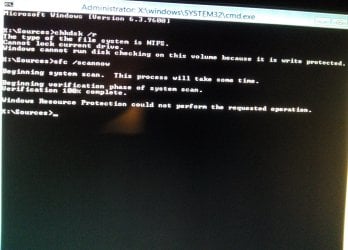
Megahertz07 I did as you said however both commands were unsuccessful. I'm posting a pic with responses.

The drive is encrypted with Truecrypt so is that why chkdsk /r couldn't be performed? Thanks for your help.
 

Attachments

  • 0IMG_20161022_203435~01.jpg
    0IMG_20161022_203435~01.jpg
    1 MB · Views: 0

My Computer

Computer type
PC/Desktop
Computer Manufacturer/Model Number
Custom
OS
Windows 7 x32
CPU
Intel Pentium Dual CPU 1.8 GHz
Memory
2 GB
Hard Drives
Western Digital ATA Device 931 GB
Sorry, my omission, you must go to disk C:
From win 7 installation disk at command prompt run chkdsk C: /r
 

My Computers

System One System Two

  • Computer type
    PC/Desktop
    Computer Manufacturer/Model Number
    custom build
    OS
    Windows 7 HP 64
    CPU
    i5 6600K - 800MHz to 4200MHz
    Motherboard
    GA-Z170-HD3P
    Memory
    4+4G GSkill DDR4 3000
    Graphics Card(s)
    IG - Intel 530
    Monitor(s) Displays
    Samsung 226BW
    Screen Resolution
    1680x1050
    Hard Drives
    (1) -1 SM951 – 128GB M.2 AHCI PCIe SSD drive for Windows 7 and Lubuntu
    (2) -1 WD SATA 3 - 1T for Data
    (3) -1 WD SATA 3 - 1T for backup
    PSU
    Thermaltake 450W TR2 gold
    Keyboard
    Old and good Chicony mechanical keyboard
    Mouse
    Logitech mX performance - 9 buttons (had to disable some)
    Internet Speed
    500Mb/s
    Browser
    Firefox 64
    Other Info
    TinyWall firewall
  • Computer type
    Laptop
    System Manufacturer/Model Number
    Asus Q550LF
    OS
    Windows 7 Pro
    CPU
    i7-4500U 800MHz to 3.0GHz
    Motherboard
    Asus Q550LF
    Memory
    (4+4)G DDR3 1600
    Graphics Card(s)
    IG intel 4400 + NVIDIA GeForce GT 745M
    Sound Card
    Realtek
    Monitor(s) Displays
    LG Display LP156WF4-SPH1
    Screen Resolution
    1920 x 1080
    Hard Drives
    BX500 120G SSD for Windows and programs +
    1T HDD for data
    Internet Speed
    500 Mb/s
    Browser
    Firefox
    Other Info
    TinyWall firewall
I tried it,
 

Attachments

  • 0_IMG_20161023_053423.jpg
    0_IMG_20161023_053423.jpg
    493.8 KB · Views: 0

My Computer

Computer type
PC/Desktop
Computer Manufacturer/Model Number
Custom
OS
Windows 7 x32
CPU
Intel Pentium Dual CPU 1.8 GHz
Memory
2 GB
Hard Drives
Western Digital ATA Device 931 GB
Rona, your disk isn't formatted (RAW).
As you said that you were installing Windows updates, it can be possible that it's a logical problem and can be fixed or can be that your disk died.
Don't try to fix it, or you may loose all data on it.
Ask Jumanji for help. He is the disk guru. Send him a private message.
http://www.sevenforums.com/member.php?u=163641
 

My Computers

System One System Two

  • Computer type
    PC/Desktop
    Computer Manufacturer/Model Number
    custom build
    OS
    Windows 7 HP 64
    CPU
    i5 6600K - 800MHz to 4200MHz
    Motherboard
    GA-Z170-HD3P
    Memory
    4+4G GSkill DDR4 3000
    Graphics Card(s)
    IG - Intel 530
    Monitor(s) Displays
    Samsung 226BW
    Screen Resolution
    1680x1050
    Hard Drives
    (1) -1 SM951 – 128GB M.2 AHCI PCIe SSD drive for Windows 7 and Lubuntu
    (2) -1 WD SATA 3 - 1T for Data
    (3) -1 WD SATA 3 - 1T for backup
    PSU
    Thermaltake 450W TR2 gold
    Keyboard
    Old and good Chicony mechanical keyboard
    Mouse
    Logitech mX performance - 9 buttons (had to disable some)
    Internet Speed
    500Mb/s
    Browser
    Firefox 64
    Other Info
    TinyWall firewall
  • Computer type
    Laptop
    System Manufacturer/Model Number
    Asus Q550LF
    OS
    Windows 7 Pro
    CPU
    i7-4500U 800MHz to 3.0GHz
    Motherboard
    Asus Q550LF
    Memory
    (4+4)G DDR3 1600
    Graphics Card(s)
    IG intel 4400 + NVIDIA GeForce GT 745M
    Sound Card
    Realtek
    Monitor(s) Displays
    LG Display LP156WF4-SPH1
    Screen Resolution
    1920 x 1080
    Hard Drives
    BX500 120G SSD for Windows and programs +
    1T HDD for data
    Internet Speed
    500 Mb/s
    Browser
    Firefox
    Other Info
    TinyWall firewall
Something is clearly wrong as the disk has more than 900 GB of content. Megahertz07 thanks for trying to help me and, if it isn't too much to ask, could you put me in contact with Jumanji as I don't have enough posting privileges to send a PM. Thank you.
 

My Computer

Computer type
PC/Desktop
Computer Manufacturer/Model Number
Custom
OS
Windows 7 x32
CPU
Intel Pentium Dual CPU 1.8 GHz
Memory
2 GB
Hard Drives
Western Digital ATA Device 931 GB
Message sent.

Roy
 

My Computer

Computer type
PC/Desktop
Computer Manufacturer/Model Number
medionl/Aspire 6930G/acer x55a
OS
W7 home premium 32bit/W7HP 64bit/w10 tp insider ring
CPU
E5300 dual core
Motherboard
medion MS7366
Memory
3gb
Graphics Card(s)
Nvidia Geforce 7100 Nforce 630i
Monitor(s) Displays
avixc
Internet Speed
n (isp resticted to 72)
Antivirus
mse/pands
Browser
palemoon
Other Info
Belkin Fd7050 n USB using Railink RT2870 drivers, more upto date
Thanks Roy.
 

My Computer

Computer type
PC/Desktop
Computer Manufacturer/Model Number
Custom
OS
Windows 7 x32
CPU
Intel Pentium Dual CPU 1.8 GHz
Memory
2 GB
Hard Drives
Western Digital ATA Device 931 GB
As far as data recovery is concerned, it may well be impossible since you have encrypted the drive with Truecrypt. Your only hope accessing any data in your system drive is to repair and restore your OS. That in any case is not my cup of tea and beyond my thought process. A complete system backup could have saved you from your current situation more so since you have encrypted the drive.

What you can do now is to present a pictorial representation of your drive and wait for other experts to work on it..

Download the Partition Wizard Bootable CD Free Edition version 9.1 ISO ( 32 bit or 64 bit as per your system OS) from Free download Magic Partition Manager Software, partition magic alternative, free partition magic, partition magic Windows 7 and server partition software - Partition Wizard Online

Download Rufus from Rufus - Create bootable USB drives the easy way

Use that PW ISO and create a bootable PW pen drive with Rufus.

Boot your PC from that pendrive using onetime boot menu and run Partition Wizard.

It will show your drive.

Take a snapshot using your mobile or any other camera and post the screenshot.
 

My Computer

OS
Windows 7 Home Premium 32 bit
jumanji, thanks for looking at the thread. I wasn't expecting that bad a news but I suppose there's nothing to do but try to save it somehow.

I have done as you said and downloaded Partition Wizard Bootable CD and Rufus and created bootable USB stick however the computer doesn't recognize it (this was always the case even when computer was healthy it didn't recognize booting from usb).

Is it ok if I create bootable Wizard Partition DVD/CD instead of USB?

Thank you,
Rona
 

My Computer

Computer type
PC/Desktop
Computer Manufacturer/Model Number
Custom
OS
Windows 7 x32
CPU
Intel Pentium Dual CPU 1.8 GHz
Memory
2 GB
Hard Drives
Western Digital ATA Device 931 GB
You should be able to use a CD/DVD player as long as you set it boot. You could try to get the CD to boot using your boot selection key. I don't list your system specs so I can't look that up.
My Asus boards use the F8 key for boot selection.
Try just installing the CD/DVD and turning on the computer. It might just pick it up and boot because it can't find anything else to boot from.

Because you did this in your post #1
After this I boot from Win DVD and open Command Prompt
You should have no problems using a CD/DVD with the programs that jumanji recommended.
 

My Computer

Computer type
PC/Desktop
Computer Manufacturer/Model Number
Home made Desktop
OS
Windows 10 Pro. 64/ version 1709 Windows 7 Pro/64
CPU
Intel i7-6800K @ 4.3
Motherboard
ASUS X-99 Deluxe II
Memory
Corsair Platinum 16 gig @2400
Graphics Card(s)
EVGA GTX 1070 OC
Monitor(s) Displays
Asus 27" LED LCD/VE278Q
Screen Resolution
1920-1080 or 1280-720 HDMI
Hard Drives
INTEL SSD 730-240 Gb Sata 3.0/
PSU
EVGA Platium 1200W
Case
Phanteks Luxe Tempered Glass 8 fans/ one radiator
Cooling
XSPC/ Water Cooled CPU
Keyboard
Das 4 Professional
Mouse
Logitech M705/MX Anywhere 2-S
Internet Speed
100 mbits
Antivirus
Microsoft Security Essentials/ Malwarebytes Premium 3.0/ SAS
Browser
I.E. 11 default/Firefox/ ISP Time Warner Cable/Spectrum
Other Info
LG BluRay Burner/
Sound system-KLipsch-THX/
Icy Dock ssd Hot Swap bays.
As Layback Bear suggested your motherboard manual should indicate the key to be pressed to bring the boot menu.

Otherwise you can enter into BIOS setup and set USB as the first boot device, save and then it should boot from your pendrive.

If your PC is UEFI ( not standard Bios) then you should set it to legacy compatibility mode and disable secure boot.

If you do not want to spend time on any f this or you are not confident, then of course burn the ISO to a CD and boot from the CD to run Partition Wizard.
 

My Computer

OS
Windows 7 Home Premium 32 bit
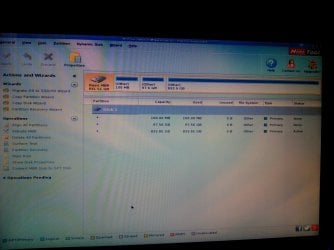
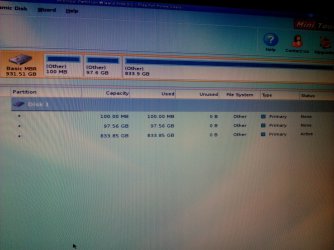
I apologize for the delay. I've run Partition Wizard and these are screenshots that first appear. Of the three partitions shown, Windows installation was originally on second (97.56 GB) partition.

Rona
 

Attachments

  • IMG_20161028_215521.jpg
    IMG_20161028_215521.jpg
    854.1 KB · Views: 0
  • IMG_20161028_215530.jpg
    IMG_20161028_215530.jpg
    1.4 MB · Views: 0

My Computer

Computer type
PC/Desktop
Computer Manufacturer/Model Number
Custom
OS
Windows 7 x32
CPU
Intel Pentium Dual CPU 1.8 GHz
Memory
2 GB
Hard Drives
Western Digital ATA Device 931 GB
Since running a partition wizard I haven't done anything, in fear I'll mess the computer even further. If someone on the forum knows what I should do to attempt to restore windows or can recommend an expert I'd be grateful.

Rona
 

My Computer

Computer type
PC/Desktop
Computer Manufacturer/Model Number
Custom
OS
Windows 7 x32
CPU
Intel Pentium Dual CPU 1.8 GHz
Memory
2 GB
Hard Drives
Western Digital ATA Device 931 GB
Please wait. I have sent a request PM to DavidE to have a look at this problem.
 

My Computer

OS
Windows 7 Home Premium 32 bit
Hi Jumanji,

I've never encrypted a disk drive with TrueCrypt, so i have no experience :(
I think you have a good idea about changing the partition type to NTFS with Partition Wizard.
I also think the 100 MB partition should be set as Active.
I think that is the "System Reserved" partition with the bootloader.
I believe Windows will auto assign the letter C to the OS partition when it starts up.
That's the way it works for multi-boot PC's, each OS gets the letter C when it starts up.

I don't know if this quote about TrueCrypt helps answer the question about NTFS partition type.

Is it possible to change the file system of an encrypted volume?

Yes, when mounted, TrueCrypt volumes can be formatted as FAT12, FAT16, FAT32, NTFS, or any other file system. TrueCrypt volumes behave as standard disk devices so you can right-click the device icon (for example in the 'Computer' or 'My Computer' list) and select 'Format'. The actual volume contents will be lost. However, the whole volume will remain encrypted. If you format a TrueCrypt-encrypted partition when the TrueCrypt volume that the partition hosts is not mounted, then the volume will be destroyed, and the partition will not be encrypted anymore (it will be empty).
Source: Frequently Asked Questions - TrueCrypt
 

My Computer

Computer type
PC/Desktop
Computer Manufacturer/Model Number
home built
OS
Multi-Boot W7_Pro_x64 W8.1_Pro_x64 W10_Pro_x64 +Linux_VMs +Chromium_VM
CPU
AMD Athlon II x4 620
Motherboard
Gigabyte GA-MA785G-UD3H
Memory
6GB GSkill DDR2 800
Graphics Card(s)
AMD 4670 GPU + AMD 4200 IGP
Sound Card
on board Realtek ALC889A
Monitor(s) Displays
RCA 40" LCD TV, Insignia 32" LCD TV, HP 15" LCD monitor
Screen Resolution
1680 x 1050
Hard Drives
OCZ Vertex 3 120GB,
Samsung F3 1TB (3),
Several others - WD, Seagate, Hitachi, ...
PSU
Corsair 500 W
Case
Rosewill mid tower
Cooling
CM 90mm rifle
Keyboard
Gyration wireless, Logitech wireless, Dell USB wired
Mouse
Gyration wireless, Logitech wireless, V7 USB wired
Internet Speed
Spectrum - 100Mbps D / 10Mbps U
Antivirus
Avast, MBAM3, EMET, WinPatrol
Browser
Pale Moon, Firefox, IE
Other Info
2 multi-boot PC's
Mainly HTPC/Office/Gen purpose (no gaming).
Trendnet USB KVM.
LG DVD burner/Blue Ray Player.
Tray system for removable SATA backup drives.

Not currently OCd, under-volted.
I use Hybrid sleep, rarely re-boot or shutdown.

Hauppauge HD-PVR, Avermedia PCIe TV Tuner, Hauppauge PCI TV Tuner.
Rona, did you create the rescue disk?
I think that the HDD wont be able to recover the encrypted disk as Rona tried to restore the MBR.
This article explains how the encryption works: Encryption Scheme - TrueCrypt Documentation
 

My Computers

System One System Two

  • Computer type
    PC/Desktop
    Computer Manufacturer/Model Number
    custom build
    OS
    Windows 7 HP 64
    CPU
    i5 6600K - 800MHz to 4200MHz
    Motherboard
    GA-Z170-HD3P
    Memory
    4+4G GSkill DDR4 3000
    Graphics Card(s)
    IG - Intel 530
    Monitor(s) Displays
    Samsung 226BW
    Screen Resolution
    1680x1050
    Hard Drives
    (1) -1 SM951 – 128GB M.2 AHCI PCIe SSD drive for Windows 7 and Lubuntu
    (2) -1 WD SATA 3 - 1T for Data
    (3) -1 WD SATA 3 - 1T for backup
    PSU
    Thermaltake 450W TR2 gold
    Keyboard
    Old and good Chicony mechanical keyboard
    Mouse
    Logitech mX performance - 9 buttons (had to disable some)
    Internet Speed
    500Mb/s
    Browser
    Firefox 64
    Other Info
    TinyWall firewall
  • Computer type
    Laptop
    System Manufacturer/Model Number
    Asus Q550LF
    OS
    Windows 7 Pro
    CPU
    i7-4500U 800MHz to 3.0GHz
    Motherboard
    Asus Q550LF
    Memory
    (4+4)G DDR3 1600
    Graphics Card(s)
    IG intel 4400 + NVIDIA GeForce GT 745M
    Sound Card
    Realtek
    Monitor(s) Displays
    LG Display LP156WF4-SPH1
    Screen Resolution
    1920 x 1080
    Hard Drives
    BX500 120G SSD for Windows and programs +
    1T HDD for data
    Internet Speed
    500 Mb/s
    Browser
    Firefox
    Other Info
    TinyWall firewall
Jumanji and David, thank you for trying to solve this, I know it's a mess.

Megahertz, I used to have a rescue disk, from five years ago, and lost it in the move so all I have now is a password.
 

My Computer

Computer type
PC/Desktop
Computer Manufacturer/Model Number
Custom
OS
Windows 7 x32
CPU
Intel Pentium Dual CPU 1.8 GHz
Memory
2 GB
Hard Drives
Western Digital ATA Device 931 GB
Thanks @DavidE for chipping in.

From your clipping and also MegaHrrtz07's reference in previous post, I presume that it is really going to be difficult to resolve the OP's problem without a real understanding of how TrueCrypt works and what changes it makes to the system bootsector and volume bootsectors. So I have deferred my idea of changing the Partition Type ID to NTFS ( though in a normal case ( without encryption ) I would have done it). Let me not mess it up further.

And @Rona88, none of us seem to know much about TrueCrypt. Now tell us how you went about truecrypting your drive.

As Megahertz queried did you create a TrueCrypt Recovery Disk? EDIT: You have already answered which I saw only after posting.

Did you encrypt the whole system drive to prevent anyone else booting your PC or did you encrypt only the third volume which presumably is your datadrive.

Do you know how all the three partitions on your drive, the 100MB System Reserved Partition, the 97.6GB system partition and the third large 833 GB partition appeared in Windows Disk Management when the system was working? I am asking about the File System. Did these appear as "Other" or"NTFS?" ( PW shows it as Other now.)

How were you accessing your truecrypt drive?

I am hoping that someone with hands-on experience with TrueCrypt should be able to pickup from your answers.
 
Last edited:

My Computer

OS
Windows 7 Home Premium 32 bit
Back
Top