
Hi and thanks for letting me join the forum,
I am the proud owner of a Compaq CQ5047UK-M PC which Ibought in April 07, it’s getting old now I agree but to be honest its works absolutelyfine and does what we need it to do
(Hope that I haven’t spoken to soon).
It’s running Windows 7 64 bit and I have upgraded the ram to8 gig, I like to run backups on a daily basis as we have lots of pics andvideos etc that we would hate to lose, sothis is done to an external drive.
I like to change these external drives every few years just incase they develop a fault, so recently I bought myself a Toshiba DWC130 3Tbexternal drive, whilst I was at the suppliers I also bought a USB 3.0 PCIexpress card to speed things up.
Back at home computer cover removed and given a good cleanup with the vacuum, USB card installed, cover on drivers loaded and all workingok.
I then ran windows backup to the new external drive andafter some 3 or so hours I get error code 0x8078002A, had a Google and afterlooking at several web sites (this one included) I find something on the linesthat Window backup doesn’t like drives over 2.5 Tb and advises to run Windows partitionto partition the drive.
I did this and left the sizing, settings etc to the wizard,ran backup again only to find the same error code to pop up.
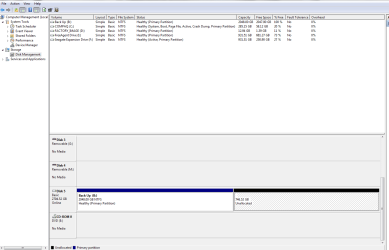
I thought right let’s reduce the size of the new main driveto under 2Tb (currently 2048.00) but all that happens is a new partitionappears within that partition. The remainder of the drive is
746.52 And is described as unallocated and if I should rightclick on it all that I can get are Properties and Help...
Now I am far from a computer wiz but I can normally get todo what I set out to do after reading up on a forum or web page but this hasstumped me.
So what I was wondering is, how can I get back my 746.52GB’s that I have lost and how can I set up the new external hard drive tobackup my data with out to much hassle.
Many Thanks in advance Swamps
I am the proud owner of a Compaq CQ5047UK-M PC which Ibought in April 07, it’s getting old now I agree but to be honest its works absolutelyfine and does what we need it to do
(Hope that I haven’t spoken to soon).
It’s running Windows 7 64 bit and I have upgraded the ram to8 gig, I like to run backups on a daily basis as we have lots of pics andvideos etc that we would hate to lose, sothis is done to an external drive.
I like to change these external drives every few years just incase they develop a fault, so recently I bought myself a Toshiba DWC130 3Tbexternal drive, whilst I was at the suppliers I also bought a USB 3.0 PCIexpress card to speed things up.
Back at home computer cover removed and given a good cleanup with the vacuum, USB card installed, cover on drivers loaded and all workingok.
I then ran windows backup to the new external drive andafter some 3 or so hours I get error code 0x8078002A, had a Google and afterlooking at several web sites (this one included) I find something on the linesthat Window backup doesn’t like drives over 2.5 Tb and advises to run Windows partitionto partition the drive.
I did this and left the sizing, settings etc to the wizard,ran backup again only to find the same error code to pop up.
I thought right let’s reduce the size of the new main driveto under 2Tb (currently 2048.00) but all that happens is a new partitionappears within that partition. The remainder of the drive is
746.52 And is described as unallocated and if I should rightclick on it all that I can get are Properties and Help...
Now I am far from a computer wiz but I can normally get todo what I set out to do after reading up on a forum or web page but this hasstumped me.
So what I was wondering is, how can I get back my 746.52GB’s that I have lost and how can I set up the new external hard drive tobackup my data with out to much hassle.
Many Thanks in advance Swamps
Attachments
My Computer
- Computer type
- PC/Desktop
- Computer Manufacturer/Model Number
- Compaq
- OS
- Windows 6 64 bit


