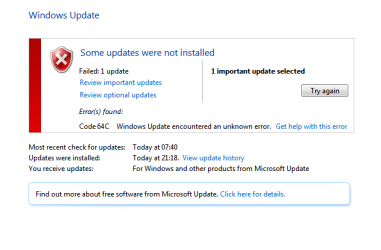
Error Code 64C

iRHardcore

New member
Member
VIP
Local time
11:50 PM
Messages
102
Location
Rugby, United Kingdom
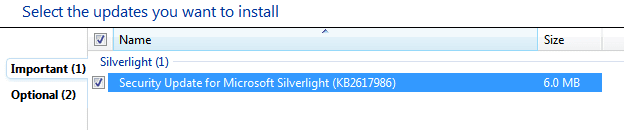
When I am given the option to update, I am able to choose between one important update (see print screen 1) and two optional updates.

Seeing as the optional ones are not needed, I attempt to install the important one only to be greeted by an installation set-up box (see print screen 2). Seeing as I don't know where the .msi is located, I cancel the installation box and I'm then greeted with the error 64C (see print screen 3).

I'm unsure as to whether or not the fact Windows cannot find the update installation file, or whatever it is, is having an effect on whether or not the error occurs.

Have any of you guys encountered this issue, or do you know a resolution for it?

Many thanks, Joe.
 

Attachments
  • 30907915cdf7039c601f09e06bd649a2.png
    30907915cdf7039c601f09e06bd649a2.png
    8.8 KB · Views: 12
  • d13895d3263cf50187d7cca2705c5b64.png
    d13895d3263cf50187d7cca2705c5b64.png
    47.2 KB · Views: 20
  • e292b9d75e5131c88e12901b566dbdd3.png
    e292b9d75e5131c88e12901b566dbdd3.png
    27.6 KB · Views: 31

My Computer

Computer Manufacturer/Model Number
Toshiba Satellite A210
OS
Windows 7 Ultimate 32-Bit (Build 7600)
Memory
1.87GB Ram
Monitor(s) Displays
Philips 244E1SB 23.6 inch Computer LCD Monitor
Hard Drives
Fujitsu Mobile MHY2250BH 250 GB
Since this update is for MS Silverlight, I would just uninstall Silverlight completely and then download a fresh copy to reinstall it.

If you can't uninstall it, download a new copy anyway and run it as if you were going to install it - it might then give you the option to repair or remove it (in that case, just let it repair itself).

After that, let Windows Update look for new updates and if it offers you the security patch for Silverlight again, this time it should work.
 

My Computer

Computer type
PC/Desktop
Computer Manufacturer/Model Number
Custom-built
OS
Windows 7 Professional SP1 32-bit
CPU
Intel Core 2 Duo E6600 2.4GHz
Motherboard
Asus PL5D2
Memory
4GB DDR2-667 (4x1GB in dual-channel config)
Graphics Card(s)
nVidia GeForce 9800 GT
Sound Card
Creative X-Fi XtremeMusic
Monitor(s) Displays
Acer P236H
Screen Resolution
1920x1200 (DVI)
Hard Drives
OCZ SSD Vertex Plus 60GB SATA (Firmware 3.55), 64MB cache
Hitachi HD321KJ SATA, 320GB, 7200rpm, 16MB cache
PSU
Antec TruePower 2.0
Case
Cooler Master Centurion
Cooling
Too many fans
Keyboard
Standard
Mouse
Microsoft wireless optical mouse
Internet Speed
AT&T U-verse (18mbit/sec)
Antivirus
Microsoft Security Essentials
Browser
Firefox
Other Info
Other devices:
Compaq CQ-60 laptop
Google Nexus 7 (2012) tablet
Nvidia SHIELD tablet (US/LTE)
Hardkernel ODROID-XU single-board computer (Samsung Exynos 5420)
Alright I'll give that a shot and let you know what the outcome is!
Thanks.
 

My Computer

Computer Manufacturer/Model Number
Toshiba Satellite A210
OS
Windows 7 Ultimate 32-Bit (Build 7600)
Memory
1.87GB Ram
Monitor(s) Displays
Philips 244E1SB 23.6 inch Computer LCD Monitor
Hard Drives
Fujitsu Mobile MHY2250BH 250 GB
I have two options to uninstall. The top one doesn't uninstall because of a missing .msi and the second one DOES uninstall. Should I just uninstall the second and leave the first?
 

Attachments

  • 642fa3742afea54f3115b143bab4ee4c.png
    642fa3742afea54f3115b143bab4ee4c.png
    6.8 KB · Views: 30

My Computer

Computer Manufacturer/Model Number
Toshiba Satellite A210
OS
Windows 7 Ultimate 32-Bit (Build 7600)
Memory
1.87GB Ram
Monitor(s) Displays
Philips 244E1SB 23.6 inch Computer LCD Monitor
Hard Drives
Fujitsu Mobile MHY2250BH 250 GB
Back
Top