Solved Error In Doing System Setup After Deleting Partition

Himself12794

New member
Local time
10:39 AM
Messages
5
I recently had a linux partition on my computer. I deleted the partition on my computer. My computer worked fine until I shut it off. When I turned it back on, I had a BOOT problem. I fixed that.

However, in the middle of fixing it I attempted an ACER factory restore option. After fixing the boot problem, Windows will seem to start normally but after showing the logo, it says Setup is starting services. After a few seconds an error pops up saying that:

"Windows could not complete installation. To install Windows on this computer, restart the installation."

So, using a repair disc I'm able to get to windows recovery environment where I see there is now an x: drive named BOOT. I can still see my files but I cannot get to anything except through the CMD option.

I tried to do a system restore, but it says I have to have a protection thing turned on, something that I cannot do. I'm at my whit's end. I cannot think of anything else to do at this moment. Can anyone help me? I cannot afford to buy anything nor get a new computer.
 

My Computer

OS
Windows 7 Home Premium 64bit
Looks like a missing MBR problem. Perhaps the computer was using Linux MBR for booting. With deletion of Linux it went away. Now perhaps you need to reformat the Hard Disk and then reinstall your Windows 7 afresh.
 

My Computer

Computer Manufacturer/Model Number
Custom Built
OS
Windows 7 Pro with SP1 32bit
Motherboard
Intel D845GVS1 X86-based PC
Memory
2 gigs of RAM
Graphics Card(s)
Intel(R) 82845G/GL/GE/PE/GV Graphics Controller
Sound Card
Realtek AC'97 Audio
Monitor(s) Displays
Samsung SyncMaster 931BF Black 19" LCD Monitor
Screen Resolution
1280X960
Hard Drives
1. SAMSUNG SP0822N ATA Device ~ 80 GigaBytes

2. Seagate FreeAgent Go USB Device ~ 500 GigaBytes
Keyboard
COMPAQ Standard PS/2 Keyboard
Mouse
iBall Laser Precise Speedster
Internet Speed
4 mb/sec
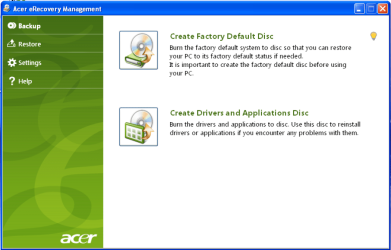
Are you doing the ACER factory restore option from the Recovery partition or Acer Recovery disks?

   Information
We always assume you have made your Recovery Disks using the OEM manufacturer's Recovery Media Creator app the first day you had your new PC.
& made the Startup Repair CD.
startup repair disc-create


Did you make the OEM manufacturer's Recovery Disks?

Acer001.PNG

You can Order Acer recovery disks from here:
https://secure.tx.acer.com/RCDB/Main.aspx?brand=acer
 

My Computer

OS
ME/XP/Vista/Win7
I used the acer factory recovery settings. I selected the one that saves all the personal documents and files in a backup, then goes back to factory settings. I was not able to create recovery discs because there were no disks available at the time. As for boot MBR, I can even see that file when I go into the recovery environment. I can access command and all.
 

My Computer

OS
Windows 7 Home Premium 64bit
I feel I also should let you know that there is an E drive that wasn't there before called PQSERVICE that seems to have a lot of boot information on it, including BOOTMGR.
 

My Computer

OS
Windows 7 Home Premium 64bit
You should never start Factory Recovery without having the Disks as a backup. Disks are 5 for $2 on the wall rack at Walgreens.

You can try running Factory Recovery again, but you may have boot sector corruption if you had GRUB on the HD when dual booting Linux. In this case you need to wipe the HD first: SSD - HDD Optimize for Windows Reinstallation

Your options then are to order Recovery Disks from Acer or use a Win7 installation DVD for your licensed version to clean reinstall with the Product Key on COA sticker, following these steps to get a perfect clean reinstall of factory OEM: Reinstalling Windows 7

Win7 Home Premium x64 SP1 English Official ISO download
Windows 7 USB-DVD Download Tool
 
I did have GRUB, but I don't seem to any more.
 

My Computer

OS
Windows 7 Home Premium 64bit
It still needs to be wiped as given because GRUB code which can corrupt Win7 remains in the boot sector. This is why I said it needs to be wiped if it had GRUB on the HD.
 
Thank y'all for your help. I ended up backing up all important files and doing a complete restore as suggested by gregrocker.
 

My Computer

OS
Windows 7 Home Premium 64bit
Back
Top