Solved Error in expand the C drive in windows 7

vinwin06

New member
Local time
12:06 AM
Messages
39
Hi all,

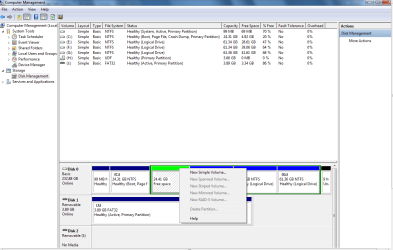
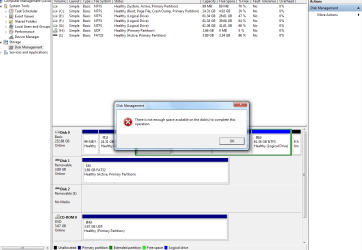
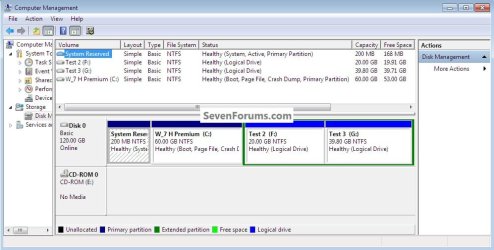
I just want to expand my c drive because its having only 5 GB free space. So i read one article in google through that i went to the "Disk management" and i deleted the volume D data. As per the article if i try to delete partition option but its grayed out. I don't know what i did wrong . I have attached the screen shoots of grayed out option and also if i try to create a new volume also i cannot able to create it showing "there is not enough memory space available on the disks to complete this operation. I have attached this screen shot too in the same file.

The below is the article link i have read it.


Extend Or Expand Volume Of Windows Partition In Windows 7/Vista

Can you please any one look into this and try to solve this issue.

Regards,

Vinoth S
 

Attachments

My Computer My Computer

At a glance

Windows 7 Ultimate x32E5300 @ 2.60GHz, 2600 Mhz2.00 GB
Computer Manufacturer/Model Number
INTEL
OS
Windows 7 Ultimate x32
CPU
E5300 @ 2.60GHz, 2600 Mhz
Memory
2.00 GB
The reason why it won't let you delete it is because it's all in an extended partition. Windows knows not to expand into an extended partition set (all of the partitions inside the green box). What you'll need to do is delete all of the BLUE partitions inside the dark green box, extend the light green parititon, then delete it, as well (edit: to remove the extended partition altogether).

(I think I got that in the right order).

To summarize, you cannot extend a primary partition (in your case, drive C) into an extended partition set (inside dark green box).

(sheer opinion: I've never undersood why people have so many small partitions, these days. Hard drives are big and inexpensive these days and the more partitions there are, the more separate FAT tables there are, thus more overhead, thus more wasted space overall)
 

My Computer My Computer

At a glance

Windows 7 Ultimate 64-bitAMD Phenom II X6 1090T 3.2GHZG.SKILL RipJaw 3x2GB DDR3-10662x HIS Radeon HD 6850 1 GB
OS
Windows 7 Ultimate 64-bit
CPU
AMD Phenom II X6 1090T 3.2GHZ
Motherboard
MSI 890FXA-GD70
Memory
G.SKILL RipJaw 3x2GB DDR3-1066
Graphics Card(s)
2x HIS Radeon HD 6850 1 GB
Sound Card
VIA 8-channel
Monitor(s) Displays
2x 20 inch Acer LCDs, 1x 32" Sony LCD TV
Screen Resolution
4480x900
Hard Drives
1x Crucial 64GB SSD
3x 1TB HDDs (WD, Seagate, Hitatchi)
1x 500GB Seagate External
PSU
Kingwin 1000W Modular
Case
Coolermaster HAF 932
Cooling
1x 120mm, 3x 200mm, CoolerMaster Hyper 212+
Keyboard
Microsoft Wireless Keyboard 1000
Mouse
Microsoft Wiresless Mouse 5000
Internet Speed
20mbps
Other Info
Samsung BD-ROM/DVD-RW
Thanks for your reply. So if i cannot able to expand my C drive , can you please help me to create the old drive D in the free space.

Guide me what i need to do create the D drive.
 

My Computer My Computer

At a glance

Windows 7 Ultimate x32E5300 @ 2.60GHz, 2600 Mhz2.00 GB
Computer Manufacturer/Model Number
INTEL
OS
Windows 7 Ultimate x32
CPU
E5300 @ 2.60GHz, 2600 Mhz
Memory
2.00 GB
Please post back a screenshot for those of us who do not use Office. The standard method is using the Snipping Tool in Start Menu, then attach file using Paper Clip.

You need to rightclick again to Delete Volume after you Delete a Logical Partition, to create Unallocated space which you can extend C into. But I need to see it to be sure.
 
Please find the attached the screen shots from snapping tool. kindly look into this.
Let me know whether can you able look these screen shots. I have saved i JPG format.
 

Attachments

  • Capture.PNG
    Capture.PNG
    34.2 KB · Views: 71
  • Capture1.PNG
    Capture1.PNG
    33.4 KB · Views: 59

My Computer My Computer

At a glance

Windows 7 Ultimate x32E5300 @ 2.60GHz, 2600 Mhz2.00 GB
Computer Manufacturer/Model Number
INTEL
OS
Windows 7 Ultimate x32
CPU
E5300 @ 2.60GHz, 2600 Mhz
Memory
2.00 GB
Delete the BRIGHT blue partitions first that are inside the dark green box. Delete the bright green, and you should be good.
 

My Computer My Computer

At a glance

Windows 7 Ultimate 64-bitAMD Phenom II X6 1090T 3.2GHZG.SKILL RipJaw 3x2GB DDR3-10662x HIS Radeon HD 6850 1 GB
OS
Windows 7 Ultimate 64-bit
CPU
AMD Phenom II X6 1090T 3.2GHZ
Motherboard
MSI 890FXA-GD70
Memory
G.SKILL RipJaw 3x2GB DDR3-1066
Graphics Card(s)
2x HIS Radeon HD 6850 1 GB
Sound Card
VIA 8-channel
Monitor(s) Displays
2x 20 inch Acer LCDs, 1x 32" Sony LCD TV
Screen Resolution
4480x900
Hard Drives
1x Crucial 64GB SSD
3x 1TB HDDs (WD, Seagate, Hitatchi)
1x 500GB Seagate External
PSU
Kingwin 1000W Modular
Case
Coolermaster HAF 932
Cooling
1x 120mm, 3x 200mm, CoolerMaster Hyper 212+
Keyboard
Microsoft Wireless Keyboard 1000
Mouse
Microsoft Wiresless Mouse 5000
Internet Speed
20mbps
Other Info
Samsung BD-ROM/DVD-RW
Its not possible for me to do because i don't external hard disk now to get the back up, so shall i include the D drive again?
 

My Computer My Computer

At a glance

Windows 7 Ultimate x32E5300 @ 2.60GHz, 2600 Mhz2.00 GB
Computer Manufacturer/Model Number
INTEL
OS
Windows 7 Ultimate x32
CPU
E5300 @ 2.60GHz, 2600 Mhz
Memory
2.00 GB
Copy your files out of the Extended Logical partitions to another HD or over your network to another computer. Then rightclick>delete each Logical sub-partition, then entire Extended partition, and the Volume (free space) to make it Unallocated Space.

Then rightclick on C to extend by as much as you need.

In the Unallocated Space, rightclick to create a single new partition for your data.

If you are unable to do these simple steps because of no place to back up (you should always have your files backed up) then use free Partition Wizard bootable CD to try to rightclick on D Free Space, then slide the left grey border to the right to make space to extend C. If it works, click OK, then Apply. You may need to delete free space again to create Primary Unallocated space to extend into.

http://www.partitionwizard.com/download.html
 
Is there is any other way i can do it?
 

My Computer My Computer

At a glance

Windows 7 Ultimate x32E5300 @ 2.60GHz, 2600 Mhz2.00 GB
Computer Manufacturer/Model Number
INTEL
OS
Windows 7 Ultimate x32
CPU
E5300 @ 2.60GHz, 2600 Mhz
Memory
2.00 GB
I added another option:

If you are unable to do these simple steps because of no place to back up (you should always have your files backed up) then use free Partition Wizard bootable CD to try to rightclick on D Free Space, then slide the left grey border to the right to make space to extend C. If it works, click OK, then Apply. You may need to delete free space again to create Primary Unallocated space to extend into.

Free Download Magic Partition Manager Software - Partition Wizard Online
 

My Computer My Computer

At a glance

Windows 7 Ultimate 64-bitAMD Phenom II X6 1090T 3.2GHZG.SKILL RipJaw 3x2GB DDR3-10662x HIS Radeon HD 6850 1 GB
OS
Windows 7 Ultimate 64-bit
CPU
AMD Phenom II X6 1090T 3.2GHZ
Motherboard
MSI 890FXA-GD70
Memory
G.SKILL RipJaw 3x2GB DDR3-1066
Graphics Card(s)
2x HIS Radeon HD 6850 1 GB
Sound Card
VIA 8-channel
Monitor(s) Displays
2x 20 inch Acer LCDs, 1x 32" Sony LCD TV
Screen Resolution
4480x900
Hard Drives
1x Crucial 64GB SSD
3x 1TB HDDs (WD, Seagate, Hitatchi)
1x 500GB Seagate External
PSU
Kingwin 1000W Modular
Case
Coolermaster HAF 932
Cooling
1x 120mm, 3x 200mm, CoolerMaster Hyper 212+
Keyboard
Microsoft Wireless Keyboard 1000
Mouse
Microsoft Wiresless Mouse 5000
Internet Speed
20mbps
Other Info
Samsung BD-ROM/DVD-RW
Thanks guys. With the help of that software i can able to expand my C drive . Thanks a lo for all your support.
 

My Computer My Computer

At a glance

Windows 7 Ultimate x32E5300 @ 2.60GHz, 2600 Mhz2.00 GB
Computer Manufacturer/Model Number
INTEL
OS
Windows 7 Ultimate x32
CPU
E5300 @ 2.60GHz, 2600 Mhz
Memory
2.00 GB
Can you tell us exactly what worked for you so we'll know to recommend it again?

Thanks.
 
Actually i have download and installed the software from the link provided by you. After that i opened the application it shows one blank partition with out allocating any name on it. In the application i right click on C drive on the option called "Move and resize" after that another window will open , in that it will show the free disk space. The we need to drag and expand the drive to limit we want. then we need apply on the application. If your expanding windows drive like C then we need to restart the PC and this application automatically expand the drive in the boot menu.

Finally i got C drive expanded upto 50 GB.

Thanks for your all support.

Your great!!!!!
 

My Computer My Computer

At a glance

Windows 7 Ultimate x32E5300 @ 2.60GHz, 2600 Mhz2.00 GB
Computer Manufacturer/Model Number
INTEL
OS
Windows 7 Ultimate x32
CPU
E5300 @ 2.60GHz, 2600 Mhz
Memory
2.00 GB
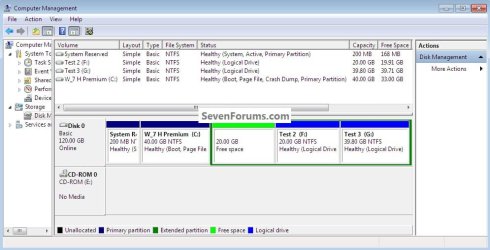
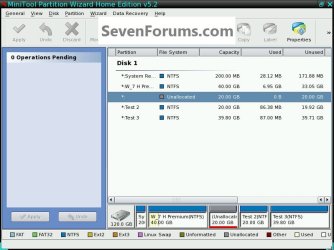
Apparently Partition Wizard's new edition 5.2 can Resize Primary partitions into Logical Free Space without having to delete or convert it first.

Another breakthrough for our favorite partitioning tool here.
 
Downloading...
 

My Computer My Computer

At a glance

Windows 7 Ultimate 64-bitAMD Phenom II X6 1090T 3.2GHZG.SKILL RipJaw 3x2GB DDR3-10662x HIS Radeon HD 6850 1 GB
OS
Windows 7 Ultimate 64-bit
CPU
AMD Phenom II X6 1090T 3.2GHZ
Motherboard
MSI 890FXA-GD70
Memory
G.SKILL RipJaw 3x2GB DDR3-1066
Graphics Card(s)
2x HIS Radeon HD 6850 1 GB
Sound Card
VIA 8-channel
Monitor(s) Displays
2x 20 inch Acer LCDs, 1x 32" Sony LCD TV
Screen Resolution
4480x900
Hard Drives
1x Crucial 64GB SSD
3x 1TB HDDs (WD, Seagate, Hitatchi)
1x 500GB Seagate External
PSU
Kingwin 1000W Modular
Case
Coolermaster HAF 932
Cooling
1x 120mm, 3x 200mm, CoolerMaster Hyper 212+
Keyboard
Microsoft Wireless Keyboard 1000
Mouse
Microsoft Wiresless Mouse 5000
Internet Speed
20mbps
Other Info
Samsung BD-ROM/DVD-RW
Evidentially Partition Wizard sees it as unallocated space.


click to enlarge
Test1.jpg
Test2.jpg
Test5.jpg
 

My Computer My Computer

At a glance

W 7 64-bit UltimateIntel Q9550 Yorkfield8GB Dominator 8500C5DATI : XFX 5870
Computer Manufacturer/Model Number
* BFK Customs *
OS
W 7 64-bit Ultimate
CPU
Intel Q9550 Yorkfield
Motherboard
ASUS P5Q Pro
Memory
8GB Dominator 8500C5D
Graphics Card(s)
ATI : XFX 5870
Sound Card
Realtek HD Audio 7-1
Monitor(s) Displays
1x 47" LCD HDMI & 3x 26" LCD HDMI
Screen Resolution
1920x1080P & 1920x1200
Hard Drives
1x 80GB Intel X25-M G2 SSD : 1x 500GB & 1x 640GB WD Caviar Black(s)
PSU
Corsair 620HX
Case
Cooler Master RC-690
Cooling
Tuniq Tower 120, 2x 140mm and 3x 120mm case fans
Keyboard
Microsoft 500
Mouse
Razer Diamondback 3G
Internet Speed
14 Mb/s
Other Info
1x Koutech 3Gb/s SATA HDD Hot Swap Rack
Back
Top