
Error in MMC snap-in

blockie

New member
Member
VIP
Local time
3:14 AM
Messages
605
Location
in Assisted Care facility, Calif
I right click "Computer" and then left click "Manage" and I get the error:
"MMC has detected an arror in a snap-in and will unload it"
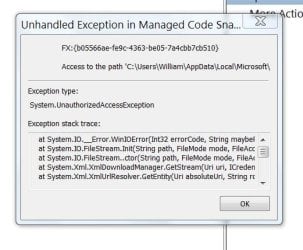
I clicked on "UNLOAD THE SNAP-IN and continue" and got the attached dialog which I then clicked on OK.
1. I don't know what a snap-in is. What is the difference between snap-in and plug-in?
2. Can I recover from this?
 

Attachments
  • Snap-in.JPG
    Snap-in.JPG
    41.9 KB · Views: 67

My Computer

Computer type
Laptop
Computer Manufacturer/Model Number
Asus
OS
W7 Ultimate
CPU
2.2 bh Intel Core i3-2330M
Motherboard
Asustek Computer Inc. P53E 1.0
Memory
4MB
Graphics Card(s)
On Board
Sound Card
On Board
Monitor(s) Displays
On Board
Screen Resolution
1366 X 768
Hard Drives
ST9500423AS
ST2000DM USB Backup Drive External
Ran sfc /scannow and found some errors that were fixed. Rebooted and still had problem.
Ran sfc /snannow again an did not find any errors. Rebooted and checked again. Still had the problem.
What next?
 

My Computer

Computer type
Laptop
Computer Manufacturer/Model Number
Asus
OS
W7 Ultimate
CPU
2.2 bh Intel Core i3-2330M
Motherboard
Asustek Computer Inc. P53E 1.0
Memory
4MB
Graphics Card(s)
On Board
Sound Card
On Board
Monitor(s) Displays
On Board
Screen Resolution
1366 X 768
Hard Drives
ST9500423AS
ST2000DM USB Backup Drive External
Hello blockie, try this:

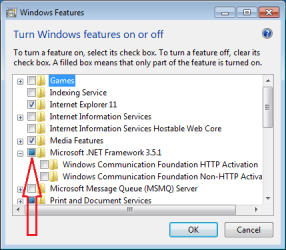
Start> In search box type Turn Windows features on or off> When the list loads, scroll down to Microsoft .NET Framework 3.5.1 and uncheck it> Click on OK and reboot> See if Computer management will open now

If so you have an issue with .NET, and we can try and tackle that

You might also try booting to Safe Mode and see if it launches OK there. If so, try a clean start to see if there is a conflict.

http://www.sevenforums.com/tutorials/69585-safe-mode.html

http://www.sevenforums.com/tutorial...ation-conflicts-performing-clean-startup.html

A Guy
 

My Computer

Computer type
PC/Desktop
OS
Windows 10 Home x64
CPU
INTEL Core i5-750 Quad-Core 3.37GHz
Motherboard
ASUS P7P55D
Memory
HyperX Fury Black Series 8GB (2 x 4GB) 1866Mhz
Graphics Card(s)
EVGA GeForce GTX 750 Superclocked 1GB 128-Bit GDDR5
Monitor(s) Displays
LG 32MA68HY 32" IPS
Screen Resolution
1920 x 1080
Hard Drives
Samsung 840 Evo 120GB, SEAGATE 500GB Barracuda® 7200.12, SATA 3 Gb/s, 7200 RPM, 16MB cache
PSU
ANTEC TruePower New TP-550, 80 PLUS, 550W
Case
ANTEC Three Hundred Illusion
Cooling
COOLER MASTER Hyper 212 Plus, 4 x 120mm 1 x 140mm Noctua's
Internet Speed
85 + Mbps
Antivirus
Avast
Browser
Vivaldi
Minor note regarding A Guy's instructions. The default W7 install makes the box to the left of Microsoft .NET Framework 3.5.1 look like this:

NET351.png

You will want to click one time on that colored box to clear it - then carry on with the steps that A Guy mentioned.


>What is the difference between snap-in and plug-in?
I do not know why MS called these applets snap-ins.
After completing A Guy instructions, please test opening snap-ins via:

Start
> search for and run mmc.exe

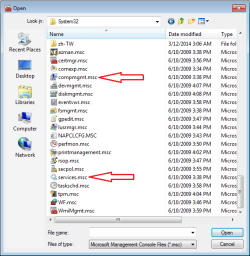
Once the MMC window opens, use File > Open:

MMC1.png


Then navigate to C:\Windows\System32 and scroll down until you see file with the .msc extension.

MMC2.png

1) Let us know if you can open both of the snap-ins highlighted in the image above will open using the steps mentioned above.


Note: you can open services.msc via Start > search for and run services.msc, but that is a slightly different test that the steps mentioned above. I want to see if the mmc app will even start correctly.


2) The error image in your original post mentions, "Access to the path..." but we cannot see the full path. If you can make that error happen again, please press Ctrl+c while the error window has focus (on top of other windows and is selected). The will try and copy/paste/post the error text to the Windows clipboard - but it does not work for all error windows :-(

If the clipboard thing does not happen to work, please see if you can reshape/resize that error window. I'm just looking for ways to see the full path to the item in that error. Might have to look in the event logs.
 

My Computer

Computer type
Laptop
Computer Manufacturer/Model Number
Employer provided Dell Latitude
OS
W7 Pro SP1 64bit
CPU
i7
Memory
8GB
Graphics Card(s)
Intel HD Graphics
Hard Drives
crappy SSD
Antivirus
Employer mandated Symantec Endpoint Protection
Browser
Pale Moon 64bit, IE11 64bit & Chrome 64bit
I am assuming the path is AppData\Local\Microsoft\Event Viewer\Settings.Xml . Shame on me if I am wrong :o

A Guy

P.S. If you have x64 version of 7, try the 32 bit console and see if that will work via UsernameIssues instructions

Start> In search box type Run> Enter> in Run box type mmc.exe /32> Enter
 

My Computer

Computer type
PC/Desktop
OS
Windows 10 Home x64
CPU
INTEL Core i5-750 Quad-Core 3.37GHz
Motherboard
ASUS P7P55D
Memory
HyperX Fury Black Series 8GB (2 x 4GB) 1866Mhz
Graphics Card(s)
EVGA GeForce GTX 750 Superclocked 1GB 128-Bit GDDR5
Monitor(s) Displays
LG 32MA68HY 32" IPS
Screen Resolution
1920 x 1080
Hard Drives
Samsung 840 Evo 120GB, SEAGATE 500GB Barracuda® 7200.12, SATA 3 Gb/s, 7200 RPM, 16MB cache
PSU
ANTEC TruePower New TP-550, 80 PLUS, 550W
Case
ANTEC Three Hundred Illusion
Cooling
COOLER MASTER Hyper 212 Plus, 4 x 120mm 1 x 140mm Noctua's
Internet Speed
85 + Mbps
Antivirus
Avast
Browser
Vivaldi
Let's go back to the SFC scan results - they may tell us more than just the pass/fail.
There may also be other things we can check...

Please follow the Windows Update Posting Instructions and post the requested data - it also applies here, and could give us some valuable information to work on.
 

My Computer

Computer type
Laptop
Computer Manufacturer/Model Number
Asus K52F or Lenovo B51-80
OS
Win 7 x64 Home Premium (and x86 VirtualBox VM)/Win10
CPU
i3 370M/i7 6500U
Motherboard
Asus/Lenovo
Memory
8GB - finally :)/8GB
Graphics Card(s)
it's an i3, dude!/dual Intel&nVidia
Sound Card
onboard
Monitor(s) Displays
15.6" built-in
Screen Resolution
1366x768/1920x1080
Hard Drives
750GB Seagate internal
Sundry external drives attached to other computers on the local network
1TB SSD on the Lenovo
PSU
n/a
Internet Speed
as much as I can get - usually on a dongle/phone, so <1MB/s
Antivirus
MSE/Defender
Browser
IE11/12/Edge/Chrome/FF(if I must)
First thing first/. I followed "The Guy" instructions with the following results:
Got the error msg trying all of the instructions.
Also ran the Safe mode and the trouble shooting instruction. Got the error.
ON my own I ran the trouble shooting with the Hide Microsoft........... unchecked and Disabled all services.Still got the error.

UsernameIssues

Open compmgmt.msc as instructed. NO error msg.
Open services.msc as instructed. Got error msg

Access to the path 'C:\Users\William\AppData\Local\Microsoft\Event Viewer\Settings.Xml' is denied.


Your right, GUY !!

The text above "is denied" gave me a clue. So I went to each folder in the path to see which one denied access. It turns out that the file "Settings.XML" is the one that did not give me access so I took ownership of that file and then went to "My Computer.......Manage" and the error did not show up.

If there is nothing further I consider the problem solved.
Thanks for all the help.
Bill
 

My Computer

Computer type
Laptop
Computer Manufacturer/Model Number
Asus
OS
W7 Ultimate
CPU
2.2 bh Intel Core i3-2330M
Motherboard
Asustek Computer Inc. P53E 1.0
Memory
4MB
Graphics Card(s)
On Board
Sound Card
On Board
Monitor(s) Displays
On Board
Screen Resolution
1366 X 768
Hard Drives
ST9500423AS
ST2000DM USB Backup Drive External
Excellent detective work! Sometimes we need to remember to KISS. Good on ya ;)

A Guy
 

My Computer

Computer type
PC/Desktop
OS
Windows 10 Home x64
CPU
INTEL Core i5-750 Quad-Core 3.37GHz
Motherboard
ASUS P7P55D
Memory
HyperX Fury Black Series 8GB (2 x 4GB) 1866Mhz
Graphics Card(s)
EVGA GeForce GTX 750 Superclocked 1GB 128-Bit GDDR5
Monitor(s) Displays
LG 32MA68HY 32" IPS
Screen Resolution
1920 x 1080
Hard Drives
Samsung 840 Evo 120GB, SEAGATE 500GB Barracuda® 7200.12, SATA 3 Gb/s, 7200 RPM, 16MB cache
PSU
ANTEC TruePower New TP-550, 80 PLUS, 550W
Case
ANTEC Three Hundred Illusion
Cooling
COOLER MASTER Hyper 212 Plus, 4 x 120mm 1 x 140mm Noctua's
Internet Speed
85 + Mbps
Antivirus
Avast
Browser
Vivaldi
Good job.

~~~
If there is nothing further I consider the problem solved.
Thanks for all the help.
Bill
I would suggest doing the things mentioned in post #7.
 

My Computer

Computer type
Laptop
Computer Manufacturer/Model Number
Employer provided Dell Latitude
OS
W7 Pro SP1 64bit
CPU
i7
Memory
8GB
Graphics Card(s)
Intel HD Graphics
Hard Drives
crappy SSD
Antivirus
Employer mandated Symantec Endpoint Protection
Browser
Pale Moon 64bit, IE11 64bit & Chrome 64bit
Items on post #7


SURP Ran it and installed one update.

sfc /scannow Ran it and NO bad files.

Windows Updates Ran it and installed one update. No errors.

Log Collection Following logs attached: CBS.zip
 

My Computer

Computer type
Laptop
Computer Manufacturer/Model Number
Asus
OS
W7 Ultimate
CPU
2.2 bh Intel Core i3-2330M
Motherboard
Asustek Computer Inc. P53E 1.0
Memory
4MB
Graphics Card(s)
On Board
Sound Card
On Board
Monitor(s) Displays
On Board
Screen Resolution
1366 X 768
Hard Drives
ST9500423AS
ST2000DM USB Backup Drive External
I don't see the log attached ;)

A Guy
 

My Computer

Computer type
PC/Desktop
OS
Windows 10 Home x64
CPU
INTEL Core i5-750 Quad-Core 3.37GHz
Motherboard
ASUS P7P55D
Memory
HyperX Fury Black Series 8GB (2 x 4GB) 1866Mhz
Graphics Card(s)
EVGA GeForce GTX 750 Superclocked 1GB 128-Bit GDDR5
Monitor(s) Displays
LG 32MA68HY 32" IPS
Screen Resolution
1920 x 1080
Hard Drives
Samsung 840 Evo 120GB, SEAGATE 500GB Barracuda® 7200.12, SATA 3 Gb/s, 7200 RPM, 16MB cache
PSU
ANTEC TruePower New TP-550, 80 PLUS, 550W
Case
ANTEC Three Hundred Illusion
Cooling
COOLER MASTER Hyper 212 Plus, 4 x 120mm 1 x 140mm Noctua's
Internet Speed
85 + Mbps
Antivirus
Avast
Browser
Vivaldi

My Computer

Computer type
Laptop
Computer Manufacturer/Model Number
Asus
OS
W7 Ultimate
CPU
2.2 bh Intel Core i3-2330M
Motherboard
Asustek Computer Inc. P53E 1.0
Memory
4MB
Graphics Card(s)
On Board
Sound Card
On Board
Monitor(s) Displays
On Board
Screen Resolution
1366 X 768
Hard Drives
ST9500423AS
ST2000DM USB Backup Drive External
Here's the summary of your CheckSUR log..
Code:
Summary:
Seconds executed: 423
 Found 596 errors
  CSI Missing Deployment Key Total count: 82
  CBS Watchlist Package Missing Total count: 416
  CBS Watchlist Component Missing Total count: 98

There is no way we can attempt to repair this number of errors and hope to get a good result - you're going to have to do a repair install.
See this tutorial for guidelines....
http://www.sevenforums.com/tutorials/3413-repair-install.html?ltr=R
 

My Computer

Computer type
Laptop
Computer Manufacturer/Model Number
Asus K52F or Lenovo B51-80
OS
Win 7 x64 Home Premium (and x86 VirtualBox VM)/Win10
CPU
i3 370M/i7 6500U
Motherboard
Asus/Lenovo
Memory
8GB - finally :)/8GB
Graphics Card(s)
it's an i3, dude!/dual Intel&nVidia
Sound Card
onboard
Monitor(s) Displays
15.6" built-in
Screen Resolution
1366x768/1920x1080
Hard Drives
750GB Seagate internal
Sundry external drives attached to other computers on the local network
1TB SSD on the Lenovo
PSU
n/a
Internet Speed
as much as I can get - usually on a dongle/phone, so <1MB/s
Antivirus
MSE/Defender
Browser
IE11/12/Edge/Chrome/FF(if I must)
I went to the site recommended. Went to the appropiate page for W7 Ultimate SP1 32bit and it (the page) was not available.
I remember saome months, or a year, ago I did a repair install. I found the DVD that I put the ISO on. The name of the disk I found is GSP1RMCVLFRER_EN_DVD. If that is the correct disk I will use it for the repair install.
I'll wait for an answer from you experts before I do anything else.
 

My Computer

Computer type
Laptop
Computer Manufacturer/Model Number
Asus
OS
W7 Ultimate
CPU
2.2 bh Intel Core i3-2330M
Motherboard
Asustek Computer Inc. P53E 1.0
Memory
4MB
Graphics Card(s)
On Board
Sound Card
On Board
Monitor(s) Displays
On Board
Screen Resolution
1366 X 768
Hard Drives
ST9500423AS
ST2000DM USB Backup Drive External
If that is the same version of the one you installed then you can use it for the Repair Install. Does it have SP1? If you're not sure then try it to see.

Be sure you have a readable PRoduct Key on the COA sticker, or audit it if retail using Belarc Advisor . Read all of the other warnings and steps in the Repair Install tutorial above.

It may be awhile before the ISO links are back up, or they may never be. So I would hold onto the disk.
 
I did the repair install. Went fine.
I ran sfc /scannow.
Then I copied the cbs log to the desktop. zipped it and included in this post.
I'm not sure on how to read it. How does it look?
Bill
 

My Computer

Computer type
Laptop
Computer Manufacturer/Model Number
Asus
OS
W7 Ultimate
CPU
2.2 bh Intel Core i3-2330M
Motherboard
Asustek Computer Inc. P53E 1.0
Memory
4MB
Graphics Card(s)
On Board
Sound Card
On Board
Monitor(s) Displays
On Board
Screen Resolution
1366 X 768
Hard Drives
ST9500423AS
ST2000DM USB Backup Drive External
There was one minor error present which SFC has corrected - should be fine now.

Good luck with the new install - don't forget all the updates!
 

My Computer

Computer type
Laptop
Computer Manufacturer/Model Number
Asus K52F or Lenovo B51-80
OS
Win 7 x64 Home Premium (and x86 VirtualBox VM)/Win10
CPU
i3 370M/i7 6500U
Motherboard
Asus/Lenovo
Memory
8GB - finally :)/8GB
Graphics Card(s)
it's an i3, dude!/dual Intel&nVidia
Sound Card
onboard
Monitor(s) Displays
15.6" built-in
Screen Resolution
1366x768/1920x1080
Hard Drives
750GB Seagate internal
Sundry external drives attached to other computers on the local network
1TB SSD on the Lenovo
PSU
n/a
Internet Speed
as much as I can get - usually on a dongle/phone, so <1MB/s
Antivirus
MSE/Defender
Browser
IE11/12/Edge/Chrome/FF(if I must)
Back
Top