
Error installing nVidia GeForce 7150M Display driver

Lucretius

New member
Local time
12:09 AM
Messages
77
Hey there everyone. I was attempting to install the display driver when I received this error message from Windows Update: "WindowsUpdate_80070006" "WindowsUpdate_dt000"

I searched Google and only found 7 results with no solutions. I attempted to get the drivers from the nVidia website and it informed me that I needed to get the drivers from my computer's manufacturer (HP)-so I went there. The only thing offered on my particular notebook's support page was an update for the Wireless Assistant.

Has anyone else encountered an error when installing nVidia drivers on their laptop or received that particular error from Windows Update?

Thanks
 

Attachments
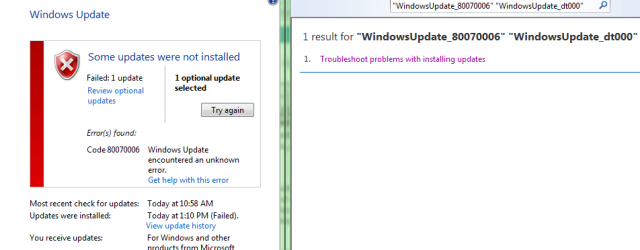
  • nVidi_display.PNG
    nVidi_display.PNG
    16.4 KB · Views: 246

My Computer

Computer Manufacturer/Model Number
HP Pavilion dv6815nr Notebook
OS
7 Home Premium x86
CPU
AMD Turion 64 X2 Mobille Technology TL-60 2.0GHz
Memory
3GB
Graphics Card(s)
NVIDIA GeForce 7150M / nForce630M
Sound Card
Conexant High Definition SmartAudio 221
Screen Resolution
1280 x 800
Hard Drives
Samsung 147GB
Mouse
Synaptics TouchPad
Other Info
Norton Security Suite (360)

My Computer

Computer Manufacturer/Model Number
Compal JFT02 (Custom Build Laptop)
OS
Windows 7 Home Premium x64 - Mac OS X 10.6.4 x64
CPU
Intel Core 2 Duo T9300 2.5 GHz
Motherboard
JFT02
Memory
4GB Kingston DDR2-800
Graphics Card(s)
NVIDIA Geforce 8600M GT (512MB Model)
Sound Card
Realtek HD Audio
Monitor(s) Displays
WUXGA Standard Laptop Display
Screen Resolution
1680*1050
Hard Drives
Toshiba 320GB 5400RPM Laptop HD
PSU
Standard Laptop Power Supply
Case
Standard Laptop Case
Cooling
Standard Laptop Cooling
Keyboard
Standard Laptop 105 Key-Keyboard
Mouse
Synaptics Touchpad
Internet Speed
Verizion Online DSL 3360/864 kbs (dl/up)
Thank you for your help. I, however, had to redefine the driver search since I'm running a 32-bit not 64-bit version of 7.

I've finished installing and everything is working fine. I haven't tried the update through Windows Update as it doesn't seem necessary since everything is fine.
 

My Computer

Computer Manufacturer/Model Number
HP Pavilion dv6815nr Notebook
OS
7 Home Premium x86
CPU
AMD Turion 64 X2 Mobille Technology TL-60 2.0GHz
Memory
3GB
Graphics Card(s)
NVIDIA GeForce 7150M / nForce630M
Sound Card
Conexant High Definition SmartAudio 221
Screen Resolution
1280 x 800
Hard Drives
Samsung 147GB
Mouse
Synaptics TouchPad
Other Info
Norton Security Suite (360)
Thank you for your help. I, however, had to redefine the driver search since I'm running a 32-bit not 64-bit version of 7.

I've finished installing and everything is working fine. I haven't tried the update through Windows Update as it doesn't seem necessary since everything is fine.
Err...minor mishap on my part but...

THE MASTER OF DRIVERS WINS AGAIN!!!

All seriousness...I am glad it works
 

My Computer

Computer Manufacturer/Model Number
Compal JFT02 (Custom Build Laptop)
OS
Windows 7 Home Premium x64 - Mac OS X 10.6.4 x64
CPU
Intel Core 2 Duo T9300 2.5 GHz
Motherboard
JFT02
Memory
4GB Kingston DDR2-800
Graphics Card(s)
NVIDIA Geforce 8600M GT (512MB Model)
Sound Card
Realtek HD Audio
Monitor(s) Displays
WUXGA Standard Laptop Display
Screen Resolution
1680*1050
Hard Drives
Toshiba 320GB 5400RPM Laptop HD
PSU
Standard Laptop Power Supply
Case
Standard Laptop Case
Cooling
Standard Laptop Cooling
Keyboard
Standard Laptop 105 Key-Keyboard
Mouse
Synaptics Touchpad
Internet Speed
Verizion Online DSL 3360/864 kbs (dl/up)
Leave it to the master of drivers to find what you missed :)
NVIDIA DRIVERS 179.48 BETA

Hi there - I have exactly the same problem. When I try to install this driver on my Go 7150M equiped machine it tells me its a Vista driver and exits. Frustrating isn't the word.

Besides that, I'm assuming the driver is my issue. I had a "coprocessor" error which has gone away. When I look at display adaptors it tells me I have a "standard VGA Graphics Adaptor" with no reference to the NVIDIA chip.

Any help would be greatly appreciated.

Thanks

Richard
 

My Computer

OS
Windows 7
Leave it to the master of drivers to find what you missed :)
NVIDIA DRIVERS 179.48 BETA

Hi there - I have exactly the same problem. When I try to install this driver on my Go 7150M equiped machine it tells me its a Vista driver and exits. Frustrating isn't the word.

Besides that, I'm assuming the driver is my issue. I had a "coprocessor" error which has gone away. When I look at display adaptors it tells me I have a "standard VGA Graphics Adaptor" with no reference to the NVIDIA chip.

Any help would be greatly appreciated.

Thanks

Richard
Are you using x64 or x86?
 

My Computer

Computer Manufacturer/Model Number
Compal JFT02 (Custom Build Laptop)
OS
Windows 7 Home Premium x64 - Mac OS X 10.6.4 x64
CPU
Intel Core 2 Duo T9300 2.5 GHz
Motherboard
JFT02
Memory
4GB Kingston DDR2-800
Graphics Card(s)
NVIDIA Geforce 8600M GT (512MB Model)
Sound Card
Realtek HD Audio
Monitor(s) Displays
WUXGA Standard Laptop Display
Screen Resolution
1680*1050
Hard Drives
Toshiba 320GB 5400RPM Laptop HD
PSU
Standard Laptop Power Supply
Case
Standard Laptop Case
Cooling
Standard Laptop Cooling
Keyboard
Standard Laptop 105 Key-Keyboard
Mouse
Synaptics Touchpad
Internet Speed
Verizion Online DSL 3360/864 kbs (dl/up)
Thank you for your help. I, however, had to redefine the driver search since I'm running a 32-bit not 64-bit version of 7.

I've finished installing and everything is working fine. I haven't tried the update through Windows Update as it doesn't seem necessary since everything is fine.
Err...minor mishap on my part but...

THE MASTER OF DRIVERS WINS AGAIN!!!

All seriousness...I am glad it works

Haha you certainly know your stuff though since you led me to the area of the solution. Thank you.
 

My Computer

Computer Manufacturer/Model Number
HP Pavilion dv6815nr Notebook
OS
7 Home Premium x86
CPU
AMD Turion 64 X2 Mobille Technology TL-60 2.0GHz
Memory
3GB
Graphics Card(s)
NVIDIA GeForce 7150M / nForce630M
Sound Card
Conexant High Definition SmartAudio 221
Screen Resolution
1280 x 800
Hard Drives
Samsung 147GB
Mouse
Synaptics TouchPad
Other Info
Norton Security Suite (360)

My Computer

Computer Manufacturer/Model Number
Compal JFT02 (Custom Build Laptop)
OS
Windows 7 Home Premium x64 - Mac OS X 10.6.4 x64
CPU
Intel Core 2 Duo T9300 2.5 GHz
Motherboard
JFT02
Memory
4GB Kingston DDR2-800
Graphics Card(s)
NVIDIA Geforce 8600M GT (512MB Model)
Sound Card
Realtek HD Audio
Monitor(s) Displays
WUXGA Standard Laptop Display
Screen Resolution
1680*1050
Hard Drives
Toshiba 320GB 5400RPM Laptop HD
PSU
Standard Laptop Power Supply
Case
Standard Laptop Case
Cooling
Standard Laptop Cooling
Keyboard
Standard Laptop 105 Key-Keyboard
Mouse
Synaptics Touchpad
Internet Speed
Verizion Online DSL 3360/864 kbs (dl/up)
I have used the 32-bit version - the message says this version is for Vista 32-bit - which is really frustrating given that it's the 7 beta!

What am I looking for with the Device Manager list to see what driver it has now? I don't see something obvious for NVIDIA as a display device

There's a "PCI System Management" and a "System Management Controller"

Cheers

Richard
 

My Computer

OS
Windows 7
I have used the 32-bit version - the message says this version is for Vista 32-bit - which is really frustrating given that it's the 7 beta!

What am I looking for with the Device Manager list to see what driver it has now? I don't see something obvious for NVIDIA as a display device

There's a "PCI System Management" and a "System Management Controller"

Cheers

Richard

Simply right-click on the video card itself after having displayed it by clicking on Display adapters and then click on Properties.
J93OSl.jpg
 

My Computer

Computer Manufacturer/Model Number
HP Pavilion dv6815nr Notebook
OS
7 Home Premium x86
CPU
AMD Turion 64 X2 Mobille Technology TL-60 2.0GHz
Memory
3GB
Graphics Card(s)
NVIDIA GeForce 7150M / nForce630M
Sound Card
Conexant High Definition SmartAudio 221
Screen Resolution
1280 x 800
Hard Drives
Samsung 147GB
Mouse
Synaptics TouchPad
Other Info
Norton Security Suite (360)
All I have showing is

"Standard VGA Graphics Adaptor"

with the driver provided by Microsoft

I don't think this is refers to the NVIDIA GeForce Go 7150M I have....
 

My Computer

OS
Windows 7
OK, it appears you have the same graphics card as I.

I located the driver for you, from the nVidia website, with the presumption that you're running Windows 7 32-bit, and have a GeForce Go 7 series card (which is for Notebooks).

Give it a try and let us know how everything goes. :)
 

My Computer

Computer Manufacturer/Model Number
HP Pavilion dv6815nr Notebook
OS
7 Home Premium x86
CPU
AMD Turion 64 X2 Mobille Technology TL-60 2.0GHz
Memory
3GB
Graphics Card(s)
NVIDIA GeForce 7150M / nForce630M
Sound Card
Conexant High Definition SmartAudio 221
Screen Resolution
1280 x 800
Hard Drives
Samsung 147GB
Mouse
Synaptics TouchPad
Other Info
Norton Security Suite (360)
Actually, just solved it. Ran the NVIDIA beta installation program in compatibility mode (as "Vista") and it finally decided that it would run. I now have graphics.

Really appreciate your support! Thank You

Richard
 

My Computer

OS
Windows 7
Actually, just solved it. Ran the NVIDIA beta installation program in compatibility mode (as "Vista") and it finally decided that it would run. I now have graphics.

Really appreciate your support! Thank You

Richard
Glad to see one of us that got your problem resolved!


This thread is 2-0!
 

My Computer

Computer Manufacturer/Model Number
Compal JFT02 (Custom Build Laptop)
OS
Windows 7 Home Premium x64 - Mac OS X 10.6.4 x64
CPU
Intel Core 2 Duo T9300 2.5 GHz
Motherboard
JFT02
Memory
4GB Kingston DDR2-800
Graphics Card(s)
NVIDIA Geforce 8600M GT (512MB Model)
Sound Card
Realtek HD Audio
Monitor(s) Displays
WUXGA Standard Laptop Display
Screen Resolution
1680*1050
Hard Drives
Toshiba 320GB 5400RPM Laptop HD
PSU
Standard Laptop Power Supply
Case
Standard Laptop Case
Cooling
Standard Laptop Cooling
Keyboard
Standard Laptop 105 Key-Keyboard
Mouse
Synaptics Touchpad
Internet Speed
Verizion Online DSL 3360/864 kbs (dl/up)
Actually, just solved it. Ran the NVIDIA beta installation program in compatibility mode (as "Vista") and it finally decided that it would run. I now have graphics.

Really appreciate your support! Thank You

Richard

I'm greatly pleased to see that your problem is no longer extant. :)

I couldn't have helped as well as I did without Zidane24's vast knowledge. ;)
 

My Computer

Computer Manufacturer/Model Number
HP Pavilion dv6815nr Notebook
OS
7 Home Premium x86
CPU
AMD Turion 64 X2 Mobille Technology TL-60 2.0GHz
Memory
3GB
Graphics Card(s)
NVIDIA GeForce 7150M / nForce630M
Sound Card
Conexant High Definition SmartAudio 221
Screen Resolution
1280 x 800
Hard Drives
Samsung 147GB
Mouse
Synaptics TouchPad
Other Info
Norton Security Suite (360)
Actually, just solved it. Ran the NVIDIA beta installation program in compatibility mode (as "Vista") and it finally decided that it would run. I now have graphics.

Really appreciate your support! Thank You

Richard

I'm greatly pleased to see that your problem is no longer extant. :)

I couldn't have helped as well as I did without Zidane24's vast knowledge. ;)
:o...

We all do what we can...I am sure someone else would have thought up of the same thing
 

My Computer

Computer Manufacturer/Model Number
Compal JFT02 (Custom Build Laptop)
OS
Windows 7 Home Premium x64 - Mac OS X 10.6.4 x64
CPU
Intel Core 2 Duo T9300 2.5 GHz
Motherboard
JFT02
Memory
4GB Kingston DDR2-800
Graphics Card(s)
NVIDIA Geforce 8600M GT (512MB Model)
Sound Card
Realtek HD Audio
Monitor(s) Displays
WUXGA Standard Laptop Display
Screen Resolution
1680*1050
Hard Drives
Toshiba 320GB 5400RPM Laptop HD
PSU
Standard Laptop Power Supply
Case
Standard Laptop Case
Cooling
Standard Laptop Cooling
Keyboard
Standard Laptop 105 Key-Keyboard
Mouse
Synaptics Touchpad
Internet Speed
Verizion Online DSL 3360/864 kbs (dl/up)
Hi guys, I've also had the same problem where the coprocessor is not installed. I've tried all the solutions you guys posted but the problem still exists. I'm not sure but I think this is whats causing the occasional choppy or laggy display when I'm either watching videos or playing games. Please help.
 

My Computer

Computer Manufacturer/Model Number
HP Pavillion dv6000
OS
Win 7 HP 32-Bit
CPU
AMD Turion(tm) X2 Moblie Technology TL-60, 2000 Mhz, 2 Cores
Thank you for your help. I, however, had to redefine the driver search since I'm running a 32-bit not 64-bit version of 7.

I've finished installing and everything is working fine. I haven't tried the update through Windows Update as it doesn't seem necessary since everything is fine.

How did you "refine" the search, I can found no such option?
I have the same problem, Im running 32 bit version
 

My Computer

OS
windows 7
Back
Top