Error launching installer windows 7

ifi444

New member
Local time
7:51 AM
Messages
20
I got a problem with softwares in drive E. When I try to install a software from drive E it give me the error i.e "Error launching Installer". And when I cut/copy a software from drive E to drive C or drive D, from there the software starts installation. What should i do so that i could install softwares from drive E directly. Please help me somebody!
 

My Computer

Computer Manufacturer/Model Number
ASUS
OS
b
I got a problem with softwares in drive E. When I try to install a software from drive E it give me the error i.e "Error launching Installer". And when I cut/copy a software from drive E to drive C or drive D, from there the software starts installation. What should i do so that i could install softwares from drive E directly. Please help me somebody!

Hi -- I need to see you Disk Management. Click on the round Windows button in the lower left of your screen. In the space above the button type "Disk Management" without the quotes and hit enter. the DM will open up. Expand the columns so all of the print can be read. Use this tutorial http://www.sevenforums.com/tutorials/9733-screenshots-files-upload-post-seven-forums.html to post a picture of it using your Snipping Tool. Thanks,
 

My Computer

Computer type
PC/Desktop
Computer Manufacturer/Model Number
Custom Build
OS
Windows 7 Home Premium 32-Bit - Build 7600 SP1
CPU
Intel Core i3-2120 3.30Ghz
Motherboard
Asus P8Z68-V LX Intel Z68 Socket H2 ATX
Memory
Kingston 4 GB DDR3 1333 mhz
Graphics Card(s)
AMD Radeon HD6670
Sound Card
Sound Blaster Audigy SE 24-Bit
Monitor(s) Displays
Asus VE228
Screen Resolution
1440 X 900
Hard Drives
OCZ Vertex 3 120 GB Sata 3 SSD ==
Kingston SH103/S3 120 G Hyper X 120 GB SSD ==
Western Digital 500 GB Caviar Green 7200 RPM ==
PSU
Corsair CX600M == 600 Watt
Case
NZXT Apollo - Silver with Clear Side Panel
Cooling
Three 120 mm Fans
Keyboard
Microsoft Natural 4000
Mouse
Microsoft Custom Optical 3000
Internet Speed
AT&T Fiber Optic Wireless Network
Antivirus
Microsoft Security Essentials
Browser
Chrome
Other Info
120 mm Blue LED Fan -- Three Blue LED Lazer Light Sticks
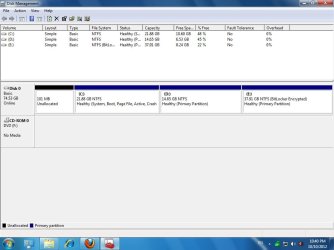
BIGMCK! this is the screenshot for my disk management
 

Attachments

  • Untitled.jpg
    Untitled.jpg
    59.7 KB · Views: 126

My Computer

Computer Manufacturer/Model Number
ASUS
OS
b
Your software should be installed on C: , nowhere else.
 

My Computer

Computer type
PC/Desktop
Computer Manufacturer/Model Number
Skylake Special #666
OS
Windows 10 Pro x64
CPU
Intel Core i7 6700K
Motherboard
Asus Sabertooth Z170 Mark 1
Memory
GSkill TridentZ RGB 16GB 3600 16-16-16-36
Graphics Card(s)
EVGA GTX 980 Ti SC x2
Sound Card
Realtek High Definition
Monitor(s) Displays
AOC G2460PG
Screen Resolution
1920 x 1080 144Hz
Hard Drives
Samsung 860 Pro 256GB, Seagate Barracuda 4TB x2
PSU
EVGA 1000 P2, EVGA White Custom Braided Cables
Case
Corsair Vengeance C70 Gunmetal Black
Cooling
Corsair H100i v2, Corsair ML120 x2, Thermal Grizzly Kryonaut
Keyboard
Logitech G910 Orion Spectrum
Mouse
Logitech G700s
Internet Speed
Verizon Fios Quantum Gateway 75/75
Antivirus
Windows Defender, Malwarebytes Free 3.8.3
Browser
Chrome
Other Info
Corsair SP120 x4, LG Blu-ray Drive, Durabrand HT-395 100 Watt Dolby Digital Amp, Corsair H2100 Wireless 7.1 Headset
The first thing I see is that your HDD is almost full. If you are going to do much else you will need another HDD. Having partitions so small is of no help to you. As AddRam said, you should put all of your programs and your Win 7 on your C: drive. The best option for you is backup all of your files and format your whole HDD so that you end up with only one partition, your C: drive. Then get a second HDD to put your documents, pictures, music etc on. This is a tutorial on installing Win 7. http://www.sevenforums.com/tutorials/1649-clean-install-windows-7-a.html Good luck,
 

My Computer

Computer type
PC/Desktop
Computer Manufacturer/Model Number
Custom Build
OS
Windows 7 Home Premium 32-Bit - Build 7600 SP1
CPU
Intel Core i3-2120 3.30Ghz
Motherboard
Asus P8Z68-V LX Intel Z68 Socket H2 ATX
Memory
Kingston 4 GB DDR3 1333 mhz
Graphics Card(s)
AMD Radeon HD6670
Sound Card
Sound Blaster Audigy SE 24-Bit
Monitor(s) Displays
Asus VE228
Screen Resolution
1440 X 900
Hard Drives
OCZ Vertex 3 120 GB Sata 3 SSD ==
Kingston SH103/S3 120 G Hyper X 120 GB SSD ==
Western Digital 500 GB Caviar Green 7200 RPM ==
PSU
Corsair CX600M == 600 Watt
Case
NZXT Apollo - Silver with Clear Side Panel
Cooling
Three 120 mm Fans
Keyboard
Microsoft Natural 4000
Mouse
Microsoft Custom Optical 3000
Internet Speed
AT&T Fiber Optic Wireless Network
Antivirus
Microsoft Security Essentials
Browser
Chrome
Other Info
120 mm Blue LED Fan -- Three Blue LED Lazer Light Sticks
Back
Top