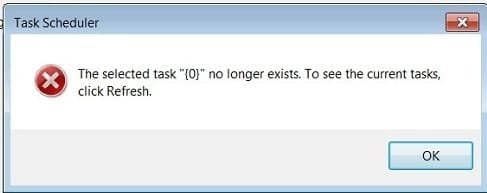
Error message in task scheduler

jes17

New member
Local time
9:34 AM
Messages
7
Does anyone know what this means and what I can do about it?
 

Attachments

  • Untitled.jpg
    Untitled.jpg
    8.8 KB · Views: 5

My Computer

OS
Win 7 64
Please run Autoruns and then click on File> Save.. Save the file in .arn format and upload here. Will have a look
 

My Computer

Computer Manufacturer/Model Number
Nothing specific....what ever the clients provide for Repair
OS
Windows 7 ultimate x64
Does anyone know what this means and what I can do about it?
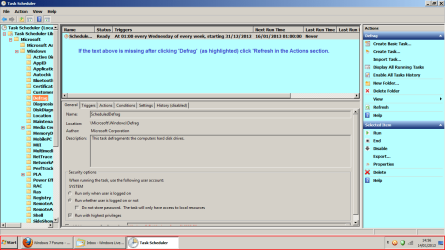
The normal culprit is Windows Disk Defragmenter.

RR.png
 

My Computer

Computer Manufacturer/Model Number
Look in my Signature.
OS
Win7 H.Prem. 32bit+SP1
Roderunner, if the normal culprit is Disk Defragmenter, and assuming that it is this time, what can I do about it? I am trying to shedule a task. When I open the scheduler, I get that error message. If I click "yes" and then "refresh" the message just apears again.

 

My Computer

OS
Win 7 64
Hi jes17, read the text in my image. Click to enlarge it.
 

My Computer

Computer Manufacturer/Model Number
Look in my Signature.
OS
Win7 H.Prem. 32bit+SP1
That can occur any time you remove programs and the un-install didn't complete or wasn't performed. Some features like Media Center perform scheduled tasks even if Media Center isn't running.

Have you removed or disabled programs lately?
 

My Computer

Computer type
PC/Desktop
Computer Manufacturer/Model Number
Built 2/11/2011
OS
Windows 7 Pro-x64
CPU
i7-2600 3.4GHz - 3.8GHz Turbo
Motherboard
Intel DH67BL-B3
Memory
8Gb - 2x4GB, Muskin 991770 PC3-1333
Graphics Card(s)
Integrated Intel HD 2000
Sound Card
Integrated Intel 10.1 HD, RealTek ALC892
Monitor(s) Displays
Asus LCD VH222H, Haier HL24XSL2a
Screen Resolution
1920x1080, 1920x1080
Hard Drives
Crucial SSD C300-128Gb,
Western Digital WD5002AALX - 500Gb,
Western Digital WD7501AALS - 750Gb
PSU
Seasonic 650W 80+ Gold Modular
Case
Rosewill Defender
Cooling
Stock CPU, Four 120mm case fans, PCH fan added
Keyboard
Logitech EX100 Y-RBH94 Wireless
Mouse
Logitech EX100 M-RCE95 Wireless
Internet Speed
3.0/1.5 Mbs
Antivirus
Microsoft Security Essentials
Browser
Microsoft Internet Explorer 11
Other Info
Antec Veris Premier-Multimedia IR Station,
Cyber Accoustics-3602 Speakers,
AFT XM-5U Card Reader,
Hauppauge TV-HVR-2250,
Sony LX300 USB Turntable
Not my computer. The user is not very computer savy and has full admin rights. I have no doubt that he adds/removes programs at his leisure.

Thanks, I think that cleared it.
 

My Computer

OS
Win 7 64
Forgot to mention that the error can occur if a user moves software too.

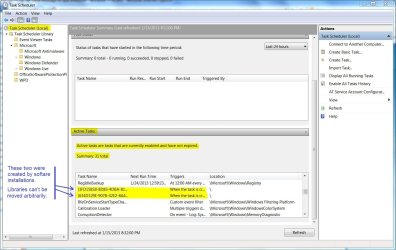
Here's a sample of scheduled tasks created when software was installed. If the target program gets moved, the task will error.
 

Attachments

  • Task Schedule.JPG
    Task Schedule.JPG
    143.8 KB · Views: 5

My Computer

Computer type
PC/Desktop
Computer Manufacturer/Model Number
Built 2/11/2011
OS
Windows 7 Pro-x64
CPU
i7-2600 3.4GHz - 3.8GHz Turbo
Motherboard
Intel DH67BL-B3
Memory
8Gb - 2x4GB, Muskin 991770 PC3-1333
Graphics Card(s)
Integrated Intel HD 2000
Sound Card
Integrated Intel 10.1 HD, RealTek ALC892
Monitor(s) Displays
Asus LCD VH222H, Haier HL24XSL2a
Screen Resolution
1920x1080, 1920x1080
Hard Drives
Crucial SSD C300-128Gb,
Western Digital WD5002AALX - 500Gb,
Western Digital WD7501AALS - 750Gb
PSU
Seasonic 650W 80+ Gold Modular
Case
Rosewill Defender
Cooling
Stock CPU, Four 120mm case fans, PCH fan added
Keyboard
Logitech EX100 Y-RBH94 Wireless
Mouse
Logitech EX100 M-RCE95 Wireless
Internet Speed
3.0/1.5 Mbs
Antivirus
Microsoft Security Essentials
Browser
Microsoft Internet Explorer 11
Other Info
Antec Veris Premier-Multimedia IR Station,
Cyber Accoustics-3602 Speakers,
AFT XM-5U Card Reader,
Hauppauge TV-HVR-2250,
Sony LX300 USB Turntable
Move the path and it throws a coniption. I understand.
 

My Computer

OS
Win 7 64
Back
Top