
Error Message is slowing down Windows

dbtmellis

New member
Member
VIP
Local time
5:00 AM
Messages
114
This error message has been giving be trouble.
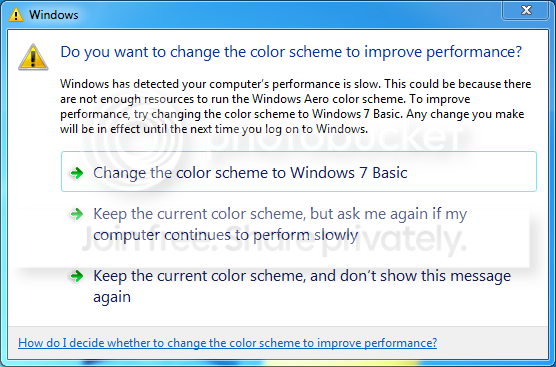
errormessage_zps1391be82.png


At first, I thought my video card was going bad. So I replaced it. I am now running an ATI Raedon HD 5450, with 1GB of Memory on it. I don't remember the old card, but I know that it was running 256MB

I still keep getting this message.

The above card has DVI output, and I have an Integrated VGA output on my Mobo. I get this message no matter which connection I use.

What makes it really annoying is that it makes my mouse icon flicker, and its severely slowing down the operation of my Windows.

I am running a Dell Insprion 530s, Windows 7 Home Premium, with 4GB of RAM and an Intel Core 2 Duo E4600 @ 2.4Ghz CPU.
 

My Computer

Computer type
PC/Desktop
Computer Manufacturer/Model Number
Dell Insprion 530s
OS
Windows 7 Home Premuim 64 Bit
CPU
Intel Core 2 Duo E4600 @ 2.4Ghz
Motherboard
Foxconn
Memory
Crucial 4GB
Graphics Card(s)
ATI Raedon 5450 1GB
Sound Card
Integrated
Monitor(s) Displays
Dell 19 inch
Screen Resolution
4:3
Hard Drives
1TB Western Digital
PSU
Bestec 250w
Keyboard
Dell
Mouse
GE
Antivirus
Microsoft Security Essentinals
Browser
Internet Explorer 11
Well initial thoughts tell me that the fact you only have 4gb ram is not enough for 7 to fully function the way its suppose to. If you can and if your mb will accept it i would up the amount of ram you have because windows is telling you there are not enough resources to run certain functions of windows. Even if the graphics card has been replaced; that card may share memory with other windows components and or services; therefore taking away the amount that is allotted for the card to use
 

My Computer

Computer type
PC/Desktop
Computer Manufacturer/Model Number
custom built
OS
Windows 7 ultimate 64-bit
CPU
Intel I7 2600K 3.4ghz
Motherboard
Asus Evo P8P67
Memory
Corsair 16gb ddr3 1600mhz
Graphics Card(s)
Nvidia Geforce gt 430
Sound Card
Sound Blaster Titanium x-fi pci express
Monitor(s) Displays
Dell E198WFP
Hard Drives
1 western digital 2TB drive.
PSU
Antec 1200 watt
Case
Inwin Dragon Rider
Cooling
6 case supplied cooling fans
Keyboard
logitech mk700
Mouse
logitech m705
Internet Speed
25-50mbps download; 10mbps upload(i think)
Antivirus
avg free 2014
Browser
mozilla firefox
Other Info
Also have a pretty bad speaker setup which is a klipsch promedia 5.1 surround speaker setup with huge subwoofer and lg blu ray player/writer. Also a hp officejet pro 8600 plus wireless all in one and a logitech s7500 webcam.
What's your Windows Experience Index (WEI) value for Graphics? Do you have hardware acceleration turned on or off? If it's turned on, try reducing it or turn it off. It could be your CPU can't keep up with the GPU.
 

My Computer

Computer type
PC/Desktop
Computer Manufacturer/Model Number
Built 2/11/2011
OS
Windows 7 Pro-x64
CPU
i7-2600 3.4GHz - 3.8GHz Turbo
Motherboard
Intel DH67BL-B3
Memory
8Gb - 2x4GB, Muskin 991770 PC3-1333
Graphics Card(s)
Integrated Intel HD 2000
Sound Card
Integrated Intel 10.1 HD, RealTek ALC892
Monitor(s) Displays
Asus LCD VH222H, Haier HL24XSL2a
Screen Resolution
1920x1080, 1920x1080
Hard Drives
Crucial SSD C300-128Gb,
Western Digital WD5002AALX - 500Gb,
Western Digital WD7501AALS - 750Gb
PSU
Seasonic 650W 80+ Gold Modular
Case
Rosewill Defender
Cooling
Stock CPU, Four 120mm case fans, PCH fan added
Keyboard
Logitech EX100 Y-RBH94 Wireless
Mouse
Logitech EX100 M-RCE95 Wireless
Internet Speed
3.0/1.5 Mbs
Antivirus
Microsoft Security Essentials
Browser
Microsoft Internet Explorer 11
Other Info
Antec Veris Premier-Multimedia IR Station,
Cyber Accoustics-3602 Speakers,
AFT XM-5U Card Reader,
Hauppauge TV-HVR-2250,
Sony LX300 USB Turntable
My Windows Experience Index is 4.4

I am running 1.96GB of Memory right now, and I have 4GB installed, so I doubt its a memory related issue
 

My Computer

Computer type
PC/Desktop
Computer Manufacturer/Model Number
Dell Insprion 530s
OS
Windows 7 Home Premuim 64 Bit
CPU
Intel Core 2 Duo E4600 @ 2.4Ghz
Motherboard
Foxconn
Memory
Crucial 4GB
Graphics Card(s)
ATI Raedon 5450 1GB
Sound Card
Integrated
Monitor(s) Displays
Dell 19 inch
Screen Resolution
4:3
Hard Drives
1TB Western Digital
PSU
Bestec 250w
Keyboard
Dell
Mouse
GE
Antivirus
Microsoft Security Essentinals
Browser
Internet Explorer 11
Did you run WEI after you installed the new card?
I recommend doing that to let Windows 7 see what you have changed.
 

My Computer

Computer type
PC/Desktop
Computer Manufacturer/Model Number
Home made Desktop
OS
Windows 10 Pro. 64/ version 1709 Windows 7 Pro/64
CPU
Intel i7-6800K @ 4.3
Motherboard
ASUS X-99 Deluxe II
Memory
Corsair Platinum 16 gig @2400
Graphics Card(s)
EVGA GTX 1070 OC
Monitor(s) Displays
Asus 27" LED LCD/VE278Q
Screen Resolution
1920-1080 or 1280-720 HDMI
Hard Drives
INTEL SSD 730-240 Gb Sata 3.0/
PSU
EVGA Platium 1200W
Case
Phanteks Luxe Tempered Glass 8 fans/ one radiator
Cooling
XSPC/ Water Cooled CPU
Keyboard
Das 4 Professional
Mouse
Logitech M705/MX Anywhere 2-S
Internet Speed
100 mbits
Antivirus
Microsoft Security Essentials/ Malwarebytes Premium 3.0/ SAS
Browser
I.E. 11 default/Firefox/ ISP Time Warner Cable/Spectrum
Other Info
LG BluRay Burner/
Sound system-KLipsch-THX/
Icy Dock ssd Hot Swap bays.
yes, the score is after I installed the new card
 

My Computer

Computer type
PC/Desktop
Computer Manufacturer/Model Number
Dell Insprion 530s
OS
Windows 7 Home Premuim 64 Bit
CPU
Intel Core 2 Duo E4600 @ 2.4Ghz
Motherboard
Foxconn
Memory
Crucial 4GB
Graphics Card(s)
ATI Raedon 5450 1GB
Sound Card
Integrated
Monitor(s) Displays
Dell 19 inch
Screen Resolution
4:3
Hard Drives
1TB Western Digital
PSU
Bestec 250w
Keyboard
Dell
Mouse
GE
Antivirus
Microsoft Security Essentinals
Browser
Internet Explorer 11

My Computer

Computer type
PC/Desktop
Computer Manufacturer/Model Number
Custom Built
OS
Windows 10 Pro
CPU
AMD Ryzen 5 2400G Processor with Radeon RX Vega 11 Graphics
Motherboard
ASRock X470 Master SLI/AC AM4 AMD Promontory X470 SATA 6Gb/s
Memory
G.SKILL Ripjaws V Series 16GB (2 x 8GB) 288-Pin DDR4 SDRAM D
Graphics Card(s)
2047MB NVIDIA GeForce GTX 1060 6GB (EVGA)
Sound Card
Motherboard Built in
Monitor(s) Displays
Acer R240HY bidx 23.8-Inch IPS HDMI DVI VGA (1920 x 1080) Wi
Screen Resolution
1920 x 1080
Hard Drives
1TB Sandisk SSD PLUS (Main drive)
500 GB Seagate 7200 RPM (Games)
500 GB Western Digital 7200 RPM (Virtual Machines)
PSU
CORSAIR TX Series TX650M 650W 80+ Gold Modular Power Supply
Case
CORSAIR CARBIDE SPEC-02 Mid-Tower Gaming Case, Red LED Fan
Cooling
220mm, two 120mm, and four 60mm fans
Keyboard
Wired Dell keyboard
Mouse
Wireless Logitech mouse
Internet Speed
250mb down, 30mb up
Antivirus
Panda Cloud Antivirus
Browser
Chrome-ish x64
Other Info
Your awesome for reading this.
4.4 is more than enough to run Aero. I'm guessing something else is hogging the CPU. When Windows "sees" a performance loss, the easiest and least important is considered to be Aero graphics and it puts up that message. About all I can suggest is run the Seven Forum Diagnostic Utility and upload the files. Be sure to use the Grab All button. We'll be able to see what's running as well as your startup aps. There's no personal information, other than the computer name, included in the files.
 

My Computer

Computer type
PC/Desktop
Computer Manufacturer/Model Number
Built 2/11/2011
OS
Windows 7 Pro-x64
CPU
i7-2600 3.4GHz - 3.8GHz Turbo
Motherboard
Intel DH67BL-B3
Memory
8Gb - 2x4GB, Muskin 991770 PC3-1333
Graphics Card(s)
Integrated Intel HD 2000
Sound Card
Integrated Intel 10.1 HD, RealTek ALC892
Monitor(s) Displays
Asus LCD VH222H, Haier HL24XSL2a
Screen Resolution
1920x1080, 1920x1080
Hard Drives
Crucial SSD C300-128Gb,
Western Digital WD5002AALX - 500Gb,
Western Digital WD7501AALS - 750Gb
PSU
Seasonic 650W 80+ Gold Modular
Case
Rosewill Defender
Cooling
Stock CPU, Four 120mm case fans, PCH fan added
Keyboard
Logitech EX100 Y-RBH94 Wireless
Mouse
Logitech EX100 M-RCE95 Wireless
Internet Speed
3.0/1.5 Mbs
Antivirus
Microsoft Security Essentials
Browser
Microsoft Internet Explorer 11
Other Info
Antec Veris Premier-Multimedia IR Station,
Cyber Accoustics-3602 Speakers,
AFT XM-5U Card Reader,
Hauppauge TV-HVR-2250,
Sony LX300 USB Turntable
The Driver update via the Device Manager says my Driver for my GPU is up to date
 

My Computer

Computer type
PC/Desktop
Computer Manufacturer/Model Number
Dell Insprion 530s
OS
Windows 7 Home Premuim 64 Bit
CPU
Intel Core 2 Duo E4600 @ 2.4Ghz
Motherboard
Foxconn
Memory
Crucial 4GB
Graphics Card(s)
ATI Raedon 5450 1GB
Sound Card
Integrated
Monitor(s) Displays
Dell 19 inch
Screen Resolution
4:3
Hard Drives
1TB Western Digital
PSU
Bestec 250w
Keyboard
Dell
Mouse
GE
Antivirus
Microsoft Security Essentinals
Browser
Internet Explorer 11
After doing more Googling on my own, I did find that I could change my BIOS settings. I think (if I recall) that I changed the memory buffer from 128MB to Max. There was the option for 256MB as well. So far it seems to help, or it has at least cut down the number of times it flashes on the screen. It went from nearly running ever app I open, to now just once or twice at system boot-up.
 

My Computer

Computer type
PC/Desktop
Computer Manufacturer/Model Number
Dell Insprion 530s
OS
Windows 7 Home Premuim 64 Bit
CPU
Intel Core 2 Duo E4600 @ 2.4Ghz
Motherboard
Foxconn
Memory
Crucial 4GB
Graphics Card(s)
ATI Raedon 5450 1GB
Sound Card
Integrated
Monitor(s) Displays
Dell 19 inch
Screen Resolution
4:3
Hard Drives
1TB Western Digital
PSU
Bestec 250w
Keyboard
Dell
Mouse
GE
Antivirus
Microsoft Security Essentinals
Browser
Internet Explorer 11
The Driver update via the Device Manager says my Driver for my GPU is up to date

That means nothing. It only means according to windows update your video card driver is up to date. (manufacturer told Microsoft/reported the updated driver) Try going to the manufacturing website. They usually have more up to date drivers.

For example, if it is an AMD card go here, If nvidia go here.

You did not post your system specs so I do not know what video card you have. That would helpful.
 

My Computer

Computer type
PC/Desktop
Computer Manufacturer/Model Number
Custom Built
OS
Windows 10 Pro
CPU
AMD Ryzen 5 2400G Processor with Radeon RX Vega 11 Graphics
Motherboard
ASRock X470 Master SLI/AC AM4 AMD Promontory X470 SATA 6Gb/s
Memory
G.SKILL Ripjaws V Series 16GB (2 x 8GB) 288-Pin DDR4 SDRAM D
Graphics Card(s)
2047MB NVIDIA GeForce GTX 1060 6GB (EVGA)
Sound Card
Motherboard Built in
Monitor(s) Displays
Acer R240HY bidx 23.8-Inch IPS HDMI DVI VGA (1920 x 1080) Wi
Screen Resolution
1920 x 1080
Hard Drives
1TB Sandisk SSD PLUS (Main drive)
500 GB Seagate 7200 RPM (Games)
500 GB Western Digital 7200 RPM (Virtual Machines)
PSU
CORSAIR TX Series TX650M 650W 80+ Gold Modular Power Supply
Case
CORSAIR CARBIDE SPEC-02 Mid-Tower Gaming Case, Red LED Fan
Cooling
220mm, two 120mm, and four 60mm fans
Keyboard
Wired Dell keyboard
Mouse
Wireless Logitech mouse
Internet Speed
250mb down, 30mb up
Antivirus
Panda Cloud Antivirus
Browser
Chrome-ish x64
Other Info
Your awesome for reading this.
My System Specs

Dell Insprinon 530s
4GB RAM
Intel Core 2 Duo E4600 2.4Ghz CPU
ATI Radeon HD 5450 1GB GPU
1TB Hdd
 

My Computer

Computer type
PC/Desktop
Computer Manufacturer/Model Number
Dell Insprion 530s
OS
Windows 7 Home Premuim 64 Bit
CPU
Intel Core 2 Duo E4600 @ 2.4Ghz
Motherboard
Foxconn
Memory
Crucial 4GB
Graphics Card(s)
ATI Raedon 5450 1GB
Sound Card
Integrated
Monitor(s) Displays
Dell 19 inch
Screen Resolution
4:3
Hard Drives
1TB Western Digital
PSU
Bestec 250w
Keyboard
Dell
Mouse
GE
Antivirus
Microsoft Security Essentinals
Browser
Internet Explorer 11

My Computer

Computer type
PC/Desktop
Computer Manufacturer/Model Number
Self Built
OS
Win 10 Pro x64
CPU
Intel I5-2500K @3.3GHz
Motherboard
Asrock P67 Extreme4
Memory
16GB G.Skill Ripjaws X (4x4GB)
Graphics Card(s)
EVGA GeForce 750 Ti SC 2GB
Sound Card
ASUS Xonar DG 5.1 Channels 24-bit 96KHz PCI Interface Sound
Monitor(s) Displays
auria eq2367
Screen Resolution
1920 x 1080
Hard Drives
250GB Samsung 850 EVO SSD
1TB WD Blue
1TB Hitachi
PSU
SeaSonic X 650W 80 Plus Gold
Case
Corsair Obsidian 750D
Cooling
Corsair H60, Three 140mm case fans
Keyboard
Logitech Wireless Keyboard K520
Mouse
Logitech Wireless Mouse M310
Internet Speed
Wave Broadband ~ 100 dn 5 up
Antivirus
Windows Defender, Malwarebytes Premium
Browser
Edge, IE11, Chrome
Other Info
Laptop specs: HP g7-1365dx /
CPU: AMD A6-3420M APU with Radeon(tm) HD Graphics /
RAM: Crucial 8Gb (2x4Gb) /
SSD: Crucial M4-CT128M4SSD2 ATA Device/ FW 000F /
GFX: AMD Radeon HD 6520G /
OS: Windows 10 Pro x64
:what::banghead::o:o How did I miss that........thanks derekimo....


Okay, go to the amd link and update your drivers. I would use the custom install when prompted and install only the updated drivers. Restart and then rate your system with Windows experience index. Report what happens. Your system is more then adequate that you should not get that message.

Also can you please let me know what shows up here by doing the following:

Click :orb: type performance. Click performance information and tools. Click advanced tools. What is listed under performance issues?
 

My Computer

Computer type
PC/Desktop
Computer Manufacturer/Model Number
Custom Built
OS
Windows 10 Pro
CPU
AMD Ryzen 5 2400G Processor with Radeon RX Vega 11 Graphics
Motherboard
ASRock X470 Master SLI/AC AM4 AMD Promontory X470 SATA 6Gb/s
Memory
G.SKILL Ripjaws V Series 16GB (2 x 8GB) 288-Pin DDR4 SDRAM D
Graphics Card(s)
2047MB NVIDIA GeForce GTX 1060 6GB (EVGA)
Sound Card
Motherboard Built in
Monitor(s) Displays
Acer R240HY bidx 23.8-Inch IPS HDMI DVI VGA (1920 x 1080) Wi
Screen Resolution
1920 x 1080
Hard Drives
1TB Sandisk SSD PLUS (Main drive)
500 GB Seagate 7200 RPM (Games)
500 GB Western Digital 7200 RPM (Virtual Machines)
PSU
CORSAIR TX Series TX650M 650W 80+ Gold Modular Power Supply
Case
CORSAIR CARBIDE SPEC-02 Mid-Tower Gaming Case, Red LED Fan
Cooling
220mm, two 120mm, and four 60mm fans
Keyboard
Wired Dell keyboard
Mouse
Wireless Logitech mouse
Internet Speed
250mb down, 30mb up
Antivirus
Panda Cloud Antivirus
Browser
Chrome-ish x64
Other Info
Your awesome for reading this.
two messages

Startup Programs are causing windows to start very slowly.
Performance can be improved by changing visual settings

Ive tried to download the drive via the AMD link, but right now I am getting a sever busy error message. I will try again probably tomorrow.
 

My Computer

Computer type
PC/Desktop
Computer Manufacturer/Model Number
Dell Insprion 530s
OS
Windows 7 Home Premuim 64 Bit
CPU
Intel Core 2 Duo E4600 @ 2.4Ghz
Motherboard
Foxconn
Memory
Crucial 4GB
Graphics Card(s)
ATI Raedon 5450 1GB
Sound Card
Integrated
Monitor(s) Displays
Dell 19 inch
Screen Resolution
4:3
Hard Drives
1TB Western Digital
PSU
Bestec 250w
Keyboard
Dell
Mouse
GE
Antivirus
Microsoft Security Essentinals
Browser
Internet Explorer 11
two messages

Startup Programs are causing windows to start very slowly.
Performance can be improved by changing visual settings

Ive tried to download the drive via the AMD link, but right now I am getting a sever busy error message. I will try again probably tomorrow.

1.) Weird, works for me....I wonder if you have malware.....what security software do you have installed?

2.) You can try searching google for amd auto update. First result (not the ad result) should be correct.

3.)Could you post a screenshot of your startup programs?

Click :orb: click run. (or on your keyboard hit windows key + R). Type msconfig. hit ok. Click the startup tab. Post the screenshot so we can see everything in there. You might need to scroll down and take another screenshot.

4.) For better visual settings performance, do the following:

Click :orb: type "adjust the appearance and performance of windows". Click the top result. Click adjust for better performance, then click custom.

Checkmark everything except the following:

These should be unchecked:

-Enable transparent glass.
-Fade or slide menus into view
-Fade or slide tooltips into view
-Fade out menu items after clicking
-Show shadows under mouse pointer
-Show shadows under windows

Click ok. Restart.
 

My Computer

Computer type
PC/Desktop
Computer Manufacturer/Model Number
Custom Built
OS
Windows 10 Pro
CPU
AMD Ryzen 5 2400G Processor with Radeon RX Vega 11 Graphics
Motherboard
ASRock X470 Master SLI/AC AM4 AMD Promontory X470 SATA 6Gb/s
Memory
G.SKILL Ripjaws V Series 16GB (2 x 8GB) 288-Pin DDR4 SDRAM D
Graphics Card(s)
2047MB NVIDIA GeForce GTX 1060 6GB (EVGA)
Sound Card
Motherboard Built in
Monitor(s) Displays
Acer R240HY bidx 23.8-Inch IPS HDMI DVI VGA (1920 x 1080) Wi
Screen Resolution
1920 x 1080
Hard Drives
1TB Sandisk SSD PLUS (Main drive)
500 GB Seagate 7200 RPM (Games)
500 GB Western Digital 7200 RPM (Virtual Machines)
PSU
CORSAIR TX Series TX650M 650W 80+ Gold Modular Power Supply
Case
CORSAIR CARBIDE SPEC-02 Mid-Tower Gaming Case, Red LED Fan
Cooling
220mm, two 120mm, and four 60mm fans
Keyboard
Wired Dell keyboard
Mouse
Wireless Logitech mouse
Internet Speed
250mb down, 30mb up
Antivirus
Panda Cloud Antivirus
Browser
Chrome-ish x64
Other Info
Your awesome for reading this.
I was finally able to download and install the drivers. turns out I did have the latest ones. I reinstalled it.

Should I leave my BIOS video setting at 128, 256, or Max?

Just remember that everything was working fine up until the last few months. It did it on my old video card, the Intgrated Video on the Mobo and now the new card.

I have Microsoft Security Essentials, and Malwayarebytes
 

My Computer

Computer type
PC/Desktop
Computer Manufacturer/Model Number
Dell Insprion 530s
OS
Windows 7 Home Premuim 64 Bit
CPU
Intel Core 2 Duo E4600 @ 2.4Ghz
Motherboard
Foxconn
Memory
Crucial 4GB
Graphics Card(s)
ATI Raedon 5450 1GB
Sound Card
Integrated
Monitor(s) Displays
Dell 19 inch
Screen Resolution
4:3
Hard Drives
1TB Western Digital
PSU
Bestec 250w
Keyboard
Dell
Mouse
GE
Antivirus
Microsoft Security Essentinals
Browser
Internet Explorer 11
looks like the Max setting seems to be working the best. It has not eliminated it 100% but it does cut down on the error message and the lag/choppiness of the Windows
 

My Computer

Computer type
PC/Desktop
Computer Manufacturer/Model Number
Dell Insprion 530s
OS
Windows 7 Home Premuim 64 Bit
CPU
Intel Core 2 Duo E4600 @ 2.4Ghz
Motherboard
Foxconn
Memory
Crucial 4GB
Graphics Card(s)
ATI Raedon 5450 1GB
Sound Card
Integrated
Monitor(s) Displays
Dell 19 inch
Screen Resolution
4:3
Hard Drives
1TB Western Digital
PSU
Bestec 250w
Keyboard
Dell
Mouse
GE
Antivirus
Microsoft Security Essentinals
Browser
Internet Explorer 11

My Computer

Computer type
PC/Desktop
Computer Manufacturer/Model Number
Built 2/11/2011
OS
Windows 7 Pro-x64
CPU
i7-2600 3.4GHz - 3.8GHz Turbo
Motherboard
Intel DH67BL-B3
Memory
8Gb - 2x4GB, Muskin 991770 PC3-1333
Graphics Card(s)
Integrated Intel HD 2000
Sound Card
Integrated Intel 10.1 HD, RealTek ALC892
Monitor(s) Displays
Asus LCD VH222H, Haier HL24XSL2a
Screen Resolution
1920x1080, 1920x1080
Hard Drives
Crucial SSD C300-128Gb,
Western Digital WD5002AALX - 500Gb,
Western Digital WD7501AALS - 750Gb
PSU
Seasonic 650W 80+ Gold Modular
Case
Rosewill Defender
Cooling
Stock CPU, Four 120mm case fans, PCH fan added
Keyboard
Logitech EX100 Y-RBH94 Wireless
Mouse
Logitech EX100 M-RCE95 Wireless
Internet Speed
3.0/1.5 Mbs
Antivirus
Microsoft Security Essentials
Browser
Microsoft Internet Explorer 11
Other Info
Antec Veris Premier-Multimedia IR Station,
Cyber Accoustics-3602 Speakers,
AFT XM-5U Card Reader,
Hauppauge TV-HVR-2250,
Sony LX300 USB Turntable
[QUOTE

You guys are going to bounce this back and forth until the OP supplies the needed info to help. I'll unsubscribe and stay out of the way. :cool:[/QUOTE]

Clarify what you mean on that?
 

My Computer

Computer type
PC/Desktop
Computer Manufacturer/Model Number
Dell Insprion 530s
OS
Windows 7 Home Premuim 64 Bit
CPU
Intel Core 2 Duo E4600 @ 2.4Ghz
Motherboard
Foxconn
Memory
Crucial 4GB
Graphics Card(s)
ATI Raedon 5450 1GB
Sound Card
Integrated
Monitor(s) Displays
Dell 19 inch
Screen Resolution
4:3
Hard Drives
1TB Western Digital
PSU
Bestec 250w
Keyboard
Dell
Mouse
GE
Antivirus
Microsoft Security Essentinals
Browser
Internet Explorer 11
Back
Top