Solved Error message says C Program Files \Common Files\System\wab32 fault

loninappleton

New member
Member
VIP
Local time
5:28 PM
Messages
892
Hello


I know I can't put the full text error in the subject. After a backup of a working HD, the target
gave this and other errors which said Windows failed to start. So opening the detail
it says the following:


[A box looking for Winmail which I don't use.]


and the error description C:\Program Files\Common Files\System\wab32.dll


fault module name ntdll.dll


I can't describe it any better.


In sum, Widows wouldn't get past this.
 

My Computer My Computer

Computer type
PC/Desktop
Computer Manufacturer/Model Number
custom
OS
Windows 7 x64 Ultimate
CPU
AMD Athlon II x3 450
Motherboard
MSI 880GM
Memory
2 GB
Hard Drives
various
Browser
Firefox, Opera

My Computer My Computer

Computer type
PC/Desktop
Computer Manufacturer/Model Number
HP Desktop & Compaq Laptop
OS
Win 10 x64, Linux Lite, Win 7 x64, BlackArch, & Kali
Hard Drives
Samsung 850 Pro 256Gb,
Hitachi HDD 1Tb,
Crucial MX SSD 250Gb
Segate 3Tb USB 3.0 Ext. Backup HDD
Internet Speed
150Mbps dn, 20Mbps up
Antivirus
Avast Free, Malwarebytes Anti-Exploit & Anti-Ransomware
Browser
Firefox, Chrome, Opera, & VPN

My Computer My Computer

Computer type
Laptop
Computer Manufacturer/Model Number
Fujitsu LIFEBOOK
OS
Win 7 HP SP1 64-bit Vista HB SP2 32-bit Linux Mint 18.3
CPU
Intel(R) Pentium(R) CPU P6200 @ 2.13GHz
Motherboard
FUJITSU FJNBB06
Memory
4.00 GB
Graphics Card(s)
Intel(R) Graphics Media Accelerator HD
Sound Card
[1] Realtek High Definition Audio [2] Intel(R) Display Audio
Screen Resolution
1366 x 768 x 32 bits (4294967296 colors) @ 59 Hz
Hard Drives
TOSHIBA MK5076GSX
Antivirus
AVG FREE
hi

please navigate to the system folder,
are the wab32 details the same description/size, see screenshot


Roy
 

Attachments

  • iona.PNG
    iona.PNG
    3.4 KB · Views: 16

My Computer My Computer

Computer type
PC/Desktop
Computer Manufacturer/Model Number
medionl/Aspire 6930G/acer x55a
OS
W7 home premium 32bit/W7HP 64bit/w10 tp insider ring
CPU
E5300 dual core
Motherboard
medion MS7366
Memory
3gb
Graphics Card(s)
Nvidia Geforce 7100 Nforce 630i
Monitor(s) Displays
avixc
Internet Speed
n (isp resticted to 72)
Antivirus
mse/pands
Browser
palemoon
Other Info
Belkin Fd7050 n USB using Railink RT2870 drivers, more upto date
dll is in 2 system folders on x64 systems, backwards compatibility with x32-x86 programs
click start orb lower-left screen
easy to access location:
copy and paste bold italic text into searchbox, click on it when it appears
C:\Program Files\Common Files\System
C:\Program Files (x86)\Common Files\System
screenshot or snippet
capture
upload
Bill
 

My Computer My Computer

Computer type
PC/Desktop
Computer Manufacturer/Model Number
HP Desktop & Compaq Laptop
OS
Win 10 x64, Linux Lite, Win 7 x64, BlackArch, & Kali
Hard Drives
Samsung 850 Pro 256Gb,
Hitachi HDD 1Tb,
Crucial MX SSD 250Gb
Segate 3Tb USB 3.0 Ext. Backup HDD
Internet Speed
150Mbps dn, 20Mbps up
Antivirus
Avast Free, Malwarebytes Anti-Exploit & Anti-Ransomware
Browser
Firefox, Chrome, Opera, & VPN
Ok, I'll work on this with one of the faulty disks. But I've proceded to do a 'Nuke and pave" with
one of the faulting drives.


Correction on the topic: This is an error in Exploere-- anything to do with doing a search
from the Win7 icon on the desktop. Everything else on the system works. I tried a restore by
using the "Everything" file search program and also msconfig through the desktop method of WinKey+R.


Nothing had worked.


But I think I know what might be happeneing: Usually I never put programs in Start. But one installation
of Everything showed that it was in the TSR mode: load and stay resident with the Start programs.
Since Explorer and Everything do similar things, could that cause a conflict?


I'm sold on the Everything program. But I may have to isolate it such as using from a USB.


I'll get to checking on Last Good Config but as usual it won't be in the next five minutes. It may
take a while for me to get back to it since I'm simply doing what I have to get things saved.
 

My Computer My Computer

Computer type
PC/Desktop
Computer Manufacturer/Model Number
custom
OS
Windows 7 x64 Ultimate
CPU
AMD Athlon II x3 450
Motherboard
MSI 880GM
Memory
2 GB
Hard Drives
various
Browser
Firefox, Opera
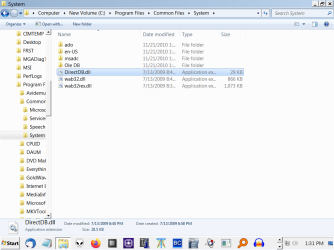
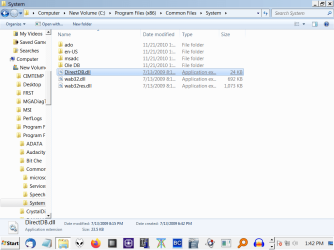
here they are from Program files and program files (x86).
 

Attachments

  • wab32.png
    wab32.png
    33.3 KB · Views: 0
  • wab Part 2.png
    wab Part 2.png
    34.3 KB · Views: 0

My Computer My Computer

Computer type
PC/Desktop
Computer Manufacturer/Model Number
custom
OS
Windows 7 x64 Ultimate
CPU
AMD Athlon II x3 450
Motherboard
MSI 880GM
Memory
2 GB
Hard Drives
various
Browser
Firefox, Opera
Hi

Those screenshots look good.

I actually think your onto to something in regard to the Everything program.
If its interacting with explorer and either delaying/stopping a program that requires wab
Such as Office2007. - uses/includes winmail

can you find the error in event viewer should give us more info.


Roy
 

My Computer My Computer

Computer type
PC/Desktop
Computer Manufacturer/Model Number
medionl/Aspire 6930G/acer x55a
OS
W7 home premium 32bit/W7HP 64bit/w10 tp insider ring
CPU
E5300 dual core
Motherboard
medion MS7366
Memory
3gb
Graphics Card(s)
Nvidia Geforce 7100 Nforce 630i
Monitor(s) Displays
avixc
Internet Speed
n (isp resticted to 72)
Antivirus
mse/pands
Browser
palemoon
Other Info
Belkin Fd7050 n USB using Railink RT2870 drivers, more upto date
I can't recall if I attempted to uninstall Everything then reinstall it. During error times the reaction is to do everything fast and fail to document.


Where I night be now from past experience is to reinstall everything, uninstall it and reinstall
without being in start.


I'll take another look.


I'm not familiar with using event viewer but it sounds like trace. Over the years I wisht I knew
about such a thing. Remembering I cannot use Explorer on this HD how do I get to Event Viewer.
Is it in Task Manager?
 

My Computer My Computer

Computer type
PC/Desktop
Computer Manufacturer/Model Number
custom
OS
Windows 7 x64 Ultimate
CPU
AMD Athlon II x3 450
Motherboard
MSI 880GM
Memory
2 GB
Hard Drives
various
Browser
Firefox, Opera
I took another look. This series of errors may have beaten me. I'm tapped out.
I got the Windows not genuine error and could not use the rearm routine.


The disk may be hosed at root level.


Is it possible to do like I mentioned with the Everything program with Explorer: just delete the

explorer.exe and stop the blocking?


I can find explorer.exe using the Everything program but I do not know which among the multiple entries
to zap. Nor do I know how to put it back-- perhaps from another HD with a simple copy and replace.


There's just too many things to juggle in this. Like McCoy with Spock's brain. :-/


I'll check Crystal disk info, but I recall that reading good. I'm very close to just doing a wipe
and forgetting it.


--

Crystal dik info reports disk ok Blue in the Good. But I got it used and it's a high hours reading.


As we go I'll try what you mentioned on the trace routine but I think it needs to be zeroed. I move HDs around to similar MSI motherboards I have. No compatibility issues like in the past. But I never know what'sgoing on behind the scenes with M$. Win7 has been stable for me for a long time.
 

My Computer My Computer

Computer type
PC/Desktop
Computer Manufacturer/Model Number
custom
OS
Windows 7 x64 Ultimate
CPU
AMD Athlon II x3 450
Motherboard
MSI 880GM
Memory
2 GB
Hard Drives
various
Browser
Firefox, Opera

My Computer My Computer

Computer type
PC/Desktop
Computer Manufacturer/Model Number
medionl/Aspire 6930G/acer x55a
OS
W7 home premium 32bit/W7HP 64bit/w10 tp insider ring
CPU
E5300 dual core
Motherboard
medion MS7366
Memory
3gb
Graphics Card(s)
Nvidia Geforce 7100 Nforce 630i
Monitor(s) Displays
avixc
Internet Speed
n (isp resticted to 72)
Antivirus
mse/pands
Browser
palemoon
Other Info
Belkin Fd7050 n USB using Railink RT2870 drivers, more upto date
Ok. for now I won't delete anything.


I'm practicing using the word sanguine:


I am less sanguine about running mgadiag or posting things in it.


It may very well be the case that I am out of rearms. It may be best not to


waste more time on it despite your great help efforts. Like I said too much to juggle.
 

My Computer My Computer

Computer type
PC/Desktop
Computer Manufacturer/Model Number
custom
OS
Windows 7 x64 Ultimate
CPU
AMD Athlon II x3 450
Motherboard
MSI 880GM
Memory
2 GB
Hard Drives
various
Browser
Firefox, Opera
Hi torchwood,

I am less sanguine about running mgadiag or posting things in it.

I have asked him in the past [other issues they were having] to run tasks and post the results but he will not post anything in the forum!
 

My Computer My Computer

Computer type
Laptop
Computer Manufacturer/Model Number
Fujitsu LIFEBOOK
OS
Win 7 HP SP1 64-bit Vista HB SP2 32-bit Linux Mint 18.3
CPU
Intel(R) Pentium(R) CPU P6200 @ 2.13GHz
Motherboard
FUJITSU FJNBB06
Memory
4.00 GB
Graphics Card(s)
Intel(R) Graphics Media Accelerator HD
Sound Card
[1] Realtek High Definition Audio [2] Intel(R) Display Audio
Screen Resolution
1366 x 768 x 32 bits (4294967296 colors) @ 59 Hz
Hard Drives
TOSHIBA MK5076GSX
Antivirus
AVG FREE
No tattling.


With this machine's difficulties I have to look up things from one that works. Simply put, I think it's hosed.
I'm seeing things that just look weird like prompts for dial up where I of course haven't used dial up in a decade. And there was that Winmail box that popped up from nowhere. It has a mind of it's own. Also
Firefox fails to start and even Tor can't be accessed so I can get back here to Sevenforums.


I'll proceed with the tracer routine a bit but it'll be at a pretty slow pace.


I may have to make some prints to paper just to follow all that.
 

My Computer My Computer

Computer type
PC/Desktop
Computer Manufacturer/Model Number
custom
OS
Windows 7 x64 Ultimate
CPU
AMD Athlon II x3 450
Motherboard
MSI 880GM
Memory
2 GB
Hard Drives
various
Browser
Firefox, Opera
It's time to let this one go. If someone else says they have an answer and that answer worked,
I'll leave the thread open a few days.


However, I did follow up with trying the Even Viewer routine from your instruction-- tried to load it by both methods and at Win-R which failed and of course the other method requiring to open Admin Tools gave theExplorer error.


The disk is hosed. No access to Explorer for whatever reason just confounds any further
action.


The disk will wiped and I'll get a new clone made or at least get my major files transferred
for backup.


Please do not suggest anything further. If it has to be marked solved

the answer is hosed: reformat.
 

My Computer My Computer

Computer type
PC/Desktop
Computer Manufacturer/Model Number
custom
OS
Windows 7 x64 Ultimate
CPU
AMD Athlon II x3 450
Motherboard
MSI 880GM
Memory
2 GB
Hard Drives
various
Browser
Firefox, Opera
I did the reformat . But some bootup problems remained. Just for those who would like to avoid
a complete disk wipe, what I've done to now is use a disk migrate routine which does a new discover process
for the migrated drive.


Here is the link used for that.


How to move Windows XP hard disk to a different computer or motherboard without BSOD | Wilders Security Forums


Yes it is XP but the process to migrate uses the same steps-- simple steps in Device Manager.
When completed, the HD is moved to the new motherboard and is seen as new or blank slate for the OS
discovery process to locate. Some driver reinstalls are necessary.


If anyone has seen an updated version of this routine directly for Win7 please respond here.
 

My Computer My Computer

Computer type
PC/Desktop
Computer Manufacturer/Model Number
custom
OS
Windows 7 x64 Ultimate
CPU
AMD Athlon II x3 450
Motherboard
MSI 880GM
Memory
2 GB
Hard Drives
various
Browser
Firefox, Opera
Back
Top