Error message with upgrade install

derm318

New member
Local time
6:54 PM
Messages
5
When I try to install the Windows 7 Home Premium upgrade I get the following error message: "Windows installation encountered an unknown error and cannot continue"

This has happened after I downloaded the software and when I used an install disc.

How do I get this work?

Norm
 

My Computer

OS
32 bit windows vista home premium
Were did you obtain the software to upgrade?
 

My Computer

Computer Manufacturer/Model Number
SMN-Productions
OS
Windows 7 x86/x64, Server 2008r2, Web Server 2008
CPU
i7 v2 3930K Steping stone 2
Motherboard
ASUS Rampage IV Extreme
Memory
G.SKILL Ripjaws Z Series 32GB
Graphics Card(s)
AMD HD 5770
Monitor(s) Displays
Acer 21" and Samsung 20"
Hard Drives
Patriot Pyro 80GB
PSU
1000 Watt
Case
HAF-X
Cooling
4 Fans
Keyboard
Black Widow Ultimate
Hello derm318, welcome to Seven Forums!


If the Windows 7 install disk is one you burned yourself it may be a bad burn and needs to be done again, if so this would be the first thing to try.

Use the free ISO burner at the link below to burn another at a speed of now more than 4x and select to let the program to verify the disk before it finishes.

ImgBurn Free ISO Burner
 

My Computer

Computer Manufacturer/Model Number
* BFK Customs *
OS
W 7 64-bit Ultimate
CPU
Intel Q9550 Yorkfield
Motherboard
ASUS P5Q Pro
Memory
8GB Dominator 8500C5D
Graphics Card(s)
ATI : XFX 5870
Sound Card
Realtek HD Audio 7-1
Monitor(s) Displays
1x 47" LCD HDMI & 3x 26" LCD HDMI
Screen Resolution
1920x1080P & 1920x1200
Hard Drives
1x 80GB Intel X25-M G2 SSD : 1x 500GB & 1x 640GB WD Caviar Black(s)
PSU
Corsair 620HX
Case
Cooler Master RC-690
Cooling
Tuniq Tower 120, 2x 140mm and 3x 120mm case fans
Keyboard
Microsoft 500
Mouse
Razer Diamondback 3G
Internet Speed
14 Mb/s
Other Info
1x Koutech 3Gb/s SATA HDD Hot Swap Rack
I have tried the downloaded version that I purchased. When that didn't work, I used a Microsoft Windows Home Premium install disc. I get the same error message with both.
 

My Computer

OS
32 bit windows vista home premium

My Computer

Computer Manufacturer/Model Number
* BFK Customs *
OS
W 7 64-bit Ultimate
CPU
Intel Q9550 Yorkfield
Motherboard
ASUS P5Q Pro
Memory
8GB Dominator 8500C5D
Graphics Card(s)
ATI : XFX 5870
Sound Card
Realtek HD Audio 7-1
Monitor(s) Displays
1x 47" LCD HDMI & 3x 26" LCD HDMI
Screen Resolution
1920x1080P & 1920x1200
Hard Drives
1x 80GB Intel X25-M G2 SSD : 1x 500GB & 1x 640GB WD Caviar Black(s)
PSU
Corsair 620HX
Case
Cooler Master RC-690
Cooling
Tuniq Tower 120, 2x 140mm and 3x 120mm case fans
Keyboard
Microsoft 500
Mouse
Razer Diamondback 3G
Internet Speed
14 Mb/s
Other Info
1x Koutech 3Gb/s SATA HDD Hot Swap Rack
Did you download an ISO file and burn it to DVD using an image burner like ImgBurn or the built-in Win7 image burner?
 
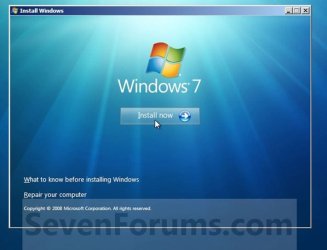
Welcome Norm. Are you booting from the dvd and getting an error before you see this screen?
install now.JPG
 

My Computer

Computer Manufacturer/Model Number
Gateway GT5692
OS
Windows 7 Ulti. x64
CPU
AMD Phenom 8450 triple-core 2.10 ghz
Memory
4GB
Graphics Card(s)
ATI Radion HD 3200
Monitor(s) Displays
Gateway FPD1775W
Screen Resolution
1280x720
Hard Drives
465.6613 Gibibytes
I want to do an upgrade from Windows Vista Home Premium. Would it be possible to do a clean install and is this possible?
In answer to the question about the nature of the download, I downloaded directly from the internet onto my hard drive. However, I could not get the program to install even after I borrowed and used a friend's copy of the official Microsoft Windows 7 Upgrade disc.
 

My Computer

OS
32 bit windows vista home premium
In answer to the question of about when I get the error message, it comes after I click on the install button and it runs through the segment checking for compatibility. At the end of that segment I get the error message.
 

My Computer

OS
32 bit windows vista home premium
I want to do an upgrade from Windows Vista Home Premium. Would it be possible to do a clean install and is this possible?
In answer to the question about the nature of the download, I downloaded directly from the internet onto my hard drive. However, I could not get the program to install even after I borrowed and used a friend's copy of the official Microsoft Windows 7 Upgrade disc.


Did you click this link, below, to have a look at the tutorial.


Do a Clean Install with a Upgrade Windows 7 Version
 

My Computer

Computer Manufacturer/Model Number
* BFK Customs *
OS
W 7 64-bit Ultimate
CPU
Intel Q9550 Yorkfield
Motherboard
ASUS P5Q Pro
Memory
8GB Dominator 8500C5D
Graphics Card(s)
ATI : XFX 5870
Sound Card
Realtek HD Audio 7-1
Monitor(s) Displays
1x 47" LCD HDMI & 3x 26" LCD HDMI
Screen Resolution
1920x1080P & 1920x1200
Hard Drives
1x 80GB Intel X25-M G2 SSD : 1x 500GB & 1x 640GB WD Caviar Black(s)
PSU
Corsair 620HX
Case
Cooler Master RC-690
Cooling
Tuniq Tower 120, 2x 140mm and 3x 120mm case fans
Keyboard
Microsoft 500
Mouse
Razer Diamondback 3G
Internet Speed
14 Mb/s
Other Info
1x Koutech 3Gb/s SATA HDD Hot Swap Rack
Back up your files, make any Recovery Disks if there is a factory recovery partition, gather your program installers, boot the DVD to clean install.

Choose Custom install, use Drive Options to first format the target partition or repartition as desired.

Clean Install Windows 7
 
I have not seen this before. What is the advantage of the clean install? How do I save all of the files, progreams, etc that are a part of my present Windows Vista system?
 

My Computer

OS
32 bit windows vista home premium
If you do a clean install all the data on Vista will be deleted, you would have to make back-ups of anything you do not want to lose before-hand; we are just trying to ascertain how you want to go about this.
 

My Computer

Computer Manufacturer/Model Number
* BFK Customs *
OS
W 7 64-bit Ultimate
CPU
Intel Q9550 Yorkfield
Motherboard
ASUS P5Q Pro
Memory
8GB Dominator 8500C5D
Graphics Card(s)
ATI : XFX 5870
Sound Card
Realtek HD Audio 7-1
Monitor(s) Displays
1x 47" LCD HDMI & 3x 26" LCD HDMI
Screen Resolution
1920x1080P & 1920x1200
Hard Drives
1x 80GB Intel X25-M G2 SSD : 1x 500GB & 1x 640GB WD Caviar Black(s)
PSU
Corsair 620HX
Case
Cooler Master RC-690
Cooling
Tuniq Tower 120, 2x 140mm and 3x 120mm case fans
Keyboard
Microsoft 500
Mouse
Razer Diamondback 3G
Internet Speed
14 Mb/s
Other Info
1x Koutech 3Gb/s SATA HDD Hot Swap Rack
A clean install is normally better because it starts fresh without allowing any corruption to be imported from Vista as often happens with in-place Upgrade.

In your case, booting the DVD might also overcome the error which is causing it to hang when run from Vista.

If you'd like to try the in-place Upgrade first, put the DVD in drive from Vista, then on Start menu rightclick on Computer and choose Open or Explore. This will present a list of files. Rightclick on Setup and Run as Administrator to see if it will start install. Choose Upgrade and have it remain connected to internet to get latest drivers/updates into installer.
 
Norm . Could it be that you are trying to upgrade to 64 bit windows? Do you have 32bit installer?
 

My Computer

Computer Manufacturer/Model Number
Gateway GT5692
OS
Windows 7 Ulti. x64
CPU
AMD Phenom 8450 triple-core 2.10 ghz
Memory
4GB
Graphics Card(s)
ATI Radion HD 3200
Monitor(s) Displays
Gateway FPD1775W
Screen Resolution
1280x720
Hard Drives
465.6613 Gibibytes
Back
Top