Solved Error Message

timlab1955

New member
Member
VIP
Local time
7:42 AM
Messages
186
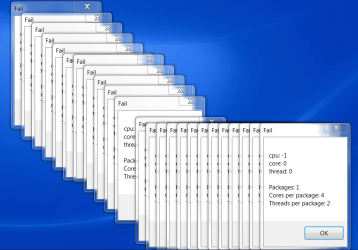
Has anyone every seen this type of message being flashed all over their desktop and the only way to stop is, is by restart? What is it trying to tell me.
 

Attachments

  • Problem With CPU.PNG
    Problem With CPU.PNG
    65.9 KB · Views: 32

My Computer

Computer Manufacturer/Model Number
Dell XPS 17
OS
Windows Professional 64bit
CPU
Intel Core i7 2820QM @ 2.30GHz, Sandy Bridge 32nm
Motherboard
03RG89, Intel Ver: A12
Memory
16GB
Graphics Card(s)
Generic PnP Monitor (1600x900@60Hz), NVIDIA GeForce GT 555m
Sound Card
High Definition Audio Device
Monitor(s) Displays
NVIDIA 3D
Screen Resolution
1600 x 900 3d
Hard Drives
250GB SAMSUNG SAMSUNG SSD PM810 2.5" 256GB ATA Device (SATA-SSD)
625GB SAMSUNG SAMSUNG HM640JJ ATA Device (SATA)
Other Info
Transend 64GB Memory Card, Lexar Echo ZE 32GB USB 2.0 Backup DriveLEHZE32GASBNA <---Newest thing and very small.
Does anything show in your Event Viewer?

Any over active processes in the Task Manager?
 

My Computer

Computer type
PC/Desktop
Computer Manufacturer/Model Number
Packard Bell
OS
Windows 7 Home Premium 64bit
CPU
Intel(R) Core(TM) i3-2120 CPU @ 3.30GHz
Motherboard
Packard Bell IPISB-AG
Memory
3.00 GB
Graphics Card(s)
(1) Intel(R) HD Graphics (2) VNC Mirror Driver
Sound Card
Realtek High Definition Audio
Monitor(s) Displays
AIO LCD
Screen Resolution
1920 x 1080
Hard Drives
WDC WD10EADX-22TDHB0 ATA Device
Fixed hard disk media
4 partitions
931.51 GB
Keyboard
Wireless
Mouse
Wireless
Antivirus
Microsoft Security Essentials
Browser
IE; Firefox
Other Info
Also:
Samsung N220 Plus Netbook - Windows 7 Home
HP laptop
iPad 5
Has anyone every seen this type of message being flashed all over their desktop and the only way to stop is, is by restart? What is it trying to tell me.

Looks like you have a gadget or some other software that is saving continually (i.e. updates quite regularly) and something is preventing this. This coincides with a problem I had with DU Meter and imaging software. Probably need to have a look at some of the last things you installed and some of their options. :rolleyes:
 

My Computer

Computer Manufacturer/Model Number
Compaq desktop
OS
Windows 7 Home Premium 64bit
CPU
Athlon II x2 215 2.7 GHz
Motherboard
Foxconn
Memory
4 GB DDR3
Graphics Card(s)
ATI Radeon 3000 integrated
Monitor(s) Displays
20" Compaq
Screen Resolution
1600 x 900
Hard Drives
2x 320 GB 7200 rpm, various USB backup drives
PSU
400w Zalman (quiet)
Next time it happens, I'll check out the task manager. Most times it happens when either i plug the computer in.
 

My Computer

Computer Manufacturer/Model Number
Dell XPS 17
OS
Windows Professional 64bit
CPU
Intel Core i7 2820QM @ 2.30GHz, Sandy Bridge 32nm
Motherboard
03RG89, Intel Ver: A12
Memory
16GB
Graphics Card(s)
Generic PnP Monitor (1600x900@60Hz), NVIDIA GeForce GT 555m
Sound Card
High Definition Audio Device
Monitor(s) Displays
NVIDIA 3D
Screen Resolution
1600 x 900 3d
Hard Drives
250GB SAMSUNG SAMSUNG SSD PM810 2.5" 256GB ATA Device (SATA-SSD)
625GB SAMSUNG SAMSUNG HM640JJ ATA Device (SATA)
Other Info
Transend 64GB Memory Card, Lexar Echo ZE 32GB USB 2.0 Backup DriveLEHZE32GASBNA <---Newest thing and very small.
Actually it was an app called HotKeyz that was causing the problem not DU meter and there was an option called Autosave which was causing it.
 

My Computer

Computer Manufacturer/Model Number
Compaq desktop
OS
Windows 7 Home Premium 64bit
CPU
Athlon II x2 215 2.7 GHz
Motherboard
Foxconn
Memory
4 GB DDR3
Graphics Card(s)
ATI Radeon 3000 integrated
Monitor(s) Displays
20" Compaq
Screen Resolution
1600 x 900
Hard Drives
2x 320 GB 7200 rpm, various USB backup drives
PSU
400w Zalman (quiet)
I found out it was the app called Temp something. I got it fixed. Thanks.
 

My Computer

Computer Manufacturer/Model Number
Dell XPS 17
OS
Windows Professional 64bit
CPU
Intel Core i7 2820QM @ 2.30GHz, Sandy Bridge 32nm
Motherboard
03RG89, Intel Ver: A12
Memory
16GB
Graphics Card(s)
Generic PnP Monitor (1600x900@60Hz), NVIDIA GeForce GT 555m
Sound Card
High Definition Audio Device
Monitor(s) Displays
NVIDIA 3D
Screen Resolution
1600 x 900 3d
Hard Drives
250GB SAMSUNG SAMSUNG SSD PM810 2.5" 256GB ATA Device (SATA-SSD)
625GB SAMSUNG SAMSUNG HM640JJ ATA Device (SATA)
Other Info
Transend 64GB Memory Card, Lexar Echo ZE 32GB USB 2.0 Backup DriveLEHZE32GASBNA <---Newest thing and very small.

My Computer

Computer type
PC/Desktop
Computer Manufacturer/Model Number
Packard Bell
OS
Windows 7 Home Premium 64bit
CPU
Intel(R) Core(TM) i3-2120 CPU @ 3.30GHz
Motherboard
Packard Bell IPISB-AG
Memory
3.00 GB
Graphics Card(s)
(1) Intel(R) HD Graphics (2) VNC Mirror Driver
Sound Card
Realtek High Definition Audio
Monitor(s) Displays
AIO LCD
Screen Resolution
1920 x 1080
Hard Drives
WDC WD10EADX-22TDHB0 ATA Device
Fixed hard disk media
4 partitions
931.51 GB
Keyboard
Wireless
Mouse
Wireless
Antivirus
Microsoft Security Essentials
Browser
IE; Firefox
Other Info
Also:
Samsung N220 Plus Netbook - Windows 7 Home
HP laptop
iPad 5
Back
Top