
ElctrcRngr
New member
- Local time
- 3:28 PM
- Messages
- 19
Hi Everyone
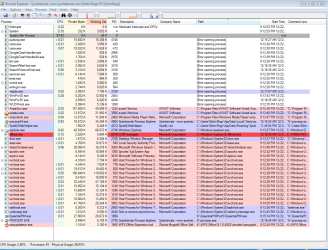
I recently did a System Restore on a Windows 7 Pro 64 bit system to correct a strange problem I was having with IE. It seems to have solved the problem, but now Process Explorer is displaying the messages in the screen shot below, and I'm not sure why. The computer is functioning fine, in fact, since the System Restore it is running like new. Is this something I need to worry about? The computer is a pretty old Dell Optiplex 760 with a 3.0GHz CoreII Duo CPU, a 140GB harddrive, with integrated graphics. I'm not sure what other info might be pertinent
I recently did a System Restore on a Windows 7 Pro 64 bit system to correct a strange problem I was having with IE. It seems to have solved the problem, but now Process Explorer is displaying the messages in the screen shot below, and I'm not sure why. The computer is functioning fine, in fact, since the System Restore it is running like new. Is this something I need to worry about? The computer is a pretty old Dell Optiplex 760 with a 3.0GHz CoreII Duo CPU, a 140GB harddrive, with integrated graphics. I'm not sure what other info might be pertinent
Attachments
My Computer
- Computer type
- PC/Desktop
- Computer Manufacturer/Model Number
- Dell Optiplex 760
- OS
- Windows 7 Pro 64bit
- CPU
- 3.0GHz Intel Core II Duo
- Motherboard
- Unknown Chipset is Intel Q43 Express
- Memory
- 4GB
- Graphics Card(s)
- Integrated
- Hard Drives
- 160 GBWestern Digital SATA w/ a Seagate 2TB External USB
- Antivirus
- Avast Free
- Browser
- Mozilla FireFox 29.0