Error saying I cannot upgrade

azulitabijou

New member
Local time
7:58 PM
Messages
4
Location
Suffolk, VA
The problem: I get 2 errors, stating that I cannot upgrade a 32 bit to a 64 bit, but also cannot upgrade a 64 bit to a 32 bit. I am guessing it has something to do with my "Program Files(x86)" folder. Is there a fix for this, or will I need to do a clean install? I didn't want it to wipe my computer, I have tons of software loaded on it for school (Animation tools, games, and Adobe master collection). Any information is much appreciated. Thanks! :geek:

Current Windows: I am running a 64 bit system (Vista)

PC Specs:
System Manufacturer/Model Number: Home Grown
OS: Vista 64bit (Trying to upgrade to 7 64bit)
CPU: Intel Core i7 920 2.66GHz LGA 1366 130W Quad-Core Processor
Motherboard: GIGABYTE GA-EX58-UD5 ATX Intel Motherboard
Memory: G.SKILL 6GB (3 x 2GB) 240-Pin DDR3 SDRAM DDR3 1333 (PC3 1066
Graphics Card(s): VisionTek Radeon HD 4870 X2 900250 Video Card
Monitor(s) Displays: ASUS VK266H Black 25.5" 2ms(GTG) Widescreen LCD Monitor
Hard Drives: Seagate Barracuda LP 1TB 3.5" SATA 3.0Gb/s Hard Drive
PSU: CORSAIR CMPSU-750TX 750W Power Supply
Case: CASE XCLIO|XCLIO 1000 BK/SIL RT
 

My Computer

Computer Manufacturer/Model Number
Home Grown
OS
Vista Home Premium 64bit (Trying to upgrade to 7 Ultimate 64bit)
CPU
Intel Core i7 920 2.66GHz LGA 1366 130W Quad-Core Processor
Motherboard
GIGABYTE GA-EX58-UD5 ATX Intel Motherboard
Memory
G.SKILL 6GB (3 x 2GB) 240-Pin DDR3 SDRAM DDR3 1333 (PC3 1066
Graphics Card(s)
VisionTek Radeon HD 4870 X2 900250 Video Card
Monitor(s) Displays
ASUS VK266H Black 25.5" 2ms(GTG) Widescreen LCD Monitor
Hard Drives
Seagate Barracuda LP 1TB 3.5" SATA 3.0Gb/s Hard Drive
PSU
CORSAIR CMPSU-750TX 750W Power Supply
Case
CASE XCLIO|XCLIO 1000 BK/SIL RT
Cooling
Wind Tunnel
Keyboard
G13
Mouse
Logitech Marble Mouse
You cannot upgrade between 32 and 64 bit or vice versa. You have to do the clean install by booting the DVD.

If you have a 64 bit Win7 that is upgradable from your 64 bit Vista, then you can do the in-place Upgrade. But run the Upgrade advisor first to work through any compatibility issues.

Windows 7 Upgrade Advisor
 
That's the thing... My pc is a 64 bit system, and I am upgrading to a 64 bit system.....
 

My Computer

Computer Manufacturer/Model Number
Home Grown
OS
Vista Home Premium 64bit (Trying to upgrade to 7 Ultimate 64bit)
CPU
Intel Core i7 920 2.66GHz LGA 1366 130W Quad-Core Processor
Motherboard
GIGABYTE GA-EX58-UD5 ATX Intel Motherboard
Memory
G.SKILL 6GB (3 x 2GB) 240-Pin DDR3 SDRAM DDR3 1333 (PC3 1066
Graphics Card(s)
VisionTek Radeon HD 4870 X2 900250 Video Card
Monitor(s) Displays
ASUS VK266H Black 25.5" 2ms(GTG) Widescreen LCD Monitor
Hard Drives
Seagate Barracuda LP 1TB 3.5" SATA 3.0Gb/s Hard Drive
PSU
CORSAIR CMPSU-750TX 750W Power Supply
Case
CASE XCLIO|XCLIO 1000 BK/SIL RT
Cooling
Wind Tunnel
Keyboard
G13
Mouse
Logitech Marble Mouse
Even if your PC is capable of running 64-bit, if you are currently running Windows Vista 32-bit, you will only be able to upgrade to Window 7 32-bit. In short you can only upgrade from 32-bit to 32-bit, or 64-bit to 64-bit.

If you want to go from Vista 32-bit to Windows 7 64-bit, you can still purchase an upgrade version of Windows 7, but you will have to do a clean installation.

FAQs - 32-bit and 64-bit Windows: frequently asked questions

Is this clear?

Cheers,
Cassandra
Microsoft Windows Outreach
 

My Computer

Computer Manufacturer/Model Number
HP/p6207c
OS
Windows 7 Professional 64-bit
CPU
Pentium(R) Dual-Core CPU E5300 @260GHz
Sound Card
RealTek High Def Audio
Monitor(s) Displays
HP 2159m
Screen Resolution
1920 x 1080 x 60
Mouse
HP M/N: M-U0009-HP1
Internet Speed
Broadband

My Computer

Computer type
PC/Desktop
Computer Manufacturer/Model Number
Custom built by me.
OS
Windows 10 Pro
CPU
Intel Core i7-4770K (3.5Ghz)
Motherboard
Gigabyte G1 Sniper 5 (F10 Bios)
Memory
32 gig Corsair Dominator Platinum (4x8Gig)
Graphics Card(s)
Sapphire Tri-X R9 Fury
Sound Card
Soundblaster ZXR
Monitor(s) Displays
NEC PA242W 24" LCD Monitor
Screen Resolution
1920 x 1200
Hard Drives
Primary - Samsung 850 Pro (512gig), Samsung 840 Pro (256gig), 2TB WD Caviar Black.
PSU
EVGA Supernova 1000 G2
Case
Cooler Master HAF X
Cooling
Corsair H100i with Corsair Air Series SP120 Quiet Fans
Keyboard
Logitech Wireless Wave
Mouse
Logitech Performance MX
Internet Speed
High Speed Cable
Antivirus
Norton Security
Browser
IE11
Other Info
Memory Timings - 1866MHz @ 9-9-9-27-1T @ 1.5 volts
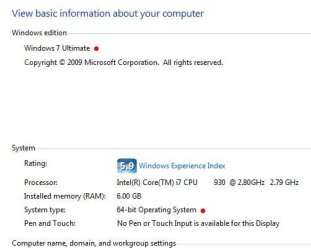
I am running 64 bit. When I click properties, it says 64 bit, which is why I said 64 bit in my first post. I am running vista 64 bit, and upgrading to 64 bit Windows 7; however, I keep getting this error.

I only have the x86 program files in addition to my real program files folder because some of my programs are 32 bit I am guessing. But if I have 64 bit Vista, shouldnt still upgrade to 64 bit 7, without deleting the 32bit programs (Adobe master collection, etc)
 

My Computer

Computer Manufacturer/Model Number
Home Grown
OS
Vista Home Premium 64bit (Trying to upgrade to 7 Ultimate 64bit)
CPU
Intel Core i7 920 2.66GHz LGA 1366 130W Quad-Core Processor
Motherboard
GIGABYTE GA-EX58-UD5 ATX Intel Motherboard
Memory
G.SKILL 6GB (3 x 2GB) 240-Pin DDR3 SDRAM DDR3 1333 (PC3 1066
Graphics Card(s)
VisionTek Radeon HD 4870 X2 900250 Video Card
Monitor(s) Displays
ASUS VK266H Black 25.5" 2ms(GTG) Widescreen LCD Monitor
Hard Drives
Seagate Barracuda LP 1TB 3.5" SATA 3.0Gb/s Hard Drive
PSU
CORSAIR CMPSU-750TX 750W Power Supply
Case
CASE XCLIO|XCLIO 1000 BK/SIL RT
Cooling
Wind Tunnel
Keyboard
G13
Mouse
Logitech Marble Mouse
What edition of vista are you running and what edition of win7 do you want to upgrade to? Not all upgrade scenarios are supported. Check the link below, it'll tell you whether what you are trying to do is possible.

Windows 7 Upgrade Paths
 

My Computer

Computer Manufacturer/Model Number
Too many to describe...
OS
Windows 7 x64 pro/ Windows 7 x86 Pro/ XP SP3 x86
Windows Vista Home Premium to Windows 7 Ultimate
 

My Computer

Computer Manufacturer/Model Number
Home Grown
OS
Vista Home Premium 64bit (Trying to upgrade to 7 Ultimate 64bit)
CPU
Intel Core i7 920 2.66GHz LGA 1366 130W Quad-Core Processor
Motherboard
GIGABYTE GA-EX58-UD5 ATX Intel Motherboard
Memory
G.SKILL 6GB (3 x 2GB) 240-Pin DDR3 SDRAM DDR3 1333 (PC3 1066
Graphics Card(s)
VisionTek Radeon HD 4870 X2 900250 Video Card
Monitor(s) Displays
ASUS VK266H Black 25.5" 2ms(GTG) Widescreen LCD Monitor
Hard Drives
Seagate Barracuda LP 1TB 3.5" SATA 3.0Gb/s Hard Drive
PSU
CORSAIR CMPSU-750TX 750W Power Supply
Case
CASE XCLIO|XCLIO 1000 BK/SIL RT
Cooling
Wind Tunnel
Keyboard
G13
Mouse
Logitech Marble Mouse
Is it Vista SP1 or Vista SP2 or plain Vista?
 

My Computer

Computer Manufacturer/Model Number
Too many to describe...
OS
Windows 7 x64 pro/ Windows 7 x86 Pro/ XP SP3 x86
I only have the x86 program files in addition to my real program files folder because some of my programs are 32 bit I am guessing. But if I have 64 bit Vista, shouldnt still upgrade to 64 bit 7, without deleting the 32bit programs (Adobe master collection, etc)

You do not and should not delete, or need to delete, any Program Files folder to do an upgrade. Do not confuse yourself by thinking you have to delete stuff before upgrading.

Please look at the links I or Bill2 provided to see your upgrade options from Vista Windows 7.

Also, as a side a 64-bit OS (Windows) WILL and SHOULD have two Programs Files folders and you DO NOT want to delete one of them for ANY reason.

Some programs will run in 32-bit mode even if they are on a 64-bit OS, example Microsoft’s Office 2007.

In short, when you install a program it will install in the appropriate Programs File and work. If you delete one of those folders you will screw-up your system.

Hope this helps.

Also if would be helpful to us as well as you if you answered the questions we asked. Also let us know if you looked at the links.

Just trying to help. Thanks.
 

My Computer

Computer type
PC/Desktop
Computer Manufacturer/Model Number
Custom built by me.
OS
Windows 10 Pro
CPU
Intel Core i7-4770K (3.5Ghz)
Motherboard
Gigabyte G1 Sniper 5 (F10 Bios)
Memory
32 gig Corsair Dominator Platinum (4x8Gig)
Graphics Card(s)
Sapphire Tri-X R9 Fury
Sound Card
Soundblaster ZXR
Monitor(s) Displays
NEC PA242W 24" LCD Monitor
Screen Resolution
1920 x 1200
Hard Drives
Primary - Samsung 850 Pro (512gig), Samsung 840 Pro (256gig), 2TB WD Caviar Black.
PSU
EVGA Supernova 1000 G2
Case
Cooler Master HAF X
Cooling
Corsair H100i with Corsair Air Series SP120 Quiet Fans
Keyboard
Logitech Wireless Wave
Mouse
Logitech Performance MX
Internet Speed
High Speed Cable
Antivirus
Norton Security
Browser
IE11
Other Info
Memory Timings - 1866MHz @ 9-9-9-27-1T @ 1.5 volts
Back
Top