Solved Error when attempting to update windows

Raith

New member
Local time
1:08 AM
Messages
23
I have ran the following (following this post: http://www.sevenforums.com/windows-...40-windows-update-posting-instructions.html):

1. System Update Readiness Tool (SURT)
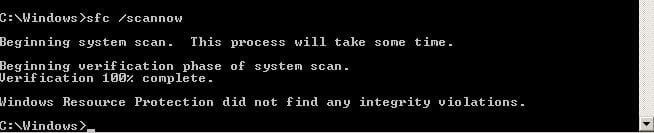
2. SFC Scan

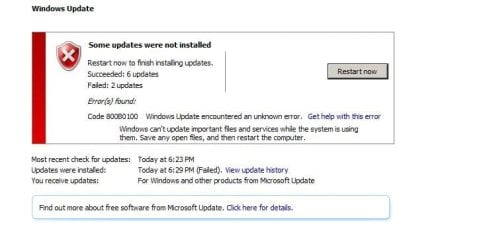
Attached screenshot (Windows Update_2016-09-03_18-36-16.jpg) references the error. I have tried a lot of different things from Google but no avail. I'm not sure why I keep getting this error, please assist. I'm running on a Windows 7.

Link here for the log: https://drive.google.com/file/d/0Bwub4C7LOXL2eVR6UWFhbEhrM2s/view?usp=sharing
 

Attachments

  • Windows Update_2016-09-03_18-36-16.jpg
    Windows Update_2016-09-03_18-36-16.jpg
    28.6 KB · Views: 1
  • Administrator CWindowsSystem32cmd.jpg
    Administrator CWindowsSystem32cmd.jpg
    11.7 KB · Views: 45

My Computer

OS
Windows 7 Home Premium
Hi,
What happens after restart
Which updates installed and which ones failed ?
Are these installed KB3020369 & KB3172605 ?
 

My Computer

Computer type
PC/Desktop
Computer Manufacturer/Model Number
Custom assembled by me :}
OS
Win-7-Pro64bit 7-H-Prem-64bit
CPU
i7-5930K 2nd i9-9940x both water blocked VRM's too
Motherboard
ASUS SABERTOOTH X99 2nd ASUS x299 Apex
Memory
Trident-z 3200C14 2nd Trident-z 3600C16
Graphics Card(s)
EVGA 1080ti ftw3 2nd Titan Xp both water blocked
Sound Card
Built-in Realtek
Monitor(s) Displays
1-AOC G2460PG 24"G-Sync 144Hz/ 2nd 1-ASUS VG248QE 24" 144Hz
Screen Resolution
1920 x 1080 144Hz
Hard Drives
2-Samsung M.2 Evo & Evo Plus
2-Samsung 850 EVO 500GB SSD's/ 3-2.5 W.D. Black 1tb-&3-1tb/3-3.5 WD Black 1tb hdd's
PSU
EVGA SuperNOVA 1000-P2 2nd 1200-P2
Case
2-Corsair Obsidian Series 450D Black ATX Mid Tower
Cooling
Custom water loops
Keyboard
Logitech G710+/ 2nd Logitech G910
Mouse
2-RedDragon M901 Perdition 16400 dpi Gaming mouse = wired
Internet Speed
Comcast Ping 19ms 89.31mbps download speed 6.12mbps upload
Antivirus
Malwarebytes Pro/ Superantispyware Pro
Browser
FireFox & Pale moon
Other Info
2nd ASUS X299 Apex/Intel i9-9940x with Custom water loop/7H-Prem-x64/Corsair 450D case/Ram Trident-z 3600C16 4x8gb / Samsung970Evo plus 500gb SSD/Dual ssd EZ swap evo/PSU EVGA SuperNova 1200w-P2 80+Platinum/GPU Titan Xp /8-ML-140 on push-pull on 2-280GTX rads
Hi,
What happens after restart
Which updates installed and which ones failed ?
Are these installed KB3020369 & KB3172605 ?
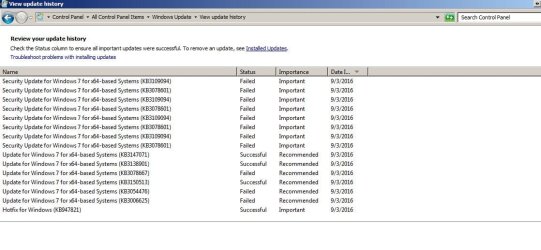
Hi there. After restart, it tells me to download it again, which I have attempted, but no avail. I have attached of the history, it's been the same ones. To answer your question:

KB3020369 - installed on 5/13/2015
KB3172605 - installed on 9/3/2016
 

Attachments

  • 1.jpg
    1.jpg
    75.7 KB · Views: 3

My Computer

OS
Windows 7 Home Premium

My Computer

Computer type
PC/Desktop
Computer Manufacturer/Model Number
Custom assembled by me :}
OS
Win-7-Pro64bit 7-H-Prem-64bit
CPU
i7-5930K 2nd i9-9940x both water blocked VRM's too
Motherboard
ASUS SABERTOOTH X99 2nd ASUS x299 Apex
Memory
Trident-z 3200C14 2nd Trident-z 3600C16
Graphics Card(s)
EVGA 1080ti ftw3 2nd Titan Xp both water blocked
Sound Card
Built-in Realtek
Monitor(s) Displays
1-AOC G2460PG 24"G-Sync 144Hz/ 2nd 1-ASUS VG248QE 24" 144Hz
Screen Resolution
1920 x 1080 144Hz
Hard Drives
2-Samsung M.2 Evo & Evo Plus
2-Samsung 850 EVO 500GB SSD's/ 3-2.5 W.D. Black 1tb-&3-1tb/3-3.5 WD Black 1tb hdd's
PSU
EVGA SuperNOVA 1000-P2 2nd 1200-P2
Case
2-Corsair Obsidian Series 450D Black ATX Mid Tower
Cooling
Custom water loops
Keyboard
Logitech G710+/ 2nd Logitech G910
Mouse
2-RedDragon M901 Perdition 16400 dpi Gaming mouse = wired
Internet Speed
Comcast Ping 19ms 89.31mbps download speed 6.12mbps upload
Antivirus
Malwarebytes Pro/ Superantispyware Pro
Browser
FireFox & Pale moon
Other Info
2nd ASUS X299 Apex/Intel i9-9940x with Custom water loop/7H-Prem-x64/Corsair 450D case/Ram Trident-z 3600C16 4x8gb / Samsung970Evo plus 500gb SSD/Dual ssd EZ swap evo/PSU EVGA SuperNova 1200w-P2 80+Platinum/GPU Titan Xp /8-ML-140 on push-pull on 2-280GTX rads
Hi,
Yep pretty old updates to be failing :/
I'm sure you already saw this useless article
https://support.microsoft.com/en-us/kb/956702

It would be better to upload the files here as the tutorial suggests too.
I checked that article and I have followed the instructions prior to me posting on the forum asking for help, the update had been failing for some time and I decided that I wanted to fix it, if it was fixable that is. I had linked to the logs here, in my OP: https://drive.google.com/file/d/0Bwub4C7LOXL2eVR6UWFhbEhrM2s/view?usp=sharing

What other files are required?
 

My Computer

OS
Windows 7 Home Premium
How did you stop the W10 upgrade?

Roy
 

My Computer

Computer type
PC/Desktop
Computer Manufacturer/Model Number
medionl/Aspire 6930G/acer x55a
OS
W7 home premium 32bit/W7HP 64bit/w10 tp insider ring
CPU
E5300 dual core
Motherboard
medion MS7366
Memory
3gb
Graphics Card(s)
Nvidia Geforce 7100 Nforce 630i
Monitor(s) Displays
avixc
Internet Speed
n (isp resticted to 72)
Antivirus
mse/pands
Browser
palemoon
Other Info
Belkin Fd7050 n USB using Railink RT2870 drivers, more upto date
How did you stop the W10 upgrade?

Roy
I think I upgraded it once but my NVidia had an issue with it and wouldn't output my monitors so I gave up, still using W7, never bothered to up to 10 ever since.
 

My Computer

OS
Windows 7 Home Premium
Anyone have suggestions or am I SOL?
 

My Computer

OS
Windows 7 Home Premium
Hi Raith,
been looking back at your earlier posts, (BSOD), and your reply to my question re W10.
The problem you encountered there seems to be related.
please run this tool, copy/paste the output
http://go.microsoft.com/fwlink/?LinkID=52012

Roy
 

My Computer

Computer type
PC/Desktop
Computer Manufacturer/Model Number
medionl/Aspire 6930G/acer x55a
OS
W7 home premium 32bit/W7HP 64bit/w10 tp insider ring
CPU
E5300 dual core
Motherboard
medion MS7366
Memory
3gb
Graphics Card(s)
Nvidia Geforce 7100 Nforce 630i
Monitor(s) Displays
avixc
Internet Speed
n (isp resticted to 72)
Antivirus
mse/pands
Browser
palemoon
Other Info
Belkin Fd7050 n USB using Railink RT2870 drivers, more upto date
Hi Roy! Thanks for the input. I have ran the tool as per suggested, and below are the output:

Diagnostic Report (1.9.0027.0):
-----------------------------------------
Windows Validation Data-->

Validation Code: 0
Cached Online Validation Code: 0x0
Windows Product Key: *****-*****-H3HJ3-T8TP2-VFC76
Windows Product Key Hash: g8oM9ePkJlNkJy8bvzZRT0kw1ko=
Windows Product ID: 00371-840-6963506-85557
Windows Product ID Type: 5
Windows License Type: Retail
Windows OS version: 6.1.7601.2.00010100.1.0.048
ID: {6B06987D-7B3D-490E-B96B-66BEEC4A77B6}(1)
Is Admin: Yes
TestCab: 0x0
LegitcheckControl ActiveX: N/A, hr = 0x80070002
Signed By: N/A, hr = 0x80070002
Product Name: Windows 7 Professional
Architecture: 0x00000009
Build lab: 7601.win7sp1_ldr.160516-0600
TTS Error:
Validation Diagnostic:
Resolution Status: N/A

Vista WgaER Data-->
ThreatID(s): N/A, hr = 0x80070002
Version: N/A, hr = 0x80070002

Windows XP Notifications Data-->
Cached Result: N/A, hr = 0x80070002
File Exists: No
Version: N/A, hr = 0x80070002
WgaTray.exe Signed By: N/A, hr = 0x80070002
WgaLogon.dll Signed By: N/A, hr = 0x80070002

OGA Notifications Data-->
Cached Result: N/A, hr = 0x80070002
Version: N/A, hr = 0x80070002
OGAExec.exe Signed By: N/A, hr = 0x80070002
OGAAddin.dll Signed By: N/A, hr = 0x80070002

OGA Data-->
Office Status: 100 Genuine
Microsoft Office Enterprise 2007 - 100 Genuine
OGA Version: N/A, 0x80070002
Signed By: N/A, hr = 0x80070002
Office Diagnostics: 025D1FF3-364-80041010_025D1FF3-229-80041010_025D1FF3-230-1_025D1FF3-517-80040154_025D1FF3-237-80040154_025D1FF3-238-2_025D1FF3-244-80070002_025D1FF3-258-3_E2AD56EA-765-d003_E2AD56EA-766-0_E2AD56EA-134-80004005_E2AD56EA-765-b01a_E2AD56EA-766-0_E2AD56EA-148-80004005_16E0B333-89-80004005_B4D0AA8B-1029-80004005

Browser Data-->
Proxy settings: N/A
User Agent: Mozilla/4.0 (compatible; MSIE 8.0; Win32)
Default Browser: C:\Program Files (x86)\Mozilla Firefox\firefox.exe
Download signed ActiveX controls: Prompt
Download unsigned ActiveX controls: Disabled
Run ActiveX controls and plug-ins: Allowed
Initialize and script ActiveX controls not marked as safe: Disabled
Allow scripting of Internet Explorer Webbrowser control: Disabled
Active scripting: Allowed
Script ActiveX controls marked as safe for scripting: Allowed

File Scan Data-->

Other data-->
Office Details: <GenuineResults><MachineData><UGUID>{6B06987D-7B3D-490E-B96B-66BEEC4A77B6}</UGUID><Version>1.9.0027.0</Version><OS>6.1.7601.2.00010100.1.0.048</OS><Architecture>x64</Architecture><PKey>*****-*****-*****-*****-VFC76</PKey><PID>00371-840-6963506-85557</PID><PIDType>5</PIDType><SID>S-1-5-21-3856965548-2691490786-3628363300</SID><SYSTEM><Manufacturer>Gigabyte Technology Co., Ltd.</Manufacturer><Model>Z68AP-D3</Model></SYSTEM><BIOS><Manufacturer>Award Software International, Inc.</Manufacturer><Version>FB</Version><SMBIOSVersion major="2" minor="4"/><Date>20111012000000.000000+000</Date></BIOS><HWID>B19C3A07018400FE</HWID><UserLCID>0409</UserLCID><SystemLCID>0409</SystemLCID><TimeZone>Eastern Standard Time(GMT-05:00)</TimeZone><iJoin>0</iJoin><SBID><stat>3</stat><msppid></msppid><name></name><model></model></SBID><OEM/><GANotification/></MachineData><Software><Office><Result>100</Result><Products><Product GUID="{90120000-0030-0000-0000-0000000FF1CE}"><LegitResult>100</LegitResult><Name>Microsoft Office Enterprise 2007</Name><Ver>12</Ver><Val>C446E1AA8CD86</Val><Hash>BMWYEP4rGTvX3ECgMyDlfjGjPOg=</Hash><Pid>89388-707-1370665-65978</Pid><PidType>14</PidType></Product></Products><Applications><App Id="15" Version="12" Result="100"/><App Id="16" Version="12" Result="100"/><App Id="18" Version="12" Result="100"/><App Id="19" Version="12" Result="100"/><App Id="1A" Version="12" Result="100"/><App Id="1B" Version="12" Result="100"/><App Id="44" Version="12" Result="100"/><App Id="A1" Version="12" Result="100"/><App Id="BA" Version="12" Result="100"/></Applications></Office></Software></GenuineResults>

Spsys.log Content: 0x80070002

Licensing Data-->
Software licensing service version: 6.1.7601.17514

Name: Windows(R) 7, Professional edition
Description: Windows Operating System - Windows(R) 7, RETAIL channel
Activation ID: e838d943-63ed-4a0b-9fb1-47152908acc9
Application ID: 55c92734-d682-4d71-983e-d6ec3f16059f
Extended PID: 00371-00170-840-696350-00-1033-7601.0000-3372014
Installation ID: 002692631006535206277050759855561416275445324362328056
Processor Certificate URL: SpcService Web Service
Machine Certificate URL: RacService Web Service
Use License URL: UseLicenseService Web Service
Product Key Certificate URL: PkcService Web Service
Partial Product Key: VFC76
License Status: Licensed
Remaining Windows rearm count: 3
Trusted time: 9/8/2016 7:08:14 PM

Windows Activation Technologies-->
HrOffline: 0x00000000
HrOnline: N/A
HealthStatus: 0x0000000000000000
Event Time Stamp: N/A
ActiveX: Registered, Version: 7.1.7600.16395
Admin Service: Registered, Version: 7.1.7600.16395
HealthStatus Bitmask Output:


HWID Data-->
HWID Hash Current: OAAAAAEABAABAAIAAQADAAAAAQABAAEAHKJm1ByQYjRK3T5Ccji0YA6f5M8agKzLzprtX0p1LnM=

OEM Activation 1.0 Data-->
N/A

OEM Activation 2.0 Data-->
BIOS valid for OA 2.0: yes, but no SLIC table
Windows marker version: N/A
OEMID and OEMTableID Consistent: N/A
BIOS Information:
ACPI Table Name OEMID Value OEMTableID Value
APIC GBT GBTUACPI
FACP GBT GBTUACPI
HPET GBT GBTUACPI
MCFG GBT GBTUACPI
MSDM GBT GBTUACPI
ASPT GBT PerfTune
SSPT GBT SsptHead
EUDS GBT
TAMG GBT GBT B0
SSDT INTEL PPM RCM
MATS MATS RCM

 

My Computer

OS
Windows 7 Home Premium
Hi Raith,
can see 2 problems,

Microsoft Office Enterprise 2007: This edition is aimed at the typical enterprise user. Like Professional Plus, it's available only through volume licensing with no upgrade pricing. It includes Word, Excel, PowerPoint, Access, Outlook, Publisher, InfoPath, Groove, OneNote, and Office Communicator and supports ECM, electronic forms, and IRM/RMS.

I suspect that an activation exploit has been used to install this, and this is why your system is only partially activated.
This can be rememedied by running KB971033
HOWEVER
Running KB971033 will make MOE 2007 become non genuine as you are are not using a VLK.
Please uninstall MOE 2007 as it is a counterfiet version, there are other free "office" programs available.

Once you uninstall MOE 2007 you should have no further problems with updates.

Roy

note please update your system specs
 

My Computer

Computer type
PC/Desktop
Computer Manufacturer/Model Number
medionl/Aspire 6930G/acer x55a
OS
W7 home premium 32bit/W7HP 64bit/w10 tp insider ring
CPU
E5300 dual core
Motherboard
medion MS7366
Memory
3gb
Graphics Card(s)
Nvidia Geforce 7100 Nforce 630i
Monitor(s) Displays
avixc
Internet Speed
n (isp resticted to 72)
Antivirus
mse/pands
Browser
palemoon
Other Info
Belkin Fd7050 n USB using Railink RT2870 drivers, more upto date
Hi Raith,
can see 2 problems,

Microsoft Office Enterprise 2007: This edition is aimed at the typical enterprise user. Like Professional Plus, it's available only through volume licensing with no upgrade pricing. It includes Word, Excel, PowerPoint, Access, Outlook, Publisher, InfoPath, Groove, OneNote, and Office Communicator and supports ECM, electronic forms, and IRM/RMS.

I suspect that an activation exploit has been used to install this, and this is why your system is only partially activated.
This can be rememedied by running KB971033
HOWEVER
Running KB971033 will make MOE 2007 become non genuine as you are are not using a VLK.
Please uninstall MOE 2007 as it is a counterfiet version, there are other free "office" programs available.

Once you uninstall MOE 2007 you should have no further problems with updates.

Roy

note please update your system specs
I appreciate your comment, I don't know if this has to do with me cloning my OS (I used to have it on a HDD to SSD), I've looked for KB971033, and it states that KB971033 is already in my system? I've had MOE 07 for years, that's odd, I have used my school's installation but will uninstall to see if it has corrected the issue - will update.
 

My Computer

OS
Windows 7 Home Premium
Hi Roy,

Just uninstalled MOE 2007, it did not work. KB971033 is already installed. Any other suggestions?
 

My Computer

OS
Windows 7 Home Premium
Hi Raith,
Run KB971033, it will still update, then
please rerun the tool,
I can see the license being Dreamspark, from the product ID, its possible that your school has either run out of licences or dropped you from it, it has been 7 years.

Can you post 1 days worth of the WindowsUpdate log

Roy
 

My Computer

Computer type
PC/Desktop
Computer Manufacturer/Model Number
medionl/Aspire 6930G/acer x55a
OS
W7 home premium 32bit/W7HP 64bit/w10 tp insider ring
CPU
E5300 dual core
Motherboard
medion MS7366
Memory
3gb
Graphics Card(s)
Nvidia Geforce 7100 Nforce 630i
Monitor(s) Displays
avixc
Internet Speed
n (isp resticted to 72)
Antivirus
mse/pands
Browser
palemoon
Other Info
Belkin Fd7050 n USB using Railink RT2870 drivers, more upto date
Hi Raith,
Run KB971033, it will still update, then
please rerun the tool,
I can see the license being Dreamspark, from the product ID, its possible that your school has either run out of licences or dropped you from it, it has been 7 years.

Can you post 1 days worth of the WindowsUpdate log

Roy
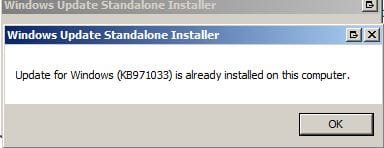
Can you show me where exactly to run it? I have ran it before, and it is showing this (attached). Is there another way?
 

Attachments

  • Windows Update Standalone Installer_2016-09-10_11-40-01.jpg
    Windows Update Standalone Installer_2016-09-10_11-40-01.jpg
    7.7 KB · Views: 16

My Computer

OS
Windows 7 Home Premium

My Computer

Computer type
PC/Desktop
Computer Manufacturer/Model Number
medionl/Aspire 6930G/acer x55a
OS
W7 home premium 32bit/W7HP 64bit/w10 tp insider ring
CPU
E5300 dual core
Motherboard
medion MS7366
Memory
3gb
Graphics Card(s)
Nvidia Geforce 7100 Nforce 630i
Monitor(s) Displays
avixc
Internet Speed
n (isp resticted to 72)
Antivirus
mse/pands
Browser
palemoon
Other Info
Belkin Fd7050 n USB using Railink RT2870 drivers, more upto date
Hi Raith,
repost that one, and the windows log from
C >> windows >> windowsUpdate.

Roy
 

My Computer

Computer type
PC/Desktop
Computer Manufacturer/Model Number
medionl/Aspire 6930G/acer x55a
OS
W7 home premium 32bit/W7HP 64bit/w10 tp insider ring
CPU
E5300 dual core
Motherboard
medion MS7366
Memory
3gb
Graphics Card(s)
Nvidia Geforce 7100 Nforce 630i
Monitor(s) Displays
avixc
Internet Speed
n (isp resticted to 72)
Antivirus
mse/pands
Browser
palemoon
Other Info
Belkin Fd7050 n USB using Railink RT2870 drivers, more upto date
Hello everyone,

I've been having the same problems with Windows updates. No matter what I did it wouldn't update just seemed to checking for updates.

I've been trying to get this sorted for the last week.

Today I've spent all day on it and finally found a solution.

I installed an update from the Microsoft site and then restarted my laptop and now within 10 mins I've got all the updates coming through.

https://support.microsoft.com/en-us/kb/3102810

Please ensure you restart it after the update has completed and then check for updates again.

This is what I did and it seems to have worked.


Thanks

NWR
 

My Computer

Computer type
Laptop
Computer Manufacturer/Model Number
Apple Macbook Pro
OS
Windows 7 Ultimate
Back
Top