Error when installing XP to dual boot with Windows 7

ToddSeimer

New member
Local time
8:06 PM
Messages
2
When I go to create the new partition in Windows 7 that I want to install XP on it creates it as a logical drive. How do I create a primary partition instead?
 

My Computer

Computer Manufacturer/Model Number
HP Mini 110
OS
Windows 7
Hello Todd, and welcome to Seven Forums.

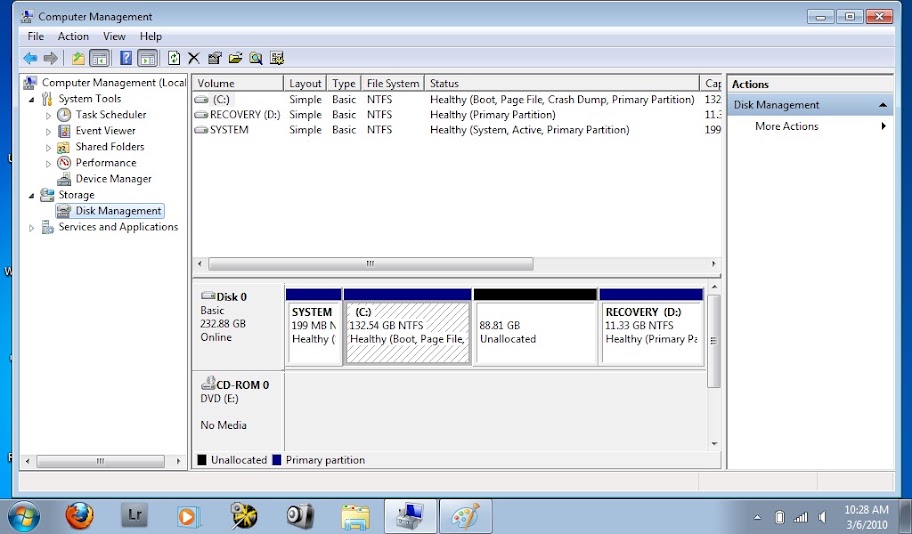
You should still be able to install XP on a logical partition as well. Could you post a screenshot of your Disk Management so we can see how your drive layout is?
 

My Computer

Computer type
PC/Desktop
Computer Manufacturer/Model Number
Self built custom
OS
64-bit Windows 11 Pro for Workstations
CPU
Intel i7-8700K OC'd to 5 GHz
Motherboard
ASUS ROG Maximus XI Formula Z390
Memory
64 GB (4x16GB) G.SKILL TridentZ RGB DDR4 3600 MHz
Graphics Card(s)
ASUS ROG-STRIX-GTX1080TI-O11G-GAMING
Sound Card
Integrated
Monitor(s) Displays
2 x Samsung Odyssey G7 27"
Screen Resolution
2560x1440
Hard Drives
1TB Samsung 990 PRO M.2,
4TB Samsung 990 PRO PRO M.2,
TerraMaster F8 SSD Plus NAS
PSU
Seasonic Prime Titanium 850W
Case
Thermaltake Core P3
Cooling
Corsair Hydro H115i
Keyboard
Logitech wireless K800
Mouse
Logitech MX Master 4
Internet Speed
2 Gb/s Download and 100 Mb/s Upload
Antivirus
Malwarebyte Anti-Malware Premium
Browser
Google Chrome
Other Info
Logitech Z625 speaker system,
Logitech BRIO 4K Pro webcam,
HP Color LaserJet Pro MFP M477fdn,
APC SMART-UPS RT 1000 XL - SURT1000XLI,
Galaxy S23 Plus phone
Here's a screenshot of disk management. I've deleted the Windows XP volume that kept coming up as a logical drive and you can see that it's just unallocated space. If I can install an OS on a logical drive then I guess that isn't my problem. What's happening is I'm trying to boot XP from my usb DVD-R and after it loads and before it gives me the setup screen I get this error "A problem has been detected and windows has been shut down to prevent damage to your computer. If this is the first time you've seen this stop error screen, restart your computer. If this screen appears again follow these steps: Check for viruses on your computer. Remove any newly installled hard drives or hard drive controllers. Check your hard drive to make sure it is properly configured and terminated. Run CHKDSK /F to check for hard drive corruption, and then restart your computer.
Technical information:
Stop: 0x0000007B (0xF78D2542,0XC00000034, 0X00000000, 0X00000000)" I'm running windows 7 starter on this netbook.
screenshot1.jpg
 

My Computer

Computer Manufacturer/Model Number
HP Mini 110
OS
Windows 7
I was trying to install XP in my HP G62-107SA last weekend in a separate Drive of my laptop. I created a new pertition by deleting recovery and HP Support drive. Then I extend my C:, after that I shrink my C: and created a new pertition D:. It is a new simple volume Basic. Then I put my XP installation disk and boot from CD. After a while before it gives me the setup screen I get this error "A problem has been detected and windows has been shut down to prevent damage to your computer. If this is the first time you've seen this stop error screen, restart your computer. If this screen appears again follow these steps: Check for viruses on your computer. Remove any newly installled hard drives or hard drive controllers. Check your hard drive to make sure it is properly configured and terminated. Run CHKDSK /F to check for hard drive corruption, and then restart your computer.

I think my problem is similiar with this. Now what should I do to seup XP in a separate pertition. Please help.

 

My Computer

Computer Manufacturer/Model Number
HP G62-107SA Notebook PC
OS
Windows 7
CPU
Intel(R) Core i3
Memory
2GB DDR3
Graphics Card(s)
Intel HD Graphics
Sound Card
Realtak High definition audio
Monitor(s) Displays
15.7
Hard Drives
250 GB
You can try removing the formatting to use XP CD to create and format partition, as XP partition table is slightly different from Win7.

It's more likely you need the SATA controller driver added to the installer at the F6 prompt during the first driver-loading phase. But you have to have a floppy drive to do it since XP is so old.

Otherwise try slipstreaming the SATA drivers into installer: http://www.sevenforums.com/tutorials/72185-sata-drivers-slipstream-into-windows-xp-cd.html?ltr=S
 
I've searched a lot but cannt find SATA driver for my laptop. I've found some driver in HP.com but those are (.exe) file which is not recognize by nLite. nLite only recognize (.ini) file. What should I do now. Where I'll get (.ini) for my HP G62-107SA Notebook PC. Please help me. I'm looking for the SATA drive for the last 3 days but no luck.
 

My Computer

Computer Manufacturer/Model Number
HP G62-107SA Notebook PC
OS
Windows 7
CPU
Intel(R) Core i3
Memory
2GB DDR3
Graphics Card(s)
Intel HD Graphics
Sound Card
Realtak High definition audio
Monitor(s) Displays
15.7
Hard Drives
250 GB
I've searched a lot but cannt find SATA driver for my laptop. I've found some driver in HP.com but those are (.exe) file which is not recognize by nLite. nLite only recognize (.ini) file. What should I do now. Where I'll get (.ini) for my HP G62-107SA Notebook PC. Please help me. I'm looking for the SATA drive for the last 3 days but no luck.

Take look here for HP Sata Controller drivers.

General XP Downgrade Guide for HP Laptops - HP Support Forum
 

My Computer

OS
ME/XP/Vista/Win7
@Theog Thanks a million million and million. That's the link I'm looking for. It's been 2 weeks I am looking for the SATA driver. I searched hp site but couldn't find this page. Once again thanks a multi billion
 

My Computer

Computer Manufacturer/Model Number
HP G62-107SA Notebook PC
OS
Windows 7
CPU
Intel(R) Core i3
Memory
2GB DDR3
Graphics Card(s)
Intel HD Graphics
Sound Card
Realtak High definition audio
Monitor(s) Displays
15.7
Hard Drives
250 GB
@Theog Thanks a million million and million. That's the link I'm looking for. It's been 2 weeks I am looking for the SATA driver. I searched hp site but couldn't find this page. Once again thanks a multi billion

You are welcome.
 

My Computer

OS
ME/XP/Vista/Win7
Back
Top