
Error when opening a file in Windows Explorer

wbuschman

New member
Local time
11:49 PM
Messages
2
This is my first time on the forums, so I hope I don't screw this up. I have searched the forums and not found an answer to this problem, so I hope I'm not re-asking an old question...

I am running Windows Seven Professional 64-bit and Windows Update isn't showing any more possible updates.

My computer is a Dell Precision M90 laptop with a Intel Core2 Duo 2.0GHz processor.

Problem:
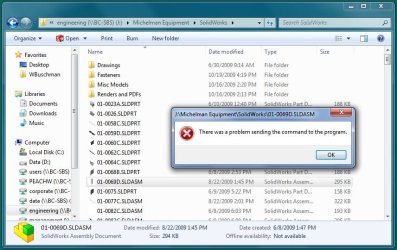
When I use Windows Explorer to open files that are associated with the program SolidWorks I receive the message: "There was a problem sending the command to the program."

I am running SolidWorks 2010 Professional SP0 which is a 3D modeling program for mechanical engineering. The program ran under XP without this issue.

I only receive this message if there is not an instance of SolidWorks running. Even after I receive this message, SolidWorks still loads and opens the file I selected through Windows Explorer.

This problem occurs no matter where the file is located (network or local).

This problem doesn't keep me from getting my work accomplished, but it is a bit of nuisance. Any help that anyone could offer would be much appreciated.

I'm including a screen capture of the message.
 

Attachments
  • Capture.JPG
    Capture.JPG
    84.9 KB · Views: 216

My Computer

Computer Manufacturer/Model Number
Dell Precision M90
OS
Windows 7 Professional - 64 Bit
CPU
Intel Core 2 T7200 (2.00GHz)
Memory
3 GB
Graphics Card(s)
NVIDIA Quatro FX 2500M
Sound Card
Onboard
Hard Drives
320Gb WD 7200RMP
Hey. Nicely laid out explanation. Refreshing. :D

You could very well try installing the software again using compatibility mode for XP SP3.

To do so, right click on the installer's .exe file and choose properties. There's a compatibility tab to go to. I trust by my estimation of your intelligence that you can figure out the rest.

If it is on CD or DVD, copy entire contents to HDD first. Then do as I've outlined.

After, run the .exe and install. Might be better to uninstall original attempt prior to new install.

Good luck and let us know if this works for you. Hopefully you make some great designs. heh heh :D
 

My Computer

Computer Manufacturer/Model Number
self built
OS
7600.20510 x86
CPU
P4 550 3.4 GHz HT running at 3.5 GHz
Motherboard
MSI PM8M3-V (MS-7211 v1.x) Micro-ATX mainboard
Memory
OCZ 2 GB(2x1GB) DDR400mHz running @ 414 mHz
Graphics Card(s)
HIS Radeon HD 3850 IceQ 3 Turbo HDMI Dual DL-DVI AGP
Sound Card
MOTU Traveler firewire studio interface 192 kHz 24 bit
Monitor(s) Displays
22" widescreen Acer X223W LCD, 17" Compaq P75 CRT
Screen Resolution
1680x1050 and 1280x1024
Hard Drives
SATA I x2 WD, 400 GB and 120 GB, SATA 2 WD Caviar Black 1 TB
PSU
350W generic
Case
Cybertronpc, it glows blue
Cooling
stock cpu fan, Ice-Q 3 gpu and system, many case fans
Keyboard
Logitch Classical Keyboard 200
Mouse
Logitech Mediaplay cordless
Internet Speed
1792/448 kbits/sec
Other Info
SATA II PCI fake RAID adapter, 1 GB Readyboost, original ATI Remote Wonder (even works with WMC perfectly), Logitech Rumblepad 2 game controller x2
SolidWorks 2010 will not be officially supporting Windows 7 until SP1 which is scheduled for release around late Nov / early Dec. Wouldnt stress about it at least until the, If the problem persists after that, you need to contact your local VAR.

I'm currently running the same setup as yourself and not seeing the same problem so it may very well be something else about your particular setup thats giving you grief.
 

My Computer

OS
Windows7
You could very well try installing the software again using compatibility mode for XP SP3.

To do so, right click on the installer's .exe file and choose properties. There's a compatibility tab to go to.

SolidWorks 2010 will not be officially supporting Windows 7 until SP1 which is scheduled for release around late Nov / early Dec.

Thanks for the replies. I think I'll wait for SP1 and see if that takes care of the problem. If not, I'll give torrentg's suggestion a shot and see if that takes care of it. If neither work, I'll probably just stop whining and click the OK button the few times I week I actually get this problem. :)

Thanks again!
 

My Computer

Computer Manufacturer/Model Number
Dell Precision M90
OS
Windows 7 Professional - 64 Bit
CPU
Intel Core 2 T7200 (2.00GHz)
Memory
3 GB
Graphics Card(s)
NVIDIA Quatro FX 2500M
Sound Card
Onboard
Hard Drives
320Gb WD 7200RMP
I'm still having this problem

Okay, SW is now supporting Windows 7...and I'm still getting this error. Can somebody please clue me in on what is going on and how to fix it? Compatibility mode seems to run slower so I'd like to run in 64 bit.

Dell Precision T3400
2 GB RAM
SolidWorks 2010
Windows 7 64-bit
 

My Computer

Computer Manufacturer/Model Number
Dell
OS
7
CPU
Precision T3400
Memory
2 GB
Graphics Card(s)
Nvidia Quadro FX570
Monitor(s) Displays
2 17's
Back
Top