Error while installing Oblivion

benbs

New member
Local time
10:42 PM
Messages
11
Hi,
I recently tried to install my copy of "The Elder Scrolls IV - Oblivion". the setup starts to load, and after about 1 minute it crashes with the following error:

http://support.installshield.com/kb/files/Q110641/Q110641.bmp

I tried to google my problem, and found this:
http://consumerdocs.installshield.com/selfservice/viewContent.do?externalId=Q110641&sliceId=1

but when i tried to open InstallShieldEngineUpdate1100.exe, it just crashed (Setup.exe has Stopped working and offers to Check online for solution)

I have already installed the game before, bu then formatted my system and now it just doesnt work.
I dont remember any problems with another Installshield Applications/Games.

Help would be appreciated,
Ben :)
 

My Computer My Computer

At a glance

Win 7 x86 build 7600Intel Core 2 Quad Q6600 2.4GHZKingston 2X1024 800MHZnVidia GeForce 8600 GT 512MB
OS
Win 7 x86 build 7600
CPU
Intel Core 2 Quad Q6600 2.4GHZ
Motherboard
ASUS P5KC
Memory
Kingston 2X1024 800MHZ
Graphics Card(s)
nVidia GeForce 8600 GT 512MB
Sound Card
on board
Monitor(s) Displays
LG FLATRON L1960TR
Screen Resolution
1280X1024
Hard Drives
Hitachi 500GB (internal)
Samsung STORY STATION 1500GB (external)
Case
Coller Master Elite 330
Keyboard
Logitech
Mouse
Logitech RX250
Internet Speed
2.5Mbps
I couldn't open second link, however I wanna ask you this question; is the InstallShieldEngineUpdate1100.exe located in folder with other files or it stands alone. Your anti-virus software or firewall might block that program from running, that's why you can see that message appear.
~Tuan
 

My Computer My Computer

At a glance

Microsoft Window 7 Professional 32 bitIntel Centrino2 vPro2GB DDR3ATI Radeon 3400
Computer Manufacturer/Model Number
Lenovo T400 2767 2JU
OS
Microsoft Window 7 Professional 32 bit
CPU
Intel Centrino2 vPro
Memory
2GB DDR3
Graphics Card(s)
ATI Radeon 3400
Sound Card
Conexant 20561 SmartAudio HD
Monitor(s) Displays
Thinkpad Display
Screen Resolution
1280x800x49 hertz
Case
Magnisium, Fe, etc..
Keyboard
embeded
Mouse
Logitech
Internet Speed
54Kb/s
no, its a single file
i tried to open it in many different locations, including desktop, ../Program Files/Common Files/InstallShield and my local disk (C).
about the link, i have now noticed that its broken, but this is the right link. maybe the servers went down for some reason.

ill now try to shut down my protections (Anti virus, firewall) and see if its working
 

My Computer My Computer

At a glance

Win 7 x86 build 7600Intel Core 2 Quad Q6600 2.4GHZKingston 2X1024 800MHZnVidia GeForce 8600 GT 512MB
OS
Win 7 x86 build 7600
CPU
Intel Core 2 Quad Q6600 2.4GHZ
Motherboard
ASUS P5KC
Memory
Kingston 2X1024 800MHZ
Graphics Card(s)
nVidia GeForce 8600 GT 512MB
Sound Card
on board
Monitor(s) Displays
LG FLATRON L1960TR
Screen Resolution
1280X1024
Hard Drives
Hitachi 500GB (internal)
Samsung STORY STATION 1500GB (external)
Case
Coller Master Elite 330
Keyboard
Logitech
Mouse
Logitech RX250
Internet Speed
2.5Mbps
Update the installshield engine.
 

My Computer My Computer

At a glance

Windows 7
OS
Windows 7
yeah, thats what im trying to do, and i cant
but when i tried to open InstallShieldEngineUpdate1100.exe, it just crashed (Setup.exe has Stopped working and offers to Check online for solution)
 

My Computer My Computer

At a glance

Win 7 x86 build 7600Intel Core 2 Quad Q6600 2.4GHZKingston 2X1024 800MHZnVidia GeForce 8600 GT 512MB
OS
Win 7 x86 build 7600
CPU
Intel Core 2 Quad Q6600 2.4GHZ
Motherboard
ASUS P5KC
Memory
Kingston 2X1024 800MHZ
Graphics Card(s)
nVidia GeForce 8600 GT 512MB
Sound Card
on board
Monitor(s) Displays
LG FLATRON L1960TR
Screen Resolution
1280X1024
Hard Drives
Hitachi 500GB (internal)
Samsung STORY STATION 1500GB (external)
Case
Coller Master Elite 330
Keyboard
Logitech
Mouse
Logitech RX250
Internet Speed
2.5Mbps
Are you using disk to install or you downloaded it online? You might wanna check the game sources..might be files corruption or missing...or dvd drive might not able to read that file

~Tuan
 

My Computer My Computer

At a glance

Microsoft Window 7 Professional 32 bitIntel Centrino2 vPro2GB DDR3ATI Radeon 3400
Computer Manufacturer/Model Number
Lenovo T400 2767 2JU
OS
Microsoft Window 7 Professional 32 bit
CPU
Intel Centrino2 vPro
Memory
2GB DDR3
Graphics Card(s)
ATI Radeon 3400
Sound Card
Conexant 20561 SmartAudio HD
Monitor(s) Displays
Thinkpad Display
Screen Resolution
1280x800x49 hertz
Case
Magnisium, Fe, etc..
Keyboard
embeded
Mouse
Logitech
Internet Speed
54Kb/s
From memory I had to run the installer with Windows SP3 compatibility and Admin mode. I had this Oblivion on Win7 prior to my last rebuild.

If this fails, I'll find my disk and try again for you.
 

My Computer My Computer

At a glance

Windows 7 Ultimate 64 bitIntel(R) Core(TM)2 Quad CPU Q8200 @ 2.33GHz8 GB KingstonNvidia GeForce 9600GT
Computer Manufacturer/Model Number
Custom Hack job
OS
Windows 7 Ultimate 64 bit
CPU
Intel(R) Core(TM)2 Quad CPU Q8200 @ 2.33GHz
Motherboard
GigaByte EP45-UD3
Memory
8 GB Kingston
Graphics Card(s)
Nvidia GeForce 9600GT
Sound Card
Soundblaster Audigy
Monitor(s) Displays
AOC x2 22"
Hard Drives
2 x Samsung 500GB (RAID)
2 x Samsung 2TB
1 x WD Green 2TB
1 x Seagate 1TB
1 x Samsung 500GB
PSU
Thermaltake QFan 750W
Case
CM Scout Gaming
Cooling
Coolermaster V10
Keyboard
Microsoft Wireless Keyboard 1000
Mouse
Microsoft Wireless Optical 2000
Internet Speed
320
Other Info
Winfast PVR2000CP
LG DVD-RAM DVD/RW/DL Super Multi
Linksys WMP300Nx2 Wireless Adapter
the compatibility mode is the first thing i tried when I first saw the problem.. unfortunately it didnt work :(
i also tried to run InstallShieldEngineUpdate1100.exe in compatibilty mode and admin privileges... didnt work either..
 

My Computer My Computer

At a glance

Win 7 x86 build 7600Intel Core 2 Quad Q6600 2.4GHZKingston 2X1024 800MHZnVidia GeForce 8600 GT 512MB
OS
Win 7 x86 build 7600
CPU
Intel Core 2 Quad Q6600 2.4GHZ
Motherboard
ASUS P5KC
Memory
Kingston 2X1024 800MHZ
Graphics Card(s)
nVidia GeForce 8600 GT 512MB
Sound Card
on board
Monitor(s) Displays
LG FLATRON L1960TR
Screen Resolution
1280X1024
Hard Drives
Hitachi 500GB (internal)
Samsung STORY STATION 1500GB (external)
Case
Coller Master Elite 330
Keyboard
Logitech
Mouse
Logitech RX250
Internet Speed
2.5Mbps
Hi benbs,

Sorry for the delay, I've been away and not able to get home to my oblivion disk.

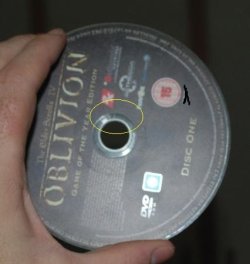
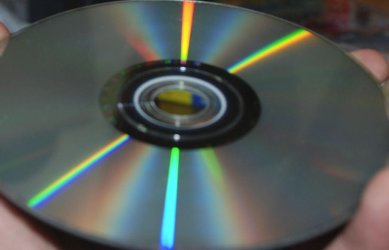
Bad news though, for us both. My disk has a small crack in it about 1 cm long. I posted a pic but it's hard to see. As this is one of my favorite games, I'm going to try to copy my disk this evening at the risk of it exploding and breaking my drive. If I can get a copy and then install it i'll let you know. If not I'm sorry that I can't help further.... and I wonder if Bethusda will replace it for me... hmm.
 

Attachments

  • oblivion.JPG
    oblivion.JPG
    25.3 KB · Views: 21
  • oblivion2.JPG
    oblivion2.JPG
    37.3 KB · Views: 9

My Computer My Computer

At a glance

Windows 7 Ultimate 64 bitIntel(R) Core(TM)2 Quad CPU Q8200 @ 2.33GHz8 GB KingstonNvidia GeForce 9600GT
Computer Manufacturer/Model Number
Custom Hack job
OS
Windows 7 Ultimate 64 bit
CPU
Intel(R) Core(TM)2 Quad CPU Q8200 @ 2.33GHz
Motherboard
GigaByte EP45-UD3
Memory
8 GB Kingston
Graphics Card(s)
Nvidia GeForce 9600GT
Sound Card
Soundblaster Audigy
Monitor(s) Displays
AOC x2 22"
Hard Drives
2 x Samsung 500GB (RAID)
2 x Samsung 2TB
1 x WD Green 2TB
1 x Seagate 1TB
1 x Samsung 500GB
PSU
Thermaltake QFan 750W
Case
CM Scout Gaming
Cooling
Coolermaster V10
Keyboard
Microsoft Wireless Keyboard 1000
Mouse
Microsoft Wireless Optical 2000
Internet Speed
320
Other Info
Winfast PVR2000CP
LG DVD-RAM DVD/RW/DL Super Multi
Linksys WMP300Nx2 Wireless Adapter
lol thanks for your help.. and im really sorry for you..
but I dont think that the problem is in the game itself. i think that the source of it is the installshield engine, which i cant fix for an unknown reason..
 

My Computer My Computer

At a glance

Win 7 x86 build 7600Intel Core 2 Quad Q6600 2.4GHZKingston 2X1024 800MHZnVidia GeForce 8600 GT 512MB
OS
Win 7 x86 build 7600
CPU
Intel Core 2 Quad Q6600 2.4GHZ
Motherboard
ASUS P5KC
Memory
Kingston 2X1024 800MHZ
Graphics Card(s)
nVidia GeForce 8600 GT 512MB
Sound Card
on board
Monitor(s) Displays
LG FLATRON L1960TR
Screen Resolution
1280X1024
Hard Drives
Hitachi 500GB (internal)
Samsung STORY STATION 1500GB (external)
Case
Coller Master Elite 330
Keyboard
Logitech
Mouse
Logitech RX250
Internet Speed
2.5Mbps
Thanks Benbs,

I copied the disk without errors, so I am going to try to install it now that I have a back up and I'l let you know if I'm successful or not.
 

My Computer My Computer

At a glance

Windows 7 Ultimate 64 bitIntel(R) Core(TM)2 Quad CPU Q8200 @ 2.33GHz8 GB KingstonNvidia GeForce 9600GT
Computer Manufacturer/Model Number
Custom Hack job
OS
Windows 7 Ultimate 64 bit
CPU
Intel(R) Core(TM)2 Quad CPU Q8200 @ 2.33GHz
Motherboard
GigaByte EP45-UD3
Memory
8 GB Kingston
Graphics Card(s)
Nvidia GeForce 9600GT
Sound Card
Soundblaster Audigy
Monitor(s) Displays
AOC x2 22"
Hard Drives
2 x Samsung 500GB (RAID)
2 x Samsung 2TB
1 x WD Green 2TB
1 x Seagate 1TB
1 x Samsung 500GB
PSU
Thermaltake QFan 750W
Case
CM Scout Gaming
Cooling
Coolermaster V10
Keyboard
Microsoft Wireless Keyboard 1000
Mouse
Microsoft Wireless Optical 2000
Internet Speed
320
Other Info
Winfast PVR2000CP
LG DVD-RAM DVD/RW/DL Super Multi
Linksys WMP300Nx2 Wireless Adapter
I should have added, that there are at least two other solutions open to you:
1. Dual boot to XP or another OS that it works on (If you have a license)
2. Install VMware, VirtualPC, VirtualBox or another virtualised solution and run Oblivion on that.

I've run Oblivion on VMware Workstation (It's free after you register) and I thought it was fine. If you're a hard core graphics squeezing gamer with a very high end card then this solution may not be the best for you. But f for me on a 22inch monitor the graphics emulation worked as good as my graphics card so it was perfect. If I can't get it installed on Win7 and I can on VMware again i'll post screen prints for you.

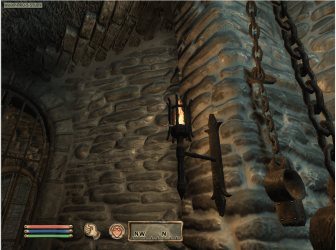
EDIT: I still have it on my games VMware machine. Here's a quick screen print from the very start of the game. It's at 1280x960 but I have options to go up to 2048 x 1536 if your card can handle it.
 

Attachments

  • screen.png
    screen.png
    355.4 KB · Views: 16
Last edited:

My Computer My Computer

At a glance

Windows 7 Ultimate 64 bitIntel(R) Core(TM)2 Quad CPU Q8200 @ 2.33GHz8 GB KingstonNvidia GeForce 9600GT
Computer Manufacturer/Model Number
Custom Hack job
OS
Windows 7 Ultimate 64 bit
CPU
Intel(R) Core(TM)2 Quad CPU Q8200 @ 2.33GHz
Motherboard
GigaByte EP45-UD3
Memory
8 GB Kingston
Graphics Card(s)
Nvidia GeForce 9600GT
Sound Card
Soundblaster Audigy
Monitor(s) Displays
AOC x2 22"
Hard Drives
2 x Samsung 500GB (RAID)
2 x Samsung 2TB
1 x WD Green 2TB
1 x Seagate 1TB
1 x Samsung 500GB
PSU
Thermaltake QFan 750W
Case
CM Scout Gaming
Cooling
Coolermaster V10
Keyboard
Microsoft Wireless Keyboard 1000
Mouse
Microsoft Wireless Optical 2000
Internet Speed
320
Other Info
Winfast PVR2000CP
LG DVD-RAM DVD/RW/DL Super Multi
Linksys WMP300Nx2 Wireless Adapter
Ok Good News, despite the crack in the disk I was able to install Oblivion and play it on my windows 7 64 bit box.
here's how:

1. Insert the Oblivion Disk

2. Explore it and find the SETUP.EXE

3. Right click on this and send to desktop (Create a Shortcut).

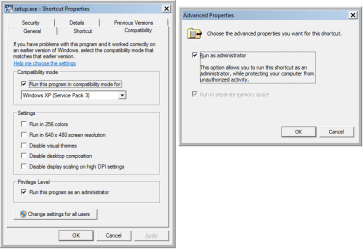
4. On the Compatability tab configure the following
- Tick the Run this program in compatability mode for: box
- Select Windows XP service pack 3 in the drop down
- Tick the Run this program as an administrator box
- Change the settigns for all users if required.
- Press OK.

5. Right click on the shortcut and select properties

6. On the shortcut tab click ADVANCED

7. Tick the Run as Administrator box and leave the Run in a Separate memory space box ticked (this makes it run in a separate memory process and more or less protects windows from the game)

8. After Installation repeat the process on the Obvlion shortcut to run it.
 

Attachments

  • properties.png
    properties.png
    15.2 KB · Views: 26

My Computer My Computer

At a glance

Windows 7 Ultimate 64 bitIntel(R) Core(TM)2 Quad CPU Q8200 @ 2.33GHz8 GB KingstonNvidia GeForce 9600GT
Computer Manufacturer/Model Number
Custom Hack job
OS
Windows 7 Ultimate 64 bit
CPU
Intel(R) Core(TM)2 Quad CPU Q8200 @ 2.33GHz
Motherboard
GigaByte EP45-UD3
Memory
8 GB Kingston
Graphics Card(s)
Nvidia GeForce 9600GT
Sound Card
Soundblaster Audigy
Monitor(s) Displays
AOC x2 22"
Hard Drives
2 x Samsung 500GB (RAID)
2 x Samsung 2TB
1 x WD Green 2TB
1 x Seagate 1TB
1 x Samsung 500GB
PSU
Thermaltake QFan 750W
Case
CM Scout Gaming
Cooling
Coolermaster V10
Keyboard
Microsoft Wireless Keyboard 1000
Mouse
Microsoft Wireless Optical 2000
Internet Speed
320
Other Info
Winfast PVR2000CP
LG DVD-RAM DVD/RW/DL Super Multi
Linksys WMP300Nx2 Wireless Adapter
hi again,
i tried to run the setup by following the instruction on your last comment. still the same problem appears..
I thought about the VMWare, but i read somewhere that the graphics setting in it is minimal, so running games is impossible..
so are there things i need to do before trying to run the game (VMWare settings etc)?
ill try it tomorrow and post the results...

thank you so much for your help!
 

My Computer My Computer

At a glance

Win 7 x86 build 7600Intel Core 2 Quad Q6600 2.4GHZKingston 2X1024 800MHZnVidia GeForce 8600 GT 512MB
OS
Win 7 x86 build 7600
CPU
Intel Core 2 Quad Q6600 2.4GHZ
Motherboard
ASUS P5KC
Memory
Kingston 2X1024 800MHZ
Graphics Card(s)
nVidia GeForce 8600 GT 512MB
Sound Card
on board
Monitor(s) Displays
LG FLATRON L1960TR
Screen Resolution
1280X1024
Hard Drives
Hitachi 500GB (internal)
Samsung STORY STATION 1500GB (external)
Case
Coller Master Elite 330
Keyboard
Logitech
Mouse
Logitech RX250
Internet Speed
2.5Mbps
hi again,
i tried to run the setup by following the instruction on your last comment. still the same problem appears..
I thought about the VMWare, but i read somewhere that the graphics setting in it is minimal, so running games is impossible..
so are there things i need to do before trying to run the game (VMWare settings etc)?
ill try it tomorrow and post the results...

thank you so much for your help!

You're welcome.

I thought that the separate memory space might have got you through as it did for me. I have the Australian release of the Game of the Year (GOTY) edition. Perhaps my installer is newer.

Some other thoughts, try these in order:
- Run windows update
- Update all hardware drivers from the manufacturers website (not MS update)
- Check for any Oblivion patches
- Disable all non essential programs that are currently running in memory by killing any autostarts that aren't part of windows and using MSCONFIG to remove or disable startup entries. Remember to check the startup folder and finally task manager for any others. We want to give as little chance for interference as possible.
- Run an SFC /SCANNOW from an elevated command prompt to ensure Windows system files are legit.
- Make sure that you have the latest windows installer version (which I think is version 5 for Windows 7)
- Turn off your firewall and antivirus (just temporarily)
- Run the setup.exe in a separate memory process and as admin.

From having a search, a least two users reported this issue with Oblivion when blackberry software was installed on their PC... just in case you have it.

If all else fails, talk to Bethesda support, they should know http://support.bethsoft.com/

RE: VMWARE - There's no way that mine is set to lowest graphics. I think Oblivion autoset it to Medium. The VMware installation is stock standard. I just adjusted the settings on the game options menu to change the screen size and graphics quality.
 

My Computer My Computer

At a glance

Windows 7 Ultimate 64 bitIntel(R) Core(TM)2 Quad CPU Q8200 @ 2.33GHz8 GB KingstonNvidia GeForce 9600GT
Computer Manufacturer/Model Number
Custom Hack job
OS
Windows 7 Ultimate 64 bit
CPU
Intel(R) Core(TM)2 Quad CPU Q8200 @ 2.33GHz
Motherboard
GigaByte EP45-UD3
Memory
8 GB Kingston
Graphics Card(s)
Nvidia GeForce 9600GT
Sound Card
Soundblaster Audigy
Monitor(s) Displays
AOC x2 22"
Hard Drives
2 x Samsung 500GB (RAID)
2 x Samsung 2TB
1 x WD Green 2TB
1 x Seagate 1TB
1 x Samsung 500GB
PSU
Thermaltake QFan 750W
Case
CM Scout Gaming
Cooling
Coolermaster V10
Keyboard
Microsoft Wireless Keyboard 1000
Mouse
Microsoft Wireless Optical 2000
Internet Speed
320
Other Info
Winfast PVR2000CP
LG DVD-RAM DVD/RW/DL Super Multi
Linksys WMP300Nx2 Wireless Adapter
- my copy of win 7 is fully updated
- my drivers are updated also
- as for the patches, im not sure how it will help because the problem starts before the setup is loaded.. :S
- im running soluto, which disables any startup item that is not necessary. i also tried to kill all the unneeded processes, including soluto. didnt work also..
- i think i tried the sfc /scannow option before.. but ill try it again now and post the results later..
- the windows installer was always my top suspect as the source of the problem. however i have version 5 (comes with win 7 as a default), and i dont know how can i update/fix/reinstall it.
- tried to turn off firewall and antivirus. didnt work either :(
- im not sure what do you mean about running in a seperate memory process..

and i wish i had a blackberry software, as i wish i had a blackberry phone :P
 

My Computer My Computer

At a glance

Win 7 x86 build 7600Intel Core 2 Quad Q6600 2.4GHZKingston 2X1024 800MHZnVidia GeForce 8600 GT 512MB
OS
Win 7 x86 build 7600
CPU
Intel Core 2 Quad Q6600 2.4GHZ
Motherboard
ASUS P5KC
Memory
Kingston 2X1024 800MHZ
Graphics Card(s)
nVidia GeForce 8600 GT 512MB
Sound Card
on board
Monitor(s) Displays
LG FLATRON L1960TR
Screen Resolution
1280X1024
Hard Drives
Hitachi 500GB (internal)
Samsung STORY STATION 1500GB (external)
Case
Coller Master Elite 330
Keyboard
Logitech
Mouse
Logitech RX250
Internet Speed
2.5Mbps
the sfc scan is now completed, everything is alright :S
 

My Computer My Computer

At a glance

Win 7 x86 build 7600Intel Core 2 Quad Q6600 2.4GHZKingston 2X1024 800MHZnVidia GeForce 8600 GT 512MB
OS
Win 7 x86 build 7600
CPU
Intel Core 2 Quad Q6600 2.4GHZ
Motherboard
ASUS P5KC
Memory
Kingston 2X1024 800MHZ
Graphics Card(s)
nVidia GeForce 8600 GT 512MB
Sound Card
on board
Monitor(s) Displays
LG FLATRON L1960TR
Screen Resolution
1280X1024
Hard Drives
Hitachi 500GB (internal)
Samsung STORY STATION 1500GB (external)
Case
Coller Master Elite 330
Keyboard
Logitech
Mouse
Logitech RX250
Internet Speed
2.5Mbps
Still no good and we've ticked of a large number of standard issues.

- im not sure what do you mean about running in a seperate memory process.
Windows 7 allows you to run 16bit programs in a separated virtual memory space, away from the OS and other software. I just realized that our Oblivion is a 32bit app, so it runs in its own visualized space anyway *slaps forehead*.

and i wish i had a blackberry software, as i wish i had a blackberry phone :P
That's funny, my first laugh of the day goes to you. :roflmao: At least we can see some humor in this.

the sfc scan is now completed, everything is alright :S
As suspected. *damn*

- the windows installer was always my top suspect as the source of the problem. however i have version 5 (comes with win 7 as a default), and i dont know how can i update/fix/reinstall it.
This installer is very different to previous versions; but the previous versions were defiantly a culprit according to my Google search (and your early gut feel). We could try to repair it. It's a shot in the dark, but as I'm/we're out of ideas you could give it a go.

Trouble Shooting Windows Installer
  1. The first thing to check would be the Disabled Sessions registry entry HKLM\Software\Microsoft\SQMClient\Windows\DisabledSessions backup (right click and Export) then remove everything except "(Default)".
  2. Check the service configuration by typing services.msc into RUN or SEARCH and pressing ENTER. Scroll down your Services and look for Windows Installer, ensure that this is set to 'Manual" and that the path to Executable is C:\Windows\system32\msiexec.exe /V (providing that C is your Windows drive).
  3. Check the MSIEXEC.exe, mine is the 64bit and is version 5.0.7600.16385, it is attached in case you want to replace (and you have a 64 bit machine). If you have a 32 bit OS, then get yours from your Installation Media, MSupdate or the MS website (I couldn't find a link sorry).
  4. Re-register msiexec. Open an elevated command prompt and type in msiexec /unreg then press ENTER. Follow this with msiexec /regserver and ENTER to re-register.

Also If you have Visual Studio Installed then let me know, as there might be some extra things to look at.

Did you contact Bethusda?

Timo

PS: Another long-shot. If you install the windows installer cleanup utility can you see any reference to Oblivion, if so use the utility to delete it.

EDIT: In an effort to give you options, you could also try XP mode.

Personally I'd stick with VMware as it keeps my games separate from my OS. For the last year I've created various VMware machines for purposes such as Games, programming and scripting, Media burning and editing, Other OS' (Macintosh, Linux, Server 2008, Vista),and Security (hack and crack testing.. all legit of course. I do work in IT!). I find that i fry my OS less when I install less on it. But admittedly i do really mess with mine and this approach is not for everyone. :-)
 

Attachments

Last edited:

My Computer My Computer

At a glance

Windows 7 Ultimate 64 bitIntel(R) Core(TM)2 Quad CPU Q8200 @ 2.33GHz8 GB KingstonNvidia GeForce 9600GT
Computer Manufacturer/Model Number
Custom Hack job
OS
Windows 7 Ultimate 64 bit
CPU
Intel(R) Core(TM)2 Quad CPU Q8200 @ 2.33GHz
Motherboard
GigaByte EP45-UD3
Memory
8 GB Kingston
Graphics Card(s)
Nvidia GeForce 9600GT
Sound Card
Soundblaster Audigy
Monitor(s) Displays
AOC x2 22"
Hard Drives
2 x Samsung 500GB (RAID)
2 x Samsung 2TB
1 x WD Green 2TB
1 x Seagate 1TB
1 x Samsung 500GB
PSU
Thermaltake QFan 750W
Case
CM Scout Gaming
Cooling
Coolermaster V10
Keyboard
Microsoft Wireless Keyboard 1000
Mouse
Microsoft Wireless Optical 2000
Internet Speed
320
Other Info
Winfast PVR2000CP
LG DVD-RAM DVD/RW/DL Super Multi
Linksys WMP300Nx2 Wireless Adapter
1. ive checked the registry keys on the sessions folder. there are no keys except for the default one.
2. the path os ok and its already set to manual.
3. im using 32bit os, searched the internet for an hour and didnt find anything. i also cant find the msiexec.exe in my installation media..
4. did it so many times before when i looked for the solution in google. never worked.

and i got visual C# express installed in my computer.

damn, it looks like anything that can go wrong happens to me :( i think ill just use VMWare and format my system when ill have some extra time..
 

My Computer My Computer

At a glance

Win 7 x86 build 7600Intel Core 2 Quad Q6600 2.4GHZKingston 2X1024 800MHZnVidia GeForce 8600 GT 512MB
OS
Win 7 x86 build 7600
CPU
Intel Core 2 Quad Q6600 2.4GHZ
Motherboard
ASUS P5KC
Memory
Kingston 2X1024 800MHZ
Graphics Card(s)
nVidia GeForce 8600 GT 512MB
Sound Card
on board
Monitor(s) Displays
LG FLATRON L1960TR
Screen Resolution
1280X1024
Hard Drives
Hitachi 500GB (internal)
Samsung STORY STATION 1500GB (external)
Case
Coller Master Elite 330
Keyboard
Logitech
Mouse
Logitech RX250
Internet Speed
2.5Mbps
I'm thinking VMware is the way to go too.

RE: Visual Studio - I stumbled across this bug last year with the 2008 visual studio version; where it caused msiexec to fail. it may not be the same issue but worth a look.
1. Go to %programfiles%\Microsoft Visual Studio 9.0\Common7\IDE\PublicAssemblies (you may need to swap out the path to fit your version of visual studio).
2. Create an "en" folder.
3. Copy all files of its parent folder to it.
4. Restart msiexec

By the way of you are a student, grab the latest copy for free from Dreamspark

I'll also try to find the location of msiexec on the installation medi...a.. get back to with that later.
 

My Computer My Computer

At a glance

Windows 7 Ultimate 64 bitIntel(R) Core(TM)2 Quad CPU Q8200 @ 2.33GHz8 GB KingstonNvidia GeForce 9600GT
Computer Manufacturer/Model Number
Custom Hack job
OS
Windows 7 Ultimate 64 bit
CPU
Intel(R) Core(TM)2 Quad CPU Q8200 @ 2.33GHz
Motherboard
GigaByte EP45-UD3
Memory
8 GB Kingston
Graphics Card(s)
Nvidia GeForce 9600GT
Sound Card
Soundblaster Audigy
Monitor(s) Displays
AOC x2 22"
Hard Drives
2 x Samsung 500GB (RAID)
2 x Samsung 2TB
1 x WD Green 2TB
1 x Seagate 1TB
1 x Samsung 500GB
PSU
Thermaltake QFan 750W
Case
CM Scout Gaming
Cooling
Coolermaster V10
Keyboard
Microsoft Wireless Keyboard 1000
Mouse
Microsoft Wireless Optical 2000
Internet Speed
320
Other Info
Winfast PVR2000CP
LG DVD-RAM DVD/RW/DL Super Multi
Linksys WMP300Nx2 Wireless Adapter
Back
Top