Error with SP1 windows update

Can I use a retail windows 7 SP1 to repair my current OS which is not SP1?

As I said I don't a windows 7 installation media so I'm thinking of downloading an official retail ISO.

Let's say I already have that ISO, can I activate it using the serial number below my laptop?
 

My Computer

Computer Manufacturer/Model Number
Samsung Electronics - NP-R580-JS01SA
OS
Windows 7 Home Premium 32bit
CPU
Intel(R) Core(TM) i5 M 520 @ 2.40Ghz
Motherboard
SAMSUNG ELECTRONICS CO. R580
Memory
4GB DDR3 RAM
Graphics Card(s)
1 GB NVidia Geforce GT 330M
Sound Card
Realtek High Definition V. 6.6
Monitor(s) Displays
Generic PnP monitor
Screen Resolution
1366 x 768
Hard Drives
500 GB IDE/SATA

My Computer

Computer Manufacturer/Model Number
HP Pavilion Elite 495UK
OS
Windows 7 Ultimate SP1 64-Bit
CPU
Intel Core i7 870 @ 2.93GHz
Motherboard
MSI 2A9C (CPU1)
Memory
8Gb Dual-Channel DDR3 @ 664MHz
Graphics Card(s)
nVidia GeForce GTX 460 1024MB dedicated RAM
Sound Card
Realtek HD Audio
Monitor(s) Displays
HP2310i
Screen Resolution
1920 x 1080
Hard Drives
1x1954GB Hitachi HDS22020ALA 330 (RAID), 1x1954GB Hitachi External for backup and storage
PSU
460W
Case
HP Elite
Cooling
Air cooled
Keyboard
Logitech K750 solar-powered keyboard
Mouse
Logitech Wireless M180 mouse
Internet Speed
2Mb
Other Info
Pure Avanti Flow Internet Radio with iPod Dock, 64Gb iPod, HP USB Speakers, Sony MDR-V500 Headphones, Sony Vaio F-Series Laptop
Seavixen: Does this apply to a REPAIR INSTALL too?
 

My Computer

Computer Manufacturer/Model Number
Samsung Electronics - NP-R580-JS01SA
OS
Windows 7 Home Premium 32bit
CPU
Intel(R) Core(TM) i5 M 520 @ 2.40Ghz
Motherboard
SAMSUNG ELECTRONICS CO. R580
Memory
4GB DDR3 RAM
Graphics Card(s)
1 GB NVidia Geforce GT 330M
Sound Card
Realtek High Definition V. 6.6
Monitor(s) Displays
Generic PnP monitor
Screen Resolution
1366 x 768
Hard Drives
500 GB IDE/SATA
I'm downloading a Windows 7 Home Premium 32-bit ISO atm (The one I downloaded before was with SP1). The repair Install tutorial only pointed out Repair Installing currently installed Windows 7 SP1. How about repair install for Windows 7 without SP1? Is there any guide for that? Please help, I'm still waiting for your reply.
 

My Computer

Computer Manufacturer/Model Number
Samsung Electronics - NP-R580-JS01SA
OS
Windows 7 Home Premium 32bit
CPU
Intel(R) Core(TM) i5 M 520 @ 2.40Ghz
Motherboard
SAMSUNG ELECTRONICS CO. R580
Memory
4GB DDR3 RAM
Graphics Card(s)
1 GB NVidia Geforce GT 330M
Sound Card
Realtek High Definition V. 6.6
Monitor(s) Displays
Generic PnP monitor
Screen Resolution
1366 x 768
Hard Drives
500 GB IDE/SATA

My Computer

Computer Manufacturer/Model Number
HP Pavilion Elite 495UK
OS
Windows 7 Ultimate SP1 64-Bit
CPU
Intel Core i7 870 @ 2.93GHz
Motherboard
MSI 2A9C (CPU1)
Memory
8Gb Dual-Channel DDR3 @ 664MHz
Graphics Card(s)
nVidia GeForce GTX 460 1024MB dedicated RAM
Sound Card
Realtek HD Audio
Monitor(s) Displays
HP2310i
Screen Resolution
1920 x 1080
Hard Drives
1x1954GB Hitachi HDS22020ALA 330 (RAID), 1x1954GB Hitachi External for backup and storage
PSU
460W
Case
HP Elite
Cooling
Air cooled
Keyboard
Logitech K750 solar-powered keyboard
Mouse
Logitech Wireless M180 mouse
Internet Speed
2Mb
Other Info
Pure Avanti Flow Internet Radio with iPod Dock, 64Gb iPod, HP USB Speakers, Sony MDR-V500 Headphones, Sony Vaio F-Series Laptop
I couldn't swear to it - but I don't believe that there's any problem using an SP1 disk to do a repair install on an RTM install. It'd get SP1 installed, at least!
 

My Computer

Computer type
Laptop
Computer Manufacturer/Model Number
Asus K52F or Lenovo B51-80
OS
Win 7 x64 Home Premium (and x86 VirtualBox VM)/Win10
CPU
i3 370M/i7 6500U
Motherboard
Asus/Lenovo
Memory
8GB - finally :)/8GB
Graphics Card(s)
it's an i3, dude!/dual Intel&nVidia
Sound Card
onboard
Monitor(s) Displays
15.6" built-in
Screen Resolution
1366x768/1920x1080
Hard Drives
750GB Seagate internal
Sundry external drives attached to other computers on the local network
1TB SSD on the Lenovo
PSU
n/a
Internet Speed
as much as I can get - usually on a dongle/phone, so <1MB/s
Antivirus
MSE/Defender
Browser
IE11/12/Edge/Chrome/FF(if I must)
@ Noel: what's an RTM?

By the way, if I do a repair install will I lose my INSTALLED PROGRAMS on my drive C? I don't want to lose them I don't want to get in trouble with the device drivers. As i've learned before that a samsung laptop is dependent on the system recovery partition to install the device drivers and all.

I don't want to modify anything aside from my current OS which can't update to SP1 and also deletes every restore point I make upon reboot. These are the only 2 problem that I have with my unit.
 

My Computer

Computer Manufacturer/Model Number
Samsung Electronics - NP-R580-JS01SA
OS
Windows 7 Home Premium 32bit
CPU
Intel(R) Core(TM) i5 M 520 @ 2.40Ghz
Motherboard
SAMSUNG ELECTRONICS CO. R580
Memory
4GB DDR3 RAM
Graphics Card(s)
1 GB NVidia Geforce GT 330M
Sound Card
Realtek High Definition V. 6.6
Monitor(s) Displays
Generic PnP monitor
Screen Resolution
1366 x 768
Hard Drives
500 GB IDE/SATA
RTM is 'Release to Manufacture' - the intial public release of the OS.
As always, back up your data to external media first!
You shouldn't lose anything by repair installing with either an original release disk, or with an SP1 disk - but this is Windows and strange things can happen. If you use the RTM disk, then you'll need to reinstall ALL the Windows Updates as well as SP1 - if you use theSP1 disk, then you only need the updates later than SP1 (WU should sort that out for you)

If I were you, I'd uninstall my Anti-Virus before attempting the repair - AV's can often get in teh way of the process, and will certianly slow it down - and you should also run the AV manufacturer's cleanup tool if they have one.
 

My Computer

Computer type
Laptop
Computer Manufacturer/Model Number
Asus K52F or Lenovo B51-80
OS
Win 7 x64 Home Premium (and x86 VirtualBox VM)/Win10
CPU
i3 370M/i7 6500U
Motherboard
Asus/Lenovo
Memory
8GB - finally :)/8GB
Graphics Card(s)
it's an i3, dude!/dual Intel&nVidia
Sound Card
onboard
Monitor(s) Displays
15.6" built-in
Screen Resolution
1366x768/1920x1080
Hard Drives
750GB Seagate internal
Sundry external drives attached to other computers on the local network
1TB SSD on the Lenovo
PSU
n/a
Internet Speed
as much as I can get - usually on a dongle/phone, so <1MB/s
Antivirus
MSE/Defender
Browser
IE11/12/Edge/Chrome/FF(if I must)
I'm using KASPERSKY INTERNET SECURITY 2012.

what do you mean by "Backup your data" ? Is it Image file backup of my whole system to an external drive?

I can do that with SAMSUNG RECOVERY SOLUTION 4 which is the one i've been using eversince.

But what if the samsung programs get deleted from drive c? that would mean that I can't run the SAMSUNG RECOVERY SOLUTION 4 to use the Image backup from the external drive.

I'm kinda confused now. I finished downloading the Windows 7 Home Premium 32-bit ISO file. I just want to make sure now that I won't get the same trouble as that lady with the samsung laptop from this thread http://www.sevenforums.com/installation-setup/200607-new-laptop-changing-partition-disks.html
 

My Computer

Computer Manufacturer/Model Number
Samsung Electronics - NP-R580-JS01SA
OS
Windows 7 Home Premium 32bit
CPU
Intel(R) Core(TM) i5 M 520 @ 2.40Ghz
Motherboard
SAMSUNG ELECTRONICS CO. R580
Memory
4GB DDR3 RAM
Graphics Card(s)
1 GB NVidia Geforce GT 330M
Sound Card
Realtek High Definition V. 6.6
Monitor(s) Displays
Generic PnP monitor
Screen Resolution
1366 x 768
Hard Drives
500 GB IDE/SATA
Images are great - but totally useless if they are stored on the same physical disk as the original data. (Think - what happens if your disk fails?)
You need to back up the entire contents of your Libraries to external media for safe-keeping, as a minimum.

http://www.sevenforums.com/tutorials/3413-repair-install.html


Kaspersky has a cleanup tool - Removal tool for Kaspersky Lab products

So long as you don't do anything silly, the built-in Recovery system for the Samsung should still be available for use to get you back to an expfactory state.
 

My Computer

Computer type
Laptop
Computer Manufacturer/Model Number
Asus K52F or Lenovo B51-80
OS
Win 7 x64 Home Premium (and x86 VirtualBox VM)/Win10
CPU
i3 370M/i7 6500U
Motherboard
Asus/Lenovo
Memory
8GB - finally :)/8GB
Graphics Card(s)
it's an i3, dude!/dual Intel&nVidia
Sound Card
onboard
Monitor(s) Displays
15.6" built-in
Screen Resolution
1366x768/1920x1080
Hard Drives
750GB Seagate internal
Sundry external drives attached to other computers on the local network
1TB SSD on the Lenovo
PSU
n/a
Internet Speed
as much as I can get - usually on a dongle/phone, so <1MB/s
Antivirus
MSE/Defender
Browser
IE11/12/Edge/Chrome/FF(if I must)
Okay thanks Noel. I just downloaded the KASPERSKY REMOVAL TOOL.

I checked the ISO file I downloaded but it seems to be corrupted. You know another site to download an Official Retail Windows 7 ISO file?
 

My Computer

Computer Manufacturer/Model Number
Samsung Electronics - NP-R580-JS01SA
OS
Windows 7 Home Premium 32bit
CPU
Intel(R) Core(TM) i5 M 520 @ 2.40Ghz
Motherboard
SAMSUNG ELECTRONICS CO. R580
Memory
4GB DDR3 RAM
Graphics Card(s)
1 GB NVidia Geforce GT 330M
Sound Card
Realtek High Definition V. 6.6
Monitor(s) Displays
Generic PnP monitor
Screen Resolution
1366 x 768
Hard Drives
500 GB IDE/SATA
Last edited:

My Computer

Computer type
Laptop
Computer Manufacturer/Model Number
Asus K52F or Lenovo B51-80
OS
Win 7 x64 Home Premium (and x86 VirtualBox VM)/Win10
CPU
i3 370M/i7 6500U
Motherboard
Asus/Lenovo
Memory
8GB - finally :)/8GB
Graphics Card(s)
it's an i3, dude!/dual Intel&nVidia
Sound Card
onboard
Monitor(s) Displays
15.6" built-in
Screen Resolution
1366x768/1920x1080
Hard Drives
750GB Seagate internal
Sundry external drives attached to other computers on the local network
1TB SSD on the Lenovo
PSU
n/a
Internet Speed
as much as I can get - usually on a dongle/phone, so <1MB/s
Antivirus
MSE/Defender
Browser
IE11/12/Edge/Chrome/FF(if I must)
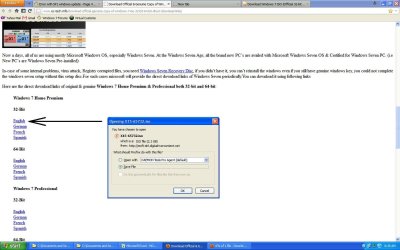
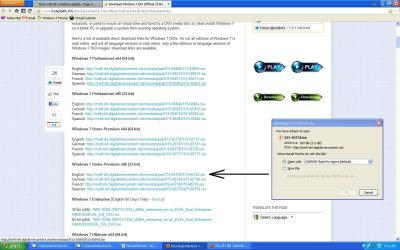
Noel these are the 2 links of the Windows 7 ISO downloads that I used before. After an error download last night I redownloaded again and it went fine this time.

I downloaded from one of these links:

are these fine? I'll just burn it on a DVD or run it with DAEMON TOOLS?


Link 1.JPG

&

Link 2.JPG


By the way, I'm downloading from my PC at the office so don't wonder if you see the XP UI from the screen shots :)


I'll just use this one without the SP1 to make sure it's compatible.
 

My Computer

Computer Manufacturer/Model Number
Samsung Electronics - NP-R580-JS01SA
OS
Windows 7 Home Premium 32bit
CPU
Intel(R) Core(TM) i5 M 520 @ 2.40Ghz
Motherboard
SAMSUNG ELECTRONICS CO. R580
Memory
4GB DDR3 RAM
Graphics Card(s)
1 GB NVidia Geforce GT 330M
Sound Card
Realtek High Definition V. 6.6
Monitor(s) Displays
Generic PnP monitor
Screen Resolution
1366 x 768
Hard Drives
500 GB IDE/SATA
By the way, RESTORE POINT issue is fixed now. But I don't know if it's stable. I'm still monitoring it. But so far after about 20 reboots the Restore Point is still there. :D

Also, you guys know the MD5 Checksum of Windows 7 Home premium?

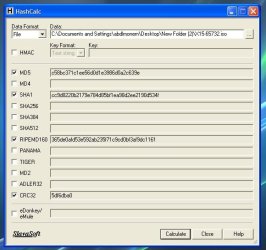
I checked the ISO that I downloaded and here's the result:

WIN7 HOME PREMIUM HASHCALC.JPG

View attachment W7 HASHCALC.txt


MD5: c58bc371c1ee56d0d1e3986d0a2c639e

SHA1: cc9d8220b2179e784d85bf1ea98d2ee2190d534f

RIPEMD160: 365de0afd53e592ab235f71c9cd0bf3af9dc1161

CRC32: 5df6dba0


Is this correct?


I won't pretend that I understand these codes but I gather that this is the way to check if you got the real thing or not.
 
Last edited:

My Computer

Computer Manufacturer/Model Number
Samsung Electronics - NP-R580-JS01SA
OS
Windows 7 Home Premium 32bit
CPU
Intel(R) Core(TM) i5 M 520 @ 2.40Ghz
Motherboard
SAMSUNG ELECTRONICS CO. R580
Memory
4GB DDR3 RAM
Graphics Card(s)
1 GB NVidia Geforce GT 330M
Sound Card
Realtek High Definition V. 6.6
Monitor(s) Displays
Generic PnP monitor
Screen Resolution
1366 x 768
Hard Drives
500 GB IDE/SATA
From what I can find out, that MD5 is correct (which means the file is OK.
I would create the DVD, rather than risk a virtual drive becoming unreadable part way through - burn it at the slowest speed you can, as this reduces the chances of errors.
 

My Computer

Computer type
Laptop
Computer Manufacturer/Model Number
Asus K52F or Lenovo B51-80
OS
Win 7 x64 Home Premium (and x86 VirtualBox VM)/Win10
CPU
i3 370M/i7 6500U
Motherboard
Asus/Lenovo
Memory
8GB - finally :)/8GB
Graphics Card(s)
it's an i3, dude!/dual Intel&nVidia
Sound Card
onboard
Monitor(s) Displays
15.6" built-in
Screen Resolution
1366x768/1920x1080
Hard Drives
750GB Seagate internal
Sundry external drives attached to other computers on the local network
1TB SSD on the Lenovo
PSU
n/a
Internet Speed
as much as I can get - usually on a dongle/phone, so <1MB/s
Antivirus
MSE/Defender
Browser
IE11/12/Edge/Chrome/FF(if I must)
Copy that Noel. I'll just have to secure blank DVD's first and learn how to burn an image to a dvd using ImgBurn. Tnx man! :)
 

My Computer

Computer Manufacturer/Model Number
Samsung Electronics - NP-R580-JS01SA
OS
Windows 7 Home Premium 32bit
CPU
Intel(R) Core(TM) i5 M 520 @ 2.40Ghz
Motherboard
SAMSUNG ELECTRONICS CO. R580
Memory
4GB DDR3 RAM
Graphics Card(s)
1 GB NVidia Geforce GT 330M
Sound Card
Realtek High Definition V. 6.6
Monitor(s) Displays
Generic PnP monitor
Screen Resolution
1366 x 768
Hard Drives
500 GB IDE/SATA
You're welcome - good luck!
 

My Computer

Computer type
Laptop
Computer Manufacturer/Model Number
Asus K52F or Lenovo B51-80
OS
Win 7 x64 Home Premium (and x86 VirtualBox VM)/Win10
CPU
i3 370M/i7 6500U
Motherboard
Asus/Lenovo
Memory
8GB - finally :)/8GB
Graphics Card(s)
it's an i3, dude!/dual Intel&nVidia
Sound Card
onboard
Monitor(s) Displays
15.6" built-in
Screen Resolution
1366x768/1920x1080
Hard Drives
750GB Seagate internal
Sundry external drives attached to other computers on the local network
1TB SSD on the Lenovo
PSU
n/a
Internet Speed
as much as I can get - usually on a dongle/phone, so <1MB/s
Antivirus
MSE/Defender
Browser
IE11/12/Edge/Chrome/FF(if I must)
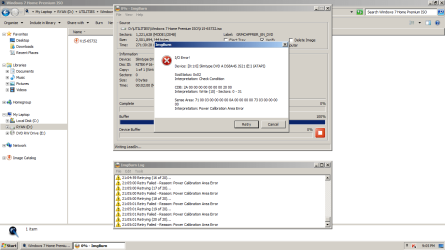
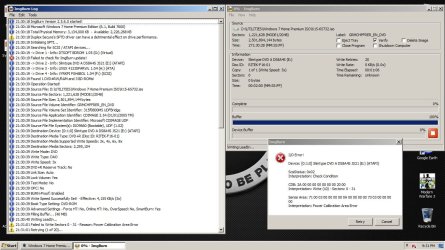
Hey guys, so I was trying to burn the ISO file to a blank DvD but I keep getting this error:

ImgBurn Error.png

View attachment ImgBurn.log

ImgBurn Error 1.jpg

View attachment ImgBurn 1.log


Am I doing something wrong? The settings perhaps?

I tried Burning from x3 up to x8 but I get the same errors again and again.


I tried using Daemon Tools Pro and I successfully burned the Image to a blank DvD but when It came to the VERIFICATION part of the whole process it failed.

I checked the DvD that I used with DT and its loaded with the files from the ISO. So I'm wondering if it's okay to use.


Please help...
 

My Computer

Computer Manufacturer/Model Number
Samsung Electronics - NP-R580-JS01SA
OS
Windows 7 Home Premium 32bit
CPU
Intel(R) Core(TM) i5 M 520 @ 2.40Ghz
Motherboard
SAMSUNG ELECTRONICS CO. R580
Memory
4GB DDR3 RAM
Graphics Card(s)
1 GB NVidia Geforce GT 330M
Sound Card
Realtek High Definition V. 6.6
Monitor(s) Displays
Generic PnP monitor
Screen Resolution
1366 x 768
Hard Drives
500 GB IDE/SATA
What type of DVD are you using?

Did you make sure it was blank and unused?

Have you considered using ImgBurn?

The Official ImgBurn Website
 

My Computer

Computer Manufacturer/Model Number
HP Pavilion Elite 495UK
OS
Windows 7 Ultimate SP1 64-Bit
CPU
Intel Core i7 870 @ 2.93GHz
Motherboard
MSI 2A9C (CPU1)
Memory
8Gb Dual-Channel DDR3 @ 664MHz
Graphics Card(s)
nVidia GeForce GTX 460 1024MB dedicated RAM
Sound Card
Realtek HD Audio
Monitor(s) Displays
HP2310i
Screen Resolution
1920 x 1080
Hard Drives
1x1954GB Hitachi HDS22020ALA 330 (RAID), 1x1954GB Hitachi External for backup and storage
PSU
460W
Case
HP Elite
Cooling
Air cooled
Keyboard
Logitech K750 solar-powered keyboard
Mouse
Logitech Wireless M180 mouse
Internet Speed
2Mb
Other Info
Pure Avanti Flow Internet Radio with iPod Dock, 64Gb iPod, HP USB Speakers, Sony MDR-V500 Headphones, Sony Vaio F-Series Laptop
The DvD was a new one. I bought it myself. A Sony DVD+R. Actually, I used ImgBurn as shown from the screenshots that I attached from my previous post.
 

My Computer

Computer Manufacturer/Model Number
Samsung Electronics - NP-R580-JS01SA
OS
Windows 7 Home Premium 32bit
CPU
Intel(R) Core(TM) i5 M 520 @ 2.40Ghz
Motherboard
SAMSUNG ELECTRONICS CO. R580
Memory
4GB DDR3 RAM
Graphics Card(s)
1 GB NVidia Geforce GT 330M
Sound Card
Realtek High Definition V. 6.6
Monitor(s) Displays
Generic PnP monitor
Screen Resolution
1366 x 768
Hard Drives
500 GB IDE/SATA
Back
Top