Error with Win 7 Clean Install

Merxz

New member
Local time
11:56 PM
Messages
8
I purchased Win 7 Pro 64 from Digital River's student deal. I then followed the instructions Here to make it a bootable dvd. I then went to Intel's site and downloaded and extracted their Intel Matrix Storage Manager for their 64bit AHCI drivers and extracted them to a usb flash drive to load during install.

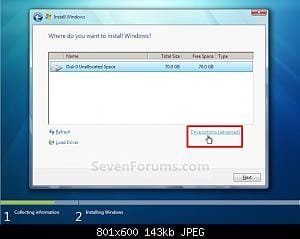
Once I put in the Win 7 dvd it gets to the point where I select which partition I want to install to. First, I load the AHCI drivers that I put on the usb flash drive, then I delete the main partition that I had Vista on, and then format it. Now, if all was working well I would hit the Next button, but at this point I get stuck, as it says, "Windows is unable to install to the selected location. Error: 0x8030001."

A couple of notes, I did enable AHCI in my motherboard's BIOS. Also, I have two Sata HD's in my computer, a 320gb that is split into a 50gb(where Vista is installed) and 270gb partition(where programs are installed) and a 1tb drive where I keep videos/music.

Does anyone know what might be causing this error and any steps that I may take to resolve it?
 

My Computer

OS
Windows Vista 64
CPU
Intel Core 2 Quag Q9400
Motherboard
Gigabyte EP45-UD3R
Memory
G.Skill 4gb (2x2gb)
Graphics Card(s)
AMD Radeon 4870 1GB
Monitor(s) Displays
Samsung SyncMaster 2253bw
Screen Resolution
1680x1050
Hard Drives
Western Digital 320GB
Western Digital 1TB
PSU
Enermax 620W
Case
Antec 300
Keyboard
Saitek Eclipse
Mouse
Logitech G5
Internet Speed
10mbps/1mbps
hi Merxz, and welcome to sevenforums,

i'm sorry but i can't help you myself - i didn't need ahci drivers for my machine.

but there are lots of other knowledgeable users around here, and it would make things easier for them if you could tell us a bit more about your pc setup.

please go to your user countol panel, by clicking the 'user cp' link at the top of the page, and then find the 'edit system spec' link on the left hand side.

your motherboard details are the most important here, i suppose...
 

My Computer

Computer Manufacturer/Model Number
mickey megabyte 1234
OS
ultimate 64 sp1
CPU
i5 2500K [email protected]
Motherboard
MSI P67A-GD53
Memory
8 gigs GSkill Ripjaws 1600
Graphics Card(s)
amd hd6950
Sound Card
creative x-fi gamer
Monitor(s) Displays
samsung 24"
Screen Resolution
1920x1080
Hard Drives
ocz vertex 2e 60 gig, samsung f3 1tb, buffalo 2tb ext
PSU
antec 550
Case
antec three hundred
Cooling
i'm a cooling fan
Keyboard
saitek eclipse ii
Mouse
logitech g3
Internet Speed
about 4 Mbps
Other Info
i love win7
Thanks for the tip, and I went ahead and updated my computer specs. Also, in case it's easier to just check this, the motherboard is a Gigabyte EP45-UD3R.
 

My Computer

OS
Windows Vista 64
CPU
Intel Core 2 Quag Q9400
Motherboard
Gigabyte EP45-UD3R
Memory
G.Skill 4gb (2x2gb)
Graphics Card(s)
AMD Radeon 4870 1GB
Monitor(s) Displays
Samsung SyncMaster 2253bw
Screen Resolution
1680x1050
Hard Drives
Western Digital 320GB
Western Digital 1TB
PSU
Enermax 620W
Case
Antec 300
Keyboard
Saitek Eclipse
Mouse
Logitech G5
Internet Speed
10mbps/1mbps
I believe 7 will install the ACHI drivers automatically. don't inatall them until your asked.
 

My Computer

Computer Manufacturer/Model Number
Dell Optiplex 980
OS
Win7 x64 Ultimate SP1
CPU
Intel i7-2600
Memory
8 Gig
Graphics Card(s)
Geforce gt 520
Monitor(s) Displays
LG & Acer
Screen Resolution
1920x1080
Internet Speed
Fios 45/35
Other Info
Windows Home Server
Alright, I'll try again without loading any drivers and report back my findings.
 

My Computer

OS
Windows Vista 64
CPU
Intel Core 2 Quag Q9400
Motherboard
Gigabyte EP45-UD3R
Memory
G.Skill 4gb (2x2gb)
Graphics Card(s)
AMD Radeon 4870 1GB
Monitor(s) Displays
Samsung SyncMaster 2253bw
Screen Resolution
1680x1050
Hard Drives
Western Digital 320GB
Western Digital 1TB
PSU
Enermax 620W
Case
Antec 300
Keyboard
Saitek Eclipse
Mouse
Logitech G5
Internet Speed
10mbps/1mbps
I purchased Win 7 Pro 64 from Digital River's student deal. I then followed the instructions Here to make it a bootable dvd. I then went to Intel's site and downloaded and extracted their Intel Matrix Storage Manager for their 64bit AHCI drivers and extracted them to a usb flash drive to load during install.

Once I put in the Win 7 dvd it gets to the point where I select which partition I want to install to. First, I load the AHCI drivers that I put on the usb flash drive, then I delete the main partition that I had Vista on, and then format it. Now, if all was working well I would hit the Next button, but at this point I get stuck, as it says, "Windows is unable to install to the selected location. Error: 0x8030001."

A couple of notes, I did enable AHCI in my motherboard's BIOS. Also, I have two Sata HD's in my computer, a 320gb that is split into a 50gb(where Vista is installed) and 270gb partition(where programs are installed) and a 1tb drive where I keep videos/music.

Does anyone know what might be causing this error and any steps that I may take to resolve it?

Hi

Can windows setup see your HD at this screen, if it can, no drivers needed.
 

Attachments

  • Step7.jpg
    Step7.jpg
    9.7 KB · Views: 5,083

My Computer

OS
ME/XP/Vista/Win7
Alright, so you guys were right and NOT loading the Intel drivers did the trick. I guess my next question is should I install them after all the installation is done and I can boot into Win 7?

It may not be the same, but I remember doing research back when I got Vista and it was recommended that you use the Intel AHCI drivers because they gave better performance vs. the standard Windows Vista AHCI drivers. Is this still true with Win 7 or did Microsoft improve the drivers on their end?
 

My Computer

OS
Windows Vista 64
CPU
Intel Core 2 Quag Q9400
Motherboard
Gigabyte EP45-UD3R
Memory
G.Skill 4gb (2x2gb)
Graphics Card(s)
AMD Radeon 4870 1GB
Monitor(s) Displays
Samsung SyncMaster 2253bw
Screen Resolution
1680x1050
Hard Drives
Western Digital 320GB
Western Digital 1TB
PSU
Enermax 620W
Case
Antec 300
Keyboard
Saitek Eclipse
Mouse
Logitech G5
Internet Speed
10mbps/1mbps
Alright, so you guys were right and NOT loading the Intel drivers did the trick. I guess my next question is should I install them after all the installation is done and I can boot into Win 7?

It may not be the same, but I remember doing research back when I got Vista and it was recommended that you use the Intel AHCI drivers because they gave better performance vs. the standard Windows Vista AHCI drivers. Is this still true with Win 7 or did Microsoft improve the drivers on their end?

I would not install any drivers just yet. If everything installs correctly, run it for a while and see if you notice any performance hits. If not, you're good. If so, download the Intel drivers. But... make sure to back everything up first in case you have to restore!
 

My Computer

Computer Manufacturer/Model Number
Dell XPS 15 L502x
OS
Windows 7 Ultimate x64 SP1
CPU
Core i7-2670QM
Memory
8GB DDR3 PC3-10600
Graphics Card(s)
Intel HD Graphics 3000 + GeForce GT 540M
Screen Resolution
1920x1080
Hard Drives
1TB 5400RPM Seagate
You could run some benchmarks, install the newer Intel AHCI drivers (probably 8.8.1.1023), benchmark again and see what you get. If its worse you can always roll back to the MS drivers.

There is a beta floating around of Intel's new Matrix Storage Manager called Intel Rapid Storage Technology. You may want to give that a try when it is released (or now). Here's a link to discussion about the Intel RST which has a further link to Intel RST 9.5.0.1037 which is not official and not Whql at this point. Keep in mind the discussion on the OCZ Forum is regarding the use (or discouraged use) of Intel drivers as they pertain to SSDs, not regular hard drives.
Discussion Intel Rapid Storage Technology 9.5.0.1037 - OCZ Forum
 

My Computer

Computer type
PC/Desktop
Computer Manufacturer/Model Number
Dell: XPS 420 (2), XPS M1330 (several), XPS 14z, Mini 9, Mini 10v
OS
W8 Pro, W7 Ultimate, XP Pro x64, Vista x64, Ubuntu
CPU
Q6600, Q6700, T7500, T7500, N270, N270
Motherboard
Dell
Memory
8GB, 8GB, 4GB, 4GB, 2GB, 2GB
Graphics Card(s)
ATI, nVidia, nVidia, nVidia, Intel, Intel
Monitor(s) Displays
Dell 2408WFP
Hard Drives
A drawer full. OCZ Vertex's in RAID 0. Vertex 3's, Vertex 4, Samsung 830's, Samsung 840's, Intel 330. Don't use dino drives any more except for servers.
Keyboard
Logitech Wave
Internet Speed
29 Mbps DL / .95 Mbps UL
Other Info
New project(2013)...Another low power server. Zotac H67ITX, i3-2100T, Windows Server 2012 Essentials on Samsung SSD.
Previous project...Low power (38-40 watts using Kill-a-Watt) Windows Home Server. Zotac ION (Atom 330, GeForce9400), 4GB RAM, 2x2TB WD Green, IN WIM miniITX Case. Fits on a shelf in laundry closet, practically silent.
Alright, thanks for the responses, I'll be sure to read over those threads.

On a separate note, I'm having trouble with the Product Key. When the install asks for me to input the product key I enter it EXACTLY the way Digital Rivers sent it to me in the email that I received, yet Windows 7 is saying that it is not valid. Anyone know something that I may be doing wrong?
 

My Computer

OS
Windows Vista 64
CPU
Intel Core 2 Quag Q9400
Motherboard
Gigabyte EP45-UD3R
Memory
G.Skill 4gb (2x2gb)
Graphics Card(s)
AMD Radeon 4870 1GB
Monitor(s) Displays
Samsung SyncMaster 2253bw
Screen Resolution
1680x1050
Hard Drives
Western Digital 320GB
Western Digital 1TB
PSU
Enermax 620W
Case
Antec 300
Keyboard
Saitek Eclipse
Mouse
Logitech G5
Internet Speed
10mbps/1mbps
it should be in XXXXX-XXXXX-XXXXX-XXXXX-XXXXX format

that is five blocks of five characters, at least mine is
 

My Computer

Computer Manufacturer/Model Number
mickey megabyte 1234
OS
ultimate 64 sp1
CPU
i5 2500K [email protected]
Motherboard
MSI P67A-GD53
Memory
8 gigs GSkill Ripjaws 1600
Graphics Card(s)
amd hd6950
Sound Card
creative x-fi gamer
Monitor(s) Displays
samsung 24"
Screen Resolution
1920x1080
Hard Drives
ocz vertex 2e 60 gig, samsung f3 1tb, buffalo 2tb ext
PSU
antec 550
Case
antec three hundred
Cooling
i'm a cooling fan
Keyboard
saitek eclipse ii
Mouse
logitech g3
Internet Speed
about 4 Mbps
Other Info
i love win7
Yes, 5 blocks of 5 character. I entered it exactly as it is presented in the email, and I have even tried entering no-caps vs caps. I'm wondering if I should get in contact with Digital Rivers and see if they can give me another key.
 

My Computer

OS
Windows Vista 64
CPU
Intel Core 2 Quag Q9400
Motherboard
Gigabyte EP45-UD3R
Memory
G.Skill 4gb (2x2gb)
Graphics Card(s)
AMD Radeon 4870 1GB
Monitor(s) Displays
Samsung SyncMaster 2253bw
Screen Resolution
1680x1050
Hard Drives
Western Digital 320GB
Western Digital 1TB
PSU
Enermax 620W
Case
Antec 300
Keyboard
Saitek Eclipse
Mouse
Logitech G5
Internet Speed
10mbps/1mbps
absolutely - you have paid for a useless product otherwise
 

My Computer

Computer Manufacturer/Model Number
mickey megabyte 1234
OS
ultimate 64 sp1
CPU
i5 2500K [email protected]
Motherboard
MSI P67A-GD53
Memory
8 gigs GSkill Ripjaws 1600
Graphics Card(s)
amd hd6950
Sound Card
creative x-fi gamer
Monitor(s) Displays
samsung 24"
Screen Resolution
1920x1080
Hard Drives
ocz vertex 2e 60 gig, samsung f3 1tb, buffalo 2tb ext
PSU
antec 550
Case
antec three hundred
Cooling
i'm a cooling fan
Keyboard
saitek eclipse ii
Mouse
logitech g3
Internet Speed
about 4 Mbps
Other Info
i love win7
Alright, I left the product key field blank and it finished the setup process. I then went to activate my product key from within windows, and I get an error "code 0xC004F061" and it says that my key can only be used for upgrades, not clean installs.

What can I do to fix this? Is there somewhere where I can enter my old Vista Home Premium 64 key, then put in my Win 7 Pro 64 upgrade key?
 

My Computer

OS
Windows Vista 64
CPU
Intel Core 2 Quag Q9400
Motherboard
Gigabyte EP45-UD3R
Memory
G.Skill 4gb (2x2gb)
Graphics Card(s)
AMD Radeon 4870 1GB
Monitor(s) Displays
Samsung SyncMaster 2253bw
Screen Resolution
1680x1050
Hard Drives
Western Digital 320GB
Western Digital 1TB
PSU
Enermax 620W
Case
Antec 300
Keyboard
Saitek Eclipse
Mouse
Logitech G5
Internet Speed
10mbps/1mbps

My Computer

Computer Manufacturer/Model Number
* BFK Customs *
OS
W 7 64-bit Ultimate
CPU
Intel Q9550 Yorkfield
Motherboard
ASUS P5Q Pro
Memory
8GB Dominator 8500C5D
Graphics Card(s)
ATI : XFX 5870
Sound Card
Realtek HD Audio 7-1
Monitor(s) Displays
1x 47" LCD HDMI & 3x 26" LCD HDMI
Screen Resolution
1920x1080P & 1920x1200
Hard Drives
1x 80GB Intel X25-M G2 SSD : 1x 500GB & 1x 640GB WD Caviar Black(s)
PSU
Corsair 620HX
Case
Cooler Master RC-690
Cooling
Tuniq Tower 120, 2x 140mm and 3x 120mm case fans
Keyboard
Microsoft 500
Mouse
Razer Diamondback 3G
Internet Speed
14 Mb/s
Other Info
1x Koutech 3Gb/s SATA HDD Hot Swap Rack
Thanks for that link, it has some nice information. Unfortunately, I did the clean install like your guide says, but when I go to enter the key it says it's invalid and intended to use to upgrade systems, not for clean installs. Am I reading your guide wrong in some way?
 

My Computer

OS
Windows Vista 64
CPU
Intel Core 2 Quag Q9400
Motherboard
Gigabyte EP45-UD3R
Memory
G.Skill 4gb (2x2gb)
Graphics Card(s)
AMD Radeon 4870 1GB
Monitor(s) Displays
Samsung SyncMaster 2253bw
Screen Resolution
1680x1050
Hard Drives
Western Digital 320GB
Western Digital 1TB
PSU
Enermax 620W
Case
Antec 300
Keyboard
Saitek Eclipse
Mouse
Logitech G5
Internet Speed
10mbps/1mbps
You use the first install as the one you're upgrading 'from' start with #1 under "Here's How".
 

My Computer

Computer Manufacturer/Model Number
* BFK Customs *
OS
W 7 64-bit Ultimate
CPU
Intel Q9550 Yorkfield
Motherboard
ASUS P5Q Pro
Memory
8GB Dominator 8500C5D
Graphics Card(s)
ATI : XFX 5870
Sound Card
Realtek HD Audio 7-1
Monitor(s) Displays
1x 47" LCD HDMI & 3x 26" LCD HDMI
Screen Resolution
1920x1080P & 1920x1200
Hard Drives
1x 80GB Intel X25-M G2 SSD : 1x 500GB & 1x 640GB WD Caviar Black(s)
PSU
Corsair 620HX
Case
Cooler Master RC-690
Cooling
Tuniq Tower 120, 2x 140mm and 3x 120mm case fans
Keyboard
Microsoft 500
Mouse
Razer Diamondback 3G
Internet Speed
14 Mb/s
Other Info
1x Koutech 3Gb/s SATA HDD Hot Swap Rack
Back
Top