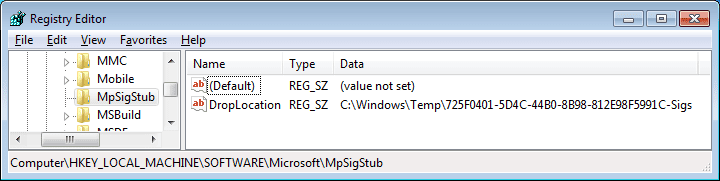
Thank you and Microsoft Security Essentials (MSE) has been installed for some time. Yes my registry looks exactly like your post. Does this mean that MSE should be re-installed?
Thanks, Ed
Sorry that I was not clear. You don't need to take any action with MSE. If you ever do uninstall MSE, that key will probably remain behind (unless Microsoft changes the uninstall process).
Registry cleaners are "snake oil" products. They are rarely of any value. If you feel that you must use one, then use the one in CCleaner. It is pretty conservative. It will probably find some .NET Framework stuff to be removed because the Windows OS puts that stuff back with each reboot. This perpetual game lets those with OCD tendencies feel good that they have cleaned the registry.
In the case of the registry key named
MpSigStub, it won't hurt MSE if you had let Norton Utilities remove the entire key*. The next time that MSE checks for updates, it will recreate that
MpSigStub key if it is missing and it recreates the value/data under it if they were removed... then MSE will create a corresponding folder in the Temp folder.
If you remove the temp files and folders (manually or via some utility), then Norton Utilities might see the
MpSigStub key as bad/invalid because there is no longer a folder on the hard drive to match the path indicated in the registry.
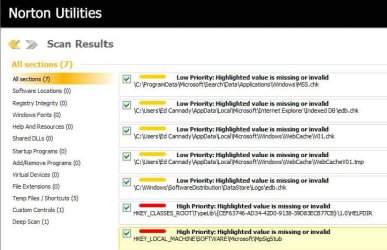
*I cannot tell by looking at the screenshot of Norton Utilities what actions it is going to take. The left pane indicates
Registry Integrity (0). The
MpSigStub key seems to be in the "
Deep Scan" category. I wonder if Norton Utilities thinks that the "fix" is to remove the
MpSigStub registry key or to recreate the folder in the Temp folder that the
MpSigStub key points to.