eSATA 2 SATA 3.0 to PCI-E PCI Express Card ASM 1061

foxint

New member
Member
VIP
Local time
4:19 AM
Messages
102
hi Guys

I have a really stupid question. been looking all over for the last few weeks. The Chinese seller is not helping.

I want to use this card with the 2 eSata connections.

I do not understand jumpers. Can anyone show me a photo of what to do with the jumpers to make the eSata ports/connections work.

I thought the default was eSata but it did not work. I showed the card to the local PC shop and they did not know...

this is what I bought

2 Esata 2 Sata 3 0 TO PCI E PCI Express Card Adapter Converter 6 0GBPS ASM1061 | eBay
Dan
 

My Computer My Computer

At a glance

Wind 7 Pro 64-bit
OS
Wind 7 Pro 64-bit
I don't think you need to set any jumpers. Is the external HDD in an enclosure? Are you powering the external HDD?

Did you connect HDD when the PC was running or shut down? Try restarting while it is plugged in. You may need a driver for hot plug to work, or to actively search for hardware changes in Device Manager.
 

My Computer My Computer

At a glance

Windows 7 Ultimate x64 SP1AMD Phenom 2 1090T2x8GB Kingston HyperX Fury Black 1600Mhz Unga...MSI GTX 970 Gaming 4G
Computer type
PC/Desktop
Computer Manufacturer/Model Number
Custom Build
OS
Windows 7 Ultimate x64 SP1
CPU
AMD Phenom 2 1090T
Motherboard
Gigabyte GA-890FXA-UD5
Memory
2x8GB Kingston HyperX Fury Black 1600Mhz Unganged
Graphics Card(s)
MSI GTX 970 Gaming 4G
Sound Card
Realtek On-Board HD 7.1 Audio / Logitech G35
Monitor(s) Displays
3xAcer GD245HQ
Screen Resolution
1920x1080
Hard Drives
Samsung 850 Pro 512GB SSD - OS /
WD Caviar Black SATA 3 - 1 TBx2 - Dynamic RAID 0 /
WD Caviar Green SATA 2 - 640GBx2 - Dynamic RAID 0 /
WD Caviar Green SATA 2 - 640GB - Internal Backup /
Seagate Barracude SATA 3 - 3TB - External Backup/ Sync
PSU
HighPower 1000W
Case
Cooler Master HAF 932
Cooling
Noctua NH-D14
Keyboard
Logitech G19
Mouse
Logitech G500
Internet Speed
100/4 Mbit Cable (100GB quota)
Antivirus
ZoneAlarm Extreme Security / MBAM Pro / MBAE Free / SAS Free
Browser
IE 11 - Firefox - Chrome
Other Info
Logitech F710/ G27/ G940/ Z5500 // TrackIR 5 // Nvidia 3D Surround Vision
Hi
Thank you.

There is an external HDD enclosure that has its own power pack. I want to boot the OS from the external (as it does now), but with the card (as I understand) it will be better and faster than the dodggy cord.

I tried to find it in the Bios. So if the jumpers are for the eSata I must have done something wrong?? I have a disc...

Will try and get back tomorrow - I am on the other side of the world and it is night...
Thanks
Dan
 

My Computer My Computer

At a glance

Wind 7 Pro 64-bit
OS
Wind 7 Pro 64-bit
Well, do you see the HDD in BIOS? Set the HDD boot order to make external first in order. Possibly you may need drivers for the card. If so, try loading Windows normally and install the drivers from CD, then try again connected to E-SATA.
 

My Computer My Computer

At a glance

Windows 7 Ultimate x64 SP1AMD Phenom 2 1090T2x8GB Kingston HyperX Fury Black 1600Mhz Unga...MSI GTX 970 Gaming 4G
Computer type
PC/Desktop
Computer Manufacturer/Model Number
Custom Build
OS
Windows 7 Ultimate x64 SP1
CPU
AMD Phenom 2 1090T
Motherboard
Gigabyte GA-890FXA-UD5
Memory
2x8GB Kingston HyperX Fury Black 1600Mhz Unganged
Graphics Card(s)
MSI GTX 970 Gaming 4G
Sound Card
Realtek On-Board HD 7.1 Audio / Logitech G35
Monitor(s) Displays
3xAcer GD245HQ
Screen Resolution
1920x1080
Hard Drives
Samsung 850 Pro 512GB SSD - OS /
WD Caviar Black SATA 3 - 1 TBx2 - Dynamic RAID 0 /
WD Caviar Green SATA 2 - 640GBx2 - Dynamic RAID 0 /
WD Caviar Green SATA 2 - 640GB - Internal Backup /
Seagate Barracude SATA 3 - 3TB - External Backup/ Sync
PSU
HighPower 1000W
Case
Cooler Master HAF 932
Cooling
Noctua NH-D14
Keyboard
Logitech G19
Mouse
Logitech G500
Internet Speed
100/4 Mbit Cable (100GB quota)
Antivirus
ZoneAlarm Extreme Security / MBAM Pro / MBAE Free / SAS Free
Browser
IE 11 - Firefox - Chrome
Other Info
Logitech F710/ G27/ G940/ Z5500 // TrackIR 5 // Nvidia 3D Surround Vision
Thank Mate

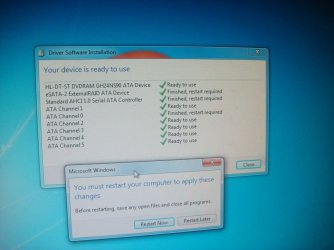
When I first put in the card it loaded the drivers automatically. Then I loaded them in from the card (just in case). I went to the BIOS and I could not see ANY PCI cards only 1 boot device (I think it was the DVD) and this was not the card?????

So the PC did not boot. So I re-connected the external HDD normally to the PCI slot on the MB and it worked.

Why is it always so hard??? Still not sure if the jumpers are in the correct alignment...but since the PC cannot see the card this is not the current issue (although it may become so)

regards
Dan
 

My Computer My Computer

At a glance

Wind 7 Pro 64-bit
OS
Wind 7 Pro 64-bit
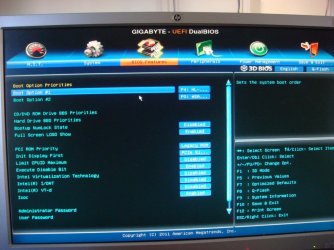
Can you post a photo of the BIOS screen for Boot Options please?
 

My Computer My Computer

At a glance

Windows 7 Ultimate x64 SP1AMD Phenom 2 1090T2x8GB Kingston HyperX Fury Black 1600Mhz Unga...MSI GTX 970 Gaming 4G
Computer type
PC/Desktop
Computer Manufacturer/Model Number
Custom Build
OS
Windows 7 Ultimate x64 SP1
CPU
AMD Phenom 2 1090T
Motherboard
Gigabyte GA-890FXA-UD5
Memory
2x8GB Kingston HyperX Fury Black 1600Mhz Unganged
Graphics Card(s)
MSI GTX 970 Gaming 4G
Sound Card
Realtek On-Board HD 7.1 Audio / Logitech G35
Monitor(s) Displays
3xAcer GD245HQ
Screen Resolution
1920x1080
Hard Drives
Samsung 850 Pro 512GB SSD - OS /
WD Caviar Black SATA 3 - 1 TBx2 - Dynamic RAID 0 /
WD Caviar Green SATA 2 - 640GBx2 - Dynamic RAID 0 /
WD Caviar Green SATA 2 - 640GB - Internal Backup /
Seagate Barracude SATA 3 - 3TB - External Backup/ Sync
PSU
HighPower 1000W
Case
Cooler Master HAF 932
Cooling
Noctua NH-D14
Keyboard
Logitech G19
Mouse
Logitech G500
Internet Speed
100/4 Mbit Cable (100GB quota)
Antivirus
ZoneAlarm Extreme Security / MBAM Pro / MBAE Free / SAS Free
Browser
IE 11 - Firefox - Chrome
Other Info
Logitech F710/ G27/ G940/ Z5500 // TrackIR 5 // Nvidia 3D Surround Vision
Hi Mate

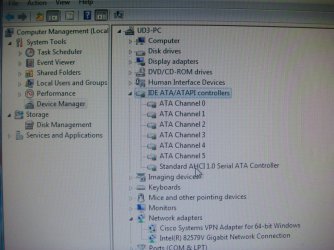
When I removed the corded HDD only one boot option. Now the PC is back there is 2 boot options. The PC is not recognising the card. I looked at Manager and could not see it???

Boot option 2 is my external HDD connected with a cord....

Dan
 

Attachments

  • 2015-07-08-UD3-small-small.JPG
    2015-07-08-UD3-small-small.JPG
    194.4 KB · Views: 0

My Computer My Computer

At a glance

Wind 7 Pro 64-bit
OS
Wind 7 Pro 64-bit
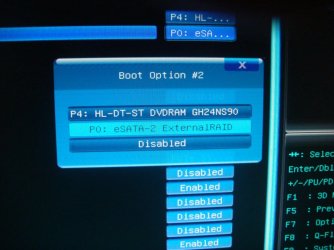
Did you try pressing ENTER when over Boot Option #1? Post a photo of that too. Also photo of boot option 2, if it is different.
 

My Computer My Computer

At a glance

Windows 7 Ultimate x64 SP1AMD Phenom 2 1090T2x8GB Kingston HyperX Fury Black 1600Mhz Unga...MSI GTX 970 Gaming 4G
Computer type
PC/Desktop
Computer Manufacturer/Model Number
Custom Build
OS
Windows 7 Ultimate x64 SP1
CPU
AMD Phenom 2 1090T
Motherboard
Gigabyte GA-890FXA-UD5
Memory
2x8GB Kingston HyperX Fury Black 1600Mhz Unganged
Graphics Card(s)
MSI GTX 970 Gaming 4G
Sound Card
Realtek On-Board HD 7.1 Audio / Logitech G35
Monitor(s) Displays
3xAcer GD245HQ
Screen Resolution
1920x1080
Hard Drives
Samsung 850 Pro 512GB SSD - OS /
WD Caviar Black SATA 3 - 1 TBx2 - Dynamic RAID 0 /
WD Caviar Green SATA 2 - 640GBx2 - Dynamic RAID 0 /
WD Caviar Green SATA 2 - 640GB - Internal Backup /
Seagate Barracude SATA 3 - 3TB - External Backup/ Sync
PSU
HighPower 1000W
Case
Cooler Master HAF 932
Cooling
Noctua NH-D14
Keyboard
Logitech G19
Mouse
Logitech G500
Internet Speed
100/4 Mbit Cable (100GB quota)
Antivirus
ZoneAlarm Extreme Security / MBAM Pro / MBAE Free / SAS Free
Browser
IE 11 - Firefox - Chrome
Other Info
Logitech F710/ G27/ G940/ Z5500 // TrackIR 5 // Nvidia 3D Surround Vision
Sir
Thank you.....

Here are your photo plus a couple more....

I tried the card in a few more slots - nothing.

I deleted all the ATA contoller then re-started and they were identified. Is this of any use?

Dan
 

Attachments

  • 2015-07-09-01-small-small.jpg
    2015-07-09-01-small-small.jpg
    155.1 KB · Views: 0
  • 2015-07-09-02-small-small.jpg
    2015-07-09-02-small-small.jpg
    262.6 KB · Views: 0
  • 2015-07-09-03-small-small.jpg
    2015-07-09-03-small-small.jpg
    167.2 KB · Views: 0
  • 2015-07-09-04-small-small.jpg
    2015-07-09-04-small-small.jpg
    173.6 KB · Views: 0

My Computer My Computer

At a glance

Wind 7 Pro 64-bit
OS
Wind 7 Pro 64-bit
There is supposed to be a list of your drives somewhere, don't you have other hard drives (or just 1 eSATA)? :)
I am inclined to think that e-SATA 2 listed is your card.

Try going into "Hard Drive BBS Priorities", and see what's inside.
 

My Computer My Computer

At a glance

Windows 7 Ultimate x64 SP1AMD Phenom 2 1090T2x8GB Kingston HyperX Fury Black 1600Mhz Unga...MSI GTX 970 Gaming 4G
Computer type
PC/Desktop
Computer Manufacturer/Model Number
Custom Build
OS
Windows 7 Ultimate x64 SP1
CPU
AMD Phenom 2 1090T
Motherboard
Gigabyte GA-890FXA-UD5
Memory
2x8GB Kingston HyperX Fury Black 1600Mhz Unganged
Graphics Card(s)
MSI GTX 970 Gaming 4G
Sound Card
Realtek On-Board HD 7.1 Audio / Logitech G35
Monitor(s) Displays
3xAcer GD245HQ
Screen Resolution
1920x1080
Hard Drives
Samsung 850 Pro 512GB SSD - OS /
WD Caviar Black SATA 3 - 1 TBx2 - Dynamic RAID 0 /
WD Caviar Green SATA 2 - 640GBx2 - Dynamic RAID 0 /
WD Caviar Green SATA 2 - 640GB - Internal Backup /
Seagate Barracude SATA 3 - 3TB - External Backup/ Sync
PSU
HighPower 1000W
Case
Cooler Master HAF 932
Cooling
Noctua NH-D14
Keyboard
Logitech G19
Mouse
Logitech G500
Internet Speed
100/4 Mbit Cable (100GB quota)
Antivirus
ZoneAlarm Extreme Security / MBAM Pro / MBAE Free / SAS Free
Browser
IE 11 - Firefox - Chrome
Other Info
Logitech F710/ G27/ G940/ Z5500 // TrackIR 5 // Nvidia 3D Surround Vision
Sir

I only have an external HDD - it is a dual HDD's in RAID 01. So no more. This is the only thing that shows up in HDD section.

Any suggestions.
 

My Computer My Computer

At a glance

Wind 7 Pro 64-bit
OS
Wind 7 Pro 64-bit
Hmm, RAID 0 or 1? It doesn't say anywhere that it supports a RAID configuration, but say it has 2 independent SATA channels.
 

My Computer My Computer

At a glance

Windows 7 Ultimate x64 SP1AMD Phenom 2 1090T2x8GB Kingston HyperX Fury Black 1600Mhz Unga...MSI GTX 970 Gaming 4G
Computer type
PC/Desktop
Computer Manufacturer/Model Number
Custom Build
OS
Windows 7 Ultimate x64 SP1
CPU
AMD Phenom 2 1090T
Motherboard
Gigabyte GA-890FXA-UD5
Memory
2x8GB Kingston HyperX Fury Black 1600Mhz Unganged
Graphics Card(s)
MSI GTX 970 Gaming 4G
Sound Card
Realtek On-Board HD 7.1 Audio / Logitech G35
Monitor(s) Displays
3xAcer GD245HQ
Screen Resolution
1920x1080
Hard Drives
Samsung 850 Pro 512GB SSD - OS /
WD Caviar Black SATA 3 - 1 TBx2 - Dynamic RAID 0 /
WD Caviar Green SATA 2 - 640GBx2 - Dynamic RAID 0 /
WD Caviar Green SATA 2 - 640GB - Internal Backup /
Seagate Barracude SATA 3 - 3TB - External Backup/ Sync
PSU
HighPower 1000W
Case
Cooler Master HAF 932
Cooling
Noctua NH-D14
Keyboard
Logitech G19
Mouse
Logitech G500
Internet Speed
100/4 Mbit Cable (100GB quota)
Antivirus
ZoneAlarm Extreme Security / MBAM Pro / MBAE Free / SAS Free
Browser
IE 11 - Firefox - Chrome
Other Info
Logitech F710/ G27/ G940/ Z5500 // TrackIR 5 // Nvidia 3D Surround Vision
Mate

The new card has nothing to do with the RAID. The RAID is a small box I have attached via a eSata cable that is physically attached to the PCI slot on the MB. I did not want to use the on-board RAID.

The new card still remains unseen and a mystery.
 

My Computer My Computer

At a glance

Wind 7 Pro 64-bit
OS
Wind 7 Pro 64-bit
Alright, did you reset the jumpers back to how they were when you got it first time? Let me ask, where did you get the idea you needed to change them in the first place? Any links to it? or anything in manual?

After resetting jumpers, plug in any HDD to it (do you have spare ones?) not your OS drives. And boot like that to Windows and see if new HDD will be seen.
 

My Computer My Computer

At a glance

Windows 7 Ultimate x64 SP1AMD Phenom 2 1090T2x8GB Kingston HyperX Fury Black 1600Mhz Unga...MSI GTX 970 Gaming 4G
Computer type
PC/Desktop
Computer Manufacturer/Model Number
Custom Build
OS
Windows 7 Ultimate x64 SP1
CPU
AMD Phenom 2 1090T
Motherboard
Gigabyte GA-890FXA-UD5
Memory
2x8GB Kingston HyperX Fury Black 1600Mhz Unganged
Graphics Card(s)
MSI GTX 970 Gaming 4G
Sound Card
Realtek On-Board HD 7.1 Audio / Logitech G35
Monitor(s) Displays
3xAcer GD245HQ
Screen Resolution
1920x1080
Hard Drives
Samsung 850 Pro 512GB SSD - OS /
WD Caviar Black SATA 3 - 1 TBx2 - Dynamic RAID 0 /
WD Caviar Green SATA 2 - 640GBx2 - Dynamic RAID 0 /
WD Caviar Green SATA 2 - 640GB - Internal Backup /
Seagate Barracude SATA 3 - 3TB - External Backup/ Sync
PSU
HighPower 1000W
Case
Cooler Master HAF 932
Cooling
Noctua NH-D14
Keyboard
Logitech G19
Mouse
Logitech G500
Internet Speed
100/4 Mbit Cable (100GB quota)
Antivirus
ZoneAlarm Extreme Security / MBAM Pro / MBAE Free / SAS Free
Browser
IE 11 - Firefox - Chrome
Other Info
Logitech F710/ G27/ G940/ Z5500 // TrackIR 5 // Nvidia 3D Surround Vision
Sir

There is no manual. I did not change the jumpers as I did not understand how they worked. I asked and asked...but nothing.

I sort of tried that... but will do that again....

Thank you..... I have another PC and will try as you said...just waiting for the win 7 updates...that have been a mess....

Thank you
Dan
 

My Computer My Computer

At a glance

Wind 7 Pro 64-bit
OS
Wind 7 Pro 64-bit
Sir

Nothing new... It did not work.

I still think the jumpers may be the issue, but no one can explain how the jumper syntax/grammar - I do not understand .... I asked my brother-in-law the electrician (not PC expert) and he suggested the jumper were for the eSata...but still not working

I am about to throw the 3 cards in the bin....

Dan
 

My Computer My Computer

At a glance

Wind 7 Pro 64-bit
OS
Wind 7 Pro 64-bit
Back
Top