
Solved eSata drive partition very slow

daniellouwrens

New member
Member
VIP
Local time
12:53 AM
Messages
173
Hi

I have a drive connected by eSata, it is 2 TB and I have three partitions, 1 TB and two 500 GB approx and two 500.

Two of the partitions are fine but the third (a 500GB) is very slow, file read and transfer are very slow.

Any ideas on why?

I have all three partitions set up the same.

Cheers

Daniel
 

My Computer My Computer

At a glance

Microsoft Windows 7 Professional 32-bit 7601 ...Intel(R) Core(TM)2 Quad CPU Q8300 @ 2.50GHz4.00 GBNVIDIA GeForce GT 220
Computer type
PC/Desktop
Computer Manufacturer/Model Number
Multimedia PC MEDION® Akoya® E7330 D
OS
Microsoft Windows 7 Professional 32-bit 7601 Multiprocessor Free Service Pack 1
CPU
Intel(R) Core(TM)2 Quad CPU Q8300 @ 2.50GHz
Motherboard
MEDIONPC MS-7366
Memory
4.00 GB
Graphics Card(s)
NVIDIA GeForce GT 220
Sound Card
(1) High Definition Audio Device (2) High Definition Audio
Screen Resolution
1920 x 1080 x 32 bits (4294967296 colors) @ 60 Hz
Hard Drives
(1) WDC WD10EZEX-00WN4A0 ATA Device (2) WDC WD6400AACS-00G8B1 ATA Device (3) Generic Flash HS-CF USB Device (4) Generic Flash HS-MS/SD USB Device (5) Generic Flash HS-SM USB Device (6) HP Officejet 5740 s USB Device (7) USB Flash Disk USB
How much slower? The last partition will be slowest as it is on the inside of the platter.
 

My Computer My Computer

At a glance

Windows 10 Pro. EFI boot partition, full EFI ...i7 4770k 4.4GHz (44-44-43-43 turbo) @ 1.248V16GB (8GBx2) @2200 MHz G.skill Sniper 10-11-1...MSI GTX 970 Gaming 4G
Computer type
PC/Desktop
Computer Manufacturer/Model Number
Home built (GeneO industries)/Model 4
OS
Windows 10 Pro. EFI boot partition, full EFI boot
CPU
i7 4770k 4.4GHz (44-44-43-43 turbo) @ 1.248V
Motherboard
ASUS Maximus VI Hero
Memory
16GB (8GBx2) @2200 MHz G.skill Sniper 10-11-10-30-1, 1.6V
Graphics Card(s)
MSI GTX 970 Gaming 4G
Sound Card
Onboard SupremeFX Audio
Monitor(s) Displays
NEC Spectraview 2490WUXi-SV
Screen Resolution
1920 x 1200
Hard Drives
Samsung 850 Pro 256GB (OS), Samsung 2x 128GB 840 Pro SSD in RAID0, 3x WD Blue 6Gb/s 1TB RAID0, WD 2TB Black external USB 3.0, 2TB WD20EARS Green external USB 3.0, 2x 500GB Seagate and 1 750 GB external USB, 1x 350GB external USB3
PSU
Seasonic X-850 (2012 KM3 model)
Case
Fractal Design Define R4
Cooling
NH-D14, NF-F12, NF-A15; NF-P14, NF-P12,NF-A14, S12A PWM
Keyboard
Cooler Master Storm Quickfire Rapid - Brown
Mouse
Logitech G602
Internet Speed
126.4 Mb/s down, 24.3 Mb/s up
Other Info
USB 3.0 x8 , SATA III x8, eSATA, USB 2.0 x6. Samsung DVD R/W drive.

WEI: CPU 7.8, Memory 7.9, Graphics 7.9, Disk 7.9
Hi

it's hard to say, the way I noticed it was that I did a Casper clone of my C Drive to the first partition on the eSata drive and it took about an hour to copy the drive of 500 GB, then I did a Casper clone of my data drive also about 500 GB to the second partition and I killed it after 5 hours, it was so slow.
There are three partitions on the Disk, I am not aware of any issues with the last partition.

FYI, Casper is backup software that copies changes only since the the last time it was run, both disks were backed up about the same time a week ago, something has changed since then.

Hope this makes sense.

cheers

Daniel
 

My Computer My Computer

At a glance

Microsoft Windows 7 Professional 32-bit 7601 ...Intel(R) Core(TM)2 Quad CPU Q8300 @ 2.50GHz4.00 GBNVIDIA GeForce GT 220
Computer type
PC/Desktop
Computer Manufacturer/Model Number
Multimedia PC MEDION® Akoya® E7330 D
OS
Microsoft Windows 7 Professional 32-bit 7601 Multiprocessor Free Service Pack 1
CPU
Intel(R) Core(TM)2 Quad CPU Q8300 @ 2.50GHz
Motherboard
MEDIONPC MS-7366
Memory
4.00 GB
Graphics Card(s)
NVIDIA GeForce GT 220
Sound Card
(1) High Definition Audio Device (2) High Definition Audio
Screen Resolution
1920 x 1080 x 32 bits (4294967296 colors) @ 60 Hz
Hard Drives
(1) WDC WD10EZEX-00WN4A0 ATA Device (2) WDC WD6400AACS-00G8B1 ATA Device (3) Generic Flash HS-CF USB Device (4) Generic Flash HS-MS/SD USB Device (5) Generic Flash HS-SM USB Device (6) HP Officejet 5740 s USB Device (7) USB Flash Disk USB
Just try copying the data to the partition to see how long it takes. and what your rate is. That will rule out Casper or not.
 

My Computer My Computer

At a glance

Windows 10 Pro. EFI boot partition, full EFI ...i7 4770k 4.4GHz (44-44-43-43 turbo) @ 1.248V16GB (8GBx2) @2200 MHz G.skill Sniper 10-11-1...MSI GTX 970 Gaming 4G
Computer type
PC/Desktop
Computer Manufacturer/Model Number
Home built (GeneO industries)/Model 4
OS
Windows 10 Pro. EFI boot partition, full EFI boot
CPU
i7 4770k 4.4GHz (44-44-43-43 turbo) @ 1.248V
Motherboard
ASUS Maximus VI Hero
Memory
16GB (8GBx2) @2200 MHz G.skill Sniper 10-11-10-30-1, 1.6V
Graphics Card(s)
MSI GTX 970 Gaming 4G
Sound Card
Onboard SupremeFX Audio
Monitor(s) Displays
NEC Spectraview 2490WUXi-SV
Screen Resolution
1920 x 1200
Hard Drives
Samsung 850 Pro 256GB (OS), Samsung 2x 128GB 840 Pro SSD in RAID0, 3x WD Blue 6Gb/s 1TB RAID0, WD 2TB Black external USB 3.0, 2TB WD20EARS Green external USB 3.0, 2x 500GB Seagate and 1 750 GB external USB, 1x 350GB external USB3
PSU
Seasonic X-850 (2012 KM3 model)
Case
Fractal Design Define R4
Cooling
NH-D14, NF-F12, NF-A15; NF-P14, NF-P12,NF-A14, S12A PWM
Keyboard
Cooler Master Storm Quickfire Rapid - Brown
Mouse
Logitech G602
Internet Speed
126.4 Mb/s down, 24.3 Mb/s up
Other Info
USB 3.0 x8 , SATA III x8, eSATA, USB 2.0 x6. Samsung DVD R/W drive.

WEI: CPU 7.8, Memory 7.9, Graphics 7.9, Disk 7.9
I would try another backup/imaging program. E.g. Macrium or Paragon - the free versions.
 

My Computer My Computer

At a glance

Vista, Windows7, Mint Mate, Zorin, Windows 8from 1.6GHz Duo to i7
Computer Manufacturer/Model Number
HP, Dell, Gateway, Toshiba - 4 laptops and 2 desktops
OS
Vista, Windows7, Mint Mate, Zorin, Windows 8
CPU
from 1.6GHz Duo to i7
Monitor(s) Displays
2x HP w2207
Hard Drives
5x HDD, 7x SSD, 12x Externals
Keyboard
with trackball - no mices
Mouse
Trackball mice
Internet Speed
DSL 6000
Hi

Thanks for the replies, the problem is fixed.

I should have done this in the first place, I looked up Casper help files and found a solution, it was to use Device Manager to change Transfer Mode from "allow BIOS to determine transfer mode" to "DMA Mode".

For some reason that partition was transferring files a lot slower than the others and I guess the BIOS found a reason to use PIO mode.

BTW I would not change from Casper for anything, I tried other backup solutions and had problems, either with how I used them or with the way they worked, Casper is VERY intuitive and simple to use and as I am adventurous with software and hardware I often need to revert to my Backup (clone) to restore my system.

Also Casper help is very good and quick, an email to their help desk is responded to in a few hours and solves the problem, the only reason I did not email Casper help with this problem is that I figured Casper was working well as I had recently run Casper on my C: drive.

Anyway all's well.

regards

Daniel
 

My Computer My Computer

At a glance

Microsoft Windows 7 Professional 32-bit 7601 ...Intel(R) Core(TM)2 Quad CPU Q8300 @ 2.50GHz4.00 GBNVIDIA GeForce GT 220
Computer type
PC/Desktop
Computer Manufacturer/Model Number
Multimedia PC MEDION® Akoya® E7330 D
OS
Microsoft Windows 7 Professional 32-bit 7601 Multiprocessor Free Service Pack 1
CPU
Intel(R) Core(TM)2 Quad CPU Q8300 @ 2.50GHz
Motherboard
MEDIONPC MS-7366
Memory
4.00 GB
Graphics Card(s)
NVIDIA GeForce GT 220
Sound Card
(1) High Definition Audio Device (2) High Definition Audio
Screen Resolution
1920 x 1080 x 32 bits (4294967296 colors) @ 60 Hz
Hard Drives
(1) WDC WD10EZEX-00WN4A0 ATA Device (2) WDC WD6400AACS-00G8B1 ATA Device (3) Generic Flash HS-CF USB Device (4) Generic Flash HS-MS/SD USB Device (5) Generic Flash HS-SM USB Device (6) HP Officejet 5740 s USB Device (7) USB Flash Disk USB
So much for Casper. Seems to be a good program. I had never heard of it. Unfortunately the $50 seperate IT from ME.
 

My Computer My Computer

At a glance

Vista, Windows7, Mint Mate, Zorin, Windows 8from 1.6GHz Duo to i7
Computer Manufacturer/Model Number
HP, Dell, Gateway, Toshiba - 4 laptops and 2 desktops
OS
Vista, Windows7, Mint Mate, Zorin, Windows 8
CPU
from 1.6GHz Duo to i7
Monitor(s) Displays
2x HP w2207
Hard Drives
5x HDD, 7x SSD, 12x Externals
Keyboard
with trackball - no mices
Mouse
Trackball mice
Internet Speed
DSL 6000
found a solution, it was to use Device Manager to change Transfer Mode from "allow BIOS to determine transfer mode" to "DMA Mode".

For some reason that partition was transferring files a lot slower than the others and I guess the BIOS found a reason to use PIO mode.
Well I'm certainly confused.

You have to be very clear and unambiguous, when you refer to a "drive" vs. "partition" in describing a problem. They don't mean the same thing. Unfortunately Windows assigns a "drive letter" to a partition, so we kind of interchangeably and casually use drive, partition, even drive letter. But they're all very precisely different concepts, and using them improperly causes confusion.


You didn't post a screenshot from DISKMGMT.MSC, so we don't know exactly what your setup looks like. But it sounds like you have TWO physical drives.

One hard drive sounds like it's your primary drive where the C-partition lives, and it sounds like there's a second "data" partition on the same hard drive (I'll call it D).

The new SATA drive sounds like a second physical hard drive, and you have created three partitions on it (I'll letter them E, F, and G). One is a 1TB partition and the other two are 500GB partitions. Did you format all three partitions as NTFS when you created them? I'll assume yes.

If the BIOS (on your motherboard) has any setup option and therefore any effect on physical access to a physical hard drive, it would have that same effect on ALL PARTITIONS ON THAT HARD DRIVE. It cannot pick and choose how to support a specific partition on that drive.

On the other hand, if your two Casper backup/clone jobs have different setup options (relating to this BIOS vs. DMA mode option), maybe this is more likely responsible for the huge difference in job time. As was pointed out, writing to outer partitions on the drive is faster than writing to inner partitions (just because of the spinning speed at physical distances from the center of rotation), but that's a relatively minor difference that doesn't seem related to your story.

Just for closure here, can you please post a screenshot of your hard drive setup using DISKMGMT.MSC. Be sure to please maximize the window first, and also spread/separate the columns so that all text in each cell is visible and can be read, before you take your screenshot.

Thanks.
 

My Computer My Computer

At a glance

Windows 7 Pro x64 (1), Win7 Pro X64 (2)i5-3350p 3.1Ghz/6MB-cache (1); E8400 3.0Ghz/6...8GB PC3-12800 DDR3 (1); 4GB PC3-10600 DDR3 (2)ATI HD7750 (1), (see TV cards); ATI R7 250 (2)
Computer type
PC/Desktop
Computer Manufacturer/Model Number
Home-built, two systems (1) and (2)
OS
Windows 7 Pro x64 (1), Win7 Pro X64 (2)
CPU
i5-3350p 3.1Ghz/6MB-cache (1); E8400 3.0Ghz/6MB-cache (2)
Motherboard
ASUS P8Z77-V Pro (1); ASUS P5Q3 (2)
Memory
8GB PC3-12800 DDR3 (1); 4GB PC3-10600 DDR3 (2)
Graphics Card(s)
ATI HD7750 (1), (see TV cards); ATI R7 250 (2)
Sound Card
Realtek ALC892 HD Audio (1); Realtek ALC1200 HD Audio (2)
Monitor(s) Displays
Eizo HD2441W LCD, Eizo S2433W (1); Eizo 24" S2433W (2)
Screen Resolution
1920x1200, 1920x1200 (1); 1920x1200 (2)
Hard Drives
(1) 1TB SATA-II (7200RPM), 2x2TB SATA-III (7200RPM), 250GB SATA-III (10000RPM) for OS; 2x2TB external USB 3.0

(2) 320GB SATA-II (7200RPM), 750GB SATA-II (7200RPM), 150GB SATA-II (10000RPM) for OS; 2TB external USB 3.0
PSU
Nesteq ECS-6001 600W (1); Nesteq ECS-5001 500W (2)
Case
Acousti-Case 360 (1) and (2)
Cooling
Noctua NH-U12P SE2 for CPU, 2x120mm case fans (1) and (2)
Keyboard
IBM PS/2 (1) and (2)
Mouse
Logitech MX Revolution wireless (1); Microsoft wired (2)
Internet Speed
100mbps down / 10mbps up
Antivirus
Microsoft Security Essentials; Malwarebyte Anti-Malware Pro
Browser
Firefox
Other Info
Ceton InfiniTV 4-tuner cablecard-enabled TV card as well as Hauppauge HVR-2250 OTA/ATSC 2-tuner TV card in (1), running under Win7 WMC
Will do, I have been in court all day and now have to go out, I will do it in the morning.

Cheers

Daniel
 

My Computer My Computer

At a glance

Microsoft Windows 7 Professional 32-bit 7601 ...Intel(R) Core(TM)2 Quad CPU Q8300 @ 2.50GHz4.00 GBNVIDIA GeForce GT 220
Computer type
PC/Desktop
Computer Manufacturer/Model Number
Multimedia PC MEDION® Akoya® E7330 D
OS
Microsoft Windows 7 Professional 32-bit 7601 Multiprocessor Free Service Pack 1
CPU
Intel(R) Core(TM)2 Quad CPU Q8300 @ 2.50GHz
Motherboard
MEDIONPC MS-7366
Memory
4.00 GB
Graphics Card(s)
NVIDIA GeForce GT 220
Sound Card
(1) High Definition Audio Device (2) High Definition Audio
Screen Resolution
1920 x 1080 x 32 bits (4294967296 colors) @ 60 Hz
Hard Drives
(1) WDC WD10EZEX-00WN4A0 ATA Device (2) WDC WD6400AACS-00G8B1 ATA Device (3) Generic Flash HS-CF USB Device (4) Generic Flash HS-MS/SD USB Device (5) Generic Flash HS-SM USB Device (6) HP Officejet 5740 s USB Device (7) USB Flash Disk USB
found a solution, it was to use Device Manager to change Transfer Mode from "allow BIOS to determine transfer mode" to "DMA Mode".

For some reason that partition was transferring files a lot slower than the others and I guess the BIOS found a reason to use PIO mode.
Well I'm certainly confused.

You have to be very clear and unambiguous, when you refer to a "drive" vs. "partition" in describing a problem. They don't mean the same thing. Unfortunately Windows assigns a "drive letter" to a partition, so we kind of interchangeably and casually use drive, partition, even drive letter. But they're all very precisely different concepts, and using them improperly causes confusion.


You didn't post a screenshot from DISKMGMT.MSC, so we don't know exactly what your setup looks like. But it sounds like you have TWO physical drives.

One hard drive sounds like it's your primary drive where the C-partition lives, and it sounds like there's a second "data" partition on the same hard drive (I'll call it D).

The new SATA drive sounds like a second physical hard drive, and you have created three partitions on it (I'll letter them E, F, and G). One is a 1TB partition and the other two are 500GB partitions. Did you format all three partitions as NTFS when you created them? I'll assume yes.

If the BIOS (on your motherboard) has any setup option and therefore any effect on physical access to a physical hard drive, it would have that same effect on ALL PARTITIONS ON THAT HARD DRIVE. It cannot pick and choose how to support a specific partition on that drive.

On the other hand, if your two Casper backup/clone jobs have different setup options (relating to this BIOS vs. DMA mode option), maybe this is more likely responsible for the huge difference in job time. As was pointed out, writing to outer partitions on the drive is faster than writing to inner partitions (just because of the spinning speed at physical distances from the center of rotation), but that's a relatively minor difference that doesn't seem related to your story.

Just for closure here, can you please post a screenshot of your hard drive setup using DISKMGMT.MSC. Be sure to please maximize the window first, and also spread/separate the columns so that all text in each cell is visible and can be read, before you take your screenshot.

Thanks.

Hi

I'm not sure where I have been ambiguous, I did, as far as I can see, refer to Drives and Partitions as separate items, but I guess I should have been even more specific and I am always willing to learn and I appreciate your interest.

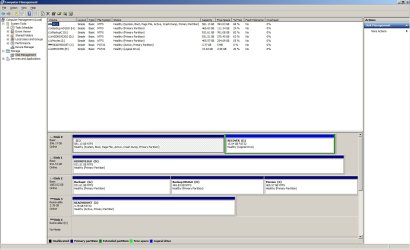
I have posted the screenshot of Diskmanagement and for added clarity, the problematic operation was D: to H: and the operation that was successfully run first was C: to G:

Since you have advised that the BIOS cannot differentiate between Partitions on the same Disk I guess there must have been some extraneous issue that was not apparent but the settings in Casper are identical except for the Drive numbers of the Source and Target drives.

For further Clarity Disk 1 (D) and Disk 2 (G, H, I,) are both eSata, perhaps that was an issue but the Casper Clone I ran last night with the new Transfer Mode settings gave me excellent and speedy results.

Regards

Daniel
 

Attachments

  • Disk Management.jpg
    Disk Management.jpg
    134.6 KB · Views: 184

My Computer My Computer

At a glance

Microsoft Windows 7 Professional 32-bit 7601 ...Intel(R) Core(TM)2 Quad CPU Q8300 @ 2.50GHz4.00 GBNVIDIA GeForce GT 220
Computer type
PC/Desktop
Computer Manufacturer/Model Number
Multimedia PC MEDION® Akoya® E7330 D
OS
Microsoft Windows 7 Professional 32-bit 7601 Multiprocessor Free Service Pack 1
CPU
Intel(R) Core(TM)2 Quad CPU Q8300 @ 2.50GHz
Motherboard
MEDIONPC MS-7366
Memory
4.00 GB
Graphics Card(s)
NVIDIA GeForce GT 220
Sound Card
(1) High Definition Audio Device (2) High Definition Audio
Screen Resolution
1920 x 1080 x 32 bits (4294967296 colors) @ 60 Hz
Hard Drives
(1) WDC WD10EZEX-00WN4A0 ATA Device (2) WDC WD6400AACS-00G8B1 ATA Device (3) Generic Flash HS-CF USB Device (4) Generic Flash HS-MS/SD USB Device (5) Generic Flash HS-SM USB Device (6) HP Officejet 5740 s USB Device (7) USB Flash Disk USB
Aha! Thank you very much for the screenshot, as it answers many questions and clears up my confusion.

I had mistakenly thought your reference to "C drive" and "data drive" were actually referring to your C and D partitions on one hard drive. Turns out these are actually two separate partitions, on two separate hard drives. It's still more precise to refer to them as "partitions" and then qualify by describing them on one or two hard drives, but at least now it's now clear why you referred to the two the way you did.

Again, a picture's worth a thousand words, and now it's all understood.


However, you'll notice that your C partition only contains 188GB in-use, with the rest currently free.

In contrast, your D partition contains 356GB in-use, with the rest currently free.

Assuming you used the same backup method for both jobs, it would certainly be reasonable for the D version to run probably twice as long as the C version. Five times as long? I'd agree, something doesn't sound right.


I should have done this in the first place, I looked up Casper help files and found a solution, it was to use Device Manager to change Transfer Mode from "allow BIOS to determine transfer mode" to "DMA Mode".
Can you be more precise in showing where this is in Device Manager?

I have two SATA drives and one SCSI drive in this machine, and there is no setting which describes the option you mention. That sounds much more like a BIOS setting itself.

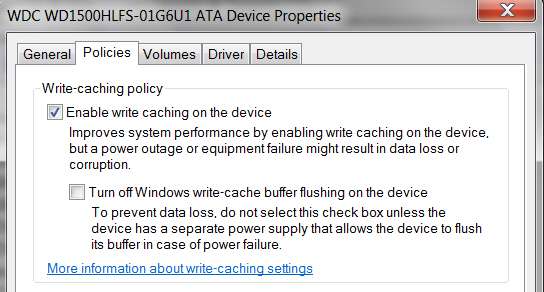
The only thing I see in Win7's Device Manager pertaining to disk drives that sounds relevant is "write cache" enabled or disabled. Certainly "enabled" is the default and pre-checked, so unless you've un-checked this for the drive (i.e. your Disk2 with the three partitions G, H, I) I don't see how this could be a factor. And besides, this still affects the entire drive and all partitions on that drive, not just one partition on that drive.

satacache.jpg


Now in the BIOS of my machine, there certainly are settings that pertain to PIO, DMA, etc., for SATA drives. But in my case at least (ASUS P5Q3 board) I never changed these from the default "auto". Did you change the corresponding settings that probably on your own motherboard's BIOS? But again, this would still affect all partitions on that SATA drive, not just one.

mobosatabios.jpg


Anyway, I'd like to know more precisely exactly what you changed that solved your performance problem. Where was it, and what was the option? Screenshot if you can?

Very curious.
 

My Computer My Computer

At a glance

Windows 7 Pro x64 (1), Win7 Pro X64 (2)i5-3350p 3.1Ghz/6MB-cache (1); E8400 3.0Ghz/6...8GB PC3-12800 DDR3 (1); 4GB PC3-10600 DDR3 (2)ATI HD7750 (1), (see TV cards); ATI R7 250 (2)
Computer type
PC/Desktop
Computer Manufacturer/Model Number
Home-built, two systems (1) and (2)
OS
Windows 7 Pro x64 (1), Win7 Pro X64 (2)
CPU
i5-3350p 3.1Ghz/6MB-cache (1); E8400 3.0Ghz/6MB-cache (2)
Motherboard
ASUS P8Z77-V Pro (1); ASUS P5Q3 (2)
Memory
8GB PC3-12800 DDR3 (1); 4GB PC3-10600 DDR3 (2)
Graphics Card(s)
ATI HD7750 (1), (see TV cards); ATI R7 250 (2)
Sound Card
Realtek ALC892 HD Audio (1); Realtek ALC1200 HD Audio (2)
Monitor(s) Displays
Eizo HD2441W LCD, Eizo S2433W (1); Eizo 24" S2433W (2)
Screen Resolution
1920x1200, 1920x1200 (1); 1920x1200 (2)
Hard Drives
(1) 1TB SATA-II (7200RPM), 2x2TB SATA-III (7200RPM), 250GB SATA-III (10000RPM) for OS; 2x2TB external USB 3.0

(2) 320GB SATA-II (7200RPM), 750GB SATA-II (7200RPM), 150GB SATA-II (10000RPM) for OS; 2TB external USB 3.0
PSU
Nesteq ECS-6001 600W (1); Nesteq ECS-5001 500W (2)
Case
Acousti-Case 360 (1) and (2)
Cooling
Noctua NH-U12P SE2 for CPU, 2x120mm case fans (1) and (2)
Keyboard
IBM PS/2 (1) and (2)
Mouse
Logitech MX Revolution wireless (1); Microsoft wired (2)
Internet Speed
100mbps down / 10mbps up
Antivirus
Microsoft Security Essentials; Malwarebyte Anti-Malware Pro
Browser
Firefox
Other Info
Ceton InfiniTV 4-tuner cablecard-enabled TV card as well as Hauppauge HVR-2250 OTA/ATSC 2-tuner TV card in (1), running under Win7 WMC
Hi

I changed to options in Device Manager/IDE ATA Atapi Controllers/NVIDIA nForce Serial ATA Controller and unchecked "Let BIOS Select Transfer mode"

I did not enter the BIOS, but mine is also set to Auto.

I have uploaded a Screenshot.

Regards

Daniel
 

Attachments

  • Device Manager.jpg
    Device Manager.jpg
    51.6 KB · Views: 122

My Computer My Computer

At a glance

Microsoft Windows 7 Professional 32-bit 7601 ...Intel(R) Core(TM)2 Quad CPU Q8300 @ 2.50GHz4.00 GBNVIDIA GeForce GT 220
Computer type
PC/Desktop
Computer Manufacturer/Model Number
Multimedia PC MEDION® Akoya® E7330 D
OS
Microsoft Windows 7 Professional 32-bit 7601 Multiprocessor Free Service Pack 1
CPU
Intel(R) Core(TM)2 Quad CPU Q8300 @ 2.50GHz
Motherboard
MEDIONPC MS-7366
Memory
4.00 GB
Graphics Card(s)
NVIDIA GeForce GT 220
Sound Card
(1) High Definition Audio Device (2) High Definition Audio
Screen Resolution
1920 x 1080 x 32 bits (4294967296 colors) @ 60 Hz
Hard Drives
(1) WDC WD10EZEX-00WN4A0 ATA Device (2) WDC WD6400AACS-00G8B1 ATA Device (3) Generic Flash HS-CF USB Device (4) Generic Flash HS-MS/SD USB Device (5) Generic Flash HS-SM USB Device (6) HP Officejet 5740 s USB Device (7) USB Flash Disk USB
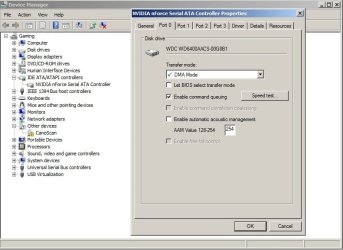
Very enlightening. This is something specifically unique to the nVidia driver for the SATA controllers on your motherboard, that provides these additional tweaks. It is not standard with Win7 itself.

And that is really very very BIOS-level micro-function control, at the driver level in Win7 from nVidia.

But again, whatever you've set here should apply to the drive (and all partitions on it), not one particular partition. So while you may have now set things for superior performance than it was previously, I'm still mystified as to why you saw its negative effect on just you D->H job, and not on your C->G job (taking into account that D has twice as much data to copy than C did).

Nothing at all like this shows up in Device Manager for the SATA controllers on my ASUS P5Q3 motherboard with its Intel ICH10 chipset, with drivers from Intel. You have to actually go into the BIOS at boot time to be able to reconfigure any of this type of hardware related stuff (from "auto").

sataproperties.jpg


Anyway, very interesting. It's now much clearer what you did, that apparently boosted your performance as you state.

No question that "DMA mode" is higher performance than "PIO mode", and uses much less CPU resource. I actually don't know what's wrong with "let BIOS choose transfer mode" if your BIOS has "auto" for the SATA setup options. You'd think this would imply "DMA mode" for transfers, which should be just what you've now manually selected anyway. I don't know how/why your previous "let BIOS choose" would imply the slower PIO mode instead of DMA mode.

Ok. Whatever the real explanation, I would say you did the right thing here if the setting you're now at gives you the performance you expected.

And as your green-check indicates, "case closed".
 

My Computer My Computer

At a glance

Windows 7 Pro x64 (1), Win7 Pro X64 (2)i5-3350p 3.1Ghz/6MB-cache (1); E8400 3.0Ghz/6...8GB PC3-12800 DDR3 (1); 4GB PC3-10600 DDR3 (2)ATI HD7750 (1), (see TV cards); ATI R7 250 (2)
Computer type
PC/Desktop
Computer Manufacturer/Model Number
Home-built, two systems (1) and (2)
OS
Windows 7 Pro x64 (1), Win7 Pro X64 (2)
CPU
i5-3350p 3.1Ghz/6MB-cache (1); E8400 3.0Ghz/6MB-cache (2)
Motherboard
ASUS P8Z77-V Pro (1); ASUS P5Q3 (2)
Memory
8GB PC3-12800 DDR3 (1); 4GB PC3-10600 DDR3 (2)
Graphics Card(s)
ATI HD7750 (1), (see TV cards); ATI R7 250 (2)
Sound Card
Realtek ALC892 HD Audio (1); Realtek ALC1200 HD Audio (2)
Monitor(s) Displays
Eizo HD2441W LCD, Eizo S2433W (1); Eizo 24" S2433W (2)
Screen Resolution
1920x1200, 1920x1200 (1); 1920x1200 (2)
Hard Drives
(1) 1TB SATA-II (7200RPM), 2x2TB SATA-III (7200RPM), 250GB SATA-III (10000RPM) for OS; 2x2TB external USB 3.0

(2) 320GB SATA-II (7200RPM), 750GB SATA-II (7200RPM), 150GB SATA-II (10000RPM) for OS; 2TB external USB 3.0
PSU
Nesteq ECS-6001 600W (1); Nesteq ECS-5001 500W (2)
Case
Acousti-Case 360 (1) and (2)
Cooling
Noctua NH-U12P SE2 for CPU, 2x120mm case fans (1) and (2)
Keyboard
IBM PS/2 (1) and (2)
Mouse
Logitech MX Revolution wireless (1); Microsoft wired (2)
Internet Speed
100mbps down / 10mbps up
Antivirus
Microsoft Security Essentials; Malwarebyte Anti-Malware Pro
Browser
Firefox
Other Info
Ceton InfiniTV 4-tuner cablecard-enabled TV card as well as Hauppauge HVR-2250 OTA/ATSC 2-tuner TV card in (1), running under Win7 WMC
Hi

What options were available under the "Advanced" Tab?

I guess my real problem is that before I formatted and reinstalled W7 the Casper Clone speed was fine, perhaps because after I did a W7 upgrade over a Vista OS the settings did not change but when I did an install after formatting and the loaded the drivers the internal options changed, I did not do that following the upgrade install.

Interesting stuff.

regards

Daniel
 

My Computer My Computer

At a glance

Microsoft Windows 7 Professional 32-bit 7601 ...Intel(R) Core(TM)2 Quad CPU Q8300 @ 2.50GHz4.00 GBNVIDIA GeForce GT 220
Computer type
PC/Desktop
Computer Manufacturer/Model Number
Multimedia PC MEDION® Akoya® E7330 D
OS
Microsoft Windows 7 Professional 32-bit 7601 Multiprocessor Free Service Pack 1
CPU
Intel(R) Core(TM)2 Quad CPU Q8300 @ 2.50GHz
Motherboard
MEDIONPC MS-7366
Memory
4.00 GB
Graphics Card(s)
NVIDIA GeForce GT 220
Sound Card
(1) High Definition Audio Device (2) High Definition Audio
Screen Resolution
1920 x 1080 x 32 bits (4294967296 colors) @ 60 Hz
Hard Drives
(1) WDC WD10EZEX-00WN4A0 ATA Device (2) WDC WD6400AACS-00G8B1 ATA Device (3) Generic Flash HS-CF USB Device (4) Generic Flash HS-MS/SD USB Device (5) Generic Flash HS-SM USB Device (6) HP Officejet 5740 s USB Device (7) USB Flash Disk USB
What options were available under the "Advanced" Tab?
Well, how embarrassing.

By sheer chance, I'd randomly selected one of those ATA channels and looked at all the tabs, and there was nothing shown under Advanced. I happen to be at my second machine right now, which uses a Supermicro C2SBX board (with Intel ICH9R chipset). I have three SATA drives on this machine, as well as a BluRay SATA drive.

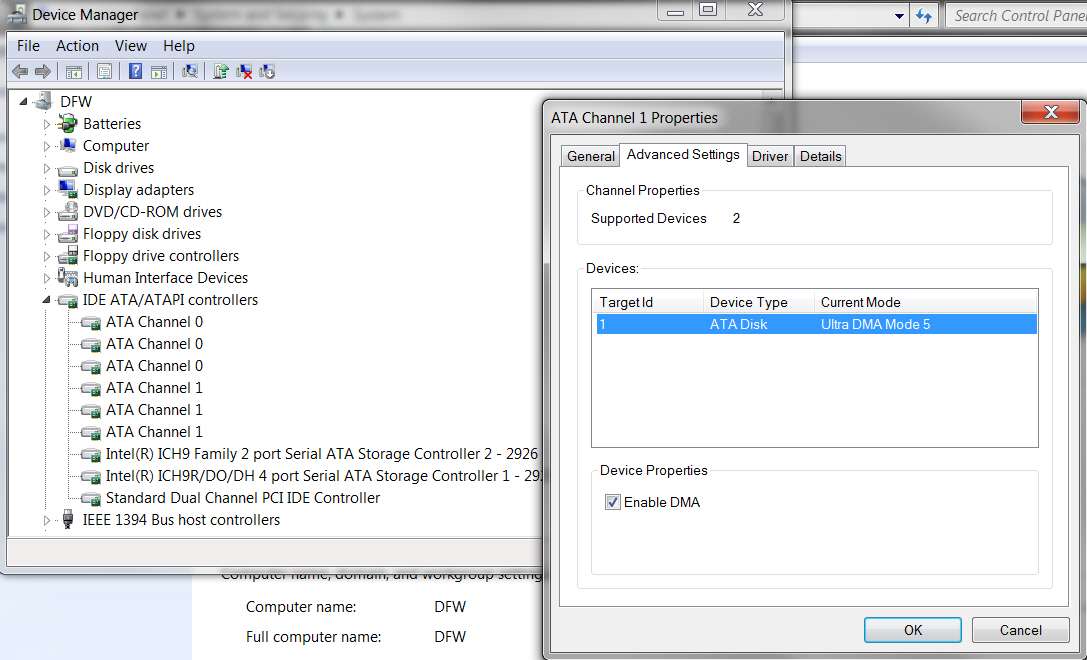
Well, sure enough, looking at these ATA channels on this machine it shows the following where there is a drive connected to that channel:

ich9sata.jpg


I then went back to my first machine (where I have two SATA drives and a conventional CD/DVD drive) and looked at all the ATA channels. Sure enough, the Advanced tab looks just like the above for those channels where a drive is attached. The only difference is that the conventional CD/DVD drive uses DMA mode 2, rather than DMA mode 5 for my BluRay drive.


Anyway, although the nVidia SATA driver is clearly different than the Intel SATA driver and the Device Manager interface obviously is different, it does appear possible to enable/disable DMA mode even with the Intel driver.

However the setting shown in my screenshot is the default. I did not set that value.
 

My Computer My Computer

At a glance

Windows 7 Pro x64 (1), Win7 Pro X64 (2)i5-3350p 3.1Ghz/6MB-cache (1); E8400 3.0Ghz/6...8GB PC3-12800 DDR3 (1); 4GB PC3-10600 DDR3 (2)ATI HD7750 (1), (see TV cards); ATI R7 250 (2)
Computer type
PC/Desktop
Computer Manufacturer/Model Number
Home-built, two systems (1) and (2)
OS
Windows 7 Pro x64 (1), Win7 Pro X64 (2)
CPU
i5-3350p 3.1Ghz/6MB-cache (1); E8400 3.0Ghz/6MB-cache (2)
Motherboard
ASUS P8Z77-V Pro (1); ASUS P5Q3 (2)
Memory
8GB PC3-12800 DDR3 (1); 4GB PC3-10600 DDR3 (2)
Graphics Card(s)
ATI HD7750 (1), (see TV cards); ATI R7 250 (2)
Sound Card
Realtek ALC892 HD Audio (1); Realtek ALC1200 HD Audio (2)
Monitor(s) Displays
Eizo HD2441W LCD, Eizo S2433W (1); Eizo 24" S2433W (2)
Screen Resolution
1920x1200, 1920x1200 (1); 1920x1200 (2)
Hard Drives
(1) 1TB SATA-II (7200RPM), 2x2TB SATA-III (7200RPM), 250GB SATA-III (10000RPM) for OS; 2x2TB external USB 3.0

(2) 320GB SATA-II (7200RPM), 750GB SATA-II (7200RPM), 150GB SATA-II (10000RPM) for OS; 2TB external USB 3.0
PSU
Nesteq ECS-6001 600W (1); Nesteq ECS-5001 500W (2)
Case
Acousti-Case 360 (1) and (2)
Cooling
Noctua NH-U12P SE2 for CPU, 2x120mm case fans (1) and (2)
Keyboard
IBM PS/2 (1) and (2)
Mouse
Logitech MX Revolution wireless (1); Microsoft wired (2)
Internet Speed
100mbps down / 10mbps up
Antivirus
Microsoft Security Essentials; Malwarebyte Anti-Malware Pro
Browser
Firefox
Other Info
Ceton InfiniTV 4-tuner cablecard-enabled TV card as well as Hauppauge HVR-2250 OTA/ATSC 2-tuner TV card in (1), running under Win7 WMC
As we say "you live and you learn" and as long as you are willing to learn it is all good stuff.

Regards

Daniel
 

My Computer My Computer

At a glance

Microsoft Windows 7 Professional 32-bit 7601 ...Intel(R) Core(TM)2 Quad CPU Q8300 @ 2.50GHz4.00 GBNVIDIA GeForce GT 220
Computer type
PC/Desktop
Computer Manufacturer/Model Number
Multimedia PC MEDION® Akoya® E7330 D
OS
Microsoft Windows 7 Professional 32-bit 7601 Multiprocessor Free Service Pack 1
CPU
Intel(R) Core(TM)2 Quad CPU Q8300 @ 2.50GHz
Motherboard
MEDIONPC MS-7366
Memory
4.00 GB
Graphics Card(s)
NVIDIA GeForce GT 220
Sound Card
(1) High Definition Audio Device (2) High Definition Audio
Screen Resolution
1920 x 1080 x 32 bits (4294967296 colors) @ 60 Hz
Hard Drives
(1) WDC WD10EZEX-00WN4A0 ATA Device (2) WDC WD6400AACS-00G8B1 ATA Device (3) Generic Flash HS-CF USB Device (4) Generic Flash HS-MS/SD USB Device (5) Generic Flash HS-SM USB Device (6) HP Officejet 5740 s USB Device (7) USB Flash Disk USB
Back
Top