Ethernet Adapter Question?.

bluesjunior

New member
Local time
2:56 PM
Messages
33
I have recently installed an old WinXP desktop PC to my workshop. It lay in the loft the last few years packed and unused. I have it all working now updated to XP SP3 final updates and it is at present connecting to the internet through a long Cat5E cable from my Virgin superhub 2 modem. The XP PC connects via a VIA VT-6102 Rhine II Fast Ethernet Adapter on the motherboard. My question is, can someone with more technical knowledge tell me if this adapter is wireless capable and if so what do I need to get it connected wirelessly to the Virgin Superhub wi-fi?.
 

My Computer

Computer type
PC/Desktop
Computer Manufacturer/Model Number
Custom Build
OS
Windows 7 Home Premium 64bit SP1
CPU
AMD Athlon II X3 450
Motherboard
Gigabyte GA-MA770T-UD3
Memory
8.00GB Dual Channel DDR3
Graphics Card(s)
Radeon HD 5750
Hard Drives
465GB SAMSUNG HD502HJ SATA Disk Device
931GB BUFFALO External HDD USB Device
Antivirus
Comodo CIS
Browser
Pale Moon 64bit
Ethernet and wireless are not the same thing so no you cannot use it to connect wirelessly to the internet. However you can buy a wireless adapter if you can find one compatible with XP. That won't be easy and you might have to go with a site that uses private sellers such as ebay or amazon.
 

My Computers

System One System Two

No it is not, you`d have to buy a wireless adapter.

Why would you want to go wireless, when wired is better ???
 

My Computer

Computer type
PC/Desktop
Computer Manufacturer/Model Number
Skylake Special #666
OS
Windows 10 Pro x64
CPU
Intel Core i7 6700K
Motherboard
Asus Sabertooth Z170 Mark 1
Memory
GSkill TridentZ RGB 16GB 3600 16-16-16-36
Graphics Card(s)
EVGA GTX 980 Ti SC x2
Sound Card
Realtek High Definition
Monitor(s) Displays
AOC G2460PG
Screen Resolution
1920 x 1080 144Hz
Hard Drives
Samsung 860 Pro 256GB, Seagate Barracuda 4TB x2
PSU
EVGA 1000 P2, EVGA White Custom Braided Cables
Case
Corsair Vengeance C70 Gunmetal Black
Cooling
Corsair H100i v2, Corsair ML120 x2, Thermal Grizzly Kryonaut
Keyboard
Logitech G910 Orion Spectrum
Mouse
Logitech G700s
Internet Speed
Verizon Fios Quantum Gateway 75/75
Antivirus
Windows Defender, Malwarebytes Free 3.8.3
Browser
Chrome
Other Info
Corsair SP120 x4, LG Blu-ray Drive, Durabrand HT-395 100 Watt Dolby Digital Amp, Corsair H2100 Wireless 7.1 Headset

My Computer

Computer type
PC/Desktop
Computer Manufacturer/Model Number
Self Built
OS
Win 10 Pro x64
CPU
Intel I5-2500K @3.3GHz
Motherboard
Asrock P67 Extreme4
Memory
16GB G.Skill Ripjaws X (4x4GB)
Graphics Card(s)
EVGA GeForce 750 Ti SC 2GB
Sound Card
ASUS Xonar DG 5.1 Channels 24-bit 96KHz PCI Interface Sound
Monitor(s) Displays
auria eq2367
Screen Resolution
1920 x 1080
Hard Drives
250GB Samsung 850 EVO SSD
1TB WD Blue
1TB Hitachi
PSU
SeaSonic X 650W 80 Plus Gold
Case
Corsair Obsidian 750D
Cooling
Corsair H60, Three 140mm case fans
Keyboard
Logitech Wireless Keyboard K520
Mouse
Logitech Wireless Mouse M310
Internet Speed
Wave Broadband ~ 100 dn 5 up
Antivirus
Windows Defender, Malwarebytes Premium
Browser
Edge, IE11, Chrome
Other Info
Laptop specs: HP g7-1365dx /
CPU: AMD A6-3420M APU with Radeon(tm) HD Graphics /
RAM: Crucial 8Gb (2x4Gb) /
SSD: Crucial M4-CT128M4SSD2 ATA Device/ FW 000F /
GFX: AMD Radeon HD 6520G /
OS: Windows 10 Pro x64
No it is not, you`d have to buy a wireless adapter.

Why would you want to go wireless, when wired is better ???

The cable I have is quite long and I don't want to go drilling holes through walls etc. Also for some reason I am being limited to 10Mbps on the XP machine while my Win7 main PC is getting the full 200Mbps. My wife's tablet and mobile phone get a great service from the WiFi from the Virgin superhub2 and as the workshop is just outside the house I should get a much better service wirelessly.
 

My Computer

Computer type
PC/Desktop
Computer Manufacturer/Model Number
Custom Build
OS
Windows 7 Home Premium 64bit SP1
CPU
AMD Athlon II X3 450
Motherboard
Gigabyte GA-MA770T-UD3
Memory
8.00GB Dual Channel DDR3
Graphics Card(s)
Radeon HD 5750
Hard Drives
465GB SAMSUNG HD502HJ SATA Disk Device
931GB BUFFALO External HDD USB Device
Antivirus
Comodo CIS
Browser
Pale Moon 64bit
If you want wireless then you`ll have to get a card at your closest retailer.

Make sure you get the fastest speed you can afford, a wireless N adapter should be fine.

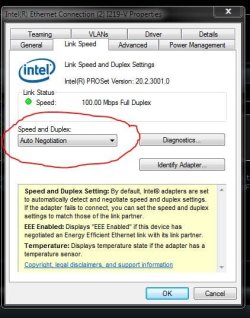
200 Mbps on your other machines is very good, check the ethernet card speed on the XP machine you`re working on, make sure it`s set to auto negotiate or 100 Mb Full Duplex
 

Attachments

  • Capture.JPG
    Capture.JPG
    49.4 KB · Views: 23

My Computer

Computer type
PC/Desktop
Computer Manufacturer/Model Number
Skylake Special #666
OS
Windows 10 Pro x64
CPU
Intel Core i7 6700K
Motherboard
Asus Sabertooth Z170 Mark 1
Memory
GSkill TridentZ RGB 16GB 3600 16-16-16-36
Graphics Card(s)
EVGA GTX 980 Ti SC x2
Sound Card
Realtek High Definition
Monitor(s) Displays
AOC G2460PG
Screen Resolution
1920 x 1080 144Hz
Hard Drives
Samsung 860 Pro 256GB, Seagate Barracuda 4TB x2
PSU
EVGA 1000 P2, EVGA White Custom Braided Cables
Case
Corsair Vengeance C70 Gunmetal Black
Cooling
Corsair H100i v2, Corsair ML120 x2, Thermal Grizzly Kryonaut
Keyboard
Logitech G910 Orion Spectrum
Mouse
Logitech G700s
Internet Speed
Verizon Fios Quantum Gateway 75/75
Antivirus
Windows Defender, Malwarebytes Free 3.8.3
Browser
Chrome
Other Info
Corsair SP120 x4, LG Blu-ray Drive, Durabrand HT-395 100 Watt Dolby Digital Amp, Corsair H2100 Wireless 7.1 Headset
If you want wireless then you`ll have to get a card at your closest retailer.

Are there cards at retail stores for XP?
 

My Computers

System One System Two

Who knows. But if he wants one he`ll have to find one somewhere.
 

My Computer

Computer type
PC/Desktop
Computer Manufacturer/Model Number
Skylake Special #666
OS
Windows 10 Pro x64
CPU
Intel Core i7 6700K
Motherboard
Asus Sabertooth Z170 Mark 1
Memory
GSkill TridentZ RGB 16GB 3600 16-16-16-36
Graphics Card(s)
EVGA GTX 980 Ti SC x2
Sound Card
Realtek High Definition
Monitor(s) Displays
AOC G2460PG
Screen Resolution
1920 x 1080 144Hz
Hard Drives
Samsung 860 Pro 256GB, Seagate Barracuda 4TB x2
PSU
EVGA 1000 P2, EVGA White Custom Braided Cables
Case
Corsair Vengeance C70 Gunmetal Black
Cooling
Corsair H100i v2, Corsair ML120 x2, Thermal Grizzly Kryonaut
Keyboard
Logitech G910 Orion Spectrum
Mouse
Logitech G700s
Internet Speed
Verizon Fios Quantum Gateway 75/75
Antivirus
Windows Defender, Malwarebytes Free 3.8.3
Browser
Chrome
Other Info
Corsair SP120 x4, LG Blu-ray Drive, Durabrand HT-395 100 Watt Dolby Digital Amp, Corsair H2100 Wireless 7.1 Headset
If you want wireless then you`ll have to get a card at your closest retailer.

Make sure you get the fastest speed you can afford, a wireless N adapter should be fine.

200 Mbps on your other machines is very good, check the ethernet card speed on the XP machine you`re working on, make sure it`s set to auto negotiate or 100 Mb Full Duplex

Yes, I tried that but if I set it at anything other than auto/negotiate it won't connect at all just goes through an endless loop of connecting/disconnecting. When set to auto/negotiate it only connects at 10Mbps even though the card is capable of 100. I have checked that it is the "latest" drivers which are installed. One thing that I don't understand is that above the Local Area Connection icon there is one called Internet Gateway. I have a feeling that somehow it is connecting through my Win7 machine and not through its own connection to the Virgin Hub even though I have set individual setting info with the proper Virgin IP addresses in the internet settings options box.
 

My Computer

Computer type
PC/Desktop
Computer Manufacturer/Model Number
Custom Build
OS
Windows 7 Home Premium 64bit SP1
CPU
AMD Athlon II X3 450
Motherboard
Gigabyte GA-MA770T-UD3
Memory
8.00GB Dual Channel DDR3
Graphics Card(s)
Radeon HD 5750
Hard Drives
465GB SAMSUNG HD502HJ SATA Disk Device
931GB BUFFALO External HDD USB Device
Antivirus
Comodo CIS
Browser
Pale Moon 64bit
One thing that I don't understand is that above the Local Area Connection icon there is one called Internet Gateway. I have a feeling that somehow it is connecting through my Win7 machine and not through its own connection to the Virgin Hub even though I have set individual setting info with the proper Virgin IP addresses in the internet settings options box.

Here's something you could do to see if the XP pc is connecting through the Win 7 pc.

  • Turn off the Win 7 PC.
  • Unplug the Win 7 PC LAN cable.
  • Re-boot the XP PC.
  • See how the XP PC internet connectivity looks and works.
  • If it works the same, i don't see how it could be connecting through the Win 7 pc when that PC is off and unplugged.

2)
Regarding Wireless adapters that support XP.
I looked at several on Newegg (US) and every one of them supports XP.
There is a wide range of prices and "device types".

If you want to get an idea of what devices might be available to you, here is a Newegg link for Wireless adapters:
Wireless Adapters, PCI Adapter, Wireless-G Adapter - Newegg
 

My Computer

Computer type
PC/Desktop
Computer Manufacturer/Model Number
home built
OS
Multi-Boot W7_Pro_x64 W8.1_Pro_x64 W10_Pro_x64 +Linux_VMs +Chromium_VM
CPU
AMD Athlon II x4 620
Motherboard
Gigabyte GA-MA785G-UD3H
Memory
6GB GSkill DDR2 800
Graphics Card(s)
AMD 4670 GPU + AMD 4200 IGP
Sound Card
on board Realtek ALC889A
Monitor(s) Displays
RCA 40" LCD TV, Insignia 32" LCD TV, HP 15" LCD monitor
Screen Resolution
1680 x 1050
Hard Drives
OCZ Vertex 3 120GB,
Samsung F3 1TB (3),
Several others - WD, Seagate, Hitachi, ...
PSU
Corsair 500 W
Case
Rosewill mid tower
Cooling
CM 90mm rifle
Keyboard
Gyration wireless, Logitech wireless, Dell USB wired
Mouse
Gyration wireless, Logitech wireless, V7 USB wired
Internet Speed
Spectrum - 100Mbps D / 10Mbps U
Antivirus
Avast, MBAM3, EMET, WinPatrol
Browser
Pale Moon, Firefox, IE
Other Info
2 multi-boot PC's
Mainly HTPC/Office/Gen purpose (no gaming).
Trendnet USB KVM.
LG DVD burner/Blue Ray Player.
Tray system for removable SATA backup drives.

Not currently OCd, under-volted.
I use Hybrid sleep, rarely re-boot or shutdown.

Hauppauge HD-PVR, Avermedia PCIe TV Tuner, Hauppauge PCI TV Tuner.
Back
Top