
Ethernet Cables and RGB convert to HDMI cable

SherriBabee

GEEK-ette in Training
Member
Local time
2:00 AM
Messages
54
Location
Amboy, Illinois
Hello Folks,

1) I need some help with ordering some replacement Ethernet cables. My connectors on them are broke so they don't stay in place. Are there any numbers I need to know? I want to get 2 or 3 of them in about 10-20 ft.
1 is for my Laptop connection, and the others are for backups for other items down the road, to have spares.

2) My Vizio TV is currently hooked up as a projector to my laptop. But I don't have HDMI on the laptop, is there some kind of converter that I can attached to make it work that way?

Here's something I found on Amazon, I need the length for my setup
https://www.amazon.com/UGREEN-Bi-Directional-Adapter-Raspberry-Graphics/dp/B00B2HOKCY/ref=cm_wl_huc_item


Thank you...
Sherri
 
Last edited:

My Computer My Computer

At a glance

Win7 Home Premium x64AMD V140 Processor8gb CrucialATI Mobility Radeon HD 4200 Series
Computer type
Laptop
Computer Manufacturer/Model Number
Toshiba Satellite C655D-S5086
OS
Win7 Home Premium x64
CPU
AMD V140 Processor
Motherboard
AMD M785 (RS880M) + SB810/SB850
Memory
8gb Crucial
Graphics Card(s)
ATI Mobility Radeon HD 4200 Series
Sound Card
Conexant CX20671 SmartAudio HD
Monitor(s) Displays
Vizio E552VLE-55 inch TV
Screen Resolution
1920 x 1080
Hard Drives
Crucial MX300, 525 GB, SATA III SSD
Keyboard
Logitech K260, wireless
Mouse
Logitech K260, Wireless
Internet Speed
Comcast?
Antivirus
Avast
Browser
Firefox 56.0.2_x64
Other Info
External: Toshiba MQ01UBD100, 5400 RPM, 1000 GB ,
External: Toshiba MK3265GSXN, 5400 RPM, 320 GB HDD
1) Look at the information printed on the side of your current Ethernet cable - it probably is CAT 5e. It could also be CAT 5 or CAT 6. If you match that number, you will be fine. You can go as low as CAT 5 and it will work, but you could go faster if the computer and router allows for it.

2) What kind of video output is on your laptop?
 

My Computer My Computer

At a glance

Linux Mint 18.2 xfce 64-bit (VMWare host) / W...Haswell4 GB
Computer type
PC/Desktop
Computer Manufacturer/Model Number
Dell
OS
Linux Mint 18.2 xfce 64-bit (VMWare host) / Windows 8.1 Pro 32-bit (VMWare guest)
CPU
Haswell
Memory
4 GB
Monitor(s) Displays
Acer 23"
Screen Resolution
1920 x 1080
Hard Drives
Two hard drives, 1TB each: One for Linux, one for my data.
Keyboard
IBM Model M
Antivirus
Sophos (Linux), Trend Micro (Windows)
Browser
Firefox, Opera
Other Info
I use Samba to share my data drive with the other computers at my house and with my guest session in VMWare Workstation Player.
1) Look at the information printed on the side of your current Ethernet cable - it probably is CAT 5e. It could also be CAT 5 or CAT 6. If you match that number, you will be fine. You can go as low as CAT 5 and it will work, but you could go faster if the computer and router allows for it.

Don't have any markings on the one's im using.
But I thought I'd go with these ones CAT6:

Mediabridge Ethernet Cable (15 Feet) - Supports Cat6/5e/5, 550MHz, 10Gbps - RJ45 Cord

https://www.amazon.com/gp/product/B00EUHRLF6/ref=ox_sc_act_title_1?smid=A1DCPNQKKEISZB&psc=1


2) What kind of video output is on your laptop?

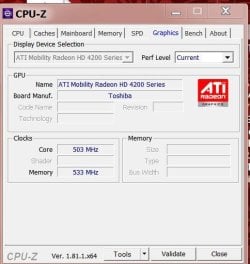
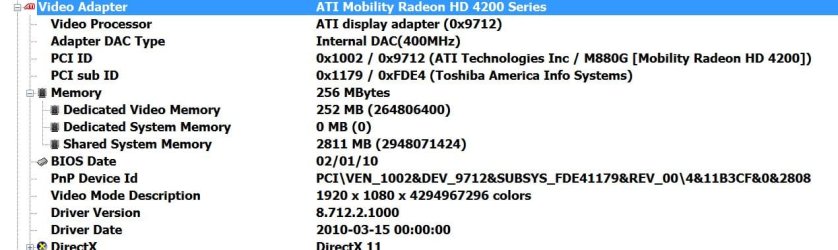
I took snapshots with 2 programs, pics attached
 

Attachments

  • Graphics-1.jpg
    Graphics-1.jpg
    34.4 KB · Views: 12
  • Graphics-2.jpg
    Graphics-2.jpg
    65.2 KB · Views: 0

My Computer My Computer

At a glance

Win7 Home Premium x64AMD V140 Processor8gb CrucialATI Mobility Radeon HD 4200 Series
Computer type
Laptop
Computer Manufacturer/Model Number
Toshiba Satellite C655D-S5086
OS
Win7 Home Premium x64
CPU
AMD V140 Processor
Motherboard
AMD M785 (RS880M) + SB810/SB850
Memory
8gb Crucial
Graphics Card(s)
ATI Mobility Radeon HD 4200 Series
Sound Card
Conexant CX20671 SmartAudio HD
Monitor(s) Displays
Vizio E552VLE-55 inch TV
Screen Resolution
1920 x 1080
Hard Drives
Crucial MX300, 525 GB, SATA III SSD
Keyboard
Logitech K260, wireless
Mouse
Logitech K260, Wireless
Internet Speed
Comcast?
Antivirus
Avast
Browser
Firefox 56.0.2_x64
Other Info
External: Toshiba MQ01UBD100, 5400 RPM, 1000 GB ,
External: Toshiba MK3265GSXN, 5400 RPM, 320 GB HDD
The Ethernet cable you have chosen will work for your situation.

Something like this will work for the video conversion from VGA to HDMI:

https://www.amazon.com/dp/B01H5BOLYC/ref=psdc_14570285011_t5_B006FILNV6

You will need a VGA extension cable in order to connect this device to your computer. If you want sound, you will need the audio cable which is pictured. It looks like neither of these come with the device.

Also, I wouldn't hook the USB to the computer; I would get a USB charging device (available everywhere) and plug the USB cable into it.
 

My Computer My Computer

At a glance

Linux Mint 18.2 xfce 64-bit (VMWare host) / W...Haswell4 GB
Computer type
PC/Desktop
Computer Manufacturer/Model Number
Dell
OS
Linux Mint 18.2 xfce 64-bit (VMWare host) / Windows 8.1 Pro 32-bit (VMWare guest)
CPU
Haswell
Memory
4 GB
Monitor(s) Displays
Acer 23"
Screen Resolution
1920 x 1080
Hard Drives
Two hard drives, 1TB each: One for Linux, one for my data.
Keyboard
IBM Model M
Antivirus
Sophos (Linux), Trend Micro (Windows)
Browser
Firefox, Opera
Other Info
I use Samba to share my data drive with the other computers at my house and with my guest session in VMWare Workstation Player.
The Ethernet cable you have chosen will work for your situation.

Something like this will work for the video conversion from VGA to HDMI:

https://www.amazon.com/dp/B01H5BOLYC/ref=psdc_14570285011_t5_B006FILNV6

You will need a VGA extension cable in order to connect this device to your computer. If you want sound, you will need the audio cable which is pictured. It looks like neither of these come with the device.

Also, I wouldn't hook the USB to the computer; I would get a USB charging device (available everywhere) and plug the USB cable into it.

2) Would this one work, it says it's Bi-Directional too and has the length I need:
https://www.amazon.com/gp/product/B00B2HOKCY/ref=ox_sc_act_title_3?smid=AKXVBT49GGF3B&psc=1


Already have a USB charging Hub, I'm looking to get a bigger one, 14 ports :D
https://www.amazon.com/dp/B00GSLMTQ8/_encoding=UTF8?coliid=I22KQ8U25HQY6X&colid=3LX17ROIHHFBR
 

My Computer My Computer

At a glance

Win7 Home Premium x64AMD V140 Processor8gb CrucialATI Mobility Radeon HD 4200 Series
Computer type
Laptop
Computer Manufacturer/Model Number
Toshiba Satellite C655D-S5086
OS
Win7 Home Premium x64
CPU
AMD V140 Processor
Motherboard
AMD M785 (RS880M) + SB810/SB850
Memory
8gb Crucial
Graphics Card(s)
ATI Mobility Radeon HD 4200 Series
Sound Card
Conexant CX20671 SmartAudio HD
Monitor(s) Displays
Vizio E552VLE-55 inch TV
Screen Resolution
1920 x 1080
Hard Drives
Crucial MX300, 525 GB, SATA III SSD
Keyboard
Logitech K260, wireless
Mouse
Logitech K260, Wireless
Internet Speed
Comcast?
Antivirus
Avast
Browser
Firefox 56.0.2_x64
Other Info
External: Toshiba MQ01UBD100, 5400 RPM, 1000 GB ,
External: Toshiba MK3265GSXN, 5400 RPM, 320 GB HDD
2) Would this one work, it says it's Bi-Directional too and has the length I need:
https://www.amazon.com/gp/product/B00B2HOKCY/ref=ox_sc_act_title_3?smid=AKXVBT49GGF3B&psc=1

This wire would not work, because it converts from DVI to HDMI. You need to convert from VGA to HDMI. Also, VGA is lo-resolution, while HDMI is high-resolution; you need to up-convert to get from VGA to HDMI. A simple cable won't do it; it has to have some electronics to do the conversion. That's why power is required.

Is HDMI the only input your TV has? If it has a VGA input, then you can use that input, and a VGA-to-VGA cable, and you won't have to convert anything. You'd probably have better picture quality if you didn't have to up-convert the signal.

Already have a USB charging Hub, I'm looking to get a bigger one, 14 ports :D
https://www.amazon.com/dp/B00GSLMTQ8/_encoding=UTF8?coliid=I22KQ8U25HQY6X&colid=3LX17ROIHHFBR

That will work, if you are using the A/C adapter with it.
 

My Computer My Computer

At a glance

Linux Mint 18.2 xfce 64-bit (VMWare host) / W...Haswell4 GB
Computer type
PC/Desktop
Computer Manufacturer/Model Number
Dell
OS
Linux Mint 18.2 xfce 64-bit (VMWare host) / Windows 8.1 Pro 32-bit (VMWare guest)
CPU
Haswell
Memory
4 GB
Monitor(s) Displays
Acer 23"
Screen Resolution
1920 x 1080
Hard Drives
Two hard drives, 1TB each: One for Linux, one for my data.
Keyboard
IBM Model M
Antivirus
Sophos (Linux), Trend Micro (Windows)
Browser
Firefox, Opera
Other Info
I use Samba to share my data drive with the other computers at my house and with my guest session in VMWare Workstation Player.
This wire would not work, because it converts from DVI to HDMI. You need to convert from VGA to HDMI. Also, VGA is lo-resolution, while HDMI is high-resolution; you need to up-convert to get from VGA to HDMI. A simple cable won't do it; it has to have some electronics to do the conversion. That's why power is required.

Is HDMI the only input your TV has? If it has a VGA input, then you can use that input, and a VGA-to-VGA cable, and you won't have to convert anything. You'd probably have better picture quality if you didn't have to up-convert the signal.
Yes, I currently am using VGA to VGA, just thought it would be faster if could use the HDMI...
The laptop is 7 yrs old now and didn't have an HDMI port when I bought it, only 2 USB ports
 

My Computer My Computer

At a glance

Win7 Home Premium x64AMD V140 Processor8gb CrucialATI Mobility Radeon HD 4200 Series
Computer type
Laptop
Computer Manufacturer/Model Number
Toshiba Satellite C655D-S5086
OS
Win7 Home Premium x64
CPU
AMD V140 Processor
Motherboard
AMD M785 (RS880M) + SB810/SB850
Memory
8gb Crucial
Graphics Card(s)
ATI Mobility Radeon HD 4200 Series
Sound Card
Conexant CX20671 SmartAudio HD
Monitor(s) Displays
Vizio E552VLE-55 inch TV
Screen Resolution
1920 x 1080
Hard Drives
Crucial MX300, 525 GB, SATA III SSD
Keyboard
Logitech K260, wireless
Mouse
Logitech K260, Wireless
Internet Speed
Comcast?
Antivirus
Avast
Browser
Firefox 56.0.2_x64
Other Info
External: Toshiba MQ01UBD100, 5400 RPM, 1000 GB ,
External: Toshiba MK3265GSXN, 5400 RPM, 320 GB HDD
Back
Top