"Ethernet" Connection Drop

I feel like I should join in on this and see what the heck the problem is. Just bought a new HP XW4600 for my work desktop. quad core, 6gig RAM, on board nic, nvid quadro dual monitor card.

My first step was to format the HD. I the installed Win 7 pro from our MSDN site, connection drops every 2 minutes and is a NIGHTMARE to get running againg.

suggestion?

You disable IP-6 support in networking? Update all the drivers? Anything in event viewer (type event viewer in search) look in the app tab.

Ken
 

My Computer

Computer Manufacturer/Model Number
HP Pavillion dv-7 1005 Tx
OS
Win 8 Release candidate 8400
CPU
[email protected]
Memory
4 gigs
Graphics Card(s)
Nvidia 9600M
Sound Card
HD built-in
Monitor(s) Displays
17" Wxga
Screen Resolution
1440x900
Cooling
none
Internet Speed
45Mb down 5Mb up
You disable IP-6 support in networking? Update all the drivers? Anything in event viewer (type event viewer in search) look in the app tab.

Ken
I have yet to disable IP-6 support, I was trying to troubleshoot via my netbook and that was a challege! LOL

Drivers should I update? This is an approved model to be upgraded per HP's site. I upgrade my video card, but thats it so far. Any suggestions on other drivers to upgrade?

thanks for replying.
 

My Computer

Computer Manufacturer/Model Number
HP XW4600
OS
Windows 7 64bit (hopefully)
CPU
Intel® Core™2 Quad Q9300 processor
Motherboard
Intel® X38 Express chipset
Memory
6 GB 800 MHz DDR2 SDRAM
Graphics Card(s)
Nvidia Quadro NVS 285
Sound Card
on board
Hard Drives
250gig sata
Case
HP
Cooling
HP
Keyboard
HP
Mouse
HP
Internet Speed
1000/100/10, WIRED
Other Info
on board NIC Broadcom NetXtreme Gigabit
I have yet to disable IP-6 support, I was trying to troubleshoot via my netbook and that was a challege! LOL

Drivers should I update? This is an approved model to be upgraded per HP's site. I upgrade my video card, but thats it so far. Any suggestions on other drivers to upgrade?

thanks for replying.

We could use a ton more info. If you could fill in your system specs (in the lower left corner). We need you wifi card, etc. Is this 32 bit or 64?

Ken
 

My Computer

Computer Manufacturer/Model Number
HP Pavillion dv-7 1005 Tx
OS
Win 8 Release candidate 8400
CPU
[email protected]
Memory
4 gigs
Graphics Card(s)
Nvidia 9600M
Sound Card
HD built-in
Monitor(s) Displays
17" Wxga
Screen Resolution
1440x900
Cooling
none
Internet Speed
45Mb down 5Mb up
We could use a ton more info. If you could fill in your system specs (in the lower left corner). We need you wifi card, etc. Is this 32 bit or 64?

Ken

done :)

Also, I looked in the event viewer, but there is nothing there showing a drop in the connection, etc. Normally you would/should see a warning, etc, but this shows nothing. I have the computer plugged directly into a Cisco 3560 switch at my desk, that uplinks to our core Cisco Catalyst in the data center. No other problems from that switch, just W7 dropping it.
 

My Computer

Computer Manufacturer/Model Number
HP XW4600
OS
Windows 7 64bit (hopefully)
CPU
Intel® Core™2 Quad Q9300 processor
Motherboard
Intel® X38 Express chipset
Memory
6 GB 800 MHz DDR2 SDRAM
Graphics Card(s)
Nvidia Quadro NVS 285
Sound Card
on board
Hard Drives
250gig sata
Case
HP
Cooling
HP
Keyboard
HP
Mouse
HP
Internet Speed
1000/100/10, WIRED
Other Info
on board NIC Broadcom NetXtreme Gigabit
Just adding to the collective, I as well have the same problem, Connection dropping and about 90% reduction in download speeds, I already tried reverting to older drivers, updating to latest, Disabling IPv6, Disabling QoS, Turning off automatic updates, nothing helps, the strange part is, The connection works flawlessly when working in safe mode with networking, If I had any form of knowledge I could try tinkering with services to see if one might be interfering with the connection, but since I'm a novice, It's nigh impossible for me to attempt anything.
 

My Computer

Computer Manufacturer/Model Number
HP a6200n
OS
Windows 7 7600 64Bit
CPU
AMD Athlon™ 64 X2 Dual-Core 5000+
Motherboard
NVIDIA nForce 430 Chipset ECS MCP61PM-HM/Nettle2-GL8E
Memory
4GB DDR2-SDRAM 5300 667
Graphics Card(s)
Visiontek Radeon HD3870 512MB
Sound Card
Realtek HD Integrated
Monitor(s) Displays
Vizio VA16L
Screen Resolution
1360x768
Hard Drives
360.0 GB Serial ATA-300 - 7200.0 rpm
PSU
HP Generic 250w
Case
HP Pavillion mid-tower
Cooling
Stock Fan
Keyboard
Gearhead 107-Key Slim keyboard
Mouse
HP 3-button mouse
Internet Speed
20Mbps/5MBps
Other Info
Integrated 10/100 BaseT Ethernet card,
Comcast Cable Internet,
Motorola SB 5101 Surfboard Cable Modem,
D-Link 3200 Rev.b 10/100 Wired router EBR-2310,
Just adding to the collective, I as well have the same problem, Connection dropping and about 90% reduction in download speeds, I already tried reverting to older drivers, updating to latest, Disabling IPv6, Disabling QoS, Turning off automatic updates, nothing helps, the strange part is, The connection works flawlessly when working in safe mode with networking, If I had any form of knowledge I could try tinkering with services to see if one might be interfering with the connection, but since I'm a novice, It's nigh impossible for me to attempt anything.
You have sort of answered your own question... Safe mode, does not load DRIVERS. So check your drivers....

For every body else, one simply question.
EVERONE OF YOU STATES UPGRADED TO THE NEWEST DRIVERS.
DUH - give you and ideas. Then reverted back to old drivers.
actually delete ever device via control panel... then reboot.
simple
does the system work. yes or no
we can start from there....please do not HI JACK the thread.
start your own...
 
Strangely enough, my problem was fixed by using Level 3's DNS servers (4.2.2.1 and 4.2.2.2) rather than my ISP's.

I gave it a try after finding hundreds of "Name resolution for the name groups.google.com timed out after none of the configured DNS servers responded." <--- these sorts of messages in my eventlog.

Strange one for sure, maybe someone with more networking knowledge can figure out what is going on there. It's a large ISP, so I find it very hard to believe that their DNS Servers crapped out at the same time that I installed a Windows 7 post 7100 build, and that they have remained flaky for the past month or so.

I was receiving my dns info through DHCP, so maybe specifying the address of my ISP's DNS Servers would accomplish the same result as using a third party one? I'll give it a try...
 

My Computer

OS
Windows 7
A default gateway message indicates the problem is not related to DNS. Sounds more a like a TCPIP routing issue. Check your router IP configuration and then the PC IP config. Make sure they are on the same network and as the router. Verify DHCP is working correctly.
 

My Computer

Computer Manufacturer/Model Number
Dell Inspiron 1525 Notebook
OS
Windows 7
CPU
rocessor Intel(R) Pentium(R) Dual CPU T2390 @ 1.86GHz, 1867
Motherboard
Intel(R) ICH8 Family Chipset
Memory
Installed Physical Memory (RAM) 4 GB
Graphics Card(s)
Mobile Intel(R) 965 Express Chipset Family (Sux)
Sound Card
Intel(R) High Definition Audio HDMI
Well, Now I feel like Kind of an idiot, but my Problem was "easily" solved by doing a clean re-install.
 

My Computer

Computer Manufacturer/Model Number
HP a6200n
OS
Windows 7 7600 64Bit
CPU
AMD Athlon™ 64 X2 Dual-Core 5000+
Motherboard
NVIDIA nForce 430 Chipset ECS MCP61PM-HM/Nettle2-GL8E
Memory
4GB DDR2-SDRAM 5300 667
Graphics Card(s)
Visiontek Radeon HD3870 512MB
Sound Card
Realtek HD Integrated
Monitor(s) Displays
Vizio VA16L
Screen Resolution
1360x768
Hard Drives
360.0 GB Serial ATA-300 - 7200.0 rpm
PSU
HP Generic 250w
Case
HP Pavillion mid-tower
Cooling
Stock Fan
Keyboard
Gearhead 107-Key Slim keyboard
Mouse
HP 3-button mouse
Internet Speed
20Mbps/5MBps
Other Info
Integrated 10/100 BaseT Ethernet card,
Comcast Cable Internet,
Motorola SB 5101 Surfboard Cable Modem,
D-Link 3200 Rev.b 10/100 Wired router EBR-2310,
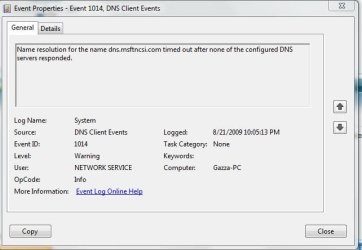
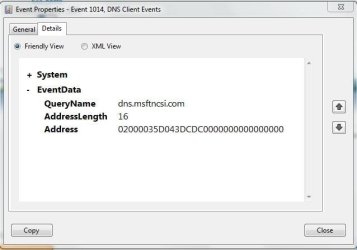
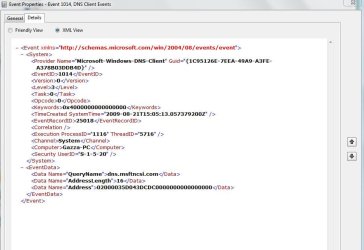
I have the same issue my router keeps resetting itself
I just looked up in the event viewer & it telling me
Please look at pictures

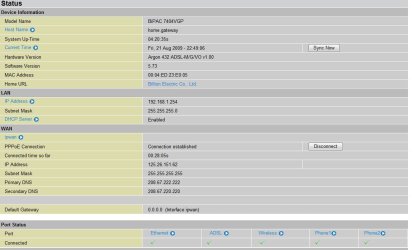
My Router is a Billion 7404vgpm
 

Attachments

  • dns 1.JPG
    dns 1.JPG
    47 KB · Views: 28
  • dns 2.JPG
    dns 2.JPG
    38.8 KB · Views: 17
  • dns 3.JPG
    dns 3.JPG
    85.7 KB · Views: 25

My Computer

Computer Manufacturer/Model Number
Gigabyte Asus
OS
,Windows 7-64.7600.16385 Ultimate
CPU
AMD Athlon(tm) 64 X2 Dual Core Processor 4800+, 2500
Motherboard
GA-MA78G-DS3H
Memory
Geil 4 Gig DDR2 800 PC2-6400 (400 MHz)
Graphics Card(s)
ATI Onboard 3200
Sound Card
ATI High Definition Audio Device
Monitor(s) Displays
Acer 22"
Screen Resolution
1680x1050
Hard Drives
1 x120 Gig
1 X 80 Gig
PSU
550 watt
Case
Cooler Master
Keyboard
Wireless Microsoft
Mouse
Wireless Microsoft
Internet Speed
3 Meg down .5 up
Other Info
BIOS Version/Date Award Software International, Inc. F8, 12/08/2009
Well, Now I feel like Kind of an idiot, but my Problem was "easily" solved by doing a clean re-install.

Z

clean install is one of our comandments.

glad you are working

Ken
 

My Computer

Computer Manufacturer/Model Number
HP Pavillion dv-7 1005 Tx
OS
Win 8 Release candidate 8400
CPU
[email protected]
Memory
4 gigs
Graphics Card(s)
Nvidia 9600M
Sound Card
HD built-in
Monitor(s) Displays
17" Wxga
Screen Resolution
1440x900
Cooling
none
Internet Speed
45Mb down 5Mb up
I have the same isue my router keeps resetting inself
I just looked up in the event viewer & it telling me
Please look at pictures

My Router is a Billion 7404vgpm

What do you have configured as dns in your router?

Ken
 

My Computer

Computer Manufacturer/Model Number
HP Pavillion dv-7 1005 Tx
OS
Win 8 Release candidate 8400
CPU
[email protected]
Memory
4 gigs
Graphics Card(s)
Nvidia 9600M
Sound Card
HD built-in
Monitor(s) Displays
17" Wxga
Screen Resolution
1440x900
Cooling
none
Internet Speed
45Mb down 5Mb up
I have a static IP, DHCP is not working DHCP is turned on but not working it seems
I have only recently changed to a static IP because of the same problem but it has made no difference
some times its fine for hours then it will reset many times in a few minutes
 

My Computer

Computer Manufacturer/Model Number
Gigabyte Asus
OS
,Windows 7-64.7600.16385 Ultimate
CPU
AMD Athlon(tm) 64 X2 Dual Core Processor 4800+, 2500
Motherboard
GA-MA78G-DS3H
Memory
Geil 4 Gig DDR2 800 PC2-6400 (400 MHz)
Graphics Card(s)
ATI Onboard 3200
Sound Card
ATI High Definition Audio Device
Monitor(s) Displays
Acer 22"
Screen Resolution
1680x1050
Hard Drives
1 x120 Gig
1 X 80 Gig
PSU
550 watt
Case
Cooler Master
Keyboard
Wireless Microsoft
Mouse
Wireless Microsoft
Internet Speed
3 Meg down .5 up
Other Info
BIOS Version/Date Award Software International, Inc. F8, 12/08/2009
open dns
 

My Computer

Computer Manufacturer/Model Number
Gigabyte Asus
OS
,Windows 7-64.7600.16385 Ultimate
CPU
AMD Athlon(tm) 64 X2 Dual Core Processor 4800+, 2500
Motherboard
GA-MA78G-DS3H
Memory
Geil 4 Gig DDR2 800 PC2-6400 (400 MHz)
Graphics Card(s)
ATI Onboard 3200
Sound Card
ATI High Definition Audio Device
Monitor(s) Displays
Acer 22"
Screen Resolution
1680x1050
Hard Drives
1 x120 Gig
1 X 80 Gig
PSU
550 watt
Case
Cooler Master
Keyboard
Wireless Microsoft
Mouse
Wireless Microsoft
Internet Speed
3 Meg down .5 up
Other Info
BIOS Version/Date Award Software International, Inc. F8, 12/08/2009
Open DNS
 

Attachments

  • dns4.JPG
    dns4.JPG
    105.9 KB · Views: 50

My Computer

Computer Manufacturer/Model Number
Gigabyte Asus
OS
,Windows 7-64.7600.16385 Ultimate
CPU
AMD Athlon(tm) 64 X2 Dual Core Processor 4800+, 2500
Motherboard
GA-MA78G-DS3H
Memory
Geil 4 Gig DDR2 800 PC2-6400 (400 MHz)
Graphics Card(s)
ATI Onboard 3200
Sound Card
ATI High Definition Audio Device
Monitor(s) Displays
Acer 22"
Screen Resolution
1680x1050
Hard Drives
1 x120 Gig
1 X 80 Gig
PSU
550 watt
Case
Cooler Master
Keyboard
Wireless Microsoft
Mouse
Wireless Microsoft
Internet Speed
3 Meg down .5 up
Other Info
BIOS Version/Date Award Software International, Inc. F8, 12/08/2009
A default gateway message indicates the problem is not related to DNS. Sounds more a like a TCPIP routing issue. Check your router IP configuration and then the PC IP config. Make sure they are on the same network and as the router. Verify DHCP is working correctly.

Well, I could show you literally hundreds of these "Name resolution for the name *whatever* timed out after none of the configured DNS servers responded." errors before I specified the DNS servers. Since then I have none.

I didn't change any router settings between the time I installed pre-7100 builds where I wasnt having this problem and post 7100 builds where I did. I'm wondering if something isn't broken in the way these windows 7 builds retrieve/address DHCP-specified DNS servers, because it turns out that specifying my ISP's DNS servers does fix it as well. (I don't need to use Level 3's, I just need to manually add the ones that should be added through DHCP).
 

My Computer

OS
Windows 7
Any updates on this Issue?
My adapter is Realtek with the latest Win 7 x64 drivers

Product Type Realtek PCIe GBE Family Controller


Driver c:\windows\system32\drivers\rtlh64.sys (6.225.703.2009, 206.00 KB (210,944 bytes), 8/11/2009 4:20 PM)
 

My Computer

Computer Manufacturer/Model Number
Gigabyte Asus
OS
,Windows 7-64.7600.16385 Ultimate
CPU
AMD Athlon(tm) 64 X2 Dual Core Processor 4800+, 2500
Motherboard
GA-MA78G-DS3H
Memory
Geil 4 Gig DDR2 800 PC2-6400 (400 MHz)
Graphics Card(s)
ATI Onboard 3200
Sound Card
ATI High Definition Audio Device
Monitor(s) Displays
Acer 22"
Screen Resolution
1680x1050
Hard Drives
1 x120 Gig
1 X 80 Gig
PSU
550 watt
Case
Cooler Master
Keyboard
Wireless Microsoft
Mouse
Wireless Microsoft
Internet Speed
3 Meg down .5 up
Other Info
BIOS Version/Date Award Software International, Inc. F8, 12/08/2009
Gazzasore - I have REaltek GB driver : 7.3.522.2009 from 22/5/2009. It seems its never revision but older . Browse though forum and find a link to the realtek driver I have. I dont have any problem since installing it.
 

My Computer

OS
windows 7
CPU
i7 920
Motherboard
Asus Rampage II GENE
Memory
3 x 2 Gb
Graphics Card(s)
ATI 4870
Sound Card
X-FI on MB
Hard Drives
Intel SSD M X-25 80Gb (OS)
Samsung SpinPoint 1Tb (DATA)
PSU
500W
Cooling
Air
Try using ICS between the two computers.
 

My Computer

Computer Manufacturer/Model Number
Custom
OS
Windows 7 Professional 32-bit
CPU
Intel(R) Pentium(R) D CPU 3.00 GHz
Motherboard
Asus P5B-VM
Memory
Kingston DDR2 3 gigs total Dual channels Symmetric
Graphics Card(s)
NVIDIA GeForce 8600 GT
Sound Card
Hi defonition Sound max
Monitor(s) Displays
CisNet
Screen Resolution
1280*1024
Hard Drives
WDC WD16000AA-00L7A0 SATA DRIVE
WDC IDE Drive 80 gigs.
PSU
Raidmax 380 watt
Case
Generic brand
Cooling
Standard fan
Keyboard
Logitech Cordless desktop EX100
Mouse
Logitech Cordless desktop EX100
Internet Speed
5.0 mbs
Other Info
MSE anti-virus
I have switched from 64 to 32 bit and the network has settled down
 

My Computer

Computer Manufacturer/Model Number
Foxconn Winfast K8M890-8237
OS
Windows 7 Build 7201
CPU
AMD Athlon 64 X2 6000+
Motherboard
Winfast K8M890M2MA-RS2H
Memory
KINGMAX 2x1024 DDR2 800
Graphics Card(s)
Geforce 8600GT
Sound Card
Onboard Realtek AC'97
Monitor(s) Displays
SONY 46Inch LCD 1080P
Screen Resolution
1080P
Hard Drives
80GB Western Digital SATA
PSU
ThermalTake 430W
Case
Theater Case Bach
Cooling
AMD CPU Stock 2x80mm and 2x40mm case
Keyboard
Logitech Dinovo Bluetooth
Mouse
Part of keyboard
Back
Top