
Ethernet Connection

polarbear

New member
Power User
Local time
4:45 PM
Messages
310
Hi Folks. I can see all my dial up as well as my wireless connections in my Internet access section. However, my Ethernet connections are not shown there unless I'm connected with no option to turn them on or off. I added a shortcut to my desktop so not a big thing but I would like to have all my internet connections together. :huh:
 

My Computer

Computer Manufacturer/Model Number
Toshiba Satellite
OS
Windows 7 Home Premium 64-bit
CPU
Pentium(R) Dual-Core T4300 @ 2.10GHz
Motherboard
Toshiba Model KSWAA - Chipset Intel GL40 Rev 07
Memory
3 GB DDR2 PC2-6400 (400 MHz) Samsung M4 70T2864Q23-CF7
Graphics Card(s)
Mobile Intel GMA4500M 32bit OS (64bit OS) dynamically
Sound Card
Realtek ALC272-GR Software Sound
Monitor(s) Displays
16.0" HD TFT with TrueBrite Matrix colour LCD display
Screen Resolution
1366 x 768
Hard Drives
FUJITSU MJA2320BH G2-(S2) 320GB (5400RPM) Serial-ATA
Keyboard
Canadian Bilingual Keyboard 105 keys with 13 Function keys
Mouse
Touchpad Point device & Lexma USB Mouse
Internet Speed
Walking is Faster
Other Info
Wireless LAN Realtek RTL89191SE 802.11n PCI-E NIC + a
LAN Realek PCIe FE Family Controller and
TOSHIBA Software Modem
Send us a screenshot of your Network and sharing centre window.
 

My Computer

Computer type
PC/Desktop
OS
Microsoft Windows 7 Home Premium 64-bit 7601 Multiprocessor Free Service Pack 1
CPU
Intel(R) Core(TM) i7-3770 CPU @ 3.40GHz
Motherboard
ASUSTeK COMPUTER INC. P8H77-M
Memory
8.00 GB
Graphics Card(s)
Intel(R) HD Graphics 4000
Sound Card
On Board
Monitor(s) Displays
Dell 24"
Screen Resolution
1920 x 1080
Hard Drives
(1) INTEL SSDSC2CT180A3 ATA Device (2) ST500DM002-1BD142 ATA Device (3) WDC WD3200AAKS-75L9A0 ATA Device (4) Generic- Compact Flash USB Device (5) Generic- MS/MS-Pro USB Device (6) Generic- SD/MMC USB Device (7) Generic- SM/xD-Picture USB
PSU
500w Corsair
Case
Cooler Master
Cooling
3 Fans
Keyboard
Logitech MK300
Mouse
Logitech WOM
Internet Speed
75Mb
Antivirus
Norton 360
Browser
Firefox, Opera, IE
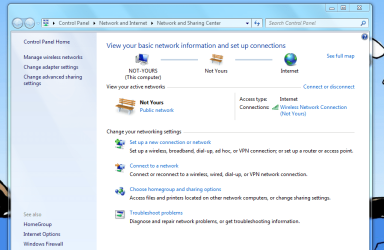
Hi mitch, my window will not stay open to snip a pic of my connections and what's available. I included a pic of the short cut I use and my connections.
 

Attachments

  • pic1.PNG
    pic1.PNG
    170.6 KB · Views: 39
  • pic2.PNG
    pic2.PNG
    10.8 KB · Views: 535

My Computer

Computer Manufacturer/Model Number
Toshiba Satellite
OS
Windows 7 Home Premium 64-bit
CPU
Pentium(R) Dual-Core T4300 @ 2.10GHz
Motherboard
Toshiba Model KSWAA - Chipset Intel GL40 Rev 07
Memory
3 GB DDR2 PC2-6400 (400 MHz) Samsung M4 70T2864Q23-CF7
Graphics Card(s)
Mobile Intel GMA4500M 32bit OS (64bit OS) dynamically
Sound Card
Realtek ALC272-GR Software Sound
Monitor(s) Displays
16.0" HD TFT with TrueBrite Matrix colour LCD display
Screen Resolution
1366 x 768
Hard Drives
FUJITSU MJA2320BH G2-(S2) 320GB (5400RPM) Serial-ATA
Keyboard
Canadian Bilingual Keyboard 105 keys with 13 Function keys
Mouse
Touchpad Point device & Lexma USB Mouse
Internet Speed
Walking is Faster
Other Info
Wireless LAN Realtek RTL89191SE 802.11n PCI-E NIC + a
LAN Realek PCIe FE Family Controller and
TOSHIBA Software Modem
Bump...
 

My Computer

Computer Manufacturer/Model Number
Toshiba Satellite
OS
Windows 7 Home Premium 64-bit
CPU
Pentium(R) Dual-Core T4300 @ 2.10GHz
Motherboard
Toshiba Model KSWAA - Chipset Intel GL40 Rev 07
Memory
3 GB DDR2 PC2-6400 (400 MHz) Samsung M4 70T2864Q23-CF7
Graphics Card(s)
Mobile Intel GMA4500M 32bit OS (64bit OS) dynamically
Sound Card
Realtek ALC272-GR Software Sound
Monitor(s) Displays
16.0" HD TFT with TrueBrite Matrix colour LCD display
Screen Resolution
1366 x 768
Hard Drives
FUJITSU MJA2320BH G2-(S2) 320GB (5400RPM) Serial-ATA
Keyboard
Canadian Bilingual Keyboard 105 keys with 13 Function keys
Mouse
Touchpad Point device & Lexma USB Mouse
Internet Speed
Walking is Faster
Other Info
Wireless LAN Realtek RTL89191SE 802.11n PCI-E NIC + a
LAN Realek PCIe FE Family Controller and
TOSHIBA Software Modem
Please don't bump before looking at the time difference between us. In fact don't bump at all. it is gainst the rules of the Forum.
Didn't quite understand your post anyway . I asked you to post a screen shot of your Network and Sharing Centre Window and that's exactly what you sent. However I have never seen a connection called "Not Yours" and I cannot find any reference to it on the internet after extensive searching. Perhaps another member will come up with the answer, sorry!
 

My Computer

Computer type
PC/Desktop
OS
Microsoft Windows 7 Home Premium 64-bit 7601 Multiprocessor Free Service Pack 1
CPU
Intel(R) Core(TM) i7-3770 CPU @ 3.40GHz
Motherboard
ASUSTeK COMPUTER INC. P8H77-M
Memory
8.00 GB
Graphics Card(s)
Intel(R) HD Graphics 4000
Sound Card
On Board
Monitor(s) Displays
Dell 24"
Screen Resolution
1920 x 1080
Hard Drives
(1) INTEL SSDSC2CT180A3 ATA Device (2) ST500DM002-1BD142 ATA Device (3) WDC WD3200AAKS-75L9A0 ATA Device (4) Generic- Compact Flash USB Device (5) Generic- MS/MS-Pro USB Device (6) Generic- SD/MMC USB Device (7) Generic- SM/xD-Picture USB
PSU
500w Corsair
Case
Cooler Master
Cooling
3 Fans
Keyboard
Logitech MK300
Mouse
Logitech WOM
Internet Speed
75Mb
Antivirus
Norton 360
Browser
Firefox, Opera, IE
Sorry about the Bump. "Not Yours" is the name of the wireless SSID. Like I say it's not a big thing as the Short Cut works great for the Ethernet connection. Just wish I could control it from the Internet access off the task bar.
Thanks
 

My Computer

Computer Manufacturer/Model Number
Toshiba Satellite
OS
Windows 7 Home Premium 64-bit
CPU
Pentium(R) Dual-Core T4300 @ 2.10GHz
Motherboard
Toshiba Model KSWAA - Chipset Intel GL40 Rev 07
Memory
3 GB DDR2 PC2-6400 (400 MHz) Samsung M4 70T2864Q23-CF7
Graphics Card(s)
Mobile Intel GMA4500M 32bit OS (64bit OS) dynamically
Sound Card
Realtek ALC272-GR Software Sound
Monitor(s) Displays
16.0" HD TFT with TrueBrite Matrix colour LCD display
Screen Resolution
1366 x 768
Hard Drives
FUJITSU MJA2320BH G2-(S2) 320GB (5400RPM) Serial-ATA
Keyboard
Canadian Bilingual Keyboard 105 keys with 13 Function keys
Mouse
Touchpad Point device & Lexma USB Mouse
Internet Speed
Walking is Faster
Other Info
Wireless LAN Realtek RTL89191SE 802.11n PCI-E NIC + a
LAN Realek PCIe FE Family Controller and
TOSHIBA Software Modem
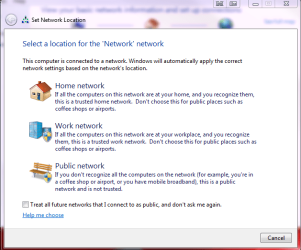
Looking at your network sharing center and looking at mine. The first thing I notice is your "View your active networks" is set to public. Try switching to "Home network" and see if that might make a difference. Here is a screen shot explaining the difference between them.


network.PNG
 

My Computer

Computer Manufacturer/Model Number
Custom built
OS
Windows 7 Ultimate 64 bit
CPU
AMD Phenom II X4 965 Black Edition
Motherboard
Gigabyte GA-MA790X-DS4
Memory
GSkill 4 X 2 GB PC 8500
Graphics Card(s)
XFX Radeon HD 6790 D
Sound Card
On board RealTek HD
Monitor(s) Displays
Dual monitors:Samsung SyncMaster S20B300
Screen Resolution
1600 X 900
Hard Drives
Seagate Barracuda 1TB (primary)
Seagate Barracuda 2 X 320 GB
PSU
Ultra X4 750 watt fully modular
Case
Thermaltake Overseer RX 1 full tower
Cooling
Core-Contact 92 mm CPU Cooler
Keyboard
Logitech G510
Mouse
Razor DeathAdder
Internet Speed
50/5 Mbps UL/DL
Other Info
Optical: Super Muliti DVD burner w/lightscribe, Hauppauge WinTV HVR-1800
Hi Bassfisher and thanks for the reply. I changed my setup to Home Network and it asked me to turn IPv6 on. I checked all my settings and IPv6 is turned on everywhere. Following this I checked and confirmed all drivers were the latest. Sounds like I may have a software issue. I will likely try to delete the drivers for the network card and reinstall them later today if I get a chance. Thanks again. :)
 

My Computer

Computer Manufacturer/Model Number
Toshiba Satellite
OS
Windows 7 Home Premium 64-bit
CPU
Pentium(R) Dual-Core T4300 @ 2.10GHz
Motherboard
Toshiba Model KSWAA - Chipset Intel GL40 Rev 07
Memory
3 GB DDR2 PC2-6400 (400 MHz) Samsung M4 70T2864Q23-CF7
Graphics Card(s)
Mobile Intel GMA4500M 32bit OS (64bit OS) dynamically
Sound Card
Realtek ALC272-GR Software Sound
Monitor(s) Displays
16.0" HD TFT with TrueBrite Matrix colour LCD display
Screen Resolution
1366 x 768
Hard Drives
FUJITSU MJA2320BH G2-(S2) 320GB (5400RPM) Serial-ATA
Keyboard
Canadian Bilingual Keyboard 105 keys with 13 Function keys
Mouse
Touchpad Point device & Lexma USB Mouse
Internet Speed
Walking is Faster
Other Info
Wireless LAN Realtek RTL89191SE 802.11n PCI-E NIC + a
LAN Realek PCIe FE Family Controller and
TOSHIBA Software Modem
Hi Bassfisher and thanks for the reply. I changed my setup to Home Network and it asked me to turn IPv6 on. I checked all my settings and IPv6 is turned on everywhere. Following this I checked and confirmed all drivers were the latest. Sounds like I may have a software issue. I will likely try to delete the drivers for the network card and reinstall them later today if I get a chance. Thanks again. :)


This is a common problem, please follow the steps below to fix the IPv6 problem.
smile.gif


1. Temporarily disable Firewall and third party antivirus program on the computer for a test.

2. Verify relevant services
=========================
a. Click "Start", type "services.msc" (without quotation marks) in Search Bar and press Enter.

Note: If you are prompted for an administrator password or confirmation, type your password, or click Continue.

b. Right click the "Peer Networking Grouping" service and choose Properties.
c. Please check if the service is started; if not, please click the Start button and see if it works.
d. You may also choose Automatic next to Startup type.
e. Click OK.
f. Please repeat the above steps with another service: PNRP Machine Name Publication Service.

3. Modify IPv6 registry key to enable IPV6
==========================
a. Click Start, type regedit in Search Bar, and then click regedit in the Programs list.

Note: If you are prompted for an administrator password or confirmation, type your password or click Continue.

b. Locate and then click the following registry subkey:

HKEY_LOCAL_MACHINE\SYSTEM\CurrentControlSet\services\TCPIP6\Parameters

c. Check whether the "DisabledComponents" registry key exists. If so, let's move on the next steps.

d. Double click the "DisabledComponents" registry key and modify the value to 0.

(If the key doesn't exist, please create the key above and assign the value 0)

e. Exit Registry Editor, and then restart the computer.

Source> HomeGroup get an error of must have IPv6 enabled
 

My Computer

Computer type
PC/Desktop
Computer Manufacturer/Model Number
Home built
OS
Windows 7 Ult, Windows 8.1 Pro,
CPU
Q9650-4.275GHz, E8600 4.5GHz, E6750-3.8GHz
Motherboard
Evga 780i FTW
Memory
G.Skill PC2 9600 1200Mhz 5 5 5 15 2T
Graphics Card(s)
GTX480
Sound Card
Asus Xonar D2
Monitor(s) Displays
HannsG
Screen Resolution
1680X1050
Hard Drives
GSkill Phoenix Pro 120GB SSD
PSU
ThermalTake Toughpower 1000Watt modular
Case
ThermalTake XaserV
Cooling
Xigmatek S1283
Keyboard
Logitech G15
Mouse
Logitech G9
Internet Speed
T1
Hi chev65, worked great for the IPv6 and setting up my network. Thanks!
Now if I can get my Ethernet connection to work with out using a short cut from the desk top I will be 100%.
Added to your Rep for the IPv6. :) Thanks again!
 

My Computer

Computer Manufacturer/Model Number
Toshiba Satellite
OS
Windows 7 Home Premium 64-bit
CPU
Pentium(R) Dual-Core T4300 @ 2.10GHz
Motherboard
Toshiba Model KSWAA - Chipset Intel GL40 Rev 07
Memory
3 GB DDR2 PC2-6400 (400 MHz) Samsung M4 70T2864Q23-CF7
Graphics Card(s)
Mobile Intel GMA4500M 32bit OS (64bit OS) dynamically
Sound Card
Realtek ALC272-GR Software Sound
Monitor(s) Displays
16.0" HD TFT with TrueBrite Matrix colour LCD display
Screen Resolution
1366 x 768
Hard Drives
FUJITSU MJA2320BH G2-(S2) 320GB (5400RPM) Serial-ATA
Keyboard
Canadian Bilingual Keyboard 105 keys with 13 Function keys
Mouse
Touchpad Point device & Lexma USB Mouse
Internet Speed
Walking is Faster
Other Info
Wireless LAN Realtek RTL89191SE 802.11n PCI-E NIC + a
LAN Realek PCIe FE Family Controller and
TOSHIBA Software Modem
Hi chev65, worked great for the IPv6 and setting up my network. Thanks!
Now if I can get my Ethernet connection to work with out using a short cut from the desk top I will be 100%.
Added to your Rep for the IPv6. :) Thanks again!

Glad to help on the IPv6 problem. As for the eithernet connection problem, usually updating the firmware on the router will fix that or using a more recent network driver.
 

My Computer

Computer type
PC/Desktop
Computer Manufacturer/Model Number
Home built
OS
Windows 7 Ult, Windows 8.1 Pro,
CPU
Q9650-4.275GHz, E8600 4.5GHz, E6750-3.8GHz
Motherboard
Evga 780i FTW
Memory
G.Skill PC2 9600 1200Mhz 5 5 5 15 2T
Graphics Card(s)
GTX480
Sound Card
Asus Xonar D2
Monitor(s) Displays
HannsG
Screen Resolution
1680X1050
Hard Drives
GSkill Phoenix Pro 120GB SSD
PSU
ThermalTake Toughpower 1000Watt modular
Case
ThermalTake XaserV
Cooling
Xigmatek S1283
Keyboard
Logitech G15
Mouse
Logitech G9
Internet Speed
T1
Back
Top