Ethernet Hookup Not Listed

david622

New member
Local time
11:47 PM
Messages
19
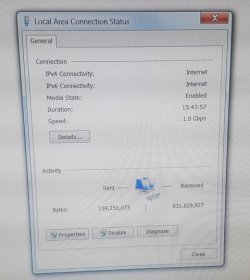
As you can see in this first picture my Ethernet Cable Adapter is hooked up.
NETWORK SHARING CENTER.PNG

But it's not listed as a connection. Also if i disable my wireless adapter the Ethernet won't connect to internet.
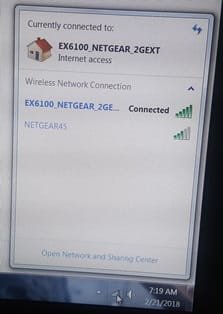
network list.jpg
 

My Computer

Computer type
PC/Desktop
Computer Manufacturer/Model Number
Gateway
OS
Windows 7 Home Premium 64-bit SP1
CPU
Intel Core i3 2120
Motherboard
Gateway ZX6970 (CPU 1)
Memory
DDR3
Graphics Card(s)
AIO LCD on Intel HD Graphics
Hard Drives
Western Digital WDC WD20EADS-00R6B0 ATA Device
Antivirus
Microsoft Essentials
Browser
Chrome
Have you checked the status of the Ethernet in the the "Change adapter settings"? If it is working, then there's nothing to worry about.
 

My Computer

Computer type
PC/Desktop
Computer Manufacturer/Model Number
ASUS X550ZE
OS
Windows 7 Home Premium 64-BIT
CPU
AMD A8 7200P
Motherboard
N/A
Memory
8GB 1600mhz
Graphics Card(s)
Radeon R5 (APU) + Radeon R5 M230 2GB Dual Graphics
Sound Card
Realtek ALC269 with SonicMaster
Monitor(s) Displays
Laptop Display
Screen Resolution
1920 x 1080 @60hz
Hard Drives
WDC WD50 00LPVX-80V0TT0 (500GB)
PSU
Laptop Charger
Mouse
ARMAGGEDON TEXTRON SCORPION 7
Internet Speed
100 mbps DOWN / 50 mbps UP
Antivirus
Windows Defender
Browser
Mozzila FireFox, Valve Steam in-game internet browser
Yes it looks good
adapter status.jpg

My Ethernat will not connect to internet if I disable my wireless connection.
 

My Computer

Computer type
PC/Desktop
Computer Manufacturer/Model Number
Gateway
OS
Windows 7 Home Premium 64-bit SP1
CPU
Intel Core i3 2120
Motherboard
Gateway ZX6970 (CPU 1)
Memory
DDR3
Graphics Card(s)
AIO LCD on Intel HD Graphics
Hard Drives
Western Digital WDC WD20EADS-00R6B0 ATA Device
Antivirus
Microsoft Essentials
Browser
Chrome
Sounds like your Ethernet connection is not working; when you think it is working, you are actually connected via the wifi connection.

Ethernet won't be listed with the available wireless connections; only the wireless connections show in that list.
 

My Computer

Computer type
PC/Desktop
Computer Manufacturer/Model Number
Dell
OS
Linux Mint 18.2 xfce 64-bit (VMWare host) / Windows 8.1 Pro 32-bit (VMWare guest)
CPU
Haswell
Memory
4 GB
Monitor(s) Displays
Acer 23"
Screen Resolution
1920 x 1080
Hard Drives
Two hard drives, 1TB each: One for Linux, one for my data.
Keyboard
IBM Model M
Antivirus
Sophos (Linux), Trend Micro (Windows)
Browser
Firefox, Opera
Other Info
I use Samba to share my data drive with the other computers at my house and with my guest session in VMWare Workstation Player.
Back
Top