
Solved Even the Administrator account can't delete this folder...

newTechie

New member
Local time
7:43 PM
Messages
7
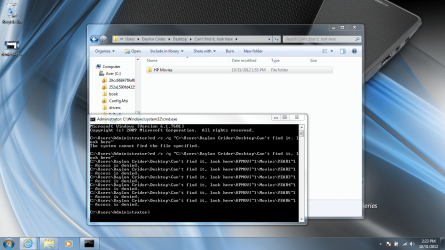
I've searched and tried everything I can for the past two hours and I cannot, for the life of me, get this folder and its sub-folders deleted. The attached picture is "Access is denied" output after the following scenario:

I ran "net user administrator /active:yes" from the elevated cmd

I logged into the newly found admin account and ran: rd /s /q "file location"

As I said before, the attached file is the output after that command executed


Any help would be greatly appreciated!
 

Attachments
  • deniedAccess2.png
    deniedAccess2.png
    276.3 KB · Views: 41

My Computer My Computer

OS
Windows 7 Home Premium 64bit
Have you tried to take ownership of the file?
 

My Computer My Computer

OS
Windows 7 Ultimate x64
I haven't tried that as of yet. Where can I see how?
 

My Computer My Computer

OS
Windows 7 Home Premium 64bit
I'm sorry I should have specified how to do that & Welcome to the forum.

Right Click on the folder & select properties.
Click on the Security Tab.
Choose Advanced.
Click on the Owner Tab.
Click Edit.
Select User listed or select Other users or groups
Select okay or apply.

If you have to select other users or groups.
Select user or group dialog box opens.
Type in the name of the user or group and click Check Names
Then click okay.

Let me know if that helps.
 

My Computer My Computer

OS
Windows 7 Ultimate x64
I was able to successfully change ownership, unfortunately this did not solve my problem. I tried both right-clicking to delete it and using cmd to delete it after changing ownership, but neither worked.
 

My Computer My Computer

OS
Windows 7 Home Premium 64bit
May i suggest trying to delete it while on safe mode and if that doesnt work,kill explorer.exe in task manager,delete and reopen explorer under file,new task explorer.exe,ok.
 

My Computer My Computer

Computer type
PC/Desktop
Computer Manufacturer/Model Number
Homebuilt,Quadcore processor on Asus MB
OS
Microsoft Windows 7 Ultimate 64-bit Service Pack 1
CPU
Intel(R) Core(TM)2 Quad Q 9550 @ 2.83 GHz
Motherboard
ASUS P5B-Deluxe Wi-Fi Edition
Memory
4x1024 GB DDR2 Corsair PC2-6400 800 Mhz
Graphics Card(s)
MSI TwiFrozer II 1024MB GDDR5
Sound Card
Realtek ALC883 @ Intel 82801HB ICH8 - High Def
Monitor(s) Displays
Asus VW195 [19" LCD]
Screen Resolution
1440x860 pixels
Hard Drives
OCZ Vertex Plus Series SATA II 2.5" SSD 128GB-

Westarn Digital SATA II 250GB
PSU
Corsair CX600W
Case
Custom built,cut and painted
Cooling
Xigmatek Gaia 2x120mm fan
Keyboard
MS Generic
Mouse
MS Optical 6000
Internet Speed
never enough
Antivirus
ESET Smart Security 6.0.306.0
Killing "explorer.exe" did not fix the problem, nor did Safe Mode. I'm starting to wonder what I did to this folder to make it so undelete-able haha
 

My Computer My Computer

OS
Windows 7 Home Premium 64bit
can you move the folder to an usb stick and format it?
 

My Computer My Computer

Computer type
PC/Desktop
Computer Manufacturer/Model Number
Homebuilt,Quadcore processor on Asus MB
OS
Microsoft Windows 7 Ultimate 64-bit Service Pack 1
CPU
Intel(R) Core(TM)2 Quad Q 9550 @ 2.83 GHz
Motherboard
ASUS P5B-Deluxe Wi-Fi Edition
Memory
4x1024 GB DDR2 Corsair PC2-6400 800 Mhz
Graphics Card(s)
MSI TwiFrozer II 1024MB GDDR5
Sound Card
Realtek ALC883 @ Intel 82801HB ICH8 - High Def
Monitor(s) Displays
Asus VW195 [19" LCD]
Screen Resolution
1440x860 pixels
Hard Drives
OCZ Vertex Plus Series SATA II 2.5" SSD 128GB-

Westarn Digital SATA II 250GB
PSU
Corsair CX600W
Case
Custom built,cut and painted
Cooling
Xigmatek Gaia 2x120mm fan
Keyboard
MS Generic
Mouse
MS Optical 6000
Internet Speed
never enough
Antivirus
ESET Smart Security 6.0.306.0
It will not let me move the folders to my external hard drive, or any of my 5 USBs
 

My Computer My Computer

OS
Windows 7 Home Premium 64bit
Now that your the owner check the permissions of the folder.

Assuming your computer is part of.the administrators group look at that one first make sure you have modify or full contol. Then check through the others to make sure there is no deny permissions set.

I will go into more details when I'm at a pc.
 

My Computer My Computer

OS
Windows 7 Ultimate x64
That power user is really quick!Properties,security tab,click on each group,i'm outta here...
 

My Computer My Computer

Computer type
PC/Desktop
Computer Manufacturer/Model Number
Homebuilt,Quadcore processor on Asus MB
OS
Microsoft Windows 7 Ultimate 64-bit Service Pack 1
CPU
Intel(R) Core(TM)2 Quad Q 9550 @ 2.83 GHz
Motherboard
ASUS P5B-Deluxe Wi-Fi Edition
Memory
4x1024 GB DDR2 Corsair PC2-6400 800 Mhz
Graphics Card(s)
MSI TwiFrozer II 1024MB GDDR5
Sound Card
Realtek ALC883 @ Intel 82801HB ICH8 - High Def
Monitor(s) Displays
Asus VW195 [19" LCD]
Screen Resolution
1440x860 pixels
Hard Drives
OCZ Vertex Plus Series SATA II 2.5" SSD 128GB-

Westarn Digital SATA II 250GB
PSU
Corsair CX600W
Case
Custom built,cut and painted
Cooling
Xigmatek Gaia 2x120mm fan
Keyboard
MS Generic
Mouse
MS Optical 6000
Internet Speed
never enough
Antivirus
ESET Smart Security 6.0.306.0

My Computer My Computer

Computer type
Laptop
Computer Manufacturer/Model Number
Sager NP9170
OS
Win 7 Pro x64 / Win 10 Pro
CPU
Intel(R) Core(TM) i7-3630QM CPU @ 2.40GHz
Motherboard
CLEVO P170EM
Memory
12 GB
Graphics Card(s)
(1) Intel(R) HD Graphics 4000 (2) NVIDIA GeForce GTX 675M
Sound Card
(1) Realtek High Definition Audio (2) Intel(R) Display Aud
Monitor(s) Displays
17.3
Screen Resolution
1920x1080
Hard Drives
(1) Samsung 860 EVO 500GB(OS) (1) Samsung 860 EVO 500GB(Data)
Keyboard
Backlite
Antivirus
MSE, Malwarebytes Pro
Browser
Firefox
Other Info
DESKTOP: Custom-built.
OS: Win 10 Pro x64.
CASE: Rosewill R5.
CPU: Intel I5 4670K CPU @ 3.40GHz.
CPU COOLER: Cool Master Hyper 212 EVO.
MOTHERBOARD: Asus Z87-A.
MEMORY: Kingston HyperX 2x4 GB.
GPU: Nvidia Geforce 650 TI.
PSU: Corsair TX750.
DRIVES: (1) Samsung 840 120 GB SSD (2) Western Digital blue 500 GB 7200 RPM.
I have all permissions and none are denied, It says it is "Read-only" and won't let me change it
 

My Computer My Computer

OS
Windows 7 Home Premium 64bit
I booted into safe mode, deleted the folder there, booted normally and was able to successfully delete the folder there as well. Thanks for all the help guys! I'll know what to do if this ever happens again!
 

My Computer My Computer

OS
Windows 7 Home Premium 64bit
Admin can't delete files

Before you try anything complex, shutdown and restart[cold reboot]. Then try again to delete. Thius worked for me
 

My Computer My Computer

Computer type
Laptop
Computer Manufacturer/Model Number
hp
OS
win 7 64bit
CPU
i5
Motherboard
hp
Memory
12 GByte
Graphics Card(s)
Radeon 6470
Hard Drives
300 Gb Hitachi
Browser
avg

My Computer My Computer

Computer type
PC/Desktop
Computer Manufacturer/Model Number
Dell Optiplex 780
OS
Windows 10 Home 64 bit
CPU
Intel Core 2 Dun CPU E8400 @ 3.00 GHz
Motherboard
Dell Inc. 200DY
Memory
4 MG.
Hard Drives
C: Internal 500 Gig.
J: Iomega External 500 Gig.
Antivirus
Defender, SUPERAntiSpyware Pro, Malwarebytes Anti-Malware
Browser
Edge
I install and set up a new PC at least once a week, and one of the things I always install is a program called "Grant Admin Full Control". You can easily find and download it from the internet.
Once you install it, it becomes an option in the Right Click drop down menu.
So you can right click on any file or folder and make it "Yours".
To do something with a file or folder you still may have to right click it, look at "Properties" and remove the Read Only attribute.

A folder can be a lot easier to remove if you first delete all the files IN it.

I'm forever running into things I want to delete or maybe just rename, and Windows tries to make that as difficult as possible, but brute force and ignorance prevails, and I always get what I want.

Cheers mate!
:cool:
 

My Computer My Computer

Computer type
PC/Desktop
Computer Manufacturer/Model Number
Various
OS
Win 7 Pro, SP1, x86, Win-11/Pro/64
CPU
AMD
Motherboard
Various
Memory
8GB Crucial
Graphics Card(s)
Various
Sound Card
OnBoard
Monitor(s) Displays
Acer 21.5"
Hard Drives
Crucial SSD, 500 GB
PSU
OEM
Case
SFF Slim Line Case
Cooling
OEM
Keyboard
eMachines
Mouse
Logitech Wireless
Internet Speed
varies
Antivirus
Windows Defender/Super Anti-Spyware
Browser
Firefox
Live Linux CD/DVD/USB

I'm forever running into things I want to delete or maybe just rename, and Windows tries to make that as difficult as possible, but brute force and ignorance prevails, and I always get what I want.
I use a Live Linux CD/DVD/USB to "beat" Windows into submission, when it refuses to obey.
 

My Computer My Computer

Computer type
PC/Desktop
Computer Manufacturer/Model Number
n/a
OS
W7 Ultimate SP1, LM19.2 MATE, W10 Home 1703, W10 Pro 1703 VM, #All 64 bit
CPU
AMD Phenom II x6 1100T, 3.3 GHz
Motherboard
ASUS M4A88T-M/USB3 (AM3)
Memory
12GB DDR3 1333 G-Skill (4GB x 2), G-Skill (2GB x 2)
Graphics Card(s)
NVIDIA GeForce GTX 660
Sound Card
Realtek?
Monitor(s) Displays
Samsung S23B350
Screen Resolution
1920x1080
Hard Drives
WD Green 2TB (SATA), WD Green 3TB (SATA), WD Blue 4TB (SATA), WD Blue 6TB (SATA)
PSU
Cooler Master
Case
Antec GX300 Tower
Cooling
3x Antec TRICOOL 120mm Fans
Mouse
Wired Optical
Internet Speed
DSL
Antivirus
Avast
Browser
Pale Moon (64 bit)
Other Info
2018-12-27 Upgraded HDDs
2015-12-10 Upgraded case, graphics card, storage
2015-08-15 Upgraded motherboard & RAM
2015-07-15 Upgraded LM17.1 to LM17.2
Back
Top