Solved Event 45: The system could not sucessfully load the crash dump driver

aena9200

New member
Local time
2:52 PM
Messages
9
Hi,

I posted this annoying problem on the MS community but I think only useless moderators are running that forum, hopefully that is not the case here.

I am using win7 64 bit and recently my machine can no longer hibernate for a second time after a clean boot (after a clean boot it can hibernate but then it cannot after a resume). I noticed Event 45 in the event viewer and it does not make any sense. I tried to hibernate from the command line but I am getting a message "not enough storage is available to process this command.(8)". When the hibernation fails I got back to the login screen (as if I locked the station).

It is an annoying problem since I have to restart the PC every other day, so if anyone smart enough to give some insights, I would be grateful.
 
Last edited:

My Computer My Computer

At a glance

win 7 64
Computer type
PC/Desktop
OS
win 7 64
aena9200, I just reviewed your MS thread

MS Community

ZigZag3143, was offering good advice and help. Surely you are frustrated with your error. If you don't feel comfortable posting there, then by all means we can help. Follow his advice

"If you prefer we can examine the event viewer log and that will tell us if there was a BSOD.

Please provide us with your Event Viewer administrative logs by following these steps:


Click Start Menu
Type eventvwr into Search programs and files (do not hit enter)
Right click eventvwr.exe and click Run as administrator
Expand Custom Views
Click Administrative Events
Right click Administrative Events
Save all Events in Custom View As...
Save them in a folder where you will remember which folder and save as Errors.evtx
Go to where you saved Errors.evtx
Right click Errors.evtx -> send to -> compressed (zipped) folder
Upload the .zip file here"

You can upload here the file by using this method

:ar: Upload Screenshots and Files
 

My Computer My Computer

At a glance

Windows 10 Pro X64Intel(R) Core(TM) i5-3570K CPU OC@ 4.5GHZ Turbo8.00 GB DDR3 1600MhzMSI Gaming X GTX 1070
Computer type
PC/Desktop
Computer Manufacturer/Model Number
Dude Build
OS
Windows 10 Pro X64
CPU
Intel(R) Core(TM) i5-3570K CPU OC@ 4.5GHZ Turbo
Motherboard
MSI Z77A-G45 Gaming
Memory
8.00 GB DDR3 1600Mhz
Graphics Card(s)
MSI Gaming X GTX 1070
Sound Card
Realtek High Definition
Monitor(s) Displays
Dell S23O9W, HP L1710
Screen Resolution
DELL-1920 x 1080 HP-1280 x1024
Hard Drives
Crucial m4 256 SSD, WD 7200RPM 500GB WD 1TB
PSU
Seasonic X650 GOLD
Case
Zalman Z12
Cooling
Antec Kuhler 920
Keyboard
Logitech
Mouse
MSI DS100 Interceptor
Internet Speed
50 down and 5 up
Antivirus
MSE
Browser
Chrome, IE 11
Other Info
Logitech X-620 Speakers
Dude, thanks for your reply.
ZigZag3143 was insisting that there is a crash and a BSOD and I was stressing there were no crashes or the like. The only thing of interest in the event viewer is event 45 with the volmgr as the source and nothing more.
Again, when the hibernation fails I get the welcome screen as I mentioned before, so again there is no BSOD (rest assured about this).
Anyway, since you are the only one who replied, I will give you one more observation that could be of use. The MB is GA x79-ud7 that comes with a small LED screen that shows the debug code. If hibernation is going to work the screen would show 40 à 00 à 04 then the PC would turn off. When it fails it would show 40 à 00 and then the welcome screen is shown.
So, the only abnormal observations are the event 45, the message I get if I tries hibernation from the command line and the debug code sequence. So, please rule out the BSOD because there is not any, and actually, it would have been much easier it there was a BSOD, so that I could have debugged it and pinpointed the culprit driver.
 

My Computer My Computer

At a glance

win 7 64
Computer type
PC/Desktop
OS
win 7 64
Understood on the BSOD. Can you post the administrative events.

Something to try first. Let's try turning hibernation and pagefile off, then reboot and turn back on.

:ar: turn hibernation on or off

:ar: pagefile

:ar: elevated command prompt

Again, after changing the pagefile will require re-boot
 
Last edited:

My Computer My Computer

At a glance

Windows 10 Pro X64Intel(R) Core(TM) i5-3570K CPU OC@ 4.5GHZ Turbo8.00 GB DDR3 1600MhzMSI Gaming X GTX 1070
Computer type
PC/Desktop
Computer Manufacturer/Model Number
Dude Build
OS
Windows 10 Pro X64
CPU
Intel(R) Core(TM) i5-3570K CPU OC@ 4.5GHZ Turbo
Motherboard
MSI Z77A-G45 Gaming
Memory
8.00 GB DDR3 1600Mhz
Graphics Card(s)
MSI Gaming X GTX 1070
Sound Card
Realtek High Definition
Monitor(s) Displays
Dell S23O9W, HP L1710
Screen Resolution
DELL-1920 x 1080 HP-1280 x1024
Hard Drives
Crucial m4 256 SSD, WD 7200RPM 500GB WD 1TB
PSU
Seasonic X650 GOLD
Case
Zalman Z12
Cooling
Antec Kuhler 920
Keyboard
Logitech
Mouse
MSI DS100 Interceptor
Internet Speed
50 down and 5 up
Antivirus
MSE
Browser
Chrome, IE 11
Other Info
Logitech X-620 Speakers
I tried those steps before but they did not help.
Even though I don't think posting the whole events would help, I have posted them probably I overlooked something. I dumped the events in csv so you can view them in excel.
Please let me know when you download the file
 

My Computer My Computer

At a glance

win 7 64
Computer type
PC/Desktop
OS
win 7 64
I downloaded the file. It will take some time to go through it.
 

My Computer My Computer

At a glance

Windows 10 Pro X64Intel(R) Core(TM) i5-3570K CPU OC@ 4.5GHZ Turbo8.00 GB DDR3 1600MhzMSI Gaming X GTX 1070
Computer type
PC/Desktop
Computer Manufacturer/Model Number
Dude Build
OS
Windows 10 Pro X64
CPU
Intel(R) Core(TM) i5-3570K CPU OC@ 4.5GHZ Turbo
Motherboard
MSI Z77A-G45 Gaming
Memory
8.00 GB DDR3 1600Mhz
Graphics Card(s)
MSI Gaming X GTX 1070
Sound Card
Realtek High Definition
Monitor(s) Displays
Dell S23O9W, HP L1710
Screen Resolution
DELL-1920 x 1080 HP-1280 x1024
Hard Drives
Crucial m4 256 SSD, WD 7200RPM 500GB WD 1TB
PSU
Seasonic X650 GOLD
Case
Zalman Z12
Cooling
Antec Kuhler 920
Keyboard
Logitech
Mouse
MSI DS100 Interceptor
Internet Speed
50 down and 5 up
Antivirus
MSE
Browser
Chrome, IE 11
Other Info
Logitech X-620 Speakers
Tnx
take your time
 

My Computer My Computer

At a glance

win 7 64
Computer type
PC/Desktop
OS
win 7 64
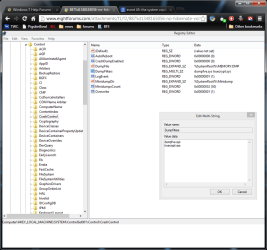
Another question, can you go to

Code:
HKLM\SYSTEM\CurrentControlSet\Control\CrashControl
in your reg editor, click on DumpFilters and post a screenshot of what it list. I found this in another post and thought it might apply here.

control.png
 

My Computer My Computer

At a glance

Windows 10 Pro X64Intel(R) Core(TM) i5-3570K CPU OC@ 4.5GHZ Turbo8.00 GB DDR3 1600MhzMSI Gaming X GTX 1070
Computer type
PC/Desktop
Computer Manufacturer/Model Number
Dude Build
OS
Windows 10 Pro X64
CPU
Intel(R) Core(TM) i5-3570K CPU OC@ 4.5GHZ Turbo
Motherboard
MSI Z77A-G45 Gaming
Memory
8.00 GB DDR3 1600Mhz
Graphics Card(s)
MSI Gaming X GTX 1070
Sound Card
Realtek High Definition
Monitor(s) Displays
Dell S23O9W, HP L1710
Screen Resolution
DELL-1920 x 1080 HP-1280 x1024
Hard Drives
Crucial m4 256 SSD, WD 7200RPM 500GB WD 1TB
PSU
Seasonic X650 GOLD
Case
Zalman Z12
Cooling
Antec Kuhler 920
Keyboard
Logitech
Mouse
MSI DS100 Interceptor
Internet Speed
50 down and 5 up
Antivirus
MSE
Browser
Chrome, IE 11
Other Info
Logitech X-620 Speakers
That was the only relevant solution I found online, but again it did not help with my problem. I have just the bitlocker driver in this entry (dumpfve) and even removing it did not help.

Dude, just to make it easier, I am not a newbie so, I have already searched online and tried all the common things. This is why I was asking for some insights i.e. some other uncommon places to start looking into and this is why I was pretty sure posting the events won't help since there is nothing suspicious there. So, again other than the event 45 and the message I get when I hibernate from the command line, nothing is out of the ordinary.
 

My Computer My Computer

At a glance

win 7 64
Computer type
PC/Desktop
OS
win 7 64
That was the only relevant solution I found online, but again it did not help with my problem. I have just the bitlocker driver in this entry (dumpfve) and even removing it did not help.

Dude, just to make it easier, I am not a newbie so, I have already searched online and tried all the common things. This is why I was asking for some insights i.e. some other uncommon places to start looking into and this is why I was pretty sure posting the events won't help since there is nothing suspicious there. So, again other than the event 45 and the message I get when I hibernate from the command line, nothing is out of the ordinary.

aena9200

Seems I traced your footsteps as you have tried all this. I will reach out for help to see about other possible solutions.
 

My Computer My Computer

At a glance

Windows 10 Pro X64Intel(R) Core(TM) i5-3570K CPU OC@ 4.5GHZ Turbo8.00 GB DDR3 1600MhzMSI Gaming X GTX 1070
Computer type
PC/Desktop
Computer Manufacturer/Model Number
Dude Build
OS
Windows 10 Pro X64
CPU
Intel(R) Core(TM) i5-3570K CPU OC@ 4.5GHZ Turbo
Motherboard
MSI Z77A-G45 Gaming
Memory
8.00 GB DDR3 1600Mhz
Graphics Card(s)
MSI Gaming X GTX 1070
Sound Card
Realtek High Definition
Monitor(s) Displays
Dell S23O9W, HP L1710
Screen Resolution
DELL-1920 x 1080 HP-1280 x1024
Hard Drives
Crucial m4 256 SSD, WD 7200RPM 500GB WD 1TB
PSU
Seasonic X650 GOLD
Case
Zalman Z12
Cooling
Antec Kuhler 920
Keyboard
Logitech
Mouse
MSI DS100 Interceptor
Internet Speed
50 down and 5 up
Antivirus
MSE
Browser
Chrome, IE 11
Other Info
Logitech X-620 Speakers
Tnx :)
 

My Computer My Computer

At a glance

win 7 64
Computer type
PC/Desktop
OS
win 7 64
No problem. Could you fill in your system specs and let us know if you have a raid setup too while I ask for help.

I put in a call for help, will post when I here something.
 

My Computer My Computer

At a glance

Windows 10 Pro X64Intel(R) Core(TM) i5-3570K CPU OC@ 4.5GHZ Turbo8.00 GB DDR3 1600MhzMSI Gaming X GTX 1070
Computer type
PC/Desktop
Computer Manufacturer/Model Number
Dude Build
OS
Windows 10 Pro X64
CPU
Intel(R) Core(TM) i5-3570K CPU OC@ 4.5GHZ Turbo
Motherboard
MSI Z77A-G45 Gaming
Memory
8.00 GB DDR3 1600Mhz
Graphics Card(s)
MSI Gaming X GTX 1070
Sound Card
Realtek High Definition
Monitor(s) Displays
Dell S23O9W, HP L1710
Screen Resolution
DELL-1920 x 1080 HP-1280 x1024
Hard Drives
Crucial m4 256 SSD, WD 7200RPM 500GB WD 1TB
PSU
Seasonic X650 GOLD
Case
Zalman Z12
Cooling
Antec Kuhler 920
Keyboard
Logitech
Mouse
MSI DS100 Interceptor
Internet Speed
50 down and 5 up
Antivirus
MSE
Browser
Chrome, IE 11
Other Info
Logitech X-620 Speakers

My Computer My Computer

At a glance

Microsoft Windows 10 Pro Insider Preview 64-bitIntel(R) Core(TM) i3-4130 CPU @ 3.40GHzCorsair Vengence 4GB x2 (8.00GB Dual-Channel ...2047MB GeForce GTS 450 (ZOTAC International)
Computer type
PC/Desktop
Computer Manufacturer/Model Number
Self Assembled
OS
Microsoft Windows 10 Pro Insider Preview 64-bit
CPU
Intel(R) Core(TM) i3-4130 CPU @ 3.40GHz
Motherboard
Gigabyte Technology Co., Ltd. B85M-D3H
Memory
Corsair Vengence 4GB x2 (8.00GB Dual-Channel DDR3 @ 798MHz)
Graphics Card(s)
2047MB GeForce GTS 450 (ZOTAC International)
Sound Card
Onboard (Realtek High Definition Audio)
Monitor(s) Displays
LG Flatron E2040T
Screen Resolution
1600x900
Hard Drives
Western Digital 1 TB
Seagate 500 GB
PSU
Corsair VS550
Case
Cooler Master K380
Cooling
Cooler Master Seidon 120V Plus
Keyboard
Logitech MK260r
Mouse
Logitech MK260r
Internet Speed
PMPL Broadband
Antivirus
Windows Defender + MBAM
Browser
Firefox
Other Info
Dell Studio 15" Laptop
Arc, Dude I have attached the files, please let me know when you download it and regarding the raid array I dont have any.
 
Last edited:

My Computer My Computer

At a glance

win 7 64
Computer type
PC/Desktop
OS
win 7 64
Event[34958]:
Log Name: System
Source: Microsoft-Windows-WER-SystemErrorReporting
Date: 2013-04-06T11:47:46.000
Event ID: 1001
Task: N/A
Level: Error
Opcode: N/A
Keyword: Classic
User: N/A
User Name: N/A
Computer: xy-PC
Description:
The computer has rebooted from a bugcheck. The bugcheck was: 0x0000009f (0x0000000000000003, 0xfffffa8003d7a060, 0xfffff80000b9c3d8, 0xfffffa801100d160). A dump was saved in: C:\Minidump\040613-17784-01.dmp. Report Id: 040613-17784-01.
So there is a BSOD for sure. And that is Hibernation/sleep related.

Follow it: http://www.sevenforums.com/tutorials/174459-dump-files-configure-windows-create-bsod.html
Go to Option Two, Point 2. Download the .reg file and merge it in registry by double clicking it.

Now put the computer in sleep and wait for another BSOD. When it occurred, search the .dmp files manually in the default path: C:\Windows\Minidump or %SystemRoot%\Minidump. See if the crash dump is recorded or not (hopefully it will be recorded).Post it following the Blue Screen of Death (BSOD) Posting Instructions.
 

My Computer My Computer

At a glance

Microsoft Windows 10 Pro Insider Preview 64-bitIntel(R) Core(TM) i3-4130 CPU @ 3.40GHzCorsair Vengence 4GB x2 (8.00GB Dual-Channel ...2047MB GeForce GTS 450 (ZOTAC International)
Computer type
PC/Desktop
Computer Manufacturer/Model Number
Self Assembled
OS
Microsoft Windows 10 Pro Insider Preview 64-bit
CPU
Intel(R) Core(TM) i3-4130 CPU @ 3.40GHz
Motherboard
Gigabyte Technology Co., Ltd. B85M-D3H
Memory
Corsair Vengence 4GB x2 (8.00GB Dual-Channel DDR3 @ 798MHz)
Graphics Card(s)
2047MB GeForce GTS 450 (ZOTAC International)
Sound Card
Onboard (Realtek High Definition Audio)
Monitor(s) Displays
LG Flatron E2040T
Screen Resolution
1600x900
Hard Drives
Western Digital 1 TB
Seagate 500 GB
PSU
Corsair VS550
Case
Cooler Master K380
Cooling
Cooler Master Seidon 120V Plus
Keyboard
Logitech MK260r
Mouse
Logitech MK260r
Internet Speed
PMPL Broadband
Antivirus
Windows Defender + MBAM
Browser
Firefox
Other Info
Dell Studio 15" Laptop
Arc, this BSOD is pretty old as you can see from the date and it was caused by the hamachi drivers. I have had hamachi since 2011 and I have never had this problem but anyway I uninstalled it after that BSOD but the problem still exists and yea I deleted the dump file after debugging it otherwise you would have found it in the files I sent.
 
Last edited by a moderator:

My Computer My Computer

At a glance

win 7 64
Computer type
PC/Desktop
OS
win 7 64
That was the last error event as per your event log.

And you already removed the zip so that I cannot have another look.

Edit: A 9F BSOD does not cause by Hamachi driver. It is a power state failure of a PnP device driver, either USB or PCI/PCIe.
 

My Computer My Computer

At a glance

Microsoft Windows 10 Pro Insider Preview 64-bitIntel(R) Core(TM) i3-4130 CPU @ 3.40GHzCorsair Vengence 4GB x2 (8.00GB Dual-Channel ...2047MB GeForce GTS 450 (ZOTAC International)
Computer type
PC/Desktop
Computer Manufacturer/Model Number
Self Assembled
OS
Microsoft Windows 10 Pro Insider Preview 64-bit
CPU
Intel(R) Core(TM) i3-4130 CPU @ 3.40GHz
Motherboard
Gigabyte Technology Co., Ltd. B85M-D3H
Memory
Corsair Vengence 4GB x2 (8.00GB Dual-Channel DDR3 @ 798MHz)
Graphics Card(s)
2047MB GeForce GTS 450 (ZOTAC International)
Sound Card
Onboard (Realtek High Definition Audio)
Monitor(s) Displays
LG Flatron E2040T
Screen Resolution
1600x900
Hard Drives
Western Digital 1 TB
Seagate 500 GB
PSU
Corsair VS550
Case
Cooler Master K380
Cooling
Cooler Master Seidon 120V Plus
Keyboard
Logitech MK260r
Mouse
Logitech MK260r
Internet Speed
PMPL Broadband
Antivirus
Windows Defender + MBAM
Browser
Firefox
Other Info
Dell Studio 15" Laptop
OK, I think the course of the topic started to derail from the main goal and since I have a real life to care for, I am not willing to get involved in a useless talk.

Thanks for those that helped.
The case it closed.
 
Last edited by a moderator:

My Computer My Computer

At a glance

win 7 64
Computer type
PC/Desktop
OS
win 7 64
A big thank you from me; just a watcher.
aena9200
Have a good day.
 

My Computer My Computer

At a glance

Windows 10 Pro. 64/ version 1709 Windows 7 Pr...Intel i7-6800K @ 4.3Corsair Platinum 16 gig @2400EVGA GTX 1070 OC
Computer type
PC/Desktop
Computer Manufacturer/Model Number
Home made Desktop
OS
Windows 10 Pro. 64/ version 1709 Windows 7 Pro/64
CPU
Intel i7-6800K @ 4.3
Motherboard
ASUS X-99 Deluxe II
Memory
Corsair Platinum 16 gig @2400
Graphics Card(s)
EVGA GTX 1070 OC
Monitor(s) Displays
Asus 27" LED LCD/VE278Q
Screen Resolution
1920-1080 or 1280-720 HDMI
Hard Drives
INTEL SSD 730-240 Gb Sata 3.0/
PSU
EVGA Platium 1200W
Case
Phanteks Luxe Tempered Glass 8 fans/ one radiator
Cooling
XSPC/ Water Cooled CPU
Keyboard
Das 4 Professional
Mouse
Logitech M705/MX Anywhere 2-S
Internet Speed
100 mbits
Antivirus
Microsoft Security Essentials/ Malwarebytes Premium 3.0/ SAS
Browser
I.E. 11 default/Firefox/ ISP Time Warner Cable/Spectrum
Other Info
LG BluRay Burner/
Sound system-KLipsch-THX/
Icy Dock ssd Hot Swap bays.
For posterity's sake I think I figured out what the problem is, it is one of many problems caused By Daemon tools. Apparently it happens when daemon tools is installed, for what ever reason it messes with hibernation and some how causes this error?
Heres a link to the information: Event ID: 45 Source: Ftdisk
Then i went hunting through the copy of the files uploaded, specifically the list of drivers and low and behold Daemon tools is installed.
 
Last edited:

My Computer My Computer

At a glance

Windows 7 enterprise 64 bit, Windows 7 Pro 64...Core i5-2400, Athlon 64 X2 6400+ ,Core i7-3632QM4GB, 4gb g.skill ddr2, 8gbRadeon HD 4550 sgb, Radeon HD 4870, NVIDIA Ge...
Computer Manufacturer/Model Number
Lenovo ThinkCenter, Custom Built PC, Acer Aspire V3-771G-9809
OS
Windows 7 enterprise 64 bit, Windows 7 Pro 64 bit ,Windows 8 64bit
CPU
Core i5-2400, Athlon 64 X2 6400+ ,Core i7-3632QM
Motherboard
ASUS M4A79 Deluxe
Memory
4GB, 4gb g.skill ddr2, 8gb
Graphics Card(s)
Radeon HD 4550 sgb, Radeon HD 4870, NVIDIA Geforce GT 650m
Monitor(s) Displays
dual samsung 22" monitors
Hard Drives
500GB, Western Digital WD Blue WD6400AAKS 640GB 7200 RPM 16MB Cache SATA 3.0Gb/s, 1TB
Case
Antec Twelve Hundred V3 Black Steel ATX Full Tower
Cooling
ASUS Silent Square Pro
Mouse
Razar Death adder
Internet Speed
20 mbps
Back
Top