
Event Error?

Wishmaster

New member
Guru
Gold Member
VIP
Local time
6:10 AM
Messages
4,513
Location
Southern Ohio
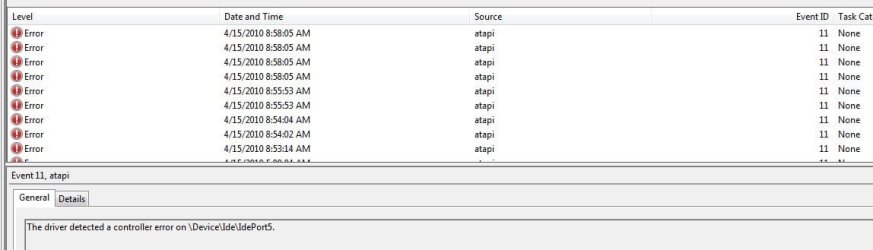
Hey guys. Ive noticed recently with every reboot I get a log in the event error refering to IDE port 5. I was thinking it may have been in reference to a Hard Drive.

I have no IDE devices however, they are all SATA 2, with the exception of my Bluray Drive which is a SATA 1 in the following SATA ports:

Intel SSD Port 0/ Vertex SSD Port2/ WD 640GB Port 3/ WD 1TB Port 4/ BD Drive Port 5

Ive ran a sfc /scan now which was clean and disk check and all HDs which also comes up clean.

No other apparrent issues or funny noises etc from drives so Im curious what this may be refering to.

Im not sure exactly whats generating this. Thoughts where to look? Thanks
it seems to generate an error only when I reboot. If its up a day or 2, nothing.
 

Attachments
  • Capture.JPG
    Capture.JPG
    40.1 KB · Views: 24
  • Capture2.JPG
    Capture2.JPG
    54.3 KB · Views: 15

My Computer

Computer Manufacturer/Model Number
Custom (Self Build)
OS
Windows 7 Home Premium 64bit
CPU
Intel Core i7 2700k
Motherboard
eVGA P67 SLI
Memory
8GB Mushkin Redline Ridgebacks @1866
Graphics Card(s)
EVGA GTX570 SC
Sound Card
XiFi Titanium HD
Monitor(s) Displays
LG W2453V
Screen Resolution
1920x1080
Hard Drives
Intel 320 80GB -- Intel X25-V 40GB --WD Black 1TB x2 -- WD Blue 640GB
PSU
Seasonic x750
Case
Corsair 600T SE White
Cooling
eVGA Superclocked CPU Cooler
Keyboard
Saitek Cyborg
Antivirus
Kaspersky
Browser
IE
Other Info
LG BD/DVD
Hey guys. Ive noticed recently with every reboot I get a log in the event error refering to IDE port 5. I was thinking it may have been in reference to a Hard Drive.

I have no IDE devices however, they are all SATA 2, with the exception of my Bluray Drive which is a SATA 1 in the following SATA ports:

Intel SSD Port 0/ Vertex SSD Port2/ WD 640GB Port 3/ WD 1TB Port 4/ BD Drive Port 5

Ive ran a sfc /scan now which was clean and disk check and all HDs which also comes up clean.

No other apparrent issues or funny noises etc from drives so Im curious what this may be refering to.

Im not sure exactly whats generating this. Thoughts where to look? Thanks
it seems to generate an error only when I reboot. If its up a day or 2, nothing.

Does your motherboard have an IDE controller on it?
If so, perhaps disabling it in the BIOS is your answer.
Also... make sure you SATA controllers are set to AHCI mode.
 

My Computer

Computer Manufacturer/Model Number
Homebrew
OS
XP Pro SP3 X86 / Win7 Pro X86
CPU
Amd 64 x2 4200 (2.4ghz)
Motherboard
Asus M2N-MX SE Plus
Memory
Kingston DDR2 800 2gb
Graphics Card(s)
Nvidia GF-8400
Sound Card
Realtek on Motherboard
Monitor(s) Displays
Acer x-193bw
Screen Resolution
1440 x 900
Hard Drives
Western Digital 500g
PSU
350watt In-Win
Case
In-Win
Cooling
Air
Keyboard
yes
Mouse
yes
Internet Speed
5mpbs
Other Info
Also ASRock ION 330 as HTPC (on XP).
Acer Aspire as GP netbook (on XP).
Source of error is Atapi. Its your optical drive (unless you have a tape backup also).
 

My Computer

Computer Manufacturer/Model Number
Too many to describe...
OS
Windows 7 x64 pro/ Windows 7 x86 Pro/ XP SP3 x86
Already in AHCI, and no, the bluray is the only optical.

Would this mean its going bad or possibly something else?

I am not sure how to test a optical drive.
 

My Computer

Computer Manufacturer/Model Number
Custom (Self Build)
OS
Windows 7 Home Premium 64bit
CPU
Intel Core i7 2700k
Motherboard
eVGA P67 SLI
Memory
8GB Mushkin Redline Ridgebacks @1866
Graphics Card(s)
EVGA GTX570 SC
Sound Card
XiFi Titanium HD
Monitor(s) Displays
LG W2453V
Screen Resolution
1920x1080
Hard Drives
Intel 320 80GB -- Intel X25-V 40GB --WD Black 1TB x2 -- WD Blue 640GB
PSU
Seasonic x750
Case
Corsair 600T SE White
Cooling
eVGA Superclocked CPU Cooler
Keyboard
Saitek Cyborg
Antivirus
Kaspersky
Browser
IE
Other Info
LG BD/DVD
Well, before testing the drive, maybe just wiggle the wires around a bit. Also, try reinstalling the ATA channels in device manager (they are under IDE\ATAPI Controllers). But would suggest you check the BD drive manual or consult the drive manufacturer for instructions on the testing.
 

My Computer

Computer Manufacturer/Model Number
Too many to describe...
OS
Windows 7 x64 pro/ Windows 7 x86 Pro/ XP SP3 x86
Question answered.


Unistalling the ATAPI driver rebooting and letting it re-instal seems to have resolved the issue.
For ther last 2 re-boots at least.

Thank you both for your responses, Ill look into further as suggested.
 

My Computer

Computer Manufacturer/Model Number
Custom (Self Build)
OS
Windows 7 Home Premium 64bit
CPU
Intel Core i7 2700k
Motherboard
eVGA P67 SLI
Memory
8GB Mushkin Redline Ridgebacks @1866
Graphics Card(s)
EVGA GTX570 SC
Sound Card
XiFi Titanium HD
Monitor(s) Displays
LG W2453V
Screen Resolution
1920x1080
Hard Drives
Intel 320 80GB -- Intel X25-V 40GB --WD Black 1TB x2 -- WD Blue 640GB
PSU
Seasonic x750
Case
Corsair 600T SE White
Cooling
eVGA Superclocked CPU Cooler
Keyboard
Saitek Cyborg
Antivirus
Kaspersky
Browser
IE
Other Info
LG BD/DVD
Back
Top