Event ID 1002 every morning turn desktop icons to white boxes

SomeUserName

Banned
Local time
1:13 AM
Messages
129
Location
Niagara Falls, ON
Every morning (This is not exaggeration) I do mean EVERY MORNING, I get Event ID 1002 DHCP-Client that says:

"The IP address lease 192.168.x.x for the Network Card with network address 0xE0CB4E2F7281 has been denied by the DHCP server 192.168.x.x (The DHCP Server sent a DHCPNACK message")

When this happens all my icons on the desktop turn to blank white boxes and then 1 by 1 change back to their correct icon picture.

How can I stop the desktop icons from change to white then back to normal? I have already tried renaming the icon cache to OLD and restarting. Didn't work/Problem still happens. Half my desktop is filled with shortcuts and icons and it really distracting/annoying when they all go white and back to normal.
 

My Computer My Computer

At a glance

Windows 7 Ultimate 64Bit (SP1)Intel® Core™ i3-6100 Processor (3M Cache, 3.7...Kingston 16GB Hyper X Fury Blue DDR3 1600Mhz ...On board (Asus B150M-C D3) VGA and DVI on Ext...
Computer type
PC/Desktop
Computer Manufacturer/Model Number
Custom built by myself
OS
Windows 7 Ultimate 64Bit (SP1)
CPU
Intel® Core™ i3-6100 Processor (3M Cache, 3.70 GHz)
Motherboard
Asus B150M-C D3
Memory
Kingston 16GB Hyper X Fury Blue DDR3 1600Mhz (2x 8GB sticks)
Graphics Card(s)
On board (Asus B150M-C D3) VGA and DVI on Extended Desktop
Sound Card
On Board (Asus B150M-C D3)
Monitor(s) Displays
Left DVI: Samsung 920WM - Right VGA: Samsung 941BW
Hard Drives
WD WD5000AADS 500GB SATA Green--WD 1TB WD1001FALS SATA Black--WD 320GB WD3200JB
PSU
Cooler Master 700W Silent Pro
Case
See through Side panel--right hinge door--5x 5" & 2x 3" bays
Cooling
Side, Front, Rear fan & Power supply fan
Keyboard
Logitech MX5000 BT
Mouse
Logitech MX500
Internet Speed
40Mb down--10Mb Up
Antivirus
AVG Internet Security
Browser
Chrome-Firefox-Opera-IE-TOR
Other Info
2x LG DVD-RW--NZXT Fan contoller--4in1 Card reader

My Computer My Computer

At a glance

W7 home premium 32bit/W7HP 64bit/w10 tp insid...E5300 dual core3gbNvidia Geforce 7100 Nforce 630i
Computer type
PC/Desktop
Computer Manufacturer/Model Number
medionl/Aspire 6930G/acer x55a
OS
W7 home premium 32bit/W7HP 64bit/w10 tp insider ring
CPU
E5300 dual core
Motherboard
medion MS7366
Memory
3gb
Graphics Card(s)
Nvidia Geforce 7100 Nforce 630i
Monitor(s) Displays
avixc
Internet Speed
n (isp resticted to 72)
Antivirus
mse/pands
Browser
palemoon
Other Info
Belkin Fd7050 n USB using Railink RT2870 drivers, more upto date
OK I made a mistake. My icons went white again but there is nothing in the event logs. THIS time. 1st time I have seen icons go white and back to normal with nothing in the event log. NOW I'm having second thoughts on if this is DCHP related or not.


Edit:Cancel this post. Checked event logs again and NOW the 1002 DHCP message is there :mad::mad::mad::mad:
 

My Computer My Computer

At a glance

Windows 7 Ultimate 64Bit (SP1)Intel® Core™ i3-6100 Processor (3M Cache, 3.7...Kingston 16GB Hyper X Fury Blue DDR3 1600Mhz ...On board (Asus B150M-C D3) VGA and DVI on Ext...
Computer type
PC/Desktop
Computer Manufacturer/Model Number
Custom built by myself
OS
Windows 7 Ultimate 64Bit (SP1)
CPU
Intel® Core™ i3-6100 Processor (3M Cache, 3.70 GHz)
Motherboard
Asus B150M-C D3
Memory
Kingston 16GB Hyper X Fury Blue DDR3 1600Mhz (2x 8GB sticks)
Graphics Card(s)
On board (Asus B150M-C D3) VGA and DVI on Extended Desktop
Sound Card
On Board (Asus B150M-C D3)
Monitor(s) Displays
Left DVI: Samsung 920WM - Right VGA: Samsung 941BW
Hard Drives
WD WD5000AADS 500GB SATA Green--WD 1TB WD1001FALS SATA Black--WD 320GB WD3200JB
PSU
Cooler Master 700W Silent Pro
Case
See through Side panel--right hinge door--5x 5" & 2x 3" bays
Cooling
Side, Front, Rear fan & Power supply fan
Keyboard
Logitech MX5000 BT
Mouse
Logitech MX500
Internet Speed
40Mb down--10Mb Up
Antivirus
AVG Internet Security
Browser
Chrome-Firefox-Opera-IE-TOR
Other Info
2x LG DVD-RW--NZXT Fan contoller--4in1 Card reader
-OK I Disabled IPv6
-The best driver for my LAN is already installed (According to windows update :sarc:)
-DNS and DHCP client are both started and running on automatic mode
----------------------------------
I Stopped right here because I thought to check my laptop as well. My laptop is always on but I rarely use it. Laptop ALSO has the same 1002 errors at the same clock time as the this one. Not sure if the icons go white on the laptop b/c the screen is always in the closed position.

This computer is used MANY hours per day and I rarely touch the laptop. Does both computers getting the same error mean this is a router issue? I did customize my router and am using it as a DHCP server so all my IPs remain the same so I can remotely access things when I need I always know what the IP is instead of IPs always changing around and I don't know the IP when I need the device.......

The 1002 error I'm getting is DHCP related and my router is being used as DHCP server --> http://www.sevenforums.com/network-sharing/365404-windows-7-wont-allow-correct-static-ip.html

Upon more playing around in event viewer I found this:
Provider

[ Name] Microsoft-Windows-Dhcp-Client
[ Guid] {15A7A4F8-0072-4EAB-ABAD-F98A4D666AED}

EventID 1002

Version 0

Level 2

Task 3

Opcode 76

Keywords 0x4000000000000000

- TimeCreated

[ SystemTime] 2016-06-14T11:28:37.651875300Z

EventRecordID 1206

Correlation

- Execution

[ ProcessID] 1444
[ ThreadID] 8692

Channel Microsoft-Windows-Dhcp-Client/Admin

Computer Desktop-PC

- Security

[ UserID] S-1-5-19


- EventData

Address1 33663168
HWLength 6
HWAddress E0CB4E2F7281
Address2 16885952


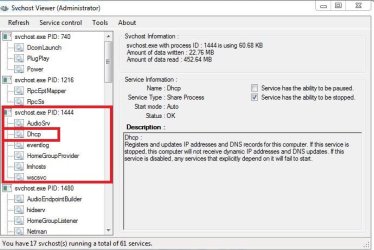
I did CNTL+ALT+DEL and looked for PID 1444. It says its SVCHOST. Checked properties and services.
Nothing interesting under properties but under services I get the following attached picture. That SVCHOST has a DHCP listing in there as well.

Doing the same on the Laptop its PID 1256 also listed as SVCHOST and in services its the exact same list as the attached picture from the this computer. And AGAIN that DHCP listing is there as well.

Would using the router as a DHCP server cause daily DHCP errors? These 1002's happen about the same time each morning. I have no connection issues with my internet. It works perfectly. I would not have even about this DHCP issue had I not started investigating why my icons were turning blank white and back to normal.

What connection/relationship does DHCP have with turning desktop icons white and back to normal?:confused:?:confused:?

If I could solve this icon issue I wont even care about the DCHP error because until now I never even knew about it so its not harming anything...except desktop icons I guess.
 

Attachments

  • Capture1444.JPG
    Capture1444.JPG
    34.7 KB · Views: 0
  • Capturesvc.JPG
    Capturesvc.JPG
    54.3 KB · Views: 19

My Computer My Computer

At a glance

Windows 7 Ultimate 64Bit (SP1)Intel® Core™ i3-6100 Processor (3M Cache, 3.7...Kingston 16GB Hyper X Fury Blue DDR3 1600Mhz ...On board (Asus B150M-C D3) VGA and DVI on Ext...
Computer type
PC/Desktop
Computer Manufacturer/Model Number
Custom built by myself
OS
Windows 7 Ultimate 64Bit (SP1)
CPU
Intel® Core™ i3-6100 Processor (3M Cache, 3.70 GHz)
Motherboard
Asus B150M-C D3
Memory
Kingston 16GB Hyper X Fury Blue DDR3 1600Mhz (2x 8GB sticks)
Graphics Card(s)
On board (Asus B150M-C D3) VGA and DVI on Extended Desktop
Sound Card
On Board (Asus B150M-C D3)
Monitor(s) Displays
Left DVI: Samsung 920WM - Right VGA: Samsung 941BW
Hard Drives
WD WD5000AADS 500GB SATA Green--WD 1TB WD1001FALS SATA Black--WD 320GB WD3200JB
PSU
Cooler Master 700W Silent Pro
Case
See through Side panel--right hinge door--5x 5" & 2x 3" bays
Cooling
Side, Front, Rear fan & Power supply fan
Keyboard
Logitech MX5000 BT
Mouse
Logitech MX500
Internet Speed
40Mb down--10Mb Up
Antivirus
AVG Internet Security
Browser
Chrome-Firefox-Opera-IE-TOR
Other Info
2x LG DVD-RW--NZXT Fan contoller--4in1 Card reader
So all my icons just flashed again and sure enough in event log is the trusty old Event !D 1002 with no disruption in my connection :mad:
 

My Computer My Computer

At a glance

Windows 7 Ultimate 64Bit (SP1)Intel® Core™ i3-6100 Processor (3M Cache, 3.7...Kingston 16GB Hyper X Fury Blue DDR3 1600Mhz ...On board (Asus B150M-C D3) VGA and DVI on Ext...
Computer type
PC/Desktop
Computer Manufacturer/Model Number
Custom built by myself
OS
Windows 7 Ultimate 64Bit (SP1)
CPU
Intel® Core™ i3-6100 Processor (3M Cache, 3.70 GHz)
Motherboard
Asus B150M-C D3
Memory
Kingston 16GB Hyper X Fury Blue DDR3 1600Mhz (2x 8GB sticks)
Graphics Card(s)
On board (Asus B150M-C D3) VGA and DVI on Extended Desktop
Sound Card
On Board (Asus B150M-C D3)
Monitor(s) Displays
Left DVI: Samsung 920WM - Right VGA: Samsung 941BW
Hard Drives
WD WD5000AADS 500GB SATA Green--WD 1TB WD1001FALS SATA Black--WD 320GB WD3200JB
PSU
Cooler Master 700W Silent Pro
Case
See through Side panel--right hinge door--5x 5" & 2x 3" bays
Cooling
Side, Front, Rear fan & Power supply fan
Keyboard
Logitech MX5000 BT
Mouse
Logitech MX500
Internet Speed
40Mb down--10Mb Up
Antivirus
AVG Internet Security
Browser
Chrome-Firefox-Opera-IE-TOR
Other Info
2x LG DVD-RW--NZXT Fan contoller--4in1 Card reader
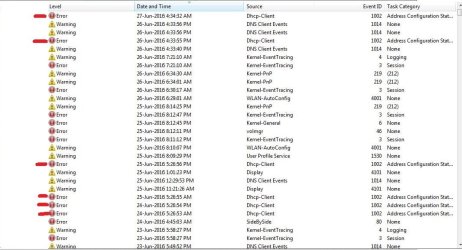
This problem, is SERIOUSLY starting to p1ss me off now. Is there anyway I can make it so even veiwer does not display EventID 1002 even if something causes it? Im getting sick of looking at it in event ID 1002 when nothing is wrong. Sorting event IDs in numerical order and using the page up/Page down buttons I get 33 pages of EventID1002 :mad::mad:

I have since installed a network meter gadget to see if I am getting connection loss. As I said before I was getting no connection loss but this meter a few times a day talks and says "connection lost and 2 seconds later it says "connection established" so I guess I am getting connection loss but it so fast it does not affect my browsing in any way so it is unnoticeable. ALSO notice how the errors happens in the AM and PM almost to the exact second at 12 hour spacing between errors.
 

Attachments

  • 13.JPG
    13.JPG
    90.4 KB · Views: 1
Last edited:

My Computer My Computer

At a glance

Windows 7 Ultimate 64Bit (SP1)Intel® Core™ i3-6100 Processor (3M Cache, 3.7...Kingston 16GB Hyper X Fury Blue DDR3 1600Mhz ...On board (Asus B150M-C D3) VGA and DVI on Ext...
Computer type
PC/Desktop
Computer Manufacturer/Model Number
Custom built by myself
OS
Windows 7 Ultimate 64Bit (SP1)
CPU
Intel® Core™ i3-6100 Processor (3M Cache, 3.70 GHz)
Motherboard
Asus B150M-C D3
Memory
Kingston 16GB Hyper X Fury Blue DDR3 1600Mhz (2x 8GB sticks)
Graphics Card(s)
On board (Asus B150M-C D3) VGA and DVI on Extended Desktop
Sound Card
On Board (Asus B150M-C D3)
Monitor(s) Displays
Left DVI: Samsung 920WM - Right VGA: Samsung 941BW
Hard Drives
WD WD5000AADS 500GB SATA Green--WD 1TB WD1001FALS SATA Black--WD 320GB WD3200JB
PSU
Cooler Master 700W Silent Pro
Case
See through Side panel--right hinge door--5x 5" & 2x 3" bays
Cooling
Side, Front, Rear fan & Power supply fan
Keyboard
Logitech MX5000 BT
Mouse
Logitech MX500
Internet Speed
40Mb down--10Mb Up
Antivirus
AVG Internet Security
Browser
Chrome-Firefox-Opera-IE-TOR
Other Info
2x LG DVD-RW--NZXT Fan contoller--4in1 Card reader
I re-enabled IPV6 since that obviously wasnt the problem
 

My Computer My Computer

At a glance

Windows 7 Ultimate 64Bit (SP1)Intel® Core™ i3-6100 Processor (3M Cache, 3.7...Kingston 16GB Hyper X Fury Blue DDR3 1600Mhz ...On board (Asus B150M-C D3) VGA and DVI on Ext...
Computer type
PC/Desktop
Computer Manufacturer/Model Number
Custom built by myself
OS
Windows 7 Ultimate 64Bit (SP1)
CPU
Intel® Core™ i3-6100 Processor (3M Cache, 3.70 GHz)
Motherboard
Asus B150M-C D3
Memory
Kingston 16GB Hyper X Fury Blue DDR3 1600Mhz (2x 8GB sticks)
Graphics Card(s)
On board (Asus B150M-C D3) VGA and DVI on Extended Desktop
Sound Card
On Board (Asus B150M-C D3)
Monitor(s) Displays
Left DVI: Samsung 920WM - Right VGA: Samsung 941BW
Hard Drives
WD WD5000AADS 500GB SATA Green--WD 1TB WD1001FALS SATA Black--WD 320GB WD3200JB
PSU
Cooler Master 700W Silent Pro
Case
See through Side panel--right hinge door--5x 5" & 2x 3" bays
Cooling
Side, Front, Rear fan & Power supply fan
Keyboard
Logitech MX5000 BT
Mouse
Logitech MX500
Internet Speed
40Mb down--10Mb Up
Antivirus
AVG Internet Security
Browser
Chrome-Firefox-Opera-IE-TOR
Other Info
2x LG DVD-RW--NZXT Fan contoller--4in1 Card reader
Back
Top