Event Log 41

Ozyman

New member
Local time
11:52 PM
Messages
9
This has been going on for about 15 days now. First I thought it happened because I accidentally installed x64 drivers on 32bit W7. So I did a fresh install. Then it happened more frequently, so I had to buy x64 and install it too. And it still happened. Now the random computer "hang" ons occur like every 2 hours, etc.... I don't know what could it be. My hardware is brand new: Crosshair Formula IV, 2 Hs 5770s, 4gb Ripjaw Ram, x4 Phenom, 750tx Corsair, and a Coolmaster 912 case (1 tb hd). Any help would be appreciated.
 

My Computer

OS
Windows 7 x64
Oh, I flashed my BIOS, installed new drivers, etc.... I don't know what else to try/do.
 

My Computer

OS
Windows 7 x64
For your Event ID: 41, do you have an Event Source?

This will greatly aid in assisting you.
 

My Computer

Computer Manufacturer/Model Number
Dell and Custom
OS
Systems 1 and 2: Windows 7 Enterprise x64, Win 8 Developer
CPU
System 1: i7 [email protected], System 2: AMD FX-4100 Zambezi 3.6G
Motherboard
System 1:Dell 06NWYK System 2: ASUS M5A97 AM3+
Memory
System 1: 8GB System 2: 8GB
Graphics Card(s)
System 1: ATI FirePro V4800 System 2: Radeon HD 6850
Sound Card
System 1: onboard System 2: onboard
Monitor(s) Displays
System1: Viewsonic HDMI 24"
Screen Resolution
System 1: 1920x1080 System 2: 1920x1080
Hard Drives
System 1: Mirrored .5B drives System 2: Seagate Barracuda ST1000DM003 1TB 7200 RPM 64MB Cache SATA 6.0Gb/s
Case
System 1: Dell System 2: Cooler Master
Internet Speed
10 MBPS
I'm a noob. How do I get an Event Source? The two crashed I've had are all Event 41.
 

My Computer

OS
Windows 7 x64
Click on Start Button. Type "eventvwr.msc" (without the quotes). There you will find Event 41 and the source.
 

My Computer

Computer Manufacturer/Model Number
Dell and Custom
OS
Systems 1 and 2: Windows 7 Enterprise x64, Win 8 Developer
CPU
System 1: i7 [email protected], System 2: AMD FX-4100 Zambezi 3.6G
Motherboard
System 1:Dell 06NWYK System 2: ASUS M5A97 AM3+
Memory
System 1: 8GB System 2: 8GB
Graphics Card(s)
System 1: ATI FirePro V4800 System 2: Radeon HD 6850
Sound Card
System 1: onboard System 2: onboard
Monitor(s) Displays
System1: Viewsonic HDMI 24"
Screen Resolution
System 1: 1920x1080 System 2: 1920x1080
Hard Drives
System 1: Mirrored .5B drives System 2: Seagate Barracuda ST1000DM003 1TB 7200 RPM 64MB Cache SATA 6.0Gb/s
Case
System 1: Dell System 2: Cooler Master
Internet Speed
10 MBPS
Log Name: System
Source: Microsoft-Windows-Kernel-Power
Date: 10/21/2010 12:11:16 AM
Event ID: 41
Task Category: (63)
Level: Critical
Keywords: (2)
User: SYSTEM
Computer: Ozymandias-PC
Description:
The system has rebooted without cleanly shutting down first. This error could be caused if the system stopped responding, crashed, or lost power unexpectedly.
Event Xml:
<Event xmlns="http://schemas.microsoft.com/win/2004/08/events/event">
<System>
<Provider Name="Microsoft-Windows-Kernel-Power" Guid="{331C3B3A-2005-44C2-AC5E-77220C37D6B4}" />
<EventID>41</EventID>
<Version>2</Version>
<Level>1</Level>
<Task>63</Task>
<Opcode>0</Opcode>
<Keywords>0x8000000000000002</Keywords>
<TimeCreated SystemTime="2010-10-21T07:11:16.717635300Z" />
<EventRecordID>2142</EventRecordID>
<Correlation />
<Execution ProcessID="4" ThreadID="8" />
<Channel>System</Channel>
<Computer>Ozymandias-PC</Computer>
<Security UserID="S-1-5-18" />
</System>
<EventData>
<Data Name="BugcheckCode">0</Data>
<Data Name="BugcheckParameter1">0x0</Data>
<Data Name="BugcheckParameter2">0x0</Data>
<Data Name="BugcheckParameter3">0x0</Data>
<Data Name="BugcheckParameter4">0x0</Data>
<Data Name="SleepInProgress">false</Data>
<Data Name="PowerButtonTimestamp">0</Data>
</EventData>
</Event>

Got that.
 

My Computer

OS
Windows 7 x64
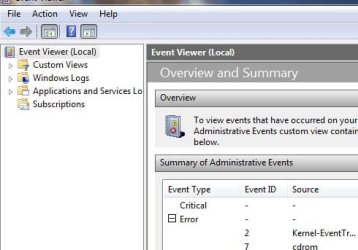
Good info. But when you go to eventvwr.msc, and the GUI pops up, please click on EVENT Viewer (Local). See if there is a critical error. And if that Event ID is 41, the source should be in the next column, as demonstrated in the attachment.
 

Attachments

  • Capture.JPG
    Capture.JPG
    30.9 KB · Views: 13

My Computer

Computer Manufacturer/Model Number
Dell and Custom
OS
Systems 1 and 2: Windows 7 Enterprise x64, Win 8 Developer
CPU
System 1: i7 [email protected], System 2: AMD FX-4100 Zambezi 3.6G
Motherboard
System 1:Dell 06NWYK System 2: ASUS M5A97 AM3+
Memory
System 1: 8GB System 2: 8GB
Graphics Card(s)
System 1: ATI FirePro V4800 System 2: Radeon HD 6850
Sound Card
System 1: onboard System 2: onboard
Monitor(s) Displays
System1: Viewsonic HDMI 24"
Screen Resolution
System 1: 1920x1080 System 2: 1920x1080
Hard Drives
System 1: Mirrored .5B drives System 2: Seagate Barracuda ST1000DM003 1TB 7200 RPM 64MB Cache SATA 6.0Gb/s
Case
System 1: Dell System 2: Cooler Master
Internet Speed
10 MBPS
Alright I did that I have two instances of Event Log 41. Source being "Kernel-Power."
 

My Computer

OS
Windows 7 x64
I've read online that it might be Sound Drivers or to enable the something regarding hibernation on cmd. Hm, this issue haunts me so badly. The only reason I only have 2 event log 41 is because I've installed windows anew over 6 times already.
 

My Computer

OS
Windows 7 x64
Some possibilities are: problems with the psu, try turning off all your power savers (e.g. sleep, hibernate). Let's try changing your power options first and see how that goes. How often was it set to sleep or hibernate? Also, disable S1/S3 in your bios for testing purposes. Please let us know how these steps go.
 

My Computer

Computer Manufacturer/Model Number
Dell and Custom
OS
Systems 1 and 2: Windows 7 Enterprise x64, Win 8 Developer
CPU
System 1: i7 [email protected], System 2: AMD FX-4100 Zambezi 3.6G
Motherboard
System 1:Dell 06NWYK System 2: ASUS M5A97 AM3+
Memory
System 1: 8GB System 2: 8GB
Graphics Card(s)
System 1: ATI FirePro V4800 System 2: Radeon HD 6850
Sound Card
System 1: onboard System 2: onboard
Monitor(s) Displays
System1: Viewsonic HDMI 24"
Screen Resolution
System 1: 1920x1080 System 2: 1920x1080
Hard Drives
System 1: Mirrored .5B drives System 2: Seagate Barracuda ST1000DM003 1TB 7200 RPM 64MB Cache SATA 6.0Gb/s
Case
System 1: Dell System 2: Cooler Master
Internet Speed
10 MBPS
All my power options have been changed. I never liked Sleep/Hibernation. I'll disable S1/S3 and keep this thread informed on the results. So far I've passed the 2 hr mark and no Shutdowns or hang times.
 

My Computer

OS
Windows 7 x64
All my power options have been changed. I never liked Sleep/Hibernation. I'll disable S1/S3 and keep this thread informed on the results. So far I've passed the 2 hr mark and no Shutdowns or hang times.

Excellent!
 

My Computer

Computer Manufacturer/Model Number
Dell and Custom
OS
Systems 1 and 2: Windows 7 Enterprise x64, Win 8 Developer
CPU
System 1: i7 [email protected], System 2: AMD FX-4100 Zambezi 3.6G
Motherboard
System 1:Dell 06NWYK System 2: ASUS M5A97 AM3+
Memory
System 1: 8GB System 2: 8GB
Graphics Card(s)
System 1: ATI FirePro V4800 System 2: Radeon HD 6850
Sound Card
System 1: onboard System 2: onboard
Monitor(s) Displays
System1: Viewsonic HDMI 24"
Screen Resolution
System 1: 1920x1080 System 2: 1920x1080
Hard Drives
System 1: Mirrored .5B drives System 2: Seagate Barracuda ST1000DM003 1TB 7200 RPM 64MB Cache SATA 6.0Gb/s
Case
System 1: Dell System 2: Cooler Master
Internet Speed
10 MBPS
Since this has happened with two different operating systems, I'm leaning more toward a power supply with an intermittent problem. Can you borrow a power supply from another pc to test?
 

My Computer

Computer Manufacturer/Model Number
Dell and Custom
OS
Systems 1 and 2: Windows 7 Enterprise x64, Win 8 Developer
CPU
System 1: i7 [email protected], System 2: AMD FX-4100 Zambezi 3.6G
Motherboard
System 1:Dell 06NWYK System 2: ASUS M5A97 AM3+
Memory
System 1: 8GB System 2: 8GB
Graphics Card(s)
System 1: ATI FirePro V4800 System 2: Radeon HD 6850
Sound Card
System 1: onboard System 2: onboard
Monitor(s) Displays
System1: Viewsonic HDMI 24"
Screen Resolution
System 1: 1920x1080 System 2: 1920x1080
Hard Drives
System 1: Mirrored .5B drives System 2: Seagate Barracuda ST1000DM003 1TB 7200 RPM 64MB Cache SATA 6.0Gb/s
Case
System 1: Dell System 2: Cooler Master
Internet Speed
10 MBPS
I'll see. I don't think I can. It happened when I was playing Civ 5 too. So I guess when the system starts working it shuts down. I'm starting to think so too either that or a heat issue but Speed Fan tells me that most of my parts run coolly at 40C.
 

My Computer

OS
Windows 7 x64
Just out of curiosity, what kind of HDD(s) are you using? I'm assuming SATA. If this is the case, can you tell me which channels it/they are on and whether or not they are set to master/slave?
 

My Computer

OS
Windows 7 Professional x64
Back
Top