event viewer error question

debgram1

New member
Member
Local time
10:38 AM
Messages
85
I'm assuming the reason why there isn't any logs in the custom views is that because somehow there is no task for it. How do I fix this? Thanks
 

Attachments

  • event viwer.jpg
    event viwer.jpg
    10.1 KB · Views: 13
  • custonviews.jpg
    custonviews.jpg
    9.2 KB · Views: 10

My Computer

OS
Windows 7 Home Premium 64-bit
CPU
Intel Core i5-2500K Sandy Bridge 3.3GHz
Motherboard
Asus P8P67 deluxe
Memory
G.SKILL Ripjaws X Series 8GB (4 x 2GB) 240-Pin DDR3 SDRAM DD
Graphics Card(s)
Sapphire ATI Radeon 4800
Hard Drives
Western Digital Caviar Blue WD2500AAKS 250GB 7200 RPM SATA 3.0Gb/s 3.5" Internal Hard Drive, WDC WD5001AALS SCSI hard drive, SAMSUNG SP2504C SCSI hard drive
Cooling
ZALMAN CNPS9900 NT 120mm 2 Ball CPU Cooler
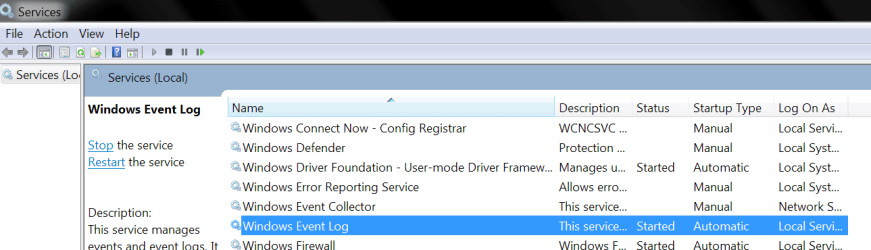
From what I'm seeing there it would appear you have stopped the event logger service.
Is that a possibility?
 

My Computer

Computer Manufacturer/Model Number
Insane hobo technologies. ;-)
OS
Windows 7 x64
CPU
Intel i7 2600k
Motherboard
Asrock z68 extreme 4 gen 3
Memory
G.skill Ripjaw 16gigs @ 1866
Graphics Card(s)
Nvidia gtx580 (evga)
Sound Card
Integrated HD audio + hdmi
Monitor(s) Displays
24" ASUS widescreen + 42" insignia
Screen Resolution
1080p (1920x1080)
Hard Drives
128 Samsung 830
256 Samsung 840
3 x 1tb storage drive (various)
1 western digital 1tb (eSATA)
1 Seagate 1tb (eSATA)
PSU
1 kilowatt SLI/Crossfire rated Silverstone modular
Case
NZXT Phantom + additional 220 fan
Cooling
Zalmann
Keyboard
Microsoft wireless 3000 (v2)
Mouse
MS - wireless 5000 (bluetrack)
Internet Speed
depends on if you ask me or my provider.
Other Info
The above information is provided as is, and the author assumes no responsibility for issues it may cause with your sanity or fanboyism.
From what I'm seeing there it would appear you have stopped the event logger service.
Is that a possibility?

It could be I don't know, so how do I get it working again. I have been having a hard drive issue so it might have messed up, I don't know.
 

My Computer

OS
Windows 7 Home Premium 64-bit
CPU
Intel Core i5-2500K Sandy Bridge 3.3GHz
Motherboard
Asus P8P67 deluxe
Memory
G.SKILL Ripjaws X Series 8GB (4 x 2GB) 240-Pin DDR3 SDRAM DD
Graphics Card(s)
Sapphire ATI Radeon 4800
Hard Drives
Western Digital Caviar Blue WD2500AAKS 250GB 7200 RPM SATA 3.0Gb/s 3.5" Internal Hard Drive, WDC WD5001AALS SCSI hard drive, SAMSUNG SP2504C SCSI hard drive
Cooling
ZALMAN CNPS9900 NT 120mm 2 Ball CPU Cooler

My Computer

Computer Manufacturer/Model Number
Insane hobo technologies. ;-)
OS
Windows 7 x64
CPU
Intel i7 2600k
Motherboard
Asrock z68 extreme 4 gen 3
Memory
G.skill Ripjaw 16gigs @ 1866
Graphics Card(s)
Nvidia gtx580 (evga)
Sound Card
Integrated HD audio + hdmi
Monitor(s) Displays
24" ASUS widescreen + 42" insignia
Screen Resolution
1080p (1920x1080)
Hard Drives
128 Samsung 830
256 Samsung 840
3 x 1tb storage drive (various)
1 western digital 1tb (eSATA)
1 Seagate 1tb (eSATA)
PSU
1 kilowatt SLI/Crossfire rated Silverstone modular
Case
NZXT Phantom + additional 220 fan
Cooling
Zalmann
Keyboard
Microsoft wireless 3000 (v2)
Mouse
MS - wireless 5000 (bluetrack)
Internet Speed
depends on if you ask me or my provider.
Other Info
The above information is provided as is, and the author assumes no responsibility for issues it may cause with your sanity or fanboyism.

My Computer

OS
Windows 7 Home Premium 64-bit
CPU
Intel Core i5-2500K Sandy Bridge 3.3GHz
Motherboard
Asus P8P67 deluxe
Memory
G.SKILL Ripjaws X Series 8GB (4 x 2GB) 240-Pin DDR3 SDRAM DD
Graphics Card(s)
Sapphire ATI Radeon 4800
Hard Drives
Western Digital Caviar Blue WD2500AAKS 250GB 7200 RPM SATA 3.0Gb/s 3.5" Internal Hard Drive, WDC WD5001AALS SCSI hard drive, SAMSUNG SP2504C SCSI hard drive
Cooling
ZALMAN CNPS9900 NT 120mm 2 Ball CPU Cooler
I have surprisingly little to go on here.
I would ask for your logs in this situation normally but that's the whole problem in the first place.
in the management console under services, the service is clearly named
windows event log
It should be started and set to automatic.

Based on what little I have to go on this is a guessing game. In the event that your com+ is completely destroyed a http://www.sevenforums.com/tutorials/3413-repair-install.html may actually be your best option.
there is literally a million things 'hardrive trouble' can lead to, and I'm good... but unfortunately my crystal ball is broken.

 

Attachments

  • Untitled.png
    Untitled.png
    24 KB · Views: 6

My Computer

Computer Manufacturer/Model Number
Insane hobo technologies. ;-)
OS
Windows 7 x64
CPU
Intel i7 2600k
Motherboard
Asrock z68 extreme 4 gen 3
Memory
G.skill Ripjaw 16gigs @ 1866
Graphics Card(s)
Nvidia gtx580 (evga)
Sound Card
Integrated HD audio + hdmi
Monitor(s) Displays
24" ASUS widescreen + 42" insignia
Screen Resolution
1080p (1920x1080)
Hard Drives
128 Samsung 830
256 Samsung 840
3 x 1tb storage drive (various)
1 western digital 1tb (eSATA)
1 Seagate 1tb (eSATA)
PSU
1 kilowatt SLI/Crossfire rated Silverstone modular
Case
NZXT Phantom + additional 220 fan
Cooling
Zalmann
Keyboard
Microsoft wireless 3000 (v2)
Mouse
MS - wireless 5000 (bluetrack)
Internet Speed
depends on if you ask me or my provider.
Other Info
The above information is provided as is, and the author assumes no responsibility for issues it may cause with your sanity or fanboyism.
I have surprisingly little to go on here.
I would ask for your logs in this situation normally but that's the whole problem in the first place.
in the management console under services, the service is clearly named
windows event log
It should be started and set to automatic.

Based on what little I have to go on this is a guessing game. In the event that your com+ is completely destroyed a http://www.sevenforums.com/tutorials/3413-repair-install.html may actually be your best option.
there is literally a million things 'hardrive trouble' can lead to, and I'm good... but unfortunately my crystal ball is broken.

well since it's only the custom view, I'll wait to do a repair. If I did a repair would that change any of my programs or settings?
 

My Computer

OS
Windows 7 Home Premium 64-bit
CPU
Intel Core i5-2500K Sandy Bridge 3.3GHz
Motherboard
Asus P8P67 deluxe
Memory
G.SKILL Ripjaws X Series 8GB (4 x 2GB) 240-Pin DDR3 SDRAM DD
Graphics Card(s)
Sapphire ATI Radeon 4800
Hard Drives
Western Digital Caviar Blue WD2500AAKS 250GB 7200 RPM SATA 3.0Gb/s 3.5" Internal Hard Drive, WDC WD5001AALS SCSI hard drive, SAMSUNG SP2504C SCSI hard drive
Cooling
ZALMAN CNPS9900 NT 120mm 2 Ball CPU Cooler
If it's only that one somewhat minor problem I would hold off on it for now.

For the record however, repair install only affects windows itself by returning it to default state.
It is not the same as reformatting your data and programs should remain functioning.
I have only personally used it about 4 times now, they were completely different situations and the result was always positive in the way of programs continuing to to work afterwards.
It will undo any theme/appearance changes you've made to windows though.
 

My Computer

Computer Manufacturer/Model Number
Insane hobo technologies. ;-)
OS
Windows 7 x64
CPU
Intel i7 2600k
Motherboard
Asrock z68 extreme 4 gen 3
Memory
G.skill Ripjaw 16gigs @ 1866
Graphics Card(s)
Nvidia gtx580 (evga)
Sound Card
Integrated HD audio + hdmi
Monitor(s) Displays
24" ASUS widescreen + 42" insignia
Screen Resolution
1080p (1920x1080)
Hard Drives
128 Samsung 830
256 Samsung 840
3 x 1tb storage drive (various)
1 western digital 1tb (eSATA)
1 Seagate 1tb (eSATA)
PSU
1 kilowatt SLI/Crossfire rated Silverstone modular
Case
NZXT Phantom + additional 220 fan
Cooling
Zalmann
Keyboard
Microsoft wireless 3000 (v2)
Mouse
MS - wireless 5000 (bluetrack)
Internet Speed
depends on if you ask me or my provider.
Other Info
The above information is provided as is, and the author assumes no responsibility for issues it may cause with your sanity or fanboyism.
okay I will wait on that. I'm getting a new hard drive tomorrow and I have used acronis to backup my drive, so to use the new drive all I have to do is run the acronis loader and restore the files to the new drive. To partiton the c drive on the new drive (I have a I drive that's also on the old drive) can I do that after I run the backup restore to c drive then partition for a I drive and run my backup of I drive?


If it's only that one somewhat minor problem I would hold off on it for now.

For the record however, repair install only affects windows itself by returning it to default state.
It is not the same as reformatting your data and programs should remain functioning.
I have only personally used it about 4 times now, they were completely different situations and the result was always positive in the way of programs continuing to to work afterwards.
It will undo any theme/appearance changes you've made to windows though.
 

My Computer

OS
Windows 7 Home Premium 64-bit
CPU
Intel Core i5-2500K Sandy Bridge 3.3GHz
Motherboard
Asus P8P67 deluxe
Memory
G.SKILL Ripjaws X Series 8GB (4 x 2GB) 240-Pin DDR3 SDRAM DD
Graphics Card(s)
Sapphire ATI Radeon 4800
Hard Drives
Western Digital Caviar Blue WD2500AAKS 250GB 7200 RPM SATA 3.0Gb/s 3.5" Internal Hard Drive, WDC WD5001AALS SCSI hard drive, SAMSUNG SP2504C SCSI hard drive
Cooling
ZALMAN CNPS9900 NT 120mm 2 Ball CPU Cooler
Back
Top