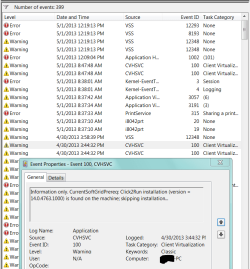
Event Viewer Errors & Warnings

I'm back with a red face. Hope I can word this to make sense. I've been reading,re-reading for hours but just wasn't sure I should give up so here's what I've done, found, & need to ask more.

I went back to Services & "Started" VSS at 8:36am. Then more reading,etc. Have been wondering more if my Office "Click to Run" was the problem 'cuz it's always listed in EV shortly before VSS so opened a couple 'doc items'. Eventually back to check EV & found more, so re-read my posts & Jacee's links hence my :o when I found my 1st flub as seen in my post #3 where I typed "icals" when it should've been "icacls".
Now my questions are: 1.) was I right by typing all that's in 'blue' as seen in my shot at post #1?
2.) when I copy/paste whs's , then I just click enter? I just did it again a bit ago & got the same as my earlier try.
Sorry to make such a mess here, will post a couple more shots for you to ponder on.(if I can find them in my mess)
 

Attachments
  • could this be my VSS problem.PNG
    could this be my VSS problem.PNG
    45 KB · Views: 6
  • Newest VSS in Events.PNG
    Newest VSS in Events.PNG
    99.2 KB · Views: 5

My Computer

Computer type
PC/Desktop
Computer Manufacturer/Model Number
emachines
OS
Microsoft Windows 7 Home Premium 64-bit 7601 Multiprocessor Free Service Pack 1
CPU
AMD Athlon(tm) II X2 220 Processor
Motherboard
eMachines EL1358G
Memory
3.00 GB
Graphics Card(s)
NVIDIA GeForce 6150SE nForce 430
Sound Card
Realtek High Definition Audio
Screen Resolution
1280 x 1024 x 32 bits (4294967296 colors) @ 60 Hz
Hard Drives
(1) WDC WD10 EADX-22TDHB0 SCSI Disk Device (2) Generic- Multi-Card USB Device
Keyboard
came with PC
Mouse
came with PC
Antivirus
Avast
Browser
IE 9
Other Info
don't know how to get info for the other 5 areas
I found something in a Microsoft forum that kinda confirms my #21 post. Others were having the same VSS warnings & errors but sounds like they were trying to do backups which I haven't. There was talk of the Office Click-To- Run. I've been half tempted for a long time to see about Uninstalling that anyway just because of it's constant filling up of the Event Viewer. I only activated it so I could read a couple documents that were emailed to me, so if I can find a different program for viewing docs will uninstall Click to Run.
 

My Computer

Computer type
PC/Desktop
Computer Manufacturer/Model Number
emachines
OS
Microsoft Windows 7 Home Premium 64-bit 7601 Multiprocessor Free Service Pack 1
CPU
AMD Athlon(tm) II X2 220 Processor
Motherboard
eMachines EL1358G
Memory
3.00 GB
Graphics Card(s)
NVIDIA GeForce 6150SE nForce 430
Sound Card
Realtek High Definition Audio
Screen Resolution
1280 x 1024 x 32 bits (4294967296 colors) @ 60 Hz
Hard Drives
(1) WDC WD10 EADX-22TDHB0 SCSI Disk Device (2) Generic- Multi-Card USB Device
Keyboard
came with PC
Mouse
came with PC
Antivirus
Avast
Browser
IE 9
Other Info
don't know how to get info for the other 5 areas
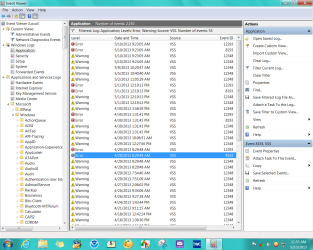
Don't know for sure if I should mark this Solved but have only found one VSS in Events since Sun. 5/5 (today's Wed.5/8). Am assuming it's due to the change in Services? Still wondering tho' about the Command Prompts that were suggested, "do they just show something or do they make changes? Should I try them again if I can figure out the correct spacing of the icacls one?
 

My Computer

Computer type
PC/Desktop
Computer Manufacturer/Model Number
emachines
OS
Microsoft Windows 7 Home Premium 64-bit 7601 Multiprocessor Free Service Pack 1
CPU
AMD Athlon(tm) II X2 220 Processor
Motherboard
eMachines EL1358G
Memory
3.00 GB
Graphics Card(s)
NVIDIA GeForce 6150SE nForce 430
Sound Card
Realtek High Definition Audio
Screen Resolution
1280 x 1024 x 32 bits (4294967296 colors) @ 60 Hz
Hard Drives
(1) WDC WD10 EADX-22TDHB0 SCSI Disk Device (2) Generic- Multi-Card USB Device
Keyboard
came with PC
Mouse
came with PC
Antivirus
Avast
Browser
IE 9
Other Info
don't know how to get info for the other 5 areas
Did you buy the Office Trial bloatware that comes preinstalled on OEM rigs? If not I'd uninstall it, or better yet that is a corrupt install to begin with so most tech enthusiasts will not run it but instead Clean Reinstall - Factory OEM Windows 7 to get rid of the bloatware and duplicate utilities that have better versions built into Win7.

At the minimum I'd Clean Up Factory Bloatware however it can damage system files so is best reinstalled.

Other Troubleshooting Steps for Windows 7 to go over your install thoroughly. I resolve all repeat errors over time by googling their text and identifying numbers to see how others resolve them. Takes research.
 
No,didn't buy anything, just 'started,activated,installed' or whatever the term is, that "Click-To_Run Office just so I could read & save some Word documents that were emailed to me.

I've tried to read all your links many times in the year that I've had this machine but I'm so damn computer illiterate that it may as well be written in a foreign language. PEBCAK :o
I don't have anything other than some DVD+R discs for any kind of 'Backup'. I did do some discs as suggested by eMachine although it was approx. 2 wks. after I bought it. There's 'Recovery 1,2,3, also AppDrv 1. Also found one that is dated 2 months later but even tho' I have written on the cover,(what it is) I don't remember doing it or what it is.:o
I'm sure I should probably wipe this thing out & start from scratch but do have some things I need to keep like email but don't even know how to save needed things so I could start over. I'm sure I wouldn't need to worry about keeping 'my settings,configurations' 'cuz that's probably a good share of my problems, "done wrong".

Sorry to ramble on like this, I just feel so stupid! I'm about half sorry I ever bought a PC.
 

My Computer

Computer type
PC/Desktop
Computer Manufacturer/Model Number
emachines
OS
Microsoft Windows 7 Home Premium 64-bit 7601 Multiprocessor Free Service Pack 1
CPU
AMD Athlon(tm) II X2 220 Processor
Motherboard
eMachines EL1358G
Memory
3.00 GB
Graphics Card(s)
NVIDIA GeForce 6150SE nForce 430
Sound Card
Realtek High Definition Audio
Screen Resolution
1280 x 1024 x 32 bits (4294967296 colors) @ 60 Hz
Hard Drives
(1) WDC WD10 EADX-22TDHB0 SCSI Disk Device (2) Generic- Multi-Card USB Device
Keyboard
came with PC
Mouse
came with PC
Antivirus
Avast
Browser
IE 9
Other Info
don't know how to get info for the other 5 areas
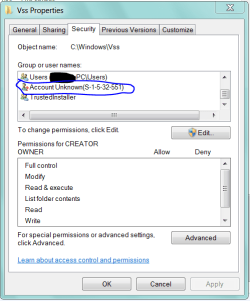
Is it possible to run VEW on just the VSS items in Event Viewer? or would that even show enough info for any of you to help me? or how do I go about getting & posting more info for each of the 3 different ID:#'s if that's what's needed?

I kid you not, I'm trying to understand this stuff but it just won't click with me. My 2yr.old greatgrandson could probably understand it as well as me.

I'm grasping at anything but then don't understand what to do with what I find. (see 2nd shot)
 

Attachments

  • 2013-05-10_115508 _ 55 events of VSS.png
    2013-05-10_115508 _ 55 events of VSS.png
    184.3 KB · Views: 2
  • Vss properties Security.PNG
    Vss properties Security.PNG
    48.9 KB · Views: 4

My Computer

Computer type
PC/Desktop
Computer Manufacturer/Model Number
emachines
OS
Microsoft Windows 7 Home Premium 64-bit 7601 Multiprocessor Free Service Pack 1
CPU
AMD Athlon(tm) II X2 220 Processor
Motherboard
eMachines EL1358G
Memory
3.00 GB
Graphics Card(s)
NVIDIA GeForce 6150SE nForce 430
Sound Card
Realtek High Definition Audio
Screen Resolution
1280 x 1024 x 32 bits (4294967296 colors) @ 60 Hz
Hard Drives
(1) WDC WD10 EADX-22TDHB0 SCSI Disk Device (2) Generic- Multi-Card USB Device
Keyboard
came with PC
Mouse
came with PC
Antivirus
Avast
Browser
IE 9
Other Info
don't know how to get info for the other 5 areas
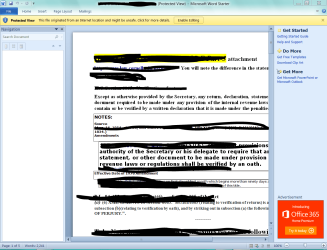
grits it sounds to me that you have the Office 2013 on a trial version and it's time has run out. You have two choices. One is to buy the key so you can use the full version of Office 2013. Two is to completely remove Office 2013. If you choose to remove it and do run this to see if any System Files need fixed.

http://www.sevenforums.com/tutorials/1538-sfc-scannow-command-system-file-checker.html

I also recommend turning vss back on.

http://www.sevenforums.com/tutorials/330-system-protection-turn-off-2.html

You could also clear Event Viewer and start all over again when done.

http://www.sevenforums.com/tutorials/25480-event-viewer-one-click-clear.html
 

My Computer

Computer type
PC/Desktop
Computer Manufacturer/Model Number
Home made Desktop
OS
Windows 10 Pro. 64/ version 1709 Windows 7 Pro/64
CPU
Intel i7-6800K @ 4.3
Motherboard
ASUS X-99 Deluxe II
Memory
Corsair Platinum 16 gig @2400
Graphics Card(s)
EVGA GTX 1070 OC
Monitor(s) Displays
Asus 27" LED LCD/VE278Q
Screen Resolution
1920-1080 or 1280-720 HDMI
Hard Drives
INTEL SSD 730-240 Gb Sata 3.0/
PSU
EVGA Platium 1200W
Case
Phanteks Luxe Tempered Glass 8 fans/ one radiator
Cooling
XSPC/ Water Cooled CPU
Keyboard
Das 4 Professional
Mouse
Logitech M705/MX Anywhere 2-S
Internet Speed
100 mbits
Antivirus
Microsoft Security Essentials/ Malwarebytes Premium 3.0/ SAS
Browser
I.E. 11 default/Firefox/ ISP Time Warner Cable/Spectrum
Other Info
LG BluRay Burner/
Sound system-KLipsch-THX/
Icy Dock ssd Hot Swap bays.
If you're using the Office trial it normally expires in 60 days or so. If it's lasted longer maybe you instead enabled Starter which is their previous ad-supported free version which is now being phased out as explained here: Microsoft begins phasing out Starter edition of its Office suite | ZDNet

Either way as Jack suggests you can uninstall Office in Control Panel to use the new free web version of Office 2013 or use the perfectly compatible popular freeware Apache OpenOffice - The Free and Open Productivity Suite if you want an installed program that will open and create your Office files.

If you're not ready to do a Clean Reinstall then maybe we can help you resolve any performance problems you have if you'll let us know the exact symptoms.

Also, would you be able to tackle Clean Up Factory Bloatware steps with our help now? This can help improve performance and help you gain confidence working with Win7.
 
I'm already late for a supper meeting so will just post a few shots for now, will be back tomorrow. I don't understand anything about Office, just need something to read docs & then forward via email.
 

Attachments

  • This is what I have to read docs.PNG
    This is what I have to read docs.PNG
    162.4 KB · Views: 4
  • Office Click-to-Run.PNG
    Office Click-to-Run.PNG
    31.5 KB · Views: 6
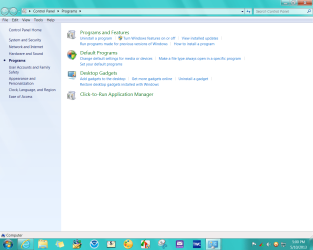
  • 2013-05-10_170037 _ CP - Programs page.png
    2013-05-10_170037 _ CP - Programs page.png
    155.8 KB · Views: 3
  • 2013-05-10_165911 _ Programs installed.png
    2013-05-10_165911 _ Programs installed.png
    9 KB · Views: 2
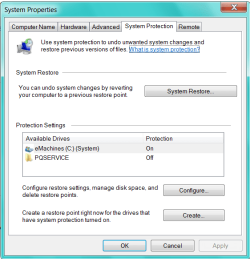
  • 2013-05-10_165508 _ protection on for Cdrive.png
    2013-05-10_165508 _ protection on for Cdrive.png
    42 KB · Views: 6

My Computer

Computer type
PC/Desktop
Computer Manufacturer/Model Number
emachines
OS
Microsoft Windows 7 Home Premium 64-bit 7601 Multiprocessor Free Service Pack 1
CPU
AMD Athlon(tm) II X2 220 Processor
Motherboard
eMachines EL1358G
Memory
3.00 GB
Graphics Card(s)
NVIDIA GeForce 6150SE nForce 430
Sound Card
Realtek High Definition Audio
Screen Resolution
1280 x 1024 x 32 bits (4294967296 colors) @ 60 Hz
Hard Drives
(1) WDC WD10 EADX-22TDHB0 SCSI Disk Device (2) Generic- Multi-Card USB Device
Keyboard
came with PC
Mouse
came with PC
Antivirus
Avast
Browser
IE 9
Other Info
don't know how to get info for the other 5 areas
Looks like you're using Starter as you can see on the top of the Office Document window. It's being phased out but they may let you keep it since it's not really connected except by MS Update and I doubt they'll bother you about changing to its free successor which is described in the link I provided you.

What exactly are performance problems you're having?
 
I guess what's really bugging me is the boatload of warnings & errors in Event Viewer,especially the VSS one that says something about 'Catastrophic Failure' which is somewhere in one of my shots earlier in thread. I think it's this one?, have posted sooo many shots in several threads about "Event Viewer or Computer Seems Sluggish" in the last cpl. months.
Yes, it does seem to be slow, I notice it when I go from page to page here in forum for one thing. It also seems to take too much time Shutting Down. Somewhere in the Event Viewer, there's lots of warnings/errors about "slow resume from sleep". I used a 'batch file' to clear EV back at the end of March so don't know for sure when some of the items 1st showed up. Do you want me to run VEW? I did run SFC/Scannow as requested by either WHS or Britton on 4/8 or 4/9 in another of my threads but not sure what it did other than break my email which I did get back via System Restore but could also fix it with a solution supplied to me by 'endeavor' who works with WM.
Sorry, I tend to ramble on too much. 'IF' my VSS problem is due to 'Office Starter/Click-to-Run', I could try to UNinstall it if I can get something basic just to be able to read & forward documents sent to me via email.
I'd best shutup now. Hope I'll be able to follow any instructions you may have for me.
Thanks in advance.
oops, forgot to ask why LBB thought I had VSS turned off?
 
Last edited:

My Computer

Computer type
PC/Desktop
Computer Manufacturer/Model Number
emachines
OS
Microsoft Windows 7 Home Premium 64-bit 7601 Multiprocessor Free Service Pack 1
CPU
AMD Athlon(tm) II X2 220 Processor
Motherboard
eMachines EL1358G
Memory
3.00 GB
Graphics Card(s)
NVIDIA GeForce 6150SE nForce 430
Sound Card
Realtek High Definition Audio
Screen Resolution
1280 x 1024 x 32 bits (4294967296 colors) @ 60 Hz
Hard Drives
(1) WDC WD10 EADX-22TDHB0 SCSI Disk Device (2) Generic- Multi-Card USB Device
Keyboard
came with PC
Mouse
came with PC
Antivirus
Avast
Browser
IE 9
Other Info
don't know how to get info for the other 5 areas
To answer your question in post # 31.
From your first post and through out your thread you and your event viewer show problems with vss. Whs has requested information on vss with commands that you can't get to work. You have stated that you turned vss on in Services which indicate to me it was off at one time or you wouldn't have to turn it on. So I posted a Tutorial to show step at a time how to turn on vss Service the correct way.

Don't assume your computer has only one problem.
A clean install as Greg has posted would probable be the quickest and best way to get rid of system problems.
Clean Reinstall - Factory OEM Windows 7
 

My Computer

Computer type
PC/Desktop
Computer Manufacturer/Model Number
Home made Desktop
OS
Windows 10 Pro. 64/ version 1709 Windows 7 Pro/64
CPU
Intel i7-6800K @ 4.3
Motherboard
ASUS X-99 Deluxe II
Memory
Corsair Platinum 16 gig @2400
Graphics Card(s)
EVGA GTX 1070 OC
Monitor(s) Displays
Asus 27" LED LCD/VE278Q
Screen Resolution
1920-1080 or 1280-720 HDMI
Hard Drives
INTEL SSD 730-240 Gb Sata 3.0/
PSU
EVGA Platium 1200W
Case
Phanteks Luxe Tempered Glass 8 fans/ one radiator
Cooling
XSPC/ Water Cooled CPU
Keyboard
Das 4 Professional
Mouse
Logitech M705/MX Anywhere 2-S
Internet Speed
100 mbits
Antivirus
Microsoft Security Essentials/ Malwarebytes Premium 3.0/ SAS
Browser
I.E. 11 default/Firefox/ ISP Time Warner Cable/Spectrum
Other Info
LG BluRay Burner/
Sound system-KLipsch-THX/
Icy Dock ssd Hot Swap bays.
Sorry LB, different term for the same thing, (kinda) confuses me. Yes, I did make a change in Services but the 'System Protection' has always been on. VSS & System Protection are one in the same?

Again, I skimmed thru the Bloatware,etc. but I don't have anything for making backups other than some DVD's, no external drive or backup program. Will also have to do some study on terms like ISO,etc. And this is a bad time to try anything anyway being Mother's Day weekend.
 

My Computer

Computer type
PC/Desktop
Computer Manufacturer/Model Number
emachines
OS
Microsoft Windows 7 Home Premium 64-bit 7601 Multiprocessor Free Service Pack 1
CPU
AMD Athlon(tm) II X2 220 Processor
Motherboard
eMachines EL1358G
Memory
3.00 GB
Graphics Card(s)
NVIDIA GeForce 6150SE nForce 430
Sound Card
Realtek High Definition Audio
Screen Resolution
1280 x 1024 x 32 bits (4294967296 colors) @ 60 Hz
Hard Drives
(1) WDC WD10 EADX-22TDHB0 SCSI Disk Device (2) Generic- Multi-Card USB Device
Keyboard
came with PC
Mouse
came with PC
Antivirus
Avast
Browser
IE 9
Other Info
don't know how to get info for the other 5 areas

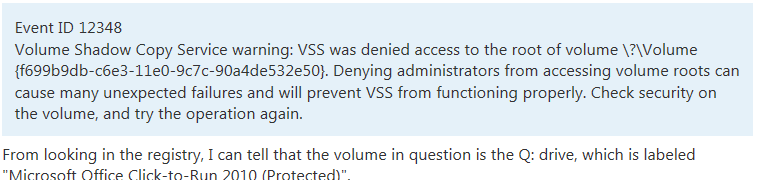
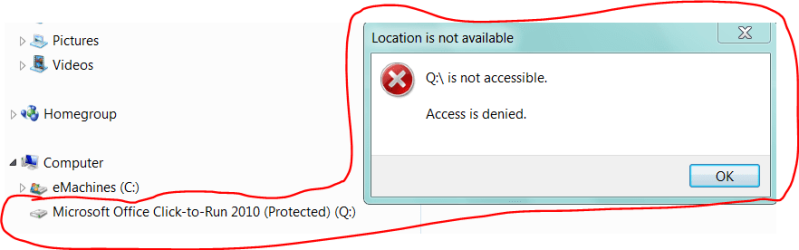
Just a note of something I came across today when actually looking for something else. I had been wondering if the two were related all the while I was posting on my issue.
 

Attachments

  • 2013-06-12_145149 _ Event ID 12348 is related to Click-to-Run.png
    2013-06-12_145149 _ Event ID 12348 is related to Click-to-Run.png
    12.3 KB · Views: 4

My Computer

Computer type
PC/Desktop
Computer Manufacturer/Model Number
emachines
OS
Microsoft Windows 7 Home Premium 64-bit 7601 Multiprocessor Free Service Pack 1
CPU
AMD Athlon(tm) II X2 220 Processor
Motherboard
eMachines EL1358G
Memory
3.00 GB
Graphics Card(s)
NVIDIA GeForce 6150SE nForce 430
Sound Card
Realtek High Definition Audio
Screen Resolution
1280 x 1024 x 32 bits (4294967296 colors) @ 60 Hz
Hard Drives
(1) WDC WD10 EADX-22TDHB0 SCSI Disk Device (2) Generic- Multi-Card USB Device
Keyboard
came with PC
Mouse
came with PC
Antivirus
Avast
Browser
IE 9
Other Info
don't know how to get info for the other 5 areas
Back
Top