Event Viewer One Click Clear

How to Clear Event Viewer with One Click in Windows


   Information
This will show you how to create a command line shortcut that will clear all of the Event Viewer logs in one click.


Here is a batch file that can help you clear the event viewer in one click.

Download


Download this file above..

Unzip on your desktop.

You can use the task scheduler to give it a high priority so you won't get a UAC prompt

See Brink's Tip HERE

Or, just copy this script and paste in notepad and save as Clean Viewer.BAT

Right click, and click on Run as administrator to run the file
Code:
@echo off
FOR /F "tokens=1,2*" %%V IN ('bcdedit') DO SET adminTest=%%V
IF (%adminTest%)==(Access) goto noAdmin
for /F "tokens=*" %%G in ('wevtutil.exe el') DO (call :do_clear "%%G")
echo.
echo goto theEnd
:do_clear
echo clearing %1
wevtutil.exe cl %1
goto :eof
:noAdmin
exit

:geek:


Last edited by a moderator:
That's odd - wevtutil is not located on your machine....????

Perhaps your path is messed up - but that would present a lot more issues.

try providing a fully qualified path and filename as part of the command line

C:\windows\system32\wevtutil.exe
 

My Computer My Computer

Computer type
Laptop
Computer Manufacturer/Model Number
HP Pavilion dv6-6c10us
OS
x64 (6.3.9600) Win8.1 Pro & soon dual boot x64 (6.1.7601) Win7_SP1 HomePrem
CPU
AMD A6-3420M APU with Radeon(tm) HD Graphics
Motherboard
Hewlett-Packard 1805
Memory
6.00 GB
Graphics Card(s)
AMD Radeon(TM) HD 6520G
Sound Card
(1) AMD High Definition Audio Device (2) IDT High Definiti
Monitor(s) Displays
HP W2072a 20" LCD (1600 x 900) @ 60 Hz
Screen Resolution
1366 x 768 x 32 bits (4294967296 colors) @ 60 Hz
Hard Drives
ST640LM0 00 HM641JI SATA Disk Device
Keyboard
Logitech k520 wireless KB
Mouse
Logitech m320 wireless mouse (bundled with KB)
Internet Speed
15/5 | 54 MB Wireless 'n'
Antivirus
Realtime: Defender or Avast | On-demand: Malwarebytes, ESET
Browser
IE 11 on Win8, IE 10 on win 7
Other Info
Media: [Gimp, Audacity, VLC] || Comm: [WEmail 2012, Skype] || Productivity: [OpenOffice,| Textpad] || Utils: [Sysinternals, cCleaner, Speccy, Defraggler]
That's odd - wevtutil is not located on your machine....????

Perhaps your path is messed up - but that would present a lot more issues.

try providing a fully qualified path and filename as part of the command line

C:\windows\system32\wevtutil.exe


Don't work for me.
 

My Computer My Computer

Computer type
PC/Desktop
Computer Manufacturer/Model Number
Custom Build
OS
Win 7 Pro 64 Bit
CPU
amd 955 be
Motherboard
Gigabyte 990
Memory
8gb
Graphics Card(s)
HD7790
Hard Drives
SSD 120. Seagate 2TB, Toshiba 1 TB
PSU
750Watt
Internet Speed
Slow
Antivirus
Eset
Browser
IE 11, Firefox

My Computer My Computer

Computer type
PC/Desktop
Computer Manufacturer/Model Number
Custom Build
OS
Win 7 Pro 64 Bit
CPU
amd 955 be
Motherboard
Gigabyte 990
Memory
8gb
Graphics Card(s)
HD7790
Hard Drives
SSD 120. Seagate 2TB, Toshiba 1 TB
PSU
750Watt
Internet Speed
Slow
Antivirus
Eset
Browser
IE 11, Firefox
That's odd - wevtutil is not located on your machine....????

Perhaps your path is messed up - but that would present a lot more issues.

try providing a fully qualified path and filename as part of the command line

C:\windows\system32\wevtutil.exe


Don't work for me.

Well, if you don't have wevtutil on your system... it will never work, regardless of what script you choose.

Try running http://www.sevenforums.com/tutorials/1538-sfc-scannow-command-system-file-checker.html and post the results as per the tutorial.
 

My Computer My Computer

Computer type
Laptop
Computer Manufacturer/Model Number
HP Pavilion dv6-6c10us
OS
x64 (6.3.9600) Win8.1 Pro & soon dual boot x64 (6.1.7601) Win7_SP1 HomePrem
CPU
AMD A6-3420M APU with Radeon(tm) HD Graphics
Motherboard
Hewlett-Packard 1805
Memory
6.00 GB
Graphics Card(s)
AMD Radeon(TM) HD 6520G
Sound Card
(1) AMD High Definition Audio Device (2) IDT High Definiti
Monitor(s) Displays
HP W2072a 20" LCD (1600 x 900) @ 60 Hz
Screen Resolution
1366 x 768 x 32 bits (4294967296 colors) @ 60 Hz
Hard Drives
ST640LM0 00 HM641JI SATA Disk Device
Keyboard
Logitech k520 wireless KB
Mouse
Logitech m320 wireless mouse (bundled with KB)
Internet Speed
15/5 | 54 MB Wireless 'n'
Antivirus
Realtime: Defender or Avast | On-demand: Malwarebytes, ESET
Browser
IE 11 on Win8, IE 10 on win 7
Other Info
Media: [Gimp, Audacity, VLC] || Comm: [WEmail 2012, Skype] || Productivity: [OpenOffice,| Textpad] || Utils: [Sysinternals, cCleaner, Speccy, Defraggler]
Seems no cmds will work on my os; apparentely the os is corrupted and will need repairing.
 

My Computer My Computer

Computer type
PC/Desktop
Computer Manufacturer/Model Number
Custom Build
OS
Win 7 Pro 64 Bit
CPU
amd 955 be
Motherboard
Gigabyte 990
Memory
8gb
Graphics Card(s)
HD7790
Hard Drives
SSD 120. Seagate 2TB, Toshiba 1 TB
PSU
750Watt
Internet Speed
Slow
Antivirus
Eset
Browser
IE 11, Firefox
Seems no cmds will work on my os; apparentely the os is corrupted and will need repairing.

The MGA tool might identify some issues
See: http://www.sevenforums.com/windows-...ne-activation-issue-posting-instructions.html

The System File Checker might identify or fix other issues.
See: http://www.sevenforums.com/tutorials/1538-sfc-scannow-command-system-file-checker.html

Follow the instructions in both tutorials and post the output from each in a new post.

Without any hard data, it will be difficult, if not impossible, to help solve the issue.

The two tutorials above might get your system repaired or you might have to run more utilities - it can be time consuming.

Run the above two tutorials and see what they report or repair.

If you would rather backup your data and do a clean install, then see this tutorial:
http://www.sevenforums.com/tutorials/1649-clean-install-windows-7-a.html
I normally reserve this option as the last resort, it is the easiest though.
Prepare for the reinstall by backing up your data - it will be overwritten!
Read all of the tip/warn boxes before running the tutorial.
 

My Computer My Computer

Computer type
Laptop
Computer Manufacturer/Model Number
HP Pavilion dv6-6c10us
OS
x64 (6.3.9600) Win8.1 Pro & soon dual boot x64 (6.1.7601) Win7_SP1 HomePrem
CPU
AMD A6-3420M APU with Radeon(tm) HD Graphics
Motherboard
Hewlett-Packard 1805
Memory
6.00 GB
Graphics Card(s)
AMD Radeon(TM) HD 6520G
Sound Card
(1) AMD High Definition Audio Device (2) IDT High Definiti
Monitor(s) Displays
HP W2072a 20" LCD (1600 x 900) @ 60 Hz
Screen Resolution
1366 x 768 x 32 bits (4294967296 colors) @ 60 Hz
Hard Drives
ST640LM0 00 HM641JI SATA Disk Device
Keyboard
Logitech k520 wireless KB
Mouse
Logitech m320 wireless mouse (bundled with KB)
Internet Speed
15/5 | 54 MB Wireless 'n'
Antivirus
Realtime: Defender or Avast | On-demand: Malwarebytes, ESET
Browser
IE 11 on Win8, IE 10 on win 7
Other Info
Media: [Gimp, Audacity, VLC] || Comm: [WEmail 2012, Skype] || Productivity: [OpenOffice,| Textpad] || Utils: [Sysinternals, cCleaner, Speccy, Defraggler]
Seems no cmds will work on my os; apparentely the os is corrupted and will need repairing.

The MGA tool might identify some issues
See: http://www.sevenforums.com/windows-...ne-activation-issue-posting-instructions.html

The System File Checker might identify or fix other issues.
See: http://www.sevenforums.com/tutorials/1538-sfc-scannow-command-system-file-checker.html

Follow the instructions in both tutorials and post the output from each in a new post.

Without any hard data, it will be difficult, if not impossible, to help solve the issue.

The two tutorials above might get your system repaired or you might have to run more utilities - it can be time consuming.

Run the above two tutorials and see what they report or repair.

If you would rather backup your data and do a clean install, then see this tutorial:
http://www.sevenforums.com/tutorials/1649-clean-install-windows-7-a.html
I normally reserve this option as the last resort, it is the easiest though.
Prepare for the reinstall by backing up your data - it will be overwritten!
Read all of the tip/warn boxes before running the tutorial.
Diagnostic Report (1.9.0027.0):
-----------------------------------------
Code:
Windows Validation Data-->
Validation Code: 0
Cached Online Validation Code: 0x0
Windows Product Key: *****-*****-MPCCD-2XWGK-DH9HD
Windows Product Key Hash: EusFWU0mttqGtyDXiDnhyP3zrNY=
Windows Product ID: 00371-152-9478176-85082
Windows Product ID Type: 5
Windows License Type: Retail
Windows OS version: 6.1.7601.2.00010100.1.0.048
ID: {B89BAB77-E75D-493D-ACE5-23CC80CCDAA6}(1)
Is Admin: Yes
TestCab: 0x0
LegitcheckControl ActiveX: N/A, hr = 0x80070002
Signed By: N/A, hr = 0x80070002
Product Name: Windows 7 Professional
Architecture: 0x00000009
Build lab: 7601.win7sp1_gdr.140303-2144
TTS Error: 
Validation Diagnostic: 
Resolution Status: N/A
Vista WgaER Data-->
ThreatID(s): N/A, hr = 0x80070002
Version: N/A, hr = 0x80070002
Windows XP Notifications Data-->
Cached Result: N/A, hr = 0x80070002
File Exists: No
Version: N/A, hr = 0x80070002
WgaTray.exe Signed By: N/A, hr = 0x80070002
WgaLogon.dll Signed By: N/A, hr = 0x80070002
OGA Notifications Data-->
Cached Result: N/A, hr = 0x80070002
Version: N/A, hr = 0x80070002
OGAExec.exe Signed By: N/A, hr = 0x80070002
OGAAddin.dll Signed By: N/A, hr = 0x80070002
OGA Data-->
Office Status: 109 N/A
OGA Version: N/A, 0x80070002
Signed By: N/A, hr = 0x80070002
Office Diagnostics: 025D1FF3-364-80041010_025D1FF3-229-80041010_025D1FF3-230-1_025D1FF3-517-80040154_025D1FF3-237-80040154_025D1FF3-238-2_025D1FF3-244-80070002_025D1FF3-258-3
Browser Data-->
Proxy settings: N/A
User Agent: Mozilla/4.0 (compatible; MSIE 8.0; Win32)
Default Browser: C:\Program Files\Internet Explorer\iexplore.exe
Download signed ActiveX controls: Prompt
Download unsigned ActiveX controls: Disabled
Run ActiveX controls and plug-ins: Allowed
Initialize and script ActiveX controls not marked as safe: Disabled
Allow scripting of Internet Explorer Webbrowser control: Disabled
Active scripting: Allowed
Script ActiveX controls marked as safe for scripting: Allowed
File Scan Data-->
Other data-->
Office Details: <GenuineResults><MachineData><UGUID>{B89BAB77-E75D-493D-ACE5-23CC80CCDAA6}</UGUID><Version>1.9.0027.0</Version><OS>6.1.7601.2.00010100.1.0.048</OS><Architecture>x64</Architecture><PKey>*****-*****-*****-*****-DH9HD</PKey><PID>00371-152-9478176-85082</PID><PIDType>5</PIDType><SID>S-1-5-21-3417293660-3230589010-3840781171</SID><SYSTEM><Manufacturer>Gigabyte Technology Co., Ltd.</Manufacturer><Model>GA-990XA-UD3</Model></SYSTEM><BIOS><Manufacturer>Award Software International, Inc.</Manufacturer><Version>F14b</Version><SMBIOSVersion major="2" minor="4"/><Date>20130124000000.000000+000</Date></BIOS><HWID>80C93307018400FA</HWID><UserLCID>0409</UserLCID><SystemLCID>0409</SystemLCID><TimeZone>Eastern Standard Time(GMT-05:00)</TimeZone><iJoin>0</iJoin><SBID><stat>3</stat><msppid></msppid><name></name><model></model></SBID><OEM/><GANotification/></MachineData><Software><Office><Result>109</Result><Products/><Applications/></Office></Software></GenuineResults>  
Spsys.log Content: 0x80070002
Licensing Data-->
Software licensing service version: 6.1.7601.17514
Name: Windows(R) 7, Professional edition
Description: Windows Operating System - Windows(R) 7, RETAIL channel
Activation ID: e838d943-63ed-4a0b-9fb1-47152908acc9
Application ID: 55c92734-d682-4d71-983e-d6ec3f16059f
Extended PID: 00371-00170-152-947817-01-1033-7601.0000-0122014
Installation ID: 000792171954552383592982434850142004980004493314848430
Processor Certificate URL: [URL]http://go.microsoft.com/fwlink/?LinkID=88338[/URL]
Machine Certificate URL: [URL]http://go.microsoft.com/fwlink/?LinkID=88339[/URL]
Use License URL: [URL]http://go.microsoft.com/fwlink/?LinkID=88341[/URL]
Product Key Certificate URL: [URL]http://go.microsoft.com/fwlink/?LinkID=88340[/URL]
Partial Product Key: DH9HD
License Status: Licensed
Remaining Windows rearm count: 3
Trusted time: 5/22/2014 7:46:07 PM
Windows Activation Technologies-->
HrOffline: 0x00000000
HrOnline: N/A
HealthStatus: 0x0000000000000000
Event Time Stamp: N/A
ActiveX: Registered, Version: 7.1.7600.16395
Admin Service: Registered, Version: 7.1.7600.16395
HealthStatus Bitmask Output:
 
HWID Data-->
HWID Hash Current: NAAAAAIABAABAAEAAAABAAAAAgABAAEAln1oS6AXBrYQM1Ty3N/cFUqCYkhQ1BTSyBOOLg==
OEM Activation 1.0 Data-->
N/A
OEM Activation 2.0 Data-->
BIOS valid for OA 2.0: yes, but no SLIC table
Windows marker version: N/A
OEMID and OEMTableID Consistent: N/A
BIOS Information: 
  ACPI Table Name OEMID Value OEMTableID Value
  APIC   GBT     GBTUACPI
  FACP   GBT     GBTUACPI
  HPET   GBT     GBTUACPI
  MCFG   GBT     GBTUACPI
  SSDT   PTLTD   POWERNOW
  MSDM   GBT     GBTUACPI
  MATS   GBT     
  TAMG   GBT     GBT   B0
  MATS   GBT

Unable to run anything in a cmd prompt, so can't do sfc.
 

My Computer My Computer

Computer type
PC/Desktop
Computer Manufacturer/Model Number
Custom Build
OS
Win 7 Pro 64 Bit
CPU
amd 955 be
Motherboard
Gigabyte 990
Memory
8gb
Graphics Card(s)
HD7790
Hard Drives
SSD 120. Seagate 2TB, Toshiba 1 TB
PSU
750Watt
Internet Speed
Slow
Antivirus
Eset
Browser
IE 11, Firefox
Ok, thanks. I'll ask someone to look at the MGA report. Your specs say Win 7 x86 Ult and MGA says Win7 Pro.

a few things you can try.

A simple built in cmd such as dir should work.

type the word PATH
in the command prompt window - see if system32 is listed. (copy the result and paste it here)

Create a test user account with admin privileges - try running anything when logged in to that account.

You might try booting to safe mode, not sure that would yield any different results though - it's a simple test, so why not try it.

If either the test admin account or a safe mode boot does allow you to execute cmds, go ahead and run the sfc.

Bill
.
 

My Computer My Computer

Computer type
Laptop
Computer Manufacturer/Model Number
HP Pavilion dv6-6c10us
OS
x64 (6.3.9600) Win8.1 Pro & soon dual boot x64 (6.1.7601) Win7_SP1 HomePrem
CPU
AMD A6-3420M APU with Radeon(tm) HD Graphics
Motherboard
Hewlett-Packard 1805
Memory
6.00 GB
Graphics Card(s)
AMD Radeon(TM) HD 6520G
Sound Card
(1) AMD High Definition Audio Device (2) IDT High Definiti
Monitor(s) Displays
HP W2072a 20" LCD (1600 x 900) @ 60 Hz
Screen Resolution
1366 x 768 x 32 bits (4294967296 colors) @ 60 Hz
Hard Drives
ST640LM0 00 HM641JI SATA Disk Device
Keyboard
Logitech k520 wireless KB
Mouse
Logitech m320 wireless mouse (bundled with KB)
Internet Speed
15/5 | 54 MB Wireless 'n'
Antivirus
Realtime: Defender or Avast | On-demand: Malwarebytes, ESET
Browser
IE 11 on Win8, IE 10 on win 7
Other Info
Media: [Gimp, Audacity, VLC] || Comm: [WEmail 2012, Skype] || Productivity: [OpenOffice,| Textpad] || Utils: [Sysinternals, cCleaner, Speccy, Defraggler]
After running this test I tried sfc and it ran this time; it said there were no problems. Also tried to clear log files the cmd ran and event viewer said only 9 error events but when I opened the admin events log it showed 138 of them.
 

My Computer My Computer

Computer type
PC/Desktop
Computer Manufacturer/Model Number
Custom Build
OS
Win 7 Pro 64 Bit
CPU
amd 955 be
Motherboard
Gigabyte 990
Memory
8gb
Graphics Card(s)
HD7790
Hard Drives
SSD 120. Seagate 2TB, Toshiba 1 TB
PSU
750Watt
Internet Speed
Slow
Antivirus
Eset
Browser
IE 11, Firefox
There's nothing amiss in the MGADiag that I can see ;)
 

My Computer My Computer

Computer type
Laptop
Computer Manufacturer/Model Number
Asus K52F or Lenovo B51-80
OS
Win 7 x64 Home Premium (and x86 VirtualBox VM)/Win10
CPU
i3 370M/i7 6500U
Motherboard
Asus/Lenovo
Memory
8GB - finally :)/8GB
Graphics Card(s)
it's an i3, dude!/dual Intel&nVidia
Sound Card
onboard
Monitor(s) Displays
15.6" built-in
Screen Resolution
1366x768/1920x1080
Hard Drives
750GB Seagate internal
Sundry external drives attached to other computers on the local network
1TB SSD on the Lenovo
PSU
n/a
Internet Speed
as much as I can get - usually on a dongle/phone, so <1MB/s
Antivirus
MSE/Defender
Browser
IE11/12/Edge/Chrome/FF(if I must)
Thanks Noel, just wanted to be sure Windows genuine wasn't messed up.

After running this test I tried sfc and it ran this time; it said there were no problems. Also tried to clear log files the cmd ran and event viewer said only 9 error events but when I opened the admin events log it showed 138 of them.

Which test? PATH, Safe Mode, or New account?

I'm going to suggest the PowerShell version again - it's much more simple. Basically the same function, but without all the cmds that might obscure the cause
See: http://www.sevenforums.com/tutorials/320451-event-viewer-clear-all-events.html
 

My Computer My Computer

Computer type
Laptop
Computer Manufacturer/Model Number
HP Pavilion dv6-6c10us
OS
x64 (6.3.9600) Win8.1 Pro & soon dual boot x64 (6.1.7601) Win7_SP1 HomePrem
CPU
AMD A6-3420M APU with Radeon(tm) HD Graphics
Motherboard
Hewlett-Packard 1805
Memory
6.00 GB
Graphics Card(s)
AMD Radeon(TM) HD 6520G
Sound Card
(1) AMD High Definition Audio Device (2) IDT High Definiti
Monitor(s) Displays
HP W2072a 20" LCD (1600 x 900) @ 60 Hz
Screen Resolution
1366 x 768 x 32 bits (4294967296 colors) @ 60 Hz
Hard Drives
ST640LM0 00 HM641JI SATA Disk Device
Keyboard
Logitech k520 wireless KB
Mouse
Logitech m320 wireless mouse (bundled with KB)
Internet Speed
15/5 | 54 MB Wireless 'n'
Antivirus
Realtime: Defender or Avast | On-demand: Malwarebytes, ESET
Browser
IE 11 on Win8, IE 10 on win 7
Other Info
Media: [Gimp, Audacity, VLC] || Comm: [WEmail 2012, Skype] || Productivity: [OpenOffice,| Textpad] || Utils: [Sysinternals, cCleaner, Speccy, Defraggler]
Thanks Noel, just wanted to be sure Windows genuine wasn't messed up.

After running this test I tried sfc and it ran this time; it said there were no problems. Also tried to clear log files the cmd ran and event viewer said only 9 error events but when I opened the admin events log it showed 138 of them.

Which test? PATH, Safe Mode, or New account?

I'm going to suggest the PowerShell version again - it's much more simple. Basically the same function, but without all the cmds that might obscure the cause
See: http://www.sevenforums.com/tutorials/320451-event-viewer-clear-all-events.html


Foreach-Object not reconized as internal or external commands, etc
 

My Computer My Computer

Computer type
PC/Desktop
Computer Manufacturer/Model Number
Custom Build
OS
Win 7 Pro 64 Bit
CPU
amd 955 be
Motherboard
Gigabyte 990
Memory
8gb
Graphics Card(s)
HD7790
Hard Drives
SSD 120. Seagate 2TB, Toshiba 1 TB
PSU
750Watt
Internet Speed
Slow
Antivirus
Eset
Browser
IE 11, Firefox
sgmdew,

A member suggested that the issue might get better attention if you started a new thread outside of this tutorial. I agree since the issue isn't strictly related to the tutorial, but is more general in nature.

I suggest your new thread be started in the General Discussion - Windows 7 Help Forums forum.
There isn't a whole lot of information that would be lost, so please consider the above.

Re: Foreach-Object not recognized as internal or external commands, etc
I want to make sure that you opened an elevated PowerShell, not Command prompt, window. The Foreach-Object is a Powershell command is not recognized in a Command prompt.
and a follow up - you had a similar issue with cmds, but I'm not certain how that was resolved. I made a few suggestions and your response was "After that test... it worked" I'm still not clear on what "test"

It is imperative that members know what you've done, what suggestion proved helpful.

So I'll ask one more time:
After running this test I tried sfc and it ran this time .....
What test did you run that made SFC work for you?

Let's continue reaching a resolution in your new thread, ok?

Thanks,

Bill
.
 

My Computer My Computer

Computer type
Laptop
Computer Manufacturer/Model Number
HP Pavilion dv6-6c10us
OS
x64 (6.3.9600) Win8.1 Pro & soon dual boot x64 (6.1.7601) Win7_SP1 HomePrem
CPU
AMD A6-3420M APU with Radeon(tm) HD Graphics
Motherboard
Hewlett-Packard 1805
Memory
6.00 GB
Graphics Card(s)
AMD Radeon(TM) HD 6520G
Sound Card
(1) AMD High Definition Audio Device (2) IDT High Definiti
Monitor(s) Displays
HP W2072a 20" LCD (1600 x 900) @ 60 Hz
Screen Resolution
1366 x 768 x 32 bits (4294967296 colors) @ 60 Hz
Hard Drives
ST640LM0 00 HM641JI SATA Disk Device
Keyboard
Logitech k520 wireless KB
Mouse
Logitech m320 wireless mouse (bundled with KB)
Internet Speed
15/5 | 54 MB Wireless 'n'
Antivirus
Realtime: Defender or Avast | On-demand: Malwarebytes, ESET
Browser
IE 11 on Win8, IE 10 on win 7
Other Info
Media: [Gimp, Audacity, VLC] || Comm: [WEmail 2012, Skype] || Productivity: [OpenOffice,| Textpad] || Utils: [Sysinternals, cCleaner, Speccy, Defraggler]

My Computer My Computer

Computer type
Laptop
Computer Manufacturer/Model Number
HP Pavilion dv6-6c10us
OS
x64 (6.3.9600) Win8.1 Pro & soon dual boot x64 (6.1.7601) Win7_SP1 HomePrem
CPU
AMD A6-3420M APU with Radeon(tm) HD Graphics
Motherboard
Hewlett-Packard 1805
Memory
6.00 GB
Graphics Card(s)
AMD Radeon(TM) HD 6520G
Sound Card
(1) AMD High Definition Audio Device (2) IDT High Definiti
Monitor(s) Displays
HP W2072a 20" LCD (1600 x 900) @ 60 Hz
Screen Resolution
1366 x 768 x 32 bits (4294967296 colors) @ 60 Hz
Hard Drives
ST640LM0 00 HM641JI SATA Disk Device
Keyboard
Logitech k520 wireless KB
Mouse
Logitech m320 wireless mouse (bundled with KB)
Internet Speed
15/5 | 54 MB Wireless 'n'
Antivirus
Realtime: Defender or Avast | On-demand: Malwarebytes, ESET
Browser
IE 11 on Win8, IE 10 on win 7
Other Info
Media: [Gimp, Audacity, VLC] || Comm: [WEmail 2012, Skype] || Productivity: [OpenOffice,| Textpad] || Utils: [Sysinternals, cCleaner, Speccy, Defraggler]
Clear System Log Again - Cleanup

After running the script, a few entries are added into the system event log that certain logs were cleared. This is due to the script clearing them alphabetically and several are cleared after the system event log. I wanted it to be super tidy so I added another line to clear the system event log one more time after everything else was cleared. Not sure if this is the best way to do it but thought I'd share my modification.

I have also confirmed that this script works great on Windows 8.1 and Windows 2012 R2.

Code:
@echo off
FOR /F "tokens=1,2*" %%V IN ('bcdedit') DO SET adminTest=%%V
IF (%adminTest%)==(Access) goto noAdmin
for /F "tokens=*" %%G in ('wevtutil.exe el') DO (call :do_clear "%%G")
[B]wevtutil.exe cl System[/B]
echo.
echo Event Logs have been cleared! ^<press any key^>
goto theEnd
:do_clear
echo clearing %1
wevtutil.exe cl %1
goto :eof
:noAdmin
echo You must run this script as an Administrator!
echo ^<press any key^>
:theEnd
pause>NUL
 

My Computer My Computer

Computer type
PC/Desktop
OS
Windows 8.1 Pro
Hi Zardoc,

Thanks for your sharing, but I have a question that how to clear the Windows log just the part of system, it's only need to clear the system log under Window logs. Thanks in advance!
 

My Computer My Computer

OS
Windows 7 Ultimate x64
Hello Arvin, and welcome to Seven Forums.

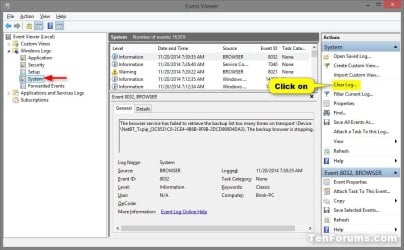
You could clear the "System" log under "Windows Logs" in Event Viewer by selecting System, then clicking on Clear log in the far right "Actions" pane like below. :)

System_Log.jpg
 

My Computer My Computer

Computer type
PC/Desktop
Computer Manufacturer/Model Number
Self built custom
OS
64-bit Windows 11 Pro for Workstations
CPU
Intel i7-8700K OC'd to 5 GHz
Motherboard
ASUS ROG Maximus XI Formula Z390
Memory
64 GB (4x16GB) G.SKILL TridentZ RGB DDR4 3600 MHz
Graphics Card(s)
ASUS ROG-STRIX-GTX1080TI-O11G-GAMING
Sound Card
Integrated
Monitor(s) Displays
2 x Samsung Odyssey G7 27"
Screen Resolution
2560x1440
Hard Drives
1TB Samsung 990 PRO M.2,
4TB Samsung 990 PRO PRO M.2,
TerraMaster F8 SSD Plus NAS
PSU
Seasonic Prime Titanium 850W
Case
Thermaltake Core P3
Cooling
Corsair Hydro H115i
Keyboard
Logitech wireless K800
Mouse
Logitech MX Master 4
Internet Speed
2 Gb/s Download and 100 Mb/s Upload
Antivirus
Malwarebyte Anti-Malware Premium
Browser
Google Chrome
Other Info
Logitech Z625 speaker system,
Logitech BRIO 4K Pro webcam,
HP Color LaserJet Pro MFP M477fdn,
APC SMART-UPS RT 1000 XL - SURT1000XLI,
Galaxy S23 Plus phone
Hi Brink,

Thanks for your reply, if I'd like to clear the system log with one click completed, so how to do work using the bat command? :p
 

My Computer My Computer

OS
Windows 7 Ultimate x64
Here is my code for those wanting an even smaller batch file and quicker clean:

Step 1: Copy/Paste the code into Notepad.
Code:
@echo off
for /F "tokens=*" %%G in ('wevtutil.exe el') DO (call :clear "%%G")
:clear
echo clearing %1
wevtutil.exe cl %1
goto :eof
exit
Step 2: Save as "All Files" and make sure you have ".bat" at the end of the name.
Step 3: Right click on the newly saved bat file, and click "Send to.. Desktop"
Step 4: Right click on the newly made shortcut on the Desktop and click "Properties" then click "Advanced" then check the box "Run as Administrator" and hit "OK"

Now you can simply double click the shortcut at your leisure and quickly clear event logs. No annoying Yes|No prompts to clear logs and no "click to exit prompt" pauses after clearing and all done with 141 bytes of code.
 

My Computer My Computer

OS
Micro$oft 64-bit
Memory
16Gb
Monitor(s) Displays
LCD
Screen Resolution
1080p
Hard Drives
120Gb + 2Tb + 750Gb
PSU
800W
Cooling
Liquid
Other Info
( . Y . )
Thanks, works great win 7Pro, 64bit
 

My Computer My Computer

Computer type
PC/Desktop
Computer Manufacturer/Model Number
Custom Build
OS
Win 7 Pro 64 Bit
CPU
amd 955 be
Motherboard
Gigabyte 990
Memory
8gb
Graphics Card(s)
HD7790
Hard Drives
SSD 120. Seagate 2TB, Toshiba 1 TB
PSU
750Watt
Internet Speed
Slow
Antivirus
Eset
Browser
IE 11, Firefox
Back
Top