event viewer

phenix

New member
Member
VIP
Local time
3:10 PM
Messages
254
I have a long start up problem. Running Windows 7 pro 64-bit.
Have run Chkdsk and it found 1000s of the following errors and fixed
them. "inserting an index entry with id xxxx into index $s11 of file 9".

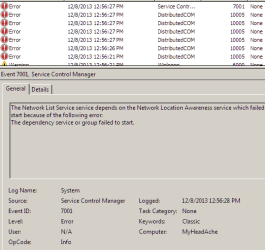
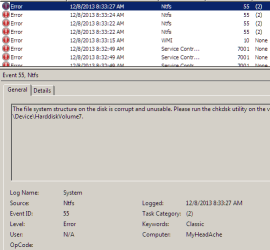
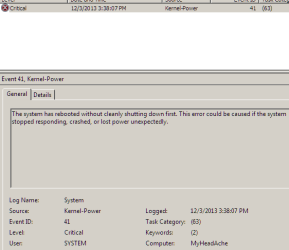
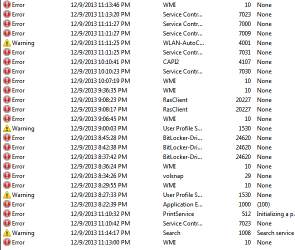
Then I went into "Event Viewer" and found several hundred more errors.
I tried solving them on Microsoft and had no luck. I have included a
screen shot of 3 of them. NTFS being the worst one.
Thought maybe help with fixing 1 or two of these would help me solve the
rest.
 

Attachments
  • 2013-12-08_135846.png
    2013-12-08_135846.png
    7 KB · Views: 36
  • 2013-12-08_140020.png
    2013-12-08_140020.png
    8.5 KB · Views: 36
  • 2013-12-08_140200.png
    2013-12-08_140200.png
    8.2 KB · Views: 36

My Computer

Computer type
PC/Desktop
Computer Manufacturer/Model Number
had the system built by PCsandParts
OS
windows 7 Pro 64 bit
CPU
mini tower
Motherboard
h110m-k (lga1151)
Memory
4g
Graphics Card(s)
nvidia geforce gt730 graphics card
Sound Card
high definition audio device
Monitor(s) Displays
19" dell ultra sharp
Screen Resolution
1280 x 800
Hard Drives
Kingston SSD
PSU
?
Case
?
Cooling
?
Keyboard
standard ps/2 keyboard
Mouse
ps/2 compatible optical
Internet Speed
fiber optics
Antivirus
ESET Smart Security
Browser
IE11
Other Info
no Wifi. Bose speakers, optical drive tsstcorp dvd+-RW

My Computer

Computer type
Laptop
Computer Manufacturer/Model Number
Employer provided Dell Latitude
OS
W7 Pro SP1 64bit
CPU
i7
Memory
8GB
Graphics Card(s)
Intel HD Graphics
Hard Drives
crappy SSD
Antivirus
Employer mandated Symantec Endpoint Protection
Browser
Pale Moon 64bit, IE11 64bit & Chrome 64bit
Thank you for replying UsernameIssues.
I went to another computer and down loaded Windows defender offline 64-bit.
Went to the problem computer and it would not start.
I have been reading on the seven forum about people having a lot of
problems with Windows defender offline and that makes me wary of it.
I don't need more problems.
 

My Computer

Computer type
PC/Desktop
Computer Manufacturer/Model Number
had the system built by PCsandParts
OS
windows 7 Pro 64 bit
CPU
mini tower
Motherboard
h110m-k (lga1151)
Memory
4g
Graphics Card(s)
nvidia geforce gt730 graphics card
Sound Card
high definition audio device
Monitor(s) Displays
19" dell ultra sharp
Screen Resolution
1280 x 800
Hard Drives
Kingston SSD
PSU
?
Case
?
Cooling
?
Keyboard
standard ps/2 keyboard
Mouse
ps/2 compatible optical
Internet Speed
fiber optics
Antivirus
ESET Smart Security
Browser
IE11
Other Info
no Wifi. Bose speakers, optical drive tsstcorp dvd+-RW
My Computer

Computer type
Laptop
Computer Manufacturer/Model Number
Employer provided Dell Latitude
OS
W7 Pro SP1 64bit
CPU
i7
Memory
8GB
Graphics Card(s)
Intel HD Graphics
Hard Drives
crappy SSD
Antivirus
Employer mandated Symantec Endpoint Protection
Browser
Pale Moon 64bit, IE11 64bit & Chrome 64bit
Thanks again for helping.
I have 6G. It starts but takes about 80 seconds to do so.
But when you look in the Event Viewer there are just to
many errors there.
I will check out your other suggestions.

I'm also considering reinstalling the OS again according to
Gregrockers tutorial. The process I used to install the OS
was way different from Gregrockers approach. Had a lot
of trouble gaining access to the internet. I did not format
the drive but installed it over the old OS.

One thing that I am wary of is the losing the product ID #.
They might not activate it again.
 

My Computer

Computer type
PC/Desktop
Computer Manufacturer/Model Number
had the system built by PCsandParts
OS
windows 7 Pro 64 bit
CPU
mini tower
Motherboard
h110m-k (lga1151)
Memory
4g
Graphics Card(s)
nvidia geforce gt730 graphics card
Sound Card
high definition audio device
Monitor(s) Displays
19" dell ultra sharp
Screen Resolution
1280 x 800
Hard Drives
Kingston SSD
PSU
?
Case
?
Cooling
?
Keyboard
standard ps/2 keyboard
Mouse
ps/2 compatible optical
Internet Speed
fiber optics
Antivirus
ESET Smart Security
Browser
IE11
Other Info
no Wifi. Bose speakers, optical drive tsstcorp dvd+-RW
I'm not sure how likely that is as I've not had to do such an install.
 

My Computer

Computer type
Laptop
Computer Manufacturer/Model Number
Employer provided Dell Latitude
OS
W7 Pro SP1 64bit
CPU
i7
Memory
8GB
Graphics Card(s)
Intel HD Graphics
Hard Drives
crappy SSD
Antivirus
Employer mandated Symantec Endpoint Protection
Browser
Pale Moon 64bit, IE11 64bit & Chrome 64bit
I would not waste any time with such a heavily corrupted system but instead back up data (to quarantine to scan with Malwarebytes and AV), wipe the HD with Diskpart Clean Command then do a Clean Reinstall - Factory OEM Windows 7.

If you will stick closely with the steps in the tutorial you'll get and keep a perfect install for as long as you do. We're here to help you as needed.
 
Haven't done any damage yet. Going though the tutorial "How to clean reinstall a factory OEM windows 7".
I have a HP p7-1380t with (I think) a uefi bios. Does that mean I should not use this tutorial and go to the one in #8 at the bottom of #8?
 

My Computer

Computer type
PC/Desktop
Computer Manufacturer/Model Number
had the system built by PCsandParts
OS
windows 7 Pro 64 bit
CPU
mini tower
Motherboard
h110m-k (lga1151)
Memory
4g
Graphics Card(s)
nvidia geforce gt730 graphics card
Sound Card
high definition audio device
Monitor(s) Displays
19" dell ultra sharp
Screen Resolution
1280 x 800
Hard Drives
Kingston SSD
PSU
?
Case
?
Cooling
?
Keyboard
standard ps/2 keyboard
Mouse
ps/2 compatible optical
Internet Speed
fiber optics
Antivirus
ESET Smart Security
Browser
IE11
Other Info
no Wifi. Bose speakers, optical drive tsstcorp dvd+-RW
The extra steps for UEFI BIOS are to look for the UEFI DVD or flash stick when booting, then make sure you delete all partitions during the booted install. Otherwise they're the same steps in the tutorial which compiles everything that needs to be remembered and works best to get and keep a perfect install.

Watch this video to better understand UEFI BIOS vs. Legacy BIOS - YouTube.

If you decide you don't need the extra layer of UEFI crapware or have any installation issues, what always works for others is to Bypass UEFI to Install WIn7
 
Thank you very much Gregrocker for a well thought out tutorial.
You are to be commended for it.
The startup time now has dropped by 50+ seconds and
the close time will be missed if you blink. Needless to say
I am very pleased with the results.

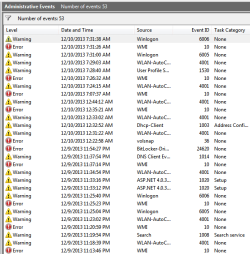
I have attached the results from the "Event Viewer"/
custom/administrator. Would someone give me some insights
as to if they need to be fixed or just ignore them.
 

Attachments

  • 2013-12-10_074420.png
    2013-12-10_074420.png
    15.2 KB · Views: 13
  • 2013-12-10_074511.png
    2013-12-10_074511.png
    10.2 KB · Views: 13
Last edited:

My Computer

Computer type
PC/Desktop
Computer Manufacturer/Model Number
had the system built by PCsandParts
OS
windows 7 Pro 64 bit
CPU
mini tower
Motherboard
h110m-k (lga1151)
Memory
4g
Graphics Card(s)
nvidia geforce gt730 graphics card
Sound Card
high definition audio device
Monitor(s) Displays
19" dell ultra sharp
Screen Resolution
1280 x 800
Hard Drives
Kingston SSD
PSU
?
Case
?
Cooling
?
Keyboard
standard ps/2 keyboard
Mouse
ps/2 compatible optical
Internet Speed
fiber optics
Antivirus
ESET Smart Security
Browser
IE11
Other Info
no Wifi. Bose speakers, optical drive tsstcorp dvd+-RW
A very serious error has popped up on this HP p7-1380t.
I tried to back it up with Clonezilla-live and it found that I had things
initialized as GPT and MBR. I tried to fix this with MiniToolPartition,
but can't find a way to do it with that program. Things I need are greyed
out. So I'm left with a good install that I can't back up.
I did change the BIOS to accept Legacy and not UEFI. I think this
has something to do with the errors.
 

My Computer

Computer type
PC/Desktop
Computer Manufacturer/Model Number
had the system built by PCsandParts
OS
windows 7 Pro 64 bit
CPU
mini tower
Motherboard
h110m-k (lga1151)
Memory
4g
Graphics Card(s)
nvidia geforce gt730 graphics card
Sound Card
high definition audio device
Monitor(s) Displays
19" dell ultra sharp
Screen Resolution
1280 x 800
Hard Drives
Kingston SSD
PSU
?
Case
?
Cooling
?
Keyboard
standard ps/2 keyboard
Mouse
ps/2 compatible optical
Internet Speed
fiber optics
Antivirus
ESET Smart Security
Browser
IE11
Other Info
no Wifi. Bose speakers, optical drive tsstcorp dvd+-RW
Yes, I installed Windows in Legacy mode to the best of my knowledge.
I installed from a CD and changed the BIOS to Legacy. But as I said
in a previous message I found it in UEFI mode and had to change it a
2nd time. I did delete all the partitions and created 1 primary for the
whole disk.

Minitool will let me change all the Mbr to GPT but not the other way around.
Should I go ahead and do this and set the BIOS back to UEFI??
If that doesn't work, I can set the BIOS to UEFI, delete the partitions
and start all over.
Thank you for your patience.
 

My Computer

Computer type
PC/Desktop
Computer Manufacturer/Model Number
had the system built by PCsandParts
OS
windows 7 Pro 64 bit
CPU
mini tower
Motherboard
h110m-k (lga1151)
Memory
4g
Graphics Card(s)
nvidia geforce gt730 graphics card
Sound Card
high definition audio device
Monitor(s) Displays
19" dell ultra sharp
Screen Resolution
1280 x 800
Hard Drives
Kingston SSD
PSU
?
Case
?
Cooling
?
Keyboard
standard ps/2 keyboard
Mouse
ps/2 compatible optical
Internet Speed
fiber optics
Antivirus
ESET Smart Security
Browser
IE11
Other Info
no Wifi. Bose speakers, optical drive tsstcorp dvd+-RW
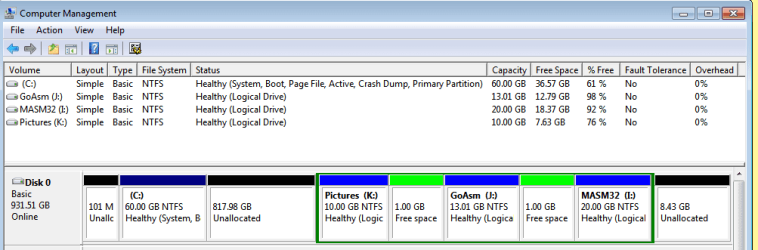
Sorry I missed the screen shot. See attached.
 

Attachments

  • 2013-12-10_192149.png
    2013-12-10_192149.png
    13.1 KB · Views: 1

My Computer

Computer type
PC/Desktop
Computer Manufacturer/Model Number
had the system built by PCsandParts
OS
windows 7 Pro 64 bit
CPU
mini tower
Motherboard
h110m-k (lga1151)
Memory
4g
Graphics Card(s)
nvidia geforce gt730 graphics card
Sound Card
high definition audio device
Monitor(s) Displays
19" dell ultra sharp
Screen Resolution
1280 x 800
Hard Drives
Kingston SSD
PSU
?
Case
?
Cooling
?
Keyboard
standard ps/2 keyboard
Mouse
ps/2 compatible optical
Internet Speed
fiber optics
Antivirus
ESET Smart Security
Browser
IE11
Other Info
no Wifi. Bose speakers, optical drive tsstcorp dvd+-RW
Well I guess you didn't delete all partitions during install, did you?

You obviously have a Legacy MBR install without UEFI or it would not be running that mess.

I would back up the files and do it over, this time following the steps to get and keep a perfect Clean Reinstall - Factory OEM Windows 7.

This time to be sure the HD is cleanest I would wipe it before reinstall using Diskpart Clean Command, accessing the installer's Command Line by pressing Shift + F10 at first screen when booted.
 
Last edited:
Yes I did delete all partitions before install.
Yes I set it to Legacy. How can you gave Legacy and UEFI?
I don't understand. To my way of thinking it's either Legacy or UEFI.
Not both.

I don't understand the Mess statement. I have been running for years
with the disk partitioned in this manner. I like to keep my data separate
from Windows.

I will do a reinstall as you instructed.
Thank you
 

My Computer

Computer type
PC/Desktop
Computer Manufacturer/Model Number
had the system built by PCsandParts
OS
windows 7 Pro 64 bit
CPU
mini tower
Motherboard
h110m-k (lga1151)
Memory
4g
Graphics Card(s)
nvidia geforce gt730 graphics card
Sound Card
high definition audio device
Monitor(s) Displays
19" dell ultra sharp
Screen Resolution
1280 x 800
Hard Drives
Kingston SSD
PSU
?
Case
?
Cooling
?
Keyboard
standard ps/2 keyboard
Mouse
ps/2 compatible optical
Internet Speed
fiber optics
Antivirus
ESET Smart Security
Browser
IE11
Other Info
no Wifi. Bose speakers, optical drive tsstcorp dvd+-RW
I am totally unfamiliar with "Diskpart".
It is not working for me.
Using another program I have deleted GoAsm, Masm32 and pictures.
Resized the C: drive to the full hd capacity.
Then in Dispart I resized the C: partition. That created Volume 7.
I then formatted Volume 7
When I tried to load the new windows it hung and would not let me
install in this new partition. I guess because the old operating was
still in C:
 

My Computer

Computer type
PC/Desktop
Computer Manufacturer/Model Number
had the system built by PCsandParts
OS
windows 7 Pro 64 bit
CPU
mini tower
Motherboard
h110m-k (lga1151)
Memory
4g
Graphics Card(s)
nvidia geforce gt730 graphics card
Sound Card
high definition audio device
Monitor(s) Displays
19" dell ultra sharp
Screen Resolution
1280 x 800
Hard Drives
Kingston SSD
PSU
?
Case
?
Cooling
?
Keyboard
standard ps/2 keyboard
Mouse
ps/2 compatible optical
Internet Speed
fiber optics
Antivirus
ESET Smart Security
Browser
IE11
Other Info
no Wifi. Bose speakers, optical drive tsstcorp dvd+-RW
What is the problem with deleting all partitions during install using the Drive Options shown in Clean Install Windows 7 Steps 7 and 8, or running Diskpart Clean Command to wipe the HD clean?

Unplug all other HD's and peripherals,

Set DVD drive first to boot, HD second, set SATA controller to AHCI, Save changes and Exit.

Then boot into Windows 7 installer DVD or flash stick burned or written using tool and latest ISO for your licensed OS version here.

At first installer screen Press Shift + F10, or enter System Recovery Options to open a Command Box, type:

DISKPART
LIST DISK
SELECT DISK 0 (after confirming Windows 7 target HD #)
CLEAN
CREATE PARTITION PRIMARY
FORMAT FS=NTFS LABEL="WINDOWS 7"
ACTIVE
EXIT
EXIT

Next click Install Now, then Custom install to Clean Install Windows 7 to the partition you created. If it fails then report back at which step and the verbatim error message.

In addition read over these steps to understand the tools and methods which work best to get and maintain a perfect Clean Reinstall - Factory OEM Windows 7. The steps are the same for retail.

After install you can adjust partition size or Create new partitions for data, etc. in Disk Mgmt. You are creating the partition here for the purpose of wiping the HD and marking Active which overcomes certain install failures.
 
Since I have a HP p7-1380t with BIOS set to UEFI, which tutorial do I use?
From reading "How to do a Clean Installation with Windows 7" under "Here's How",
I am confused by what's in #1 warning. Should I use "How to install Windows 7
using "Unified Extensible Firmware Interface" (IUEFI) OR "How to do a Clean Installation
with Windows 7"?
 

My Computer

Computer type
PC/Desktop
Computer Manufacturer/Model Number
had the system built by PCsandParts
OS
windows 7 Pro 64 bit
CPU
mini tower
Motherboard
h110m-k (lga1151)
Memory
4g
Graphics Card(s)
nvidia geforce gt730 graphics card
Sound Card
high definition audio device
Monitor(s) Displays
19" dell ultra sharp
Screen Resolution
1280 x 800
Hard Drives
Kingston SSD
PSU
?
Case
?
Cooling
?
Keyboard
standard ps/2 keyboard
Mouse
ps/2 compatible optical
Internet Speed
fiber optics
Antivirus
ESET Smart Security
Browser
IE11
Other Info
no Wifi. Bose speakers, optical drive tsstcorp dvd+-RW
Back
Top