Solved Events Viewer CAP12 Error

Judesman

New member
Member
VIP
Local time
6:24 PM
Messages
217
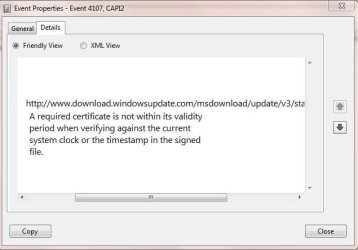
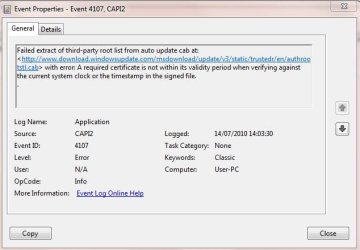
I have just discovered that for the past few days I have been getting a CAP12 Error in Events Viewer/Administrative Events.

I have tried to attach a picture of the General and Details tab but I am not sure how this is going to appear.

This error message keeps appearing and I wonder if anyone knows what this is all about please.
 

Attachments
  • CAP12 Error 1.JPG
    CAP12 Error 1.JPG
    52.6 KB · Views: 158
  • CAP12 Error 2.JPG
    CAP12 Error 2.JPG
    46 KB · Views: 61

My Computer

Computer type
PC/Desktop
Computer Manufacturer/Model Number
Dell OptiPlex 960
OS
Windows 7 64 bit
Memory
8 GB
Graphics Card(s)
Redeon HD 4670
Monitor(s) Displays
Dell
Antivirus
Norton
Browser
IE 10
From what I heard it is a problem with an update, I had it too.

What worked for me and others is to go to services and disable windows media player network services, after you click on it to be sure it does not have any dependent services.
 

My Computer

Computer type
PC/Desktop
Computer Manufacturer/Model Number
Dell XPS 420
OS
Windows 10, Home Clean Install
CPU
Intel Core2 processsor Q8200(2.33Ghz 1333FSB) Quad Core Tech
Motherboard
Dell
Memory
6 gb
Graphics Card(s)
ATI Radeon 256MB HD3650
Sound Card
Intergrated 7.1 Channel Audio
Monitor(s) Displays
Dell SP2009W 20"
Hard Drives
640 GB Serial ATA Hard drive
Cooling
Fan
Keyboard
Dell USB Keyboard
Mouse
Dell Premium Optical USB
Internet Speed
DSL 2.85
Thank you. Does that mean I will lose my link between Media Player and the internet? This is odd because this started on 11th July and I did not receive any updates at that time. Thanks for your input.
 

My Computer

Computer type
PC/Desktop
Computer Manufacturer/Model Number
Dell OptiPlex 960
OS
Windows 7 64 bit
Memory
8 GB
Graphics Card(s)
Redeon HD 4670
Monitor(s) Displays
Dell
Antivirus
Norton
Browser
IE 10
Same was true with me, started quite a bit later after the upddate. Yes, any service that is dependant on the service will be lost. Why not just try it and see if it fixes the problem. A patch is suppose to be issued from MS based upon what I read. That is about all I know on this subject.

This is the 6th question that I had in this area, in two days. Cant be a conincidence.
 

My Computer

Computer type
PC/Desktop
Computer Manufacturer/Model Number
Dell XPS 420
OS
Windows 10, Home Clean Install
CPU
Intel Core2 processsor Q8200(2.33Ghz 1333FSB) Quad Core Tech
Motherboard
Dell
Memory
6 gb
Graphics Card(s)
ATI Radeon 256MB HD3650
Sound Card
Intergrated 7.1 Channel Audio
Monitor(s) Displays
Dell SP2009W 20"
Hard Drives
640 GB Serial ATA Hard drive
Cooling
Fan
Keyboard
Dell USB Keyboard
Mouse
Dell Premium Optical USB
Internet Speed
DSL 2.85
There is an update to the certificates but you have to do it manually.

Go into the event viewer then locate the error and click on the link in the lower box to download the cab file. Extract the content to wherever you like and right click on it and select to install it.

This cured the error for me.
 

My Computer

Computer Manufacturer/Model Number
Dell e6410
OS
Windows 7 Pro
CPU
Intel Core i5 M520 @ 240GHz
Memory
2 Gig
Graphics Card(s)
Intel Grap
Sound Card
Intel Graphics Media Accelerator HD
Monitor(s) Displays
Built in (LapTop)
Screen Resolution
1440x900
Hard Drives
250 Gig STAT
Mouse
Logitech Bluetooth
Yes, try updating the certificates, which is what I did too, but did not work for me. In your case as Niles suggests may rememdy the problem.
 

My Computer

Computer type
PC/Desktop
Computer Manufacturer/Model Number
Dell XPS 420
OS
Windows 10, Home Clean Install
CPU
Intel Core2 processsor Q8200(2.33Ghz 1333FSB) Quad Core Tech
Motherboard
Dell
Memory
6 gb
Graphics Card(s)
ATI Radeon 256MB HD3650
Sound Card
Intergrated 7.1 Channel Audio
Monitor(s) Displays
Dell SP2009W 20"
Hard Drives
640 GB Serial ATA Hard drive
Cooling
Fan
Keyboard
Dell USB Keyboard
Mouse
Dell Premium Optical USB
Internet Speed
DSL 2.85
Thanks all. I have downloaded the update so I will see what happens. Many thanks.
 

My Computer

Computer type
PC/Desktop
Computer Manufacturer/Model Number
Dell OptiPlex 960
OS
Windows 7 64 bit
Memory
8 GB
Graphics Card(s)
Redeon HD 4670
Monitor(s) Displays
Dell
Antivirus
Norton
Browser
IE 10
If it does not work try my suggestion, at least we will know that it does work, even if you decided to restore it.
 

My Computer

Computer type
PC/Desktop
Computer Manufacturer/Model Number
Dell XPS 420
OS
Windows 10, Home Clean Install
CPU
Intel Core2 processsor Q8200(2.33Ghz 1333FSB) Quad Core Tech
Motherboard
Dell
Memory
6 gb
Graphics Card(s)
ATI Radeon 256MB HD3650
Sound Card
Intergrated 7.1 Channel Audio
Monitor(s) Displays
Dell SP2009W 20"
Hard Drives
640 GB Serial ATA Hard drive
Cooling
Fan
Keyboard
Dell USB Keyboard
Mouse
Dell Premium Optical USB
Internet Speed
DSL 2.85
No, the download did not work so I will disable media player network services and see what happens.

Where did the certificate download go? Where are the certificates filed? I used to know with XP but I can't find them in Win7. Should I remove the download or just leave it; any thoughts please?
 

My Computer

Computer type
PC/Desktop
Computer Manufacturer/Model Number
Dell OptiPlex 960
OS
Windows 7 64 bit
Memory
8 GB
Graphics Card(s)
Redeon HD 4670
Monitor(s) Displays
Dell
Antivirus
Norton
Browser
IE 10
Just leave the download alone, if there are no new problems.
 

My Computer

Computer type
PC/Desktop
Computer Manufacturer/Model Number
Dell XPS 420
OS
Windows 10, Home Clean Install
CPU
Intel Core2 processsor Q8200(2.33Ghz 1333FSB) Quad Core Tech
Motherboard
Dell
Memory
6 gb
Graphics Card(s)
ATI Radeon 256MB HD3650
Sound Card
Intergrated 7.1 Channel Audio
Monitor(s) Displays
Dell SP2009W 20"
Hard Drives
640 GB Serial ATA Hard drive
Cooling
Fan
Keyboard
Dell USB Keyboard
Mouse
Dell Premium Optical USB
Internet Speed
DSL 2.85
I disabled windows media player network sevices but still have the problem. 15 CAP12 Errors today.

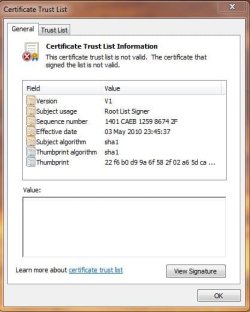
Here is the update I downloaded, its states that The Certificate Trust List is not Valid. I really do not know what all this means and having looked on Google it seems to be a common problem.

Thanks for your input.
 

Attachments

  • Certificate Trust List.JPG
    Certificate Trust List.JPG
    45.8 KB · Views: 20

My Computer

Computer type
PC/Desktop
Computer Manufacturer/Model Number
Dell OptiPlex 960
OS
Windows 7 64 bit
Memory
8 GB
Graphics Card(s)
Redeon HD 4670
Monitor(s) Displays
Dell
Antivirus
Norton
Browser
IE 10
I have spent an hour or so trawling round the net on this one. Some of the threads are so complex I don't even understand them let alone apply any of the solutions that in most cases don't seem to work. This problem seems to relate to an invalid trust certificate. If I hadn't looked in Event Viewer (How many do?) I wouldn't have know that there might be a problem. I feel inclined to forget all about it although I have already had six error messages today (By 10.00am). Any thoughts please.
 

My Computer

Computer type
PC/Desktop
Computer Manufacturer/Model Number
Dell OptiPlex 960
OS
Windows 7 64 bit
Memory
8 GB
Graphics Card(s)
Redeon HD 4670
Monitor(s) Displays
Dell
Antivirus
Norton
Browser
IE 10
OK, sure I should know this but can't think at the moment - how do I disable Windows player network services?
 

My Computer

OS
Windows 7
Easy go to services, find it in services and then just set. Once there you will see it.
 

My Computer

Computer type
PC/Desktop
Computer Manufacturer/Model Number
Dell XPS 420
OS
Windows 10, Home Clean Install
CPU
Intel Core2 processsor Q8200(2.33Ghz 1333FSB) Quad Core Tech
Motherboard
Dell
Memory
6 gb
Graphics Card(s)
ATI Radeon 256MB HD3650
Sound Card
Intergrated 7.1 Channel Audio
Monitor(s) Displays
Dell SP2009W 20"
Hard Drives
640 GB Serial ATA Hard drive
Cooling
Fan
Keyboard
Dell USB Keyboard
Mouse
Dell Premium Optical USB
Internet Speed
DSL 2.85
Strange, I have gone to services but can't see windows media player listed at all. Got a windows media center scheduler and receiver service but assume they are not what I am looking for?
 

My Computer

OS
Windows 7
It's down towards the bottom of the list. There should be three Windows Media items but you want Windows Media Player Network Sharing Service. It's underneath Scheduler and Receiver.

Disabling this did not work for me, and I had hoped someone might have some thoughts on my last post. I wonder how many people are troubled by this?
 

My Computer

Computer type
PC/Desktop
Computer Manufacturer/Model Number
Dell OptiPlex 960
OS
Windows 7 64 bit
Memory
8 GB
Graphics Card(s)
Redeon HD 4670
Monitor(s) Displays
Dell
Antivirus
Norton
Browser
IE 10
Looks like that is now completely missing for me! I know when the PC froze and restarted it had lost system time. Hate to think what else went wrong that I haven't found out yet!
 

My Computer

OS
Windows 7
Cap12 errors

I TOO HAVE BEEN RECEIVING THE SAME ERRORS. WINDOWS 7 PRO 32bit. From what I can make out it appears to be linked with Media Centre Updates. Go to programmes and features, turn windows features on and off,and un-check windows media centre, leave the computer to do its job,reboot and media centre should have gone. I did this and the error has disappeared. If this works for you, then you are well on the way to finding the core of the problem. I don't have the complete answer to this. Hope this helps you.

Regards,

NEYLANMAN
 

My Computer

OS
Windows 7 Professional 32bit
Many people (internatioanlly) have been experiencing this CAPI2 4107 error including me. The closest I could track it down to is with a process "Consent.exe".
It appears correlated with 3rd party updates. Once I noticed it with an Adobe update but more often with McAfee updates.
It definitely started for me around 11 July and continues but doesn't appear to have any performance impact.
 

My Computer

Computer type
PC/Desktop
Computer Manufacturer/Model Number
Own build
OS
Windows 7x64 Home Premium SP1
CPU
Intel i7 2600k
Motherboard
ASUS P8Z68 Deluxe
Memory
G.Skill Ripjaws (DDR3-1600) 2x4GB
Graphics Card(s)
Nvidia GeForce GTS 450; Intel HD Graphics 3000(GT2+)
Monitor(s) Displays
Dell Ultrasharp IPS panel U2311H, Samsung SyncMaster P2350
Screen Resolution
1920x1080
Hard Drives
Samsung 850 Pro SSD 256GB, Samsung SSD 840 120GB, Seagates 1TB Barracuda ST31000528AS x2
PSU
Seasonic M12II 520W
Case
Lian Li Lancool PC-K60
Cooling
Case: 1x120mm, 3x140mm CPU: Hyper 212+
Keyboard
Logitech MK520 (wireless)
Mouse
Logitech MK520
Internet Speed
6-7 Mbps
Antivirus
Norton Security Premium, Malwarebytes on 2 (MSE on 3rd PC)
Browser
FireFox
Other Info
Audio: Logitech Z523 2.1
They were caused by an update. Everyone started having the problem about the time of the updates, including myself.
 

My Computer

Computer type
PC/Desktop
Computer Manufacturer/Model Number
Dell XPS 420
OS
Windows 10, Home Clean Install
CPU
Intel Core2 processsor Q8200(2.33Ghz 1333FSB) Quad Core Tech
Motherboard
Dell
Memory
6 gb
Graphics Card(s)
ATI Radeon 256MB HD3650
Sound Card
Intergrated 7.1 Channel Audio
Monitor(s) Displays
Dell SP2009W 20"
Hard Drives
640 GB Serial ATA Hard drive
Cooling
Fan
Keyboard
Dell USB Keyboard
Mouse
Dell Premium Optical USB
Internet Speed
DSL 2.85
Back
Top