
Since this thread is getting rather confusing, I'm attempting to list troubleshooting steps I've tried in chronological order.
Full system spec
Intel Core i7 4790k @ 4.0 ghz with Corsair H100i Watercooler
Gigabyte z97x-SLI motherboard Rev 1.0 (F7 BIOS); Intel Graphics Accelerator 4600
8gb x2 Kingston Hyperx Fury Blue Memory RAM @ 1600 mhz
Gigabyte GeForce GTX 970 G1 Gaming 4GB GDDR5 PCiE Video Graphics Card
Samsung Evo 500 GB SSD x2
Corsair CX750M Powersupply
Fractal Design Define R4 Black Pearl with Window Computer Case
Non of my components have been overclocked.
List of anti-virus/ security softwares tried:
1. CCleaner
2. Microsoft Security Essentials
3. Malwarebytes
4. SUPERAntiSpyware
List of symptoms:
1. If multiple tabs on Google Chrome are opened, some pages would stop responding or crash, requiring a reload of the pages. Some pages could still work. However, sometimes the entire application crashes. Often, the "Aww Snap" page would display.
"Aww snap" page

2. Mozilla Firefox typically crashes entirely and asks if I want to Restart Firefox or Send a Report.
3. Not being able to properly install applications. Trying to install Google Chrome, for example, would stop at the "Installing" part. "Downloading" works fine.
- 3a This is true for the NVIDIA drivers - trying to update the video driver through NVIDIA Geforce Experience is impossible as it crashes during "Executing files" or "Installing".
- 3b However, I'm able to completely install an application if the installer comes with the option to "Retry" or "Abort" (typically seen when something goes wrong during install). Spamming the "Retry" button would allow the installer to progress a few percentage, same error message, "Retry", and it'd eventually go to completion.
- 3c I'm also unable to download games through Steam as the download would immediately stop after ~1 second and an error message saying download is corrupt.
4. Some games would crash completely to desktop (Counterstrike: Global Offensive). Other games do not (Hawken). Both are ran through Steam. Hoever, since today, I'm unable to run any games at all as it would immediately crash.
5. With only Chome and Steam running, Temperatures will be at around 31 C to 41 C. A fresh start of the computer sees a minimum of around 25 C before slowly increasing to a 31 C to 34 C minimum. I think this is when applications start to crash, but I'll have to verify that again.
Temperature with only Chrome opened:

With game, "Hawken", opened:
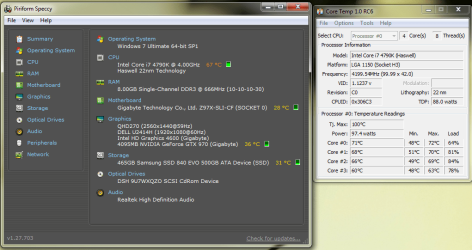
10 minutes after game closed:
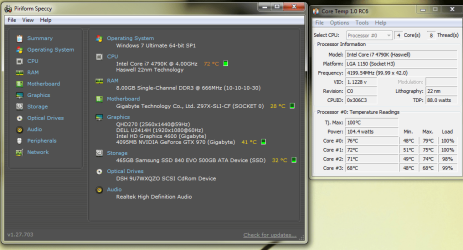
6. No BSOD
7. The Corsair logo on my Coasair H100i Watercooler would sometimes turn red, then start flashing, which may indicate power failure (I think). The last time that happened, it was because I had forgotten to plug in the data connector ( or whatever it's called.. Three pins to three holes)
8. Websites would often times load improperly. Heavily "animated" or flash-related websites, typically.
Loading improperly:
9. Sometimes, graphic artefacts would appear
Graphic artefact:
![graphic art].png](https://www.sevenforums.com/data/attachments/189/189743-046837035ba53c290ed1d4c279dec57f.jpg?hash=aMGl0bemES "graphic art].png")
10. Under "heavy stress" (with one game opened), Google Chrome would hang very often and crash.
Chronological order of troubleshooting steps:
1/5/14
1. Checked all cabling is securely connected, unplugged extra SSD, unplugged extra monitor.
- 1a. Noticed Corsair H100i cooler LED light was red and flashing instead of white. May be due to power failure. Unplugged SATA connector cable and replugged. Turns white permanently (until sometimes after restart).
This had no effect
2. Checked for new GPU drivers, Windows Updates, and drivers from Gigabyte website located here: GIGABYTE - Motherboard - Socket 1150 - GA-Z97X-SLI (rev. 1.0) . GPU drivers and Windows Update did not detect new updates.
- 2a Installed the following: Intel INF installation, Microsoft Hot fix, and Intel Management Engine Interface
- 2b. Unable to install GPU driver due to crashes:
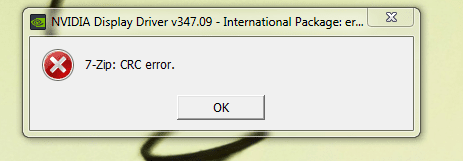
3. Checked for overheating
Temperature with only Chrome opened:
With game, "Hawken", opened:
10 minutes after game closed:
Temps would not lower until restart. Artifacts appeared on some graphics. Restarted the computer but artifacts still present for a short while. No definite consistency to artefacts showing up.
4. Reverted to previous System Restore January 1st savepoint. Applications were still crashing.
5. Uninstalled Chrome and tried reinstalling. Installer failed about 5 times even after some restarts.
Was to install Chrome immediately by launching installer immediately after restart (does not always work). Most extensions corrupted after every crash.
6. Full scan with CCleaner, Microsoft Security Essentials, Malwarebytes, SUPERAntiSpyware. Only detected Ads. Nothing suspicious.
7. SFC /SCANNOW Command through command prompt as administrator. Nothing wrong detected.
8. Studied Event Viewer:
9. Removed one stick of 8gb RAM, only running single channel using 1st slot. Still crashing. Swapped RAM stick. Still crashing.
10. Changed RAM frequency to 1333 mhz instead of 1600 mhz. Still crashing.
11. Ran in safemode with networking. Still crashes.
12. Turned off all non-microsoft related services in msconfig. Still crashes.
Memtest 1/5/14 to 1/6/14
Slot# 1 empty
Slot# 3 empty
Slot# 2 empty
Slot# 4 RAM A
4 passes - 5 errors
Slot# 1 empty
Slot# 3 empty
Slot# 2 empty
Slot# 4 RAM B
4 passes - no errors
Slot# 1 empty
Slot# 3 empty
Slot# 2 RAM B
Slot# 4 empty
4 passes - no errors
Slot# 1 empty
Slot# 3 RAM B
Slot# 2 empty
Slot# 4 empty
4 passes - no errors
Slot# 1 RAM B
Slot# 3 empty
Slot# 2 empty
Slot# 4 empty
8 passes - no errors
Slot# 1 RAM A
Slot# 3 empty
Slot# 2 empty
Slot# 4 empty
8 passes - 0 errors
1/6/14
1. Uninstalled GPU driver through "Programs and Features". Attempted to install GPU driver again. Unable to install GPU driver due to crashes:
2. Changed Windows Update to automatically update. Did not detect anything new.
3. Flashed motherboard BIOS using USB drive from F6 to F7. using BIOS from GIGABYTE - Motherboard - Socket 1150 - GA-Z97X-SLI (rev. 1.1)
4. Fresh install of Windows 8 into a separate SSD. Booted Windows 8, but Internet Explorer was also crashing.
5. Plugged in RAM A into first DDR slot. No changes
1/7/15
1. Removed Corsair H100i watercooler, cleaned and applied new thermal paste. Installed watercooler again according to instructions.
1/7/15
1. Completed Step 19 of Repair Install found in http://www.sevenforums.com/tutorials/220165-troubleshooting-steps-windows-7-a.html using a USB drive. Installed all updates, also done this http://www.sevenforums.com/tutorials/2803-device-installation-settings.html to receive other updates and updated. Applications are still crashing.
2: Fresh install of Windows 8 using disk drive on desktop (current Windows 7 was installed using a laptop). Still crashes.
1/10/15
1: Ran bootdisk. No change.
2: Took apart computer and placed motherboard on a cardboard. Rebuilt computer and checked for loose cables etc. Booted into Windows 7. Still crashes.
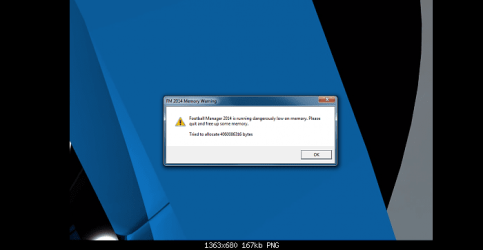
3: Ran Hawken and Football Manager through Steam. Hawken crashes to desktop while Football Manager hangs and displays the following message:
[/ATTACH]
4: Plugged in the other 8GB RAM to run dual channel. Received a crash dump instead of memory allocation error message.
Hypotheses
1. Defective RAM
- Upon running the first memtest using a single-channel of 8 GB RAM on the fourth DDR slot (RAM A), memtest encountered 5 errors in 4 passes. Errors were in Test 7 (3 times) and Test 9 (2 times). Running a separate module of RAM (RAM B) on the same slot yielded 0 errors. RAM B also produced no errors in all other slots when ran separately and in single-channel.
- RAM A was ran using memtest on the first DDR slot for 8 passes with 0 errors.
2. Overheating issue
- Computer has been running on a much higher temperature with only Google Chrome in the background (31-42+ C).
- Graphical artefacts sometimes appear after computer have been on for some time.
- Applications only start crashing a few minutes after boot.
3. Not a software issue?
- Running a fresh install of Windows 8 using a separate SSD also expericned crashing.
Last updates
I sent the motherboard in to Gigabyte for inspection and got the motherboard back after they tested it for 2 weeks.
I then suspected the processor was at fault after the Gigabyte Tech told me the memory controller was in the processor. RMA'd the processor and got a new one the next day. Plugged it in and everything worked perfectly.
Conclusion
Faulty processor was at fault. Probably the memory controller.
Full system spec
Intel Core i7 4790k @ 4.0 ghz with Corsair H100i Watercooler
Gigabyte z97x-SLI motherboard Rev 1.0 (F7 BIOS); Intel Graphics Accelerator 4600
8gb x2 Kingston Hyperx Fury Blue Memory RAM @ 1600 mhz
Gigabyte GeForce GTX 970 G1 Gaming 4GB GDDR5 PCiE Video Graphics Card
Samsung Evo 500 GB SSD x2
Corsair CX750M Powersupply
Fractal Design Define R4 Black Pearl with Window Computer Case
Non of my components have been overclocked.
List of anti-virus/ security softwares tried:
1. CCleaner
2. Microsoft Security Essentials
3. Malwarebytes
4. SUPERAntiSpyware
List of symptoms:
1. If multiple tabs on Google Chrome are opened, some pages would stop responding or crash, requiring a reload of the pages. Some pages could still work. However, sometimes the entire application crashes. Often, the "Aww Snap" page would display.
"Aww snap" page
2. Mozilla Firefox typically crashes entirely and asks if I want to Restart Firefox or Send a Report.
3. Not being able to properly install applications. Trying to install Google Chrome, for example, would stop at the "Installing" part. "Downloading" works fine.
- 3a This is true for the NVIDIA drivers - trying to update the video driver through NVIDIA Geforce Experience is impossible as it crashes during "Executing files" or "Installing".
- 3b However, I'm able to completely install an application if the installer comes with the option to "Retry" or "Abort" (typically seen when something goes wrong during install). Spamming the "Retry" button would allow the installer to progress a few percentage, same error message, "Retry", and it'd eventually go to completion.
- 3c I'm also unable to download games through Steam as the download would immediately stop after ~1 second and an error message saying download is corrupt.
4. Some games would crash completely to desktop (Counterstrike: Global Offensive). Other games do not (Hawken). Both are ran through Steam. Hoever, since today, I'm unable to run any games at all as it would immediately crash.
5. With only Chome and Steam running, Temperatures will be at around 31 C to 41 C. A fresh start of the computer sees a minimum of around 25 C before slowly increasing to a 31 C to 34 C minimum. I think this is when applications start to crash, but I'll have to verify that again.
Temperature with only Chrome opened:
With game, "Hawken", opened:
10 minutes after game closed:
6. No BSOD
7. The Corsair logo on my Coasair H100i Watercooler would sometimes turn red, then start flashing, which may indicate power failure (I think). The last time that happened, it was because I had forgotten to plug in the data connector ( or whatever it's called.. Three pins to three holes)
8. Websites would often times load improperly. Heavily "animated" or flash-related websites, typically.
Loading improperly:
9. Sometimes, graphic artefacts would appear
Graphic artefact:
10. Under "heavy stress" (with one game opened), Google Chrome would hang very often and crash.
Chronological order of troubleshooting steps:
1/5/14
1. Checked all cabling is securely connected, unplugged extra SSD, unplugged extra monitor.
- 1a. Noticed Corsair H100i cooler LED light was red and flashing instead of white. May be due to power failure. Unplugged SATA connector cable and replugged. Turns white permanently (until sometimes after restart).
This had no effect
2. Checked for new GPU drivers, Windows Updates, and drivers from Gigabyte website located here: GIGABYTE - Motherboard - Socket 1150 - GA-Z97X-SLI (rev. 1.0) . GPU drivers and Windows Update did not detect new updates.
- 2a Installed the following: Intel INF installation, Microsoft Hot fix, and Intel Management Engine Interface
- 2b. Unable to install GPU driver due to crashes:
3. Checked for overheating
Temperature with only Chrome opened:
With game, "Hawken", opened:
10 minutes after game closed:
Temps would not lower until restart. Artifacts appeared on some graphics. Restarted the computer but artifacts still present for a short while. No definite consistency to artefacts showing up.
4. Reverted to previous System Restore January 1st savepoint. Applications were still crashing.
5. Uninstalled Chrome and tried reinstalling. Installer failed about 5 times even after some restarts.
Was to install Chrome immediately by launching installer immediately after restart (does not always work). Most extensions corrupted after every crash.
6. Full scan with CCleaner, Microsoft Security Essentials, Malwarebytes, SUPERAntiSpyware. Only detected Ads. Nothing suspicious.
7. SFC /SCANNOW Command through command prompt as administrator. Nothing wrong detected.
8. Studied Event Viewer:
Code:
 Chrome crashes
Faulting application name: chrome.exe, version: 39.0.2171.95, time stamp: 0x548243f3
Faulting module name: chrome.dll, version: 39.0.2171.95, time stamp: 0x54823ff4
Exception code: 0xc0000005
Fault offset: 0x014b17c2
Faulting process id: 0x15e8
Faulting application start time: 0x01d0286ba8f6a800
Faulting application path: C:\Program Files (x86)\Google\Chrome\Application\chrome.exe
Faulting module path: C:\Program Files (x86)\Google\Chrome\Application\39.0.2171.95\chrome.dll Report Id: 49fe7d92-945f-11e4-9a18-74d435efeec1

Counterstrike: Global Offensive crash
Faulting application name: csgo.exe, version: 0.0.0.0, time stamp: 0x5462bb74
Faulting module name: tier0.dll, version: 0.0.0.0, time stamp: 0x546ef9d7
Exception code: 0x40000015
Fault offset: 0x0002051e
Faulting process id: 0xb34
Faulting application start time: 0x01d0293b816af9ff
Faulting application path: C:\Program Files (x86)\Steam\steamapps\common\Counter-Strike Global Offensive\csgo.exe
Faulting module path: C:\Program Files (x86)\Steam\steamapps\common\Counter-Strike Global Offensive\bin\tier0.dll
Report Id: c2cb64ab-952e-11e4-9e51-74d435efeec
9. Removed one stick of 8gb RAM, only running single channel using 1st slot. Still crashing. Swapped RAM stick. Still crashing.
10. Changed RAM frequency to 1333 mhz instead of 1600 mhz. Still crashing.
11. Ran in safemode with networking. Still crashes.
12. Turned off all non-microsoft related services in msconfig. Still crashes.
Memtest 1/5/14 to 1/6/14
Slot# 1 empty
Slot# 3 empty
Slot# 2 empty
Slot# 4 RAM A
4 passes - 5 errors
Slot# 1 empty
Slot# 3 empty
Slot# 2 empty
Slot# 4 RAM B
4 passes - no errors
Slot# 1 empty
Slot# 3 empty
Slot# 2 RAM B
Slot# 4 empty
4 passes - no errors
Slot# 1 empty
Slot# 3 RAM B
Slot# 2 empty
Slot# 4 empty
4 passes - no errors
Slot# 1 RAM B
Slot# 3 empty
Slot# 2 empty
Slot# 4 empty
8 passes - no errors
Slot# 1 RAM A
Slot# 3 empty
Slot# 2 empty
Slot# 4 empty
8 passes - 0 errors
1/6/14
1. Uninstalled GPU driver through "Programs and Features". Attempted to install GPU driver again. Unable to install GPU driver due to crashes:
2. Changed Windows Update to automatically update. Did not detect anything new.
3. Flashed motherboard BIOS using USB drive from F6 to F7. using BIOS from GIGABYTE - Motherboard - Socket 1150 - GA-Z97X-SLI (rev. 1.1)
4. Fresh install of Windows 8 into a separate SSD. Booted Windows 8, but Internet Explorer was also crashing.
5. Plugged in RAM A into first DDR slot. No changes
1/7/15
1. Removed Corsair H100i watercooler, cleaned and applied new thermal paste. Installed watercooler again according to instructions.
1/7/15
1. Completed Step 19 of Repair Install found in http://www.sevenforums.com/tutorials/220165-troubleshooting-steps-windows-7-a.html using a USB drive. Installed all updates, also done this http://www.sevenforums.com/tutorials/2803-device-installation-settings.html to receive other updates and updated. Applications are still crashing.
2: Fresh install of Windows 8 using disk drive on desktop (current Windows 7 was installed using a laptop). Still crashes.
1/10/15
1: Ran bootdisk. No change.
2: Took apart computer and placed motherboard on a cardboard. Rebuilt computer and checked for loose cables etc. Booted into Windows 7. Still crashes.
3: Ran Hawken and Football Manager through Steam. Hawken crashes to desktop while Football Manager hangs and displays the following message:
[/ATTACH]
4: Plugged in the other 8GB RAM to run dual channel. Received a crash dump instead of memory allocation error message.
Hypotheses
1. Defective RAM
- Upon running the first memtest using a single-channel of 8 GB RAM on the fourth DDR slot (RAM A), memtest encountered 5 errors in 4 passes. Errors were in Test 7 (3 times) and Test 9 (2 times). Running a separate module of RAM (RAM B) on the same slot yielded 0 errors. RAM B also produced no errors in all other slots when ran separately and in single-channel.
- RAM A was ran using memtest on the first DDR slot for 8 passes with 0 errors.
2. Overheating issue
- Computer has been running on a much higher temperature with only Google Chrome in the background (31-42+ C).
- Graphical artefacts sometimes appear after computer have been on for some time.
- Applications only start crashing a few minutes after boot.
3. Not a software issue?
- Running a fresh install of Windows 8 using a separate SSD also expericned crashing.
Last updates
I sent the motherboard in to Gigabyte for inspection and got the motherboard back after they tested it for 2 weeks.
I then suspected the processor was at fault after the Gigabyte Tech told me the memory controller was in the processor. RMA'd the processor and got a new one the next day. Plugged it in and everything worked perfectly.
Conclusion
Faulty processor was at fault. Probably the memory controller.
Last edited:
My Computer
At a glance
Windows 7 Home Premium 64bitIntel Core i7 4790k @ 4.0 ghz8gb x2 Kingston Hyperx Fury Blue Memory RAM @...Gigabyte GeForce GTX 970 G1 Gaming 4GB GDDR5 ...
- Computer type
- PC/Desktop
- OS
- Windows 7 Home Premium 64bit
- CPU
- Intel Core i7 4790k @ 4.0 ghz
- Motherboard
- Gigabyte z97x-SLI motherboard
- Memory
- 8gb x2 Kingston Hyperx Fury Blue Memory RAM @ 1600 mhz
- Graphics Card(s)
- Gigabyte GeForce GTX 970 G1 Gaming 4GB GDDR5 PCiE Video Grap
- Hard Drives
- Samsung Evo 500 GB SSD x2
- PSU
- Corsair CX750M Powersupply
- Cooling
- Corsair H100i Watercooler


