
everything is too wide

blueup05

New member
Local time
5:58 PM
Messages
8
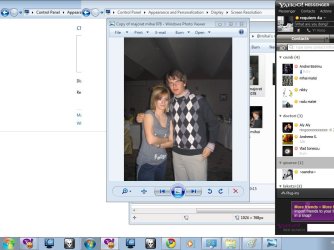
i seem to have a problem.i installed windows 7 without any problem on my fujitsu siemens amilo a1655g, but something is quite wrong.everthing is too wide. i meen the photos, the image from the movies, the icons..everything is wider than it should be..does anyone know if i can do something to repair this? i must say that the resolution setting and dpi settings are ok..
 

My Computer

Computer Manufacturer/Model Number
fujitsu siemens amilo a1655g
OS
windows 7
CPU
amd turion 64 1,8 ghz
Motherboard
acpi x86
Memory
1 gb ram
Graphics Card(s)
ATI XPRESS 200
Sound Card
Azalia compliant audio chip
Hard Drives
80 gb internal, toshiba 500 gb external
PSU
-
Case
-
Cooling
internal fans+3 external base fans
Hi
click the "Auto" Button on ur monitor and n-joy
If nothing happened, please, upload sreenshots in a thread.
Maybe, the icons and other "works" like it should be
 

My Computer

OS
Windows 7 x86 & Arch Linux
CPU
AMD Athlon 64 X2 3800+
Motherboard
ASUS M2A-VM
Memory
3 GB
Graphics Card(s)
ASUS EN8600 GT
Sound Card
Onboard HD Audio
Monitor(s) Displays
Samsung SyncMaster 940N
Screen Resolution
1280x1024
Internet Speed
1 mbit/s
man, even if i upload a photo from my camera it looks wider.my monitor is totaly ok, 3 hours ago when i was still having windows xp everything looked ok, and it's a latop so it doesen't have any monitor button..
 

My Computer

Computer Manufacturer/Model Number
fujitsu siemens amilo a1655g
OS
windows 7
CPU
amd turion 64 1,8 ghz
Motherboard
acpi x86
Memory
1 gb ram
Graphics Card(s)
ATI XPRESS 200
Sound Card
Azalia compliant audio chip
Hard Drives
80 gb internal, toshiba 500 gb external
PSU
-
Case
-
Cooling
internal fans+3 external base fans
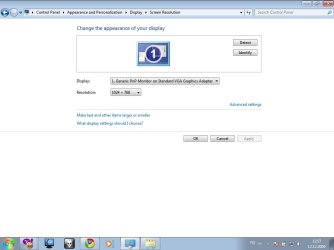
Please upload a screenshot for us. Also, please include the "Screen Resolution" window just in case. Do you have the lastest drivers installed from ATI? This is surely a graphics card issue.
 

My Computer

Computer type
Laptop
Computer Manufacturer/Model Number
Custom
OS
Windows 7 Home Premium x64
CPU
Intel Core i5 2500K
Motherboard
MSI MS-7750
Memory
8GB DDR3
Graphics Card(s)
nVidia GeForce GTX650 Ti BOOST
Sound Card
Realtek
Monitor(s) Displays
21' Philips
Screen Resolution
Full HD
Hard Drives
1TB
PSU
500W
i'll send 2 screenshots.it won't be easy 4 you to realise it, but in reality i'm much thinner and taller than in the pic:))that sounded funny.i installed the graphic card driver from the ati site. i have an ati radeon x200..so theoreticaly there shouldn't be any problems.
 

Attachments

  • prscrn1.jpg
    prscrn1.jpg
    39.8 KB · Views: 110
  • prscrn2.jpg
    prscrn2.jpg
    83.2 KB · Views: 134

My Computer

Computer Manufacturer/Model Number
fujitsu siemens amilo a1655g
OS
windows 7
CPU
amd turion 64 1,8 ghz
Motherboard
acpi x86
Memory
1 gb ram
Graphics Card(s)
ATI XPRESS 200
Sound Card
Azalia compliant audio chip
Hard Drives
80 gb internal, toshiba 500 gb external
PSU
-
Case
-
Cooling
internal fans+3 external base fans
How many inches is the display? Youre right, i dont see anything wrong with those photos. Take a look at them at another computer, and tell us, do YOU see a abnormality?
 

My Computer

Computer Manufacturer/Model Number
Acer Veriton m261 (modded)
OS
Win 7 pro 64-bit, Ubuntu 9.10 64-bit
CPU
Intel Core 2 Duo 2.60 Ghz
Motherboard
Whatever came with the system
Memory
4 gb ddr2 667 Mhz
Graphics Card(s)
NVidia Geforce 9400 GS 1 gb ddr2 550 mhz GPU
Sound Card
Intergrated
Monitor(s) Displays
samsung SyncMaster 2494 24"
Screen Resolution
1080p
Hard Drives
80gb - IDE
750gb - SATA II
PSU
whatever came with the system
Case
whatever came with the system
Cooling
whatever came with the system
Keyboard
Apple Aluminium (Awesome)
Mouse
Some awesome Dell mouse, really good.
Internet Speed
100mbps
i don't see how my monitor's size could help, it's totally irrelevant, the aspect ratio is the problem.man, of course something's wrong otherwise i wouldn't be asking questions.not only the photos are wider, everything looks wider including internet sites, etcetera.even asking me to put some screenshots was an idiot idea because it implies me being stupid or paranoid about this thing.it's from the graphic card but i have no idea what exactly.would you please be kind and not put an answer to this thread unless you can say something that could sound even a bit logical.thank's alot
 

My Computer

Computer Manufacturer/Model Number
fujitsu siemens amilo a1655g
OS
windows 7
CPU
amd turion 64 1,8 ghz
Motherboard
acpi x86
Memory
1 gb ram
Graphics Card(s)
ATI XPRESS 200
Sound Card
Azalia compliant audio chip
Hard Drives
80 gb internal, toshiba 500 gb external
PSU
-
Case
-
Cooling
internal fans+3 external base fans
i don't see how my monitor's size could help, it's totally irrelevant, the aspect ratio is the problem.man, of course something's wrong otherwise i wouldn't be asking questions.not only the photos are wider, everything looks wider including internet sites, etcetera.even asking me to put some screenshots was an idiot idea because it implies me being stupid or paranoid about this thing.it's from the graphic card but i have no idea what exactly.would you please be kind and not put an answer to this thread unless you can say something that could sound even a bit logical.thank's alot

While your video driver is showing standard vga, you post this?

Install the latest video driver from the manufacturer instead.
 

My Computer

OS
Win7
i have an ati radeon x200..i installed the compatible driver for it but without any luck and also i tried with windows 7 loader to make it download its own driver without my intervention and it also didn't help...so i kinda ran out of ideas..i found others posting the same problem on the internet and they didn't find any solution either..
 

My Computer

Computer Manufacturer/Model Number
fujitsu siemens amilo a1655g
OS
windows 7
CPU
amd turion 64 1,8 ghz
Motherboard
acpi x86
Memory
1 gb ram
Graphics Card(s)
ATI XPRESS 200
Sound Card
Azalia compliant audio chip
Hard Drives
80 gb internal, toshiba 500 gb external
PSU
-
Case
-
Cooling
internal fans+3 external base fans
i have an ati radeon x200..i installed the compatible driver for it but without any luck and also i tried with windows 7 loader to make it download its own driver without my intervention and it also didn't help...so i kinda ran out of ideas..i found others posting the same problem on the internet and they didn't find any solution either..

Install like this:

Extract from my link by running the installer. Close it as soon as it is done extracting.

Then go to device manager. Right click standard vga. Browse. Let me pick. Have disk. Browse. Find the extracted .inf. Double click on it. Hit ok. Hit next. Reboot and choose an Aero theme.

Enjoy.

ATI Catalyst? Legacy Display Driver

If you have a 200m instead, use this link:

http://support.amd.com/us/gpudownlo...x?type=2.7&product=2.7.5.3.4.3.2&lang=English
 

My Computer

OS
Win7

My Computer

Computer Manufacturer/Model Number
Compal JFT02 (Custom Build Laptop)
OS
Windows 7 Home Premium x64 - Mac OS X 10.6.4 x64
CPU
Intel Core 2 Duo T9300 2.5 GHz
Motherboard
JFT02
Memory
4GB Kingston DDR2-800
Graphics Card(s)
NVIDIA Geforce 8600M GT (512MB Model)
Sound Card
Realtek HD Audio
Monitor(s) Displays
WUXGA Standard Laptop Display
Screen Resolution
1680*1050
Hard Drives
Toshiba 320GB 5400RPM Laptop HD
PSU
Standard Laptop Power Supply
Case
Standard Laptop Case
Cooling
Standard Laptop Cooling
Keyboard
Standard Laptop 105 Key-Keyboard
Mouse
Synaptics Touchpad
Internet Speed
Verizion Online DSL 3360/864 kbs (dl/up)
thanks alot man.that worked:D
 

My Computer

Computer Manufacturer/Model Number
fujitsu siemens amilo a1655g
OS
windows 7
CPU
amd turion 64 1,8 ghz
Motherboard
acpi x86
Memory
1 gb ram
Graphics Card(s)
ATI XPRESS 200
Sound Card
Azalia compliant audio chip
Hard Drives
80 gb internal, toshiba 500 gb external
PSU
-
Case
-
Cooling
internal fans+3 external base fans

My Computer

Computer Manufacturer/Model Number
Compal JFT02 (Custom Build Laptop)
OS
Windows 7 Home Premium x64 - Mac OS X 10.6.4 x64
CPU
Intel Core 2 Duo T9300 2.5 GHz
Motherboard
JFT02
Memory
4GB Kingston DDR2-800
Graphics Card(s)
NVIDIA Geforce 8600M GT (512MB Model)
Sound Card
Realtek HD Audio
Monitor(s) Displays
WUXGA Standard Laptop Display
Screen Resolution
1680*1050
Hard Drives
Toshiba 320GB 5400RPM Laptop HD
PSU
Standard Laptop Power Supply
Case
Standard Laptop Case
Cooling
Standard Laptop Cooling
Keyboard
Standard Laptop 105 Key-Keyboard
Mouse
Synaptics Touchpad
Internet Speed
Verizion Online DSL 3360/864 kbs (dl/up)
Hi, Zidane
I am a new user and new on the forum. I have the same problem and did not understand what driver should I install? I have insalled ATI Catalist now.
Thanks
 

My Computer

OS
Windows 7
Motherboard
Athlon
Memory
1
Graphics Card(s)
ATI Radeon
Monitor(s) Displays
Dell 24
i have an ati radeon x200..i installed the compatible driver for it but without any luck and also i tried with windows 7 loader to make it download its own driver without my intervention and it also didn't help...so i kinda ran out of ideas..i found others posting the same problem on the internet and they didn't find any solution either..

If I read the specs on your notebook properly, it's native resolution is 1280X800. The images would definitely look stretched at 1024X768. Fujitsu appears to not support Win7 on it.

There are drivers available at Windows Update:

Microsoft Update Catalog

but they may not be freestanding installers.
 

My Computer

Computer Manufacturer/Model Number
homegrown
OS
Windows 7 Pro X64 SP1
CPU
Intel Core I7-3930k
Motherboard
Asus P9X79 Pro
Memory
16 GB Gskill DDR3-2133
Graphics Card(s)
eVGA GTX680
Sound Card
Creative X-Fi Titanium
Monitor(s) Displays
As PA246Q
Screen Resolution
1920 X 1200
Hard Drives
Corsair Force GT, 120 GB
WDC 1.5TB Caviar Black
PSU
PCP&C Silencer 750 Crossfire
Case
Silverstone FT02
Cooling
Noctua NH-D14
Keyboard
cheap Logitech USB
Mouse
Microsoft Intellimouse Explorer (old optical) USB
Internet Speed
6Mb cable
Other Info
Pioneer BDR-205
Samsung SH-203B
Monsoon 5.1 speakers
hi,
I have the same problem and will try installing the driver through the link on rapidshare,
can anyone tell me what I need to do to install it and whereabout on the pc to install it please?

Many Thanks
 

My Computer

OS
32 bit windows 7
I seem to have a similar problem, my old display res was able to display up to 1280x800 but now its only 1204x768. My notebook is asus f5rl. I experienced this right after i have installed windows 7.
 

My Computer

Computer Manufacturer/Model Number
Asus F5RL
OS
windows 7 ultimate 32 bit
To use the RapidShare share file you'll first have to click on the link>then once on RapidShare click on the Free User and wait for the clock to run down then download the file>I save it to my desktop but you can save it wherever you want to>if zipped or a RAR file extract it> find the setup.exe file click in it> let it install. That's about it.
Post back if you need further help.

Also the last 2 posters please fill in your system specs. It will go a long way in helping you.
Here's a program to help with that http://www.piriform.com/speccy Or go to your manufacturers page so we don't have to, and at least let us know the video adapter/card your using.
Then go to userCP>top of page>scroll to edit system specs and fill in all you know about your system
.
Please include your make and model # if a laptop or other OEM system and which version of Seven you are using 32 or 64 bit.
Thank You . Fabe
 

My Computer

Computer Manufacturer/Model Number
Self Built
OS
Windows 7 ultimate 64 bit / XP Home sp3
CPU
intel Core 2 Duo E8400 3.0ghz
Motherboard
Asus P5ND bios 1401
Memory
8 gigs 1066 OCZ Fata1ty
Graphics Card(s)
EVGA GTX 580 Call of Duty Black Ops Edition
Sound Card
Creative Soundblaster Audigy 2zs
Monitor(s) Displays
Asus 24in LCD's 2MS X2
Screen Resolution
1920x1080p @60Hz
Hard Drives
WD Caviar 500 Black/ WD Caviar 200 Blue
PSU
OCZ 700W GameXtreme
Case
NZXT Apollo
Cooling
Corsair H50 CPU/120mm x3 /60mm x2 /Corsair Dominator Ram
Keyboard
Logitech Bluetooth Wireless MX5000
Mouse
Logitech Bluetooth Wireless MX1000
Internet Speed
Download 19.83 Upload 0.97
Other Info
Logitech Z2300 Speakers/ Bose Noise Cancelling Headphones/Avermedia PCI-e Hybrid TV Bravo/Epson NX415 all in one/ 4 Port Powered USB Hub/ LG 10x Bluray Burner /TSST Corp DVDRW External
The file from rapidshare didnt work. the notebook seems to think that it has only a tandard vga monitor instead of a 1280x800 display. the chip type is ATI RADEON XPRESS 200M series. DAC type 8bit the adapter string is stated VGA. Im using 32bit Win7. in the device manager it shows generic pnp monitor. I dont know if the info would help or not, but i hope that its enough.
 

My Computer

Computer Manufacturer/Model Number
Asus F5RL
OS
windows 7 ultimate 32 bit
Problem solved!! it was so easy, i went to the device manager, plugged my laptop to the internet, tried updating the driver from the device manager, and it searched a suitable driver for the graphic, updated the driver automatically, and restarted the laptop, and the option for 1280x800 was there. so maybe those with the same problem can try this:D
 

My Computer

Computer Manufacturer/Model Number
Asus F5RL
OS
windows 7 ultimate 32 bit
Back
Top