Everytime I download this windows update my monitor turns black

bobxxx

New member
Local time
2:19 AM
Messages
13
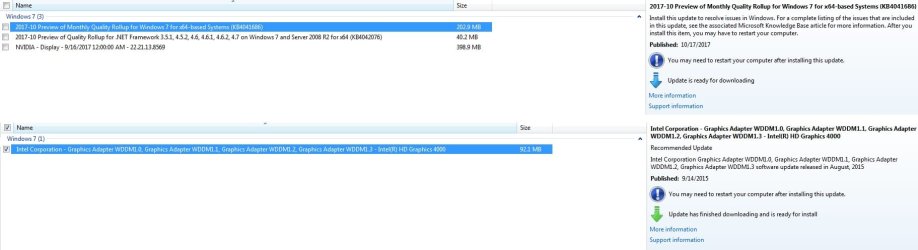
As the title says, everytime I try to use the windows update on my computer for these couple graphics changes, my computer screen turns black and kinda goes into sleep mode. I end up having to restart the computer and system restoring it back to before the update.

Here are the pics of the windows update changes that Windows wants. I just ended up not doing them, but I am puzzled as to why this is happening and if whether it could be my graphics card, although I recently replaced my graphics card because I took it to the shop recently and they gave me a new one and did a diagnostics to fix issues.

Should I be worried and what can I do to fix it so I can update and not have this problem?
 

Attachments

  • update issue.jpg
    update issue.jpg
    75.8 KB · Views: 13

My Computer My Computer

At a glance

Windows 7 Home Premium 64 bit
Computer type
PC/Desktop
OS
Windows 7 Home Premium 64 bit
Which update is causing the problem ? The nvidia update or the Intel update ?

If you need an nvidia driver get it from nvidia, not through windows update.

If you are using an nvidia graphics card, don`t even worry about the CPU graphics, just hide the update.
 

My Computer My Computer

At a glance

Windows 10 Pro x64Intel Core i7 6700KGSkill TridentZ RGB 16GB 3600 16-16-16-36EVGA GTX 980 Ti SC x2
Computer type
PC/Desktop
Computer Manufacturer/Model Number
Skylake Special #666
OS
Windows 10 Pro x64
CPU
Intel Core i7 6700K
Motherboard
Asus Sabertooth Z170 Mark 1
Memory
GSkill TridentZ RGB 16GB 3600 16-16-16-36
Graphics Card(s)
EVGA GTX 980 Ti SC x2
Sound Card
Realtek High Definition
Monitor(s) Displays
AOC G2460PG
Screen Resolution
1920 x 1080 144Hz
Hard Drives
Samsung 860 Pro 256GB, Seagate Barracuda 4TB x2
PSU
EVGA 1000 P2, EVGA White Custom Braided Cables
Case
Corsair Vengeance C70 Gunmetal Black
Cooling
Corsair H100i v2, Corsair ML120 x2, Thermal Grizzly Kryonaut
Keyboard
Logitech G910 Orion Spectrum
Mouse
Logitech G700s
Internet Speed
Verizon Fios Quantum Gateway 75/75
Antivirus
Windows Defender, Malwarebytes Free 3.8.3
Browser
Chrome
Other Info
Corsair SP120 x4, LG Blu-ray Drive, Durabrand HT-395 100 Watt Dolby Digital Amp, Corsair H2100 Wireless 7.1 Headset
We need a complete specification of your system as I am not sure if this is a laptop or a desktop you're having problem with.
 

My Computer My Computer

At a glance

Windows 7 Home Premium 64-BITAMD A8 7200P8GB 1600mhzRadeon R5 (APU) + Radeon R5 M230 2GB Dual Gra...
Computer type
PC/Desktop
Computer Manufacturer/Model Number
ASUS X550ZE
OS
Windows 7 Home Premium 64-BIT
CPU
AMD A8 7200P
Motherboard
N/A
Memory
8GB 1600mhz
Graphics Card(s)
Radeon R5 (APU) + Radeon R5 M230 2GB Dual Graphics
Sound Card
Realtek ALC269 with SonicMaster
Monitor(s) Displays
Laptop Display
Screen Resolution
1920 x 1080 @60hz
Hard Drives
WDC WD50 00LPVX-80V0TT0 (500GB)
PSU
Laptop Charger
Mouse
ARMAGGEDON TEXTRON SCORPION 7
Internet Speed
100 mbps DOWN / 50 mbps UP
Antivirus
Windows Defender
Browser
Mozzila FireFox, Valve Steam in-game internet browser
purely my point of view

Dissable MS driver updates, allways go to the manufacturer especially for graphics cards
NEVER install the PREVIEW updates.

And your comp will allways black screen when installing graphics drivers, unless there done on a reboot
(remove old drivers >> black screen >> install new drivers >> up and running)

Roy
 

My Computer My Computer

At a glance

W7 home premium 32bit/W7HP 64bit/w10 tp insid...E5300 dual core3gbNvidia Geforce 7100 Nforce 630i
Computer type
PC/Desktop
Computer Manufacturer/Model Number
medionl/Aspire 6930G/acer x55a
OS
W7 home premium 32bit/W7HP 64bit/w10 tp insider ring
CPU
E5300 dual core
Motherboard
medion MS7366
Memory
3gb
Graphics Card(s)
Nvidia Geforce 7100 Nforce 630i
Monitor(s) Displays
avixc
Internet Speed
n (isp resticted to 72)
Antivirus
mse/pands
Browser
palemoon
Other Info
Belkin Fd7050 n USB using Railink RT2870 drivers, more upto date
Which update is causing the problem ? The nvidia update or the Intel update ?

If you need an nvidia driver get it from nvidia, not through windows update.

If you are using an nvidia graphics card, don`t even worry about the CPU graphics, just hide the update.

It's the Intel update I believe. Because I tried doing just the intel update alone and it was going me the issue.

Also my computer is a desktop, Windows 7 64-bit with a GeForce Nvidia GTX 1060 graphics card. i5 processor, with DDR3 8 GB ram

Ok so the consensus is to just not do any windows updates on graphics card?


purely my point of view

Dissable MS driver updates, allways go to the manufacturer especially for graphics cards
NEVER install the PREVIEW updates.

And your comp will allways black screen when installing graphics drivers, unless there done on a reboot
(remove old drivers >> black screen >> install new drivers >> up and running)

Roy

Ok I will update from Manufacturer.

Ya I know computers black screens for a couple seconds when you install graphics drivers but this is different. When I update, it just stays black and never comes back until I unplug the computer and restart it and then windows automatically states something wrong happened and asks if I want to do a system restore. If I don't do the system restore and go straight yo start up then it goes back to the black screen. I am practically forced to system restore.
 

My Computer My Computer

At a glance

Windows 7 Home Premium 64 bit
Computer type
PC/Desktop
OS
Windows 7 Home Premium 64 bit
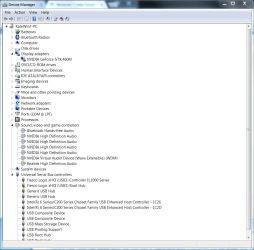
I also had trouble with the GEforce 388.13 driver, Win7 Home

I created a checkpoint and used DriverEasy to update several out-of-date drivers, including PCIexpress, as I had been seeing BSOD's with pci.sys in the backtrace. I made this mistake of installing the recommended Geforce 388.13 driver. On reboot, my screen would flash, had video drop-outs, and would sometimes generate a 16x16 grid of duplicate screens with low resolution. Along the way two Windows updates were applied.

Rolling back to my oldest checkpoint failed, I must have taken it before the Windows updates but after the new driver had been installed. I soldiered on...

The solution was to go to the Nvidia website to get the recommended driver for my ASUS G73sw laptop with a GEforce GTX 460M graphics card. The driver was bundled into their installer app, and was version 368.68 WHQL, Wed Jul 06, 2016, for Win7 64bit. You must removed all Nvidia bread crumbs left over from a previous failed uninstall, I still had one service installed.

Others may have had better luck, but this was a nightmare until I removed the old driver and loaded the new one in VGA mode (you can't install the driver in Safe Mode).

Along the way I learned how to use this site's dm_log collector (the bundle is attached) then downloaded the Microsoft 8.1A debug sdk, set an environment variable to look for symbols on Microsoft's symbol server, allowing me to run WinDebug and capture the stack trace.

My stack traces just show the pci.sys errors and BSOD; when the screen would flash I would get a warning that the GEforce had timed out on a pci transaction. Eventually this causes the BSOD. I got started on this because the BSOD would happen in the middle of the night (I had turned off sleep and hibernation).

It was well worth joining this forum, so I hope this post helps someone else with a similar problem.

helpfulHwMan

*******************************************************************************
* *
* Bugcheck Analysis *
* *
*******************************************************************************

Use !analyze -v to get detailed debugging information.

BugCheck 9F, {3, fffffa80071e9060, fffff80000b9a3d8, fffffa800f2683b0}

Probably caused by : pci.sys

Followup: MachineOwner
---------

0: kd> !analyze -v
*******************************************************************************
* *
* Bugcheck Analysis *
* *
*******************************************************************************

DRIVER_POWER_STATE_FAILURE (9f)
A driver has failed to complete a power IRP within a specific time.
Arguments:
Arg1: 0000000000000003, A device object has been blocking an Irp for too long a time
Arg2: fffffa80071e9060, Physical Device Object of the stack
Arg3: fffff80000b9a3d8, nt!TRIAGE_9F_POWER on Win7 and higher, otherwise the Functional Device Object of the stack
Arg4: fffffa800f2683b0, The blocked IRP

Debugging Details:
------------------


DRVPOWERSTATE_SUBCODE: 3

IMAGE_NAME: pci.sys

DEBUG_FLR_IMAGE_TIMESTAMP: 4ce7928f

MODULE_NAME: pci

FAULTING_MODULE: fffff88000e00000 pci

CUSTOMER_CRASH_COUNT: 1

DEFAULT_BUCKET_ID: WIN7_DRIVER_FAULT

BUGCHECK_STR: 0x9F

PROCESS_NAME: System

CURRENT_IRQL: 2

ANALYSIS_VERSION: 6.3.9600.17336 (debuggers(dbg).150226-1500) amd64fre

DPC_STACK_BASE: FFFFF80000BA0FB0

STACK_TEXT:
fffff800`00b9a388 fffff800`03301810 : 00000000`0000009f 00000000`00000003 fffffa80`071e9060 fffff800`00b9a3d8 : nt!KeBugCheckEx
fffff800`00b9a390 fffff800`0329bc3c : fffff800`00b9a4c0 fffff800`00b9a4c0 00000000`00000000 00000000`00000002 : nt! ?? ::FNODOBFM::`string'+0x2e5f0
fffff800`00b9a430 fffff800`0329bad6 : fffffa80`0af86aa8 fffffa80`0af86aa8 00000000`00000000 00000000`00000000 : nt!KiProcessTimerDpcTable+0x6c
fffff800`00b9a4a0 fffff800`0329b9be : 00000048`e7c7c24e fffff800`00b9ab18 00000000`001ea0a6 fffff800`03411748 : nt!KiProcessExpiredTimerList+0xc6
fffff800`00b9aaf0 fffff800`0329b7a7 : 0000000e`352c98c6 0000000e`001ea0a6 0000000e`352c9897 00000000`000000a6 : nt!KiTimerExpiration+0x1be
fffff800`00b9ab90 fffff800`03287b0a : fffff800`0340de80 fffff800`0341bcc0 00000000`00000001 fffff880`00000000 : nt!KiRetireDpcList+0x277
fffff800`00b9ac40 00000000`00000000 : fffff800`00b9b000 fffff800`00b95000 fffff800`00b9ac00 00000000`00000000 : nt!KiIdleLoop+0x5a


STACK_COMMAND: kb

FOLLOWUP_NAME: MachineOwner

IMAGE_VERSION: 6.1.7601.17514

FAILURE_BUCKET_ID: X64_0x9F_3_POWER_DOWN_FLxHCIc_IMAGE_pci.sys

BUCKET_ID: X64_0x9F_3_POWER_DOWN_FLxHCIc_IMAGE_pci.sys

ANALYSIS_SOURCE: KM

FAILURE_ID_HASH_STRING: km:x64_0x9f_3_power_down_flxhcic_image_pci.sys

FAILURE_ID_HASH: {10380dcc-bfc7-de71-9c06-2d76c7b39bea}

Followup: MachineOwner
---------

 

Attachments

My Computer My Computer

At a glance

Windows 7 Home Premium 64-bitIntel Core-i7-2630QM [email protected] GHz 4 core (8 si...8.0 GBNvidia GEFORCE GTX 460M Cuda 1.5GB
Computer type
Laptop
Computer Manufacturer/Model Number
ASUS Notebook G73Sw series
OS
Windows 7 Home Premium 64-bit
CPU
Intel Core-i7-2630QM [email protected] GHz 4 core (8 siamese twins)
Memory
8.0 GB
Graphics Card(s)
Nvidia GEFORCE GTX 460M Cuda 1.5GB
Hard Drives
Model WDC WD6400BEVT-80A0R SCSI Disk Device 600GB
Antivirus
Malwarebyes Anti-Malware
Browser
IE, chrome
I may have been too quick to blame Nvidia for my pci.sys crashes

I was stable for 15 days, then started crashing the Nvidia driver in pci.sys again. The screen blanked out four or five times before the BSOD. Capturing the dm bundle and examining the crash dump revealed I was crashing in the HCI Fresco Logic USB3.0 driver with a "power down" fault, even though the system wasn't going to sleep or shutting down. I was running a 7/30/2015 HCI USB 3.0 driver version 3.6.8.0.

On the Fresco Logic website I found a 3.8.33709.0 driver. It was hard to install the Fresco installer package with the crashing Nvidia display driver, so I temporarily disabled the Nvidia driver in device manager, allowing me to boot into a VGA session and run the Fresco driver install package (you can't run this in Safe mode).

I've been up and stable for a few hours now, so hopefully this problem is behind me. I'm leery of updating the Nvidia driver, as it was the recommended version for Windows 7 on their website. Stable is good place to be.

kd> !analyze -v
*******************************************************************************
* *
* Bugcheck Analysis *
* *
*******************************************************************************

DRIVER_POWER_STATE_FAILURE (9f)
A driver has failed to complete a power IRP within a specific time.
Arguments:
Arg1: 0000000000000003, A device object has been blocking an Irp for too long a time
Arg2: fffffa80072cfa10, Physical Device Object of the stack
Arg3: fffff80004c513d8, nt!TRIAGE_9F_POWER on Win7 and higher, otherwise the Functional Device Object of the stack
Arg4: fffffa800ecee0e0, The blocked IRP

Debugging Details:
------------------


DRVPOWERSTATE_SUBCODE: 3

IMAGE_NAME: pci.sys

DEBUG_FLR_IMAGE_TIMESTAMP: 4ce7928f

MODULE_NAME: pci

FAULTING_MODULE: fffff88000f9b000 pci

CUSTOMER_CRASH_COUNT: 1

DEFAULT_BUCKET_ID: WIN7_DRIVER_FAULT

BUGCHECK_STR: 0x9F

PROCESS_NAME: System

CURRENT_IRQL: 2

ANALYSIS_VERSION: 6.3.9600.17336 (debuggers(dbg).150226-1500) amd64fre

DPC_STACK_BASE: FFFFF80004C57FB0

STACK_TEXT:
fffff800`04c51388 fffff800`03301810 : 00000000`0000009f 00000000`00000003 fffffa80`072cfa10 fffff800`04c513d8 : nt!KeBugCheckEx
fffff800`04c51390 fffff800`0329bc3c : fffff800`04c514c0 fffff800`04c514c0 00000000`00000000 00000000`00000001 : nt! ?? ::FNODOBFM::`string'+0x2e5f0
fffff800`04c51430 fffff800`0329bad6 : fffffa80`0d947168 fffffa80`0d947168 00000000`00000000 00000000`00000000 : nt!KiProcessTimerDpcTable+0x6c
fffff800`04c514a0 fffff800`0329b9be : 0000008d`762f458e fffff800`04c51b18 00000000`003b6d93 fffff800`034114e8 : nt!KiProcessExpiredTimerList+0xc6
fffff800`04c51af0 fffff800`0329b7a7 : 0000001b`91387dc3 0000001b`003b6d93 0000001b`91387d71 00000000`00000093 : nt!KiTimerExpiration+0x1be
fffff800`04c51b90 fffff800`03287b0a : fffff800`0340de80 fffff800`0341bcc0 00000000`00000001 fffff880`00000000 : nt!KiRetireDpcList+0x277
fffff800`04c51c40 00000000`00000000 : fffff800`04c52000 fffff800`04c4c000 fffff800`04c51c00 00000000`00000000 : nt!KiIdleLoop+0x5a


STACK_COMMAND: kb

FOLLOWUP_NAME: MachineOwner

IMAGE_VERSION: 6.1.7601.17514

FAILURE_BUCKET_ID: X64_0x9F_3_POWER_DOWN_FLxHCIc_IMAGE_pci.sys

BUCKET_ID: X64_0x9F_3_POWER_DOWN_FLxHCIc_IMAGE_pci.sys

ANALYSIS_SOURCE: KM

FAILURE_ID_HASH_STRING: km:x64_0x9f_3_power_down_flxhcic_image_pci.sys

FAILURE_ID_HASH: {10380dcc-bfc7-de71-9c06-2d76c7b39bea}

Followup: MachineOwner
---------
0: kd> !analyze -v
*******************************************************************************
* *
* Bugcheck Analysis *
* *
*******************************************************************************

DRIVER_POWER_STATE_FAILURE (9f)
A driver has failed to complete a power IRP within a specific time.
Arguments:
Arg1: 0000000000000003, A device object has been blocking an Irp for too long a time
Arg2: fffffa80072cfa10, Physical Device Object of the stack
Arg3: fffff80004c513d8, nt!TRIAGE_9F_POWER on Win7 and higher, otherwise the Functional Device Object of the stack
Arg4: fffffa800ecee0e0, The blocked IRP

Debugging Details:
------------------


DRVPOWERSTATE_SUBCODE: 3

IMAGE_NAME: pci.sys

DEBUG_FLR_IMAGE_TIMESTAMP: 4ce7928f

MODULE_NAME: pci

FAULTING_MODULE: fffff88000f9b000 pci

CUSTOMER_CRASH_COUNT: 1

DEFAULT_BUCKET_ID: WIN7_DRIVER_FAULT

BUGCHECK_STR: 0x9F

PROCESS_NAME: System

CURRENT_IRQL: 2

ANALYSIS_VERSION: 6.3.9600.17336 (debuggers(dbg).150226-1500) amd64fre

DPC_STACK_BASE: FFFFF80004C57FB0

STACK_TEXT:
fffff800`04c51388 fffff800`03301810 : 00000000`0000009f 00000000`00000003 fffffa80`072cfa10 fffff800`04c513d8 : nt!KeBugCheckEx
fffff800`04c51390 fffff800`0329bc3c : fffff800`04c514c0 fffff800`04c514c0 00000000`00000000 00000000`00000001 : nt! ?? ::FNODOBFM::`string'+0x2e5f0
fffff800`04c51430 fffff800`0329bad6 : fffffa80`0d947168 fffffa80`0d947168 00000000`00000000 00000000`00000000 : nt!KiProcessTimerDpcTable+0x6c
fffff800`04c514a0 fffff800`0329b9be : 0000008d`762f458e fffff800`04c51b18 00000000`003b6d93 fffff800`034114e8 : nt!KiProcessExpiredTimerList+0xc6
fffff800`04c51af0 fffff800`0329b7a7 : 0000001b`91387dc3 0000001b`003b6d93 0000001b`91387d71 00000000`00000093 : nt!KiTimerExpiration+0x1be
fffff800`04c51b90 fffff800`03287b0a : fffff800`0340de80 fffff800`0341bcc0 00000000`00000001 fffff880`00000000 : nt!KiRetireDpcList+0x277
fffff800`04c51c40 00000000`00000000 : fffff800`04c52000 fffff800`04c4c000 fffff800`04c51c00 00000000`00000000 : nt!KiIdleLoop+0x5a


STACK_COMMAND: kb

FOLLOWUP_NAME: MachineOwner

IMAGE_VERSION: 6.1.7601.17514

FAILURE_BUCKET_ID: X64_0x9F_3_POWER_DOWN_FLxHCIc_IMAGE_pci.sys

BUCKET_ID: X64_0x9F_3_POWER_DOWN_FLxHCIc_IMAGE_pci.sys

ANALYSIS_SOURCE: KM

FAILURE_ID_HASH_STRING: km:x64_0x9f_3_power_down_flxhcic_image_pci.sys

FAILURE_ID_HASH: {10380dcc-bfc7-de71-9c06-2d76c7b39bea}

Followup: MachineOwner
---------
 

Attachments

My Computer My Computer

At a glance

Windows 7 Home Premium 64-bitIntel Core-i7-2630QM [email protected] GHz 4 core (8 si...8.0 GBNvidia GEFORCE GTX 460M Cuda 1.5GB
Computer type
Laptop
Computer Manufacturer/Model Number
ASUS Notebook G73Sw series
OS
Windows 7 Home Premium 64-bit
CPU
Intel Core-i7-2630QM [email protected] GHz 4 core (8 siamese twins)
Memory
8.0 GB
Graphics Card(s)
Nvidia GEFORCE GTX 460M Cuda 1.5GB
Hard Drives
Model WDC WD6400BEVT-80A0R SCSI Disk Device 600GB
Antivirus
Malwarebyes Anti-Malware
Browser
IE, chrome
Back
Top