EVGA Precision & Nvidia 9600M GT

Clippy

New member
Local time
7:42 PM
Messages
3
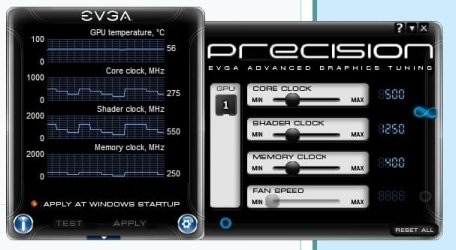
Hi all, I have an Acer 8930G laptop with an Nvidia 9600M GT graphics card (forceware v.260.89). I had downloaded EVGA Precision but I'm not sure what exactly is a good recommended setting for the core/shader/memory clock for my card should be. Hopefully someone here can advise which is a good setting to set my card to without melting it. For some reason the "test" button is greyed out so I can't find a limit of what the card can handle.

TIA!
 

My Computer My Computer

Computer Manufacturer/Model Number
Acer 8930G
OS
Windows 7 Home Premium x64
Graphics Card(s)
Nvidia 9600M GT
you need to download the accompanying program to test, though I'm blanking on its name. I think you have to be signed in first though. There is no specific perfect setting, it is just trial and error. Start small and slowly go bigger. Also, you might be able to find more help on an Nvidia forum as it is more specific, or an overclocking forum.
 

My Computer My Computer

Computer type
PC/Desktop
Computer Manufacturer/Model Number
Custom Asus Build
OS
Microsoft Windows 8.1 Pro 64-bit
CPU
Intel(R) Core(TM) i3-4130 CPU @ 3.40GHz
Motherboard
B85M-E
Memory
8.00 GB
Graphics Card(s)
None
Sound Card
Realtek High Definition Audio
Monitor(s) Displays
Asus 23.6" Monitor
Screen Resolution
1920 x 1080 x 32 bits (4294967296 colors) @ 60 Hz
Hard Drives
INTEL SSDSC2BW180A4
Samsung SSD 840 PRO Series
PSU
Seasonic S12II-380Bronze
Case
Lian Li
Cooling
Fan, Passive
Keyboard
Logitech K120
Mouse
Microsoft Touch Mouse
Internet Speed
4ms Ping, 19.0 Mbps Download, 19.0 Mbps Upload
Antivirus
Eset Endpoint
Browser
Internet Explorer, Chrome
Even though I don't recommend overclocking a laptop video card since they tend to run hot to begin with which will only shorten the life span of the hardware.

As stated above no one can tell you what your specific card will clock to as even the exact system and card will overclock differently.

Since the test is grayed out in Evga's Precision it makes me think their trying to tell you something like don't overclock this cause we won't even allow you to test it.

Their is MSI Afterburner which allows you to do the same things like change the fan speed and shader , memory clock. core clock and even the voltage. With several areas to store settings, yet still no way to test them except you also get MSI Kombuster which allows you to run benchmarks and stability tests. Which will show you any ganes you have achivded.

I have attached the program scanned with MSE no viruses found View attachment 131388

As mentioned above about the only thing you can do is to raise the levels up a little bit at a time till you find the threshold, then back them down a couple of notches.

Once again I don't recommend overclocking a laptop graphics card. risk verse reward just isn't worth it. IMO.
Fabe
 

My Computer My Computer

Computer Manufacturer/Model Number
Self Built
OS
Windows 7 ultimate 64 bit / XP Home sp3
CPU
intel Core 2 Duo E8400 3.0ghz
Motherboard
Asus P5ND bios 1401
Memory
8 gigs 1066 OCZ Fata1ty
Graphics Card(s)
EVGA GTX 580 Call of Duty Black Ops Edition
Sound Card
Creative Soundblaster Audigy 2zs
Monitor(s) Displays
Asus 24in LCD's 2MS X2
Screen Resolution
1920x1080p @60Hz
Hard Drives
WD Caviar 500 Black/ WD Caviar 200 Blue
PSU
OCZ 700W GameXtreme
Case
NZXT Apollo
Cooling
Corsair H50 CPU/120mm x3 /60mm x2 /Corsair Dominator Ram
Keyboard
Logitech Bluetooth Wireless MX5000
Mouse
Logitech Bluetooth Wireless MX1000
Internet Speed
Download 19.83 Upload 0.97
Other Info
Logitech Z2300 Speakers/ Bose Noise Cancelling Headphones/Avermedia PCI-e Hybrid TV Bravo/Epson NX415 all in one/ 4 Port Powered USB Hub/ LG 10x Bluray Burner /TSST Corp DVDRW External
Ah, its called OC scanner, the accompanying test software. It is greyed out simply because you need to first sign up at EVGA, and then download it. I'd leave all of it alone just as fabe said, I'd even uninstall precision.
 

My Computer My Computer

Computer type
PC/Desktop
Computer Manufacturer/Model Number
Custom Asus Build
OS
Microsoft Windows 8.1 Pro 64-bit
CPU
Intel(R) Core(TM) i3-4130 CPU @ 3.40GHz
Motherboard
B85M-E
Memory
8.00 GB
Graphics Card(s)
None
Sound Card
Realtek High Definition Audio
Monitor(s) Displays
Asus 23.6" Monitor
Screen Resolution
1920 x 1080 x 32 bits (4294967296 colors) @ 60 Hz
Hard Drives
INTEL SSDSC2BW180A4
Samsung SSD 840 PRO Series
PSU
Seasonic S12II-380Bronze
Case
Lian Li
Cooling
Fan, Passive
Keyboard
Logitech K120
Mouse
Microsoft Touch Mouse
Internet Speed
4ms Ping, 19.0 Mbps Download, 19.0 Mbps Upload
Antivirus
Eset Endpoint
Browser
Internet Explorer, Chrome
Thank you all for your advice, I do like Precision mainly because I get the GPU temperature on my tray as well as an ingame display which is pretty nice. For the most part I have kept it at its default settings.

My main concern on why I wanted to undertake something (which normally I don't even want to venture into because I am the ultimate novice in overclocking or tweaking anything in regards to a video card) was because I'm afraid of my laptop overheating. I do have a cooler pad, but it does minimal when it's running something graphically intensive.

I'll give the programs you've all listed above a try and see what's what. Thanks all!
 

My Computer My Computer

Computer Manufacturer/Model Number
Acer 8930G
OS
Windows 7 Home Premium x64
Graphics Card(s)
Nvidia 9600M GT
If you want to leave it installed the one thing you may benefit from is the automatic fan control properties. This will allow you to set your fan speeds to automaticaly adjust as your card temps rise and fall. Leave your clock speeds alone your setup is not what EVGA had in mind for Precision.
 

My Computer My Computer

Computer Manufacturer/Model Number
Self Built:kellymac35/TOSHIBA LAPTOP X775 3DV78
OS
WINDOWS 7 Ultimate x64 Full
CPU
INTEL i7 930/INTEL i7 2630QM 2.9 GHz With Turbo Boost
Motherboard
EVGA X58 3X SLI CLASSIFIED/TOSHIBA
Memory
MUSHKIN ENHANCED 12GB/8GB SAMSUNG DDR3 1333 MHz
Graphics Card(s)
EVGA GTX570 S.C(SLI) FERMI /GTX560M 1.5GB of GDDR 5 DISCRETE
Sound Card
REALTEK ON BOARD /BUILT IN HARMAN KARDON STEREO SPKS
Monitor(s) Displays
TOSHIBA 32'' /17.3" LCD 3D READY 120 Hz LED BACKLIT
Screen Resolution
1360x768/1920x1080
Hard Drives
MUSHKIN Enhanced Callisto Deluxe SSD X 2 240GB RAID 0/MUSHKIN Enhanced Callisto Deluxe 240 GB SSD 750 GB Serial ATA Hard Drive
PSU
CORSAIR Professional Series AX1200 1200W
Case
THERMALTAKE Xaser VI
Cooling
CORSAIR HYDRO SERIES H70
Keyboard
Logitech MX 3200/PREMIUM RAISED TILE LED BACKLIT
Mouse
Logitech
Internet Speed
DSL
Other Info
(SPDIF) To Kenwood VR-6070 Lucasfilm THX Select Surround EX
Thanks for the reply kellymac35. I knew there was something I forgot to include in my reply. I'm not sure if the fan settings are automatic, it is completely greyed out. The screenshot shows the default settings of my card right now.
 

Attachments

  • Untitled.jpg
    Untitled.jpg
    32.6 KB · Views: 96

My Computer My Computer

Computer Manufacturer/Model Number
Acer 8930G
OS
Windows 7 Home Premium x64
Graphics Card(s)
Nvidia 9600M GT
Back
Top