

Previously, we posted a proposal to mark all HTTP pages as definitively “not secure” and remove secure indicators for HTTPS pages. HTTPS usage on the web has taken off as we’ve evolved Chrome security indicators. Later this year, we’ll be taking several more steps along this path.
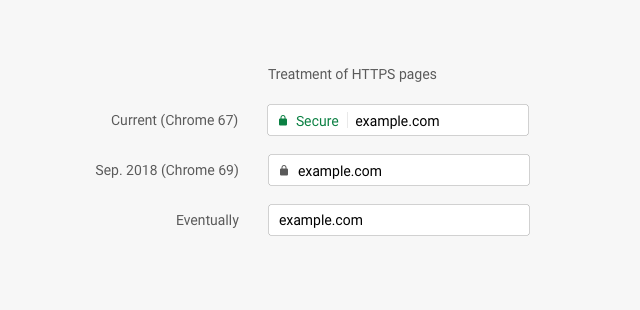
Users should expect that the web is safe by default, and they’ll be warned when there’s an issue. Since we’ll soon start marking all HTTP pages as “not secure”, we’ll step towards removing Chrome’s positive security indicators so that the default unmarked state is secure. Chrome will roll this out over time, starting by removing the “Secure” wording and HTTPS scheme in September 2018 (Chrome 69).
Chrome treatment for HTTPS pages
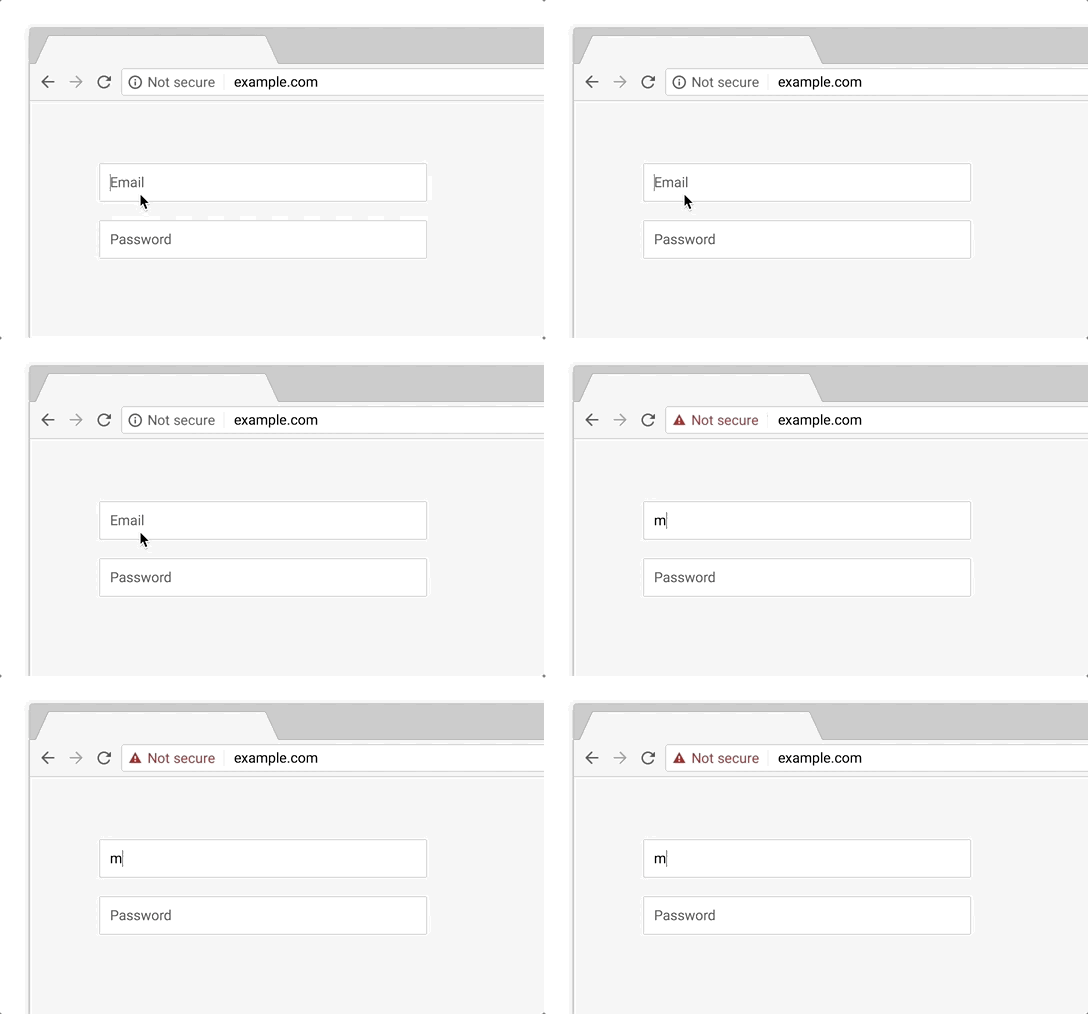
Previously, HTTP usage was too high to mark all HTTP pages with a strong red warning, but in October 2018 (Chrome 70), we’ll start showing the red “not secure” warning when users enter data on HTTP pages.
Chrome 70 treatment for HTTP pages with user input
We hope these changes continue to pave the way for a web that’s easy to use safely, by default. HTTPS is cheaper and easier than ever before, and unlocks powerful capabilities -- so don’t wait to migrate to HTTPS! Check out our set-up guides to get started.
Posted by Emily Schechter, Product Manager, Chrome Security
Source: https://blog.chromium.org/2018/05/evolving-chromes-security-indicators.html
My Computer
- Computer type
- PC/Desktop
- Computer Manufacturer/Model Number
- Self built custom
- OS
- 64-bit Windows 11 Pro for Workstations
- CPU
- Intel i7-8700K OC'd to 5 GHz
- Motherboard
- ASUS ROG Maximus XI Formula Z390
- Memory
- 64 GB (4x16GB) G.SKILL TridentZ RGB DDR4 3600 MHz
- Graphics Card(s)
- ASUS ROG-STRIX-GTX1080TI-O11G-GAMING
- Sound Card
- Integrated
- Monitor(s) Displays
- 2 x Samsung Odyssey G7 27"
- Screen Resolution
- 2560x1440
- Hard Drives
- 1TB Samsung 990 PRO M.2,
4TB Samsung 990 PRO PRO M.2,
TerraMaster F8 SSD Plus NAS
- PSU
- Seasonic Prime Titanium 850W
- Case
- Thermaltake Core P3
- Cooling
- Corsair Hydro H115i
- Keyboard
- Logitech wireless K800
- Mouse
- Logitech MX Master 4
- Internet Speed
- 2 Gb/s Download and 100 Mb/s Upload
- Antivirus
- Malwarebyte Anti-Malware Premium
- Browser
- Google Chrome
- Other Info
- Logitech Z625 speaker system,
Logitech BRIO 4K Pro webcam,
HP Color LaserJet Pro MFP M477fdn,
APC SMART-UPS RT 1000 XL - SURT1000XLI,
Galaxy S23 Plus phone