EX HDD not recognized :(

skyno

New member
Local time
12:55 AM
Messages
24
I just bought a 1.5 tb samsung story HDD and figured i would dumb everything from my 320 gb segate ex pro on to it. The seagate has sat in the same place for years with out being moved or anything, it has its own power supply and was plugged into the same port the entire time.

the seagate is not recognized and ive tryed updating drivers through device manager as well as the website (no help from website at all) drivers were up to date
would not allow me to use a perviouse driver

when i click on the drive letter i know it is i get the error : the file or directory is corrupted and unreadable...... now i know this is bad but the drive has never shown any sign of defect and has never been moved at all. I know there are ways to get data off of drives that are bad so i started doing some searching.

Some programs ive tryed are: partition wizard, EASEUS data recovery, pandora recovery, total recall data recovery

now a couple of the programs found the drives and didnt really show that there was anything wrong with the drive. and Total recall found the drive and was able to see everything but you have to pay to retreive your data. free version only alows one gig

Oh and ive also tryed computer managment>storage>disc managment

so i was wondering if anyone could help me with another way that i might not have tryed yet to get the drive to be recognized by my comp or if they know a free program i can use to retive and xfer the data to my story hdd.
 
Last edited:

My Computer

Computer Manufacturer/Model Number
emachine
OS
win 7, win xp (vpc)
CPU
AMD 64 athlon
Motherboard
odm
Memory
2 GB
Graphics Card(s)
Radeon X800 XL
Sound Card
rocketfish 5.1
Monitor(s) Displays
samsung 42" 720p LCD
Hard Drives
odm
PSU
odm
Case
odm
Cooling
odm

My Computer

Computer Manufacturer/Model Number
Custom Built
OS
Windows 7 Ultimate
CPU
AMD Athlon II X2 245 2.90Ghz
Motherboard
Some Gigabyte one, dont remember model
Memory
3.00 GB
Graphics Card(s)
8800GTS 512MB
Sound Card
Sound Blaster X-Fi Titanium Fatal1ty
Monitor(s) Displays
Dual 22" widescreen
Hard Drives
250GB internal, 500GB internal
PSU
CORSAIR CMPSU-850TX 850W Power Supply
Case
Thermalkake Tsunami Dream
Cooling
Thermaltake Golden Orb II
Keyboard
Saitek Eclipse 2
Mouse
Logitech MX518
This almost sounds like a problem getting windows to recognize the drive, rather than the drive being bad. The drive is connected through USB? Suggest removing all USB devices and rebooting PC. Plug in USB mouse and keyboard and confirm they work. Then plug in the HDD and see if windows recognizes a new device. The real test would be to take the external drive to another PC and see if it is recognized by that PC. A Guy
 

My Computer

Computer type
PC/Desktop
OS
Windows 10 Home x64
CPU
INTEL Core i5-750 Quad-Core 3.37GHz
Motherboard
ASUS P7P55D
Memory
HyperX Fury Black Series 8GB (2 x 4GB) 1866Mhz
Graphics Card(s)
EVGA GeForce GTX 750 Superclocked 1GB 128-Bit GDDR5
Monitor(s) Displays
LG 32MA68HY 32" IPS
Screen Resolution
1920 x 1080
Hard Drives
Samsung 840 Evo 120GB, SEAGATE 500GB Barracuda® 7200.12, SATA 3 Gb/s, 7200 RPM, 16MB cache
PSU
ANTEC TruePower New TP-550, 80 PLUS, 550W
Case
ANTEC Three Hundred Illusion
Cooling
COOLER MASTER Hyper 212 Plus, 4 x 120mm 1 x 140mm Noctua's
Internet Speed
85 + Mbps
Antivirus
Avast
Browser
Vivaldi
A few alternatives besides unplugging the drive along with any other usb devices for a fresh detection as A Guy recommended would be trying it on a different port and checking the data cable at both ends to make those are all the way in.

Hopefully the partition table MFT is still good on the volume. If you left the factory Fat 32 volume on it and never reformatted that to NTFS that could be the problem. As for free data recovery programs you wouldn't like one came across lately called Dr.Freeware.

That will recovery "everything" from a drive but assign each file a new number instead of name! 168gb of system files meshed with personal files, exe, ogg, dll, and every other file type from the Windows directory along with files in the user account were mixed together in over 1,000 recover_1, recover_2, recover_3, etc. folders. :sick:

The one or two programs fouind that would see each in original form wanted you to spend $70 approximate for the full version to recovery anything! The Dr.Freeware(Fedora Linux based) found everything on the drive where a resized primary was turned into unallocated drive but was able to grab everything when booted live off of the cd you first make up. Dr. Freeware - Data Recovery

Mind you this is strictly a "last resort" type of program that can recover from any partition you select or the entire drive when the partition table is toast. Last resort is the key word for it however.
 

My Computers

System One System Two

  • Computer type
    PC/Desktop
    Computer Manufacturer/Model Number
    Custom builds = 2
    OS
    W7 Ultimate x64/W10 Pro x64/W11 Pro Triple Boot - Main PC W7 Remote PC Micro ATX W7 Pro x64/W11 Pro
    CPU
    AMD Phenom II X4 975 Deneb 3.6ghz - 965 2nd remote pc
    Motherboard
    Gigabyte GA-790XTA-UD4-Gigabyte GA-880GM-D2H remote pc
    Memory
    Kingston Hyper X DDR3 1600 1.5v 16gb - Hyper X Fury 8gb 2nd
    Graphics Card(s)
    MSI HD Radeon 5750 1gb - MSI HD Radeon 6450 on mini tower
    Sound Card
    Creative Labs X-Fi Xtreme Audio P - Realtek onooard 2nd case
    Monitor(s) Displays
    ASUS VW199T-P 19" HP 2082a Main-HP 2082a 20" remote pc
    Screen Resolution
    Asus 1440x900 - HP 1600x900
    Hard Drives
    WD Black 1TB HD per OS W7, W10, and pending W11 presently on 500gb OS Drive - Pending Triple 1TB HDs for Spanned Storage/backup volume
    Single 2TB external USB enclosure, single 1TB System 7 Host/Boot drive, Pending 8TB external HD for system image b
    PSU
    Corsair 750TX - primary / Corsair CX600 - second
    Case
    Antec 900-2 - SSD compatible / NZXT Vulcan mini tower
    Cooling
    Zalman CNPS9900A
    Keyboard
    AZIO L70 Backlit Letters Gaming - ONN Cordless/USB
    Mouse
    MSI DS200 Programmable, Logitech Cordless
    Internet Speed
    30mbps upgrade - primary hard wired - mini tower usb WiFi
    Antivirus
    GFI VIPRE Internet Security 2014 on W7 2016 beta on W10,
    Browser
    Cyberfox, WaterFox 64bit FF variants, FireFox x64, Pale Moon
    Other Info
    Accomdata fan cooled usb 2.0 PIDE/Sata II, III external enclosure.
    Sambient usb/eSata PATA/Sata II, III external enclosure.
  • Computer type
    PC/Desktop
    System Manufacturer/Model Number
    CUSTOM ASSEMBLY
    OS
    W7 Pro x64/W11 Pro
    CPU
    AMD Deneb 3.6ghz - 965
    Motherboard
    Gigabyte GA-880GM-D2H remote pc
    Memory
    Kingston Hyper X Fury 8gb
    Graphics Card(s)
    MSI HD Radeon 6450 DVI Output
    Sound Card
    Realtek onooard Creative or Other separate PENDING
    Monitor(s) Displays
    VIZIO 32" LCD TV Separate LCD Pending
    Screen Resolution
    1600x1080
    Hard Drives
    WD 500GB OS Host/Boot WD Green 1TB Storage/Backup
    PSU
    Corsair 600W - THERMALTAKE 600W spare case
    Case
    NZXT Vulcan mini tower
    Cooling
    Twin 120mm Top Fans - 240mm Side Cover
    Keyboard
    ONN Cordless/USB Logitech Cordless
    Mouse
    ONN USB/Cordless - Logitech Cordless
    Internet Speed
    DSL 5G
    Browser
    MS Edge, FireFox, WaterFox x64, FireFox Nightly
    Other Info
    OS Testing-Remote Access to Main TeamViewer

My Computer

Computer Manufacturer/Model Number
emachine
OS
win 7, win xp (vpc)
CPU
AMD 64 athlon
Motherboard
odm
Memory
2 GB
Graphics Card(s)
Radeon X800 XL
Sound Card
rocketfish 5.1
Monitor(s) Displays
samsung 42" 720p LCD
Hard Drives
odm
PSU
odm
Case
odm
Cooling
odm
This almost sounds like a problem getting windows to recognize the drive, rather than the drive being bad. The drive is connected through USB? Suggest removing all USB devices and rebooting PC. Plug in USB mouse and keyboard and confirm they work. Then plug in the HDD and see if windows recognizes a new device. The real test would be to take the external drive to another PC and see if it is recognized by that PC. A Guy

thanks for the sugestions, all my usb are working fine ive tryed the 3 in front as well is 4 in back. ive also tryed 2 other computers one with windows 7 (like mine) and another with xp. all ended up bringing me back to the same point. I tryed updating drivers and all that jazz that goes with plugging in a new drive that i was aware to do. ( i did that for the other 2 computers) The only option for me to update the drive was through device manager since the website is really not user friendly at all or somthing or at least ive found it not to be. (Seagate) i go to it and see the little car icon that says drivers right under it so im like aww thats cute and creative i click on it and it takes me no were except to a buntch of trouble shooting steps that ends with no driver downloads. the gist of what i can remember reading is are hard drives come pre loaded with the software so get it off the drive. some other things ive tryed is different wall sockets just to eliminate that fluxuating or dirty power might be messing with it.

oh and some other info is ive had it hooked up to a sirge protector its whole life.
 

My Computer

Computer Manufacturer/Model Number
emachine
OS
win 7, win xp (vpc)
CPU
AMD 64 athlon
Motherboard
odm
Memory
2 GB
Graphics Card(s)
Radeon X800 XL
Sound Card
rocketfish 5.1
Monitor(s) Displays
samsung 42" 720p LCD
Hard Drives
odm
PSU
odm
Case
odm
Cooling
odm
A few alternatives besides unplugging the drive along with any other usb devices for a fresh detection as A Guy recommended would be trying it on a different port and checking the data cable at both ends to make those are all the way in.

Hopefully the partition table MFT is still good on the volume. If you left the factory Fat 32 volume on it and never reformatted that to NTFS that could be the problem. As for free data recovery programs you wouldn't like one came across lately called Dr.Freeware.

That will recovery "everything" from a drive but assign each file a new number instead of name! 168gb of system files meshed with personal files, exe, ogg, dll, and every other file type from the Windows directory along with files in the user account were mixed together in over 1,000 recover_1, recover_2, recover_3, etc. folders. :sick:

The one or two programs fouind that would see each in original form wanted you to spend $70 approximate for the full version to recovery anything! The Dr.Freeware(Fedora Linux based) found everything on the drive where a resized primary was turned into unallocated drive but was able to grab everything when booted live off of the cd you first make up. Dr. Freeware - Data Recovery

Mind you this is strictly a "last resort" type of program that can recover from any partition you select or the entire drive when the partition table is toast. Last resort is the key word for it however.

I cant remember if i reformated the drive when i first got it, i want to say no but from the programs that would show info on the drive, it showed as NTFS. But if your saying that the seagate ex pro came from factory as fat32 then i must have. At the time i got the drive, I was no where close to knowing or understanding anything about computers and related electronix at all. luckly i have some what of an understanding now lol.

Yeah i dont think i would like Dr. freeware lol since the reason i want to get the drive to work is because everything on the drive is organized and i remember it taking like all day haha but hey if it works then i will def. use it! thanks for the link! It kinda sounds like when you say last resort that after using this it will render the drive useless so if all data wasnt retrived or if it couldnt retrive the data then im really out of luck after using this program.
 

My Computer

Computer Manufacturer/Model Number
emachine
OS
win 7, win xp (vpc)
CPU
AMD 64 athlon
Motherboard
odm
Memory
2 GB
Graphics Card(s)
Radeon X800 XL
Sound Card
rocketfish 5.1
Monitor(s) Displays
samsung 42" 720p LCD
Hard Drives
odm
PSU
odm
Case
odm
Cooling
odm
When using Recuva be patient it is a long process usually even when you think it is not doing anything it is working. I accidentally formatted an external 1TB drive and it took me 4 days of 24/7 to get it all back :(


Steve
 

My Computer

Computer Manufacturer/Model Number
Over Clockers Ultima Viper 2.80Ghz
OS
Windows 7 Ultimate 64 - OEM Service Pack 1
CPU
Intel Core i7 930 2.80Ghz Bloomfield Socket LGA 1366
Motherboard
Gigabyte GA-X58A-UD3R Intel X58 Socket 1366 DDR3
Memory
Patriot Viper 6GB 3x2GB DDR3 PC3-1200C9 1600Mhz Tri Channel
Graphics Card(s)
Asus ATI Radeon HD 5770 CuCore 1024MB GDDR5 PCI Express
Sound Card
Realtek ALC889 @ Intel 82801JB ICH10 - High Definition Audio
Monitor(s) Displays
Samsung SyncMaster 920N 19"
Screen Resolution
1280*1024
Hard Drives
1 x OCZ Vertex2 Series 120GB 2.5" SATA-II SSD
1 x Seagate Barracuda 7200.12 1TB SATA-II 32MB Cache
1 x Western Digital Caviar Green 2TB SATA-II 64 MB Cache
PSU
Corsair TX 650W ATX SLi
Case
Antec 902 Ultimate Gaming Case Black
Cooling
Prolimatech Megahalems Rev B CPU Cooler Socket 775/1156/1366
Keyboard
Microsoft Comfort Curve Keyboard
Mouse
Microsoft Optical USB
Internet Speed
ADSL24 FTTC 34.2 Mbps Down 7.1Mbps Up
Other Info
OcUK 22x DVDSATA ReWriter Black
Akasa AK-FN058 Apache Black Super Silent 120mm Fan
Printer Epson Stylus Photo R300
Scanner Canon Canoscan 8000F
The Dr.Freeware will rename literally everything so you would need to sift through files recovered in tons of new folders! It's a bit too awkward and specifically is a last resort when no other data or partition recovery program will work. It's actually easier going through the expense of a professional data recovery service rather then the dentist's office this will put you through! :(

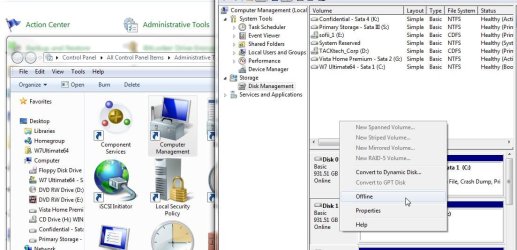
The one thing you can try is a look in the disk management tool to see if the drive's partition is showing in there. It may have ended up "offline" where you would need to restore use in there by clicking on the left square and reassigning a new drive letter to see Windows will then mount the partition on it as a new logical drive.

The image shows how to turn a drive from being online to offline while you would doing the reverse of turning the drive back online and made available once a drive letter is seen. The three windows in the image direct you into the "Control Panel>Administrative Tools>Computer Management>Storage>Disk Management" as seen there.

Once you see the drive is online open up a Windows Explorer or Computer Windows after right clicking on the volume to the right of the square to use the add new drive or change drive letter option to see if the volume has been mounted. If the drive is working normally and hasn't failed on you the partition should become available right away.
 

Attachments

  • Drive Offline or Online.jpg
    Drive Offline or Online.jpg
    97.7 KB · Views: 31

My Computers

System One System Two

  • Computer type
    PC/Desktop
    Computer Manufacturer/Model Number
    Custom builds = 2
    OS
    W7 Ultimate x64/W10 Pro x64/W11 Pro Triple Boot - Main PC W7 Remote PC Micro ATX W7 Pro x64/W11 Pro
    CPU
    AMD Phenom II X4 975 Deneb 3.6ghz - 965 2nd remote pc
    Motherboard
    Gigabyte GA-790XTA-UD4-Gigabyte GA-880GM-D2H remote pc
    Memory
    Kingston Hyper X DDR3 1600 1.5v 16gb - Hyper X Fury 8gb 2nd
    Graphics Card(s)
    MSI HD Radeon 5750 1gb - MSI HD Radeon 6450 on mini tower
    Sound Card
    Creative Labs X-Fi Xtreme Audio P - Realtek onooard 2nd case
    Monitor(s) Displays
    ASUS VW199T-P 19" HP 2082a Main-HP 2082a 20" remote pc
    Screen Resolution
    Asus 1440x900 - HP 1600x900
    Hard Drives
    WD Black 1TB HD per OS W7, W10, and pending W11 presently on 500gb OS Drive - Pending Triple 1TB HDs for Spanned Storage/backup volume
    Single 2TB external USB enclosure, single 1TB System 7 Host/Boot drive, Pending 8TB external HD for system image b
    PSU
    Corsair 750TX - primary / Corsair CX600 - second
    Case
    Antec 900-2 - SSD compatible / NZXT Vulcan mini tower
    Cooling
    Zalman CNPS9900A
    Keyboard
    AZIO L70 Backlit Letters Gaming - ONN Cordless/USB
    Mouse
    MSI DS200 Programmable, Logitech Cordless
    Internet Speed
    30mbps upgrade - primary hard wired - mini tower usb WiFi
    Antivirus
    GFI VIPRE Internet Security 2014 on W7 2016 beta on W10,
    Browser
    Cyberfox, WaterFox 64bit FF variants, FireFox x64, Pale Moon
    Other Info
    Accomdata fan cooled usb 2.0 PIDE/Sata II, III external enclosure.
    Sambient usb/eSata PATA/Sata II, III external enclosure.
  • Computer type
    PC/Desktop
    System Manufacturer/Model Number
    CUSTOM ASSEMBLY
    OS
    W7 Pro x64/W11 Pro
    CPU
    AMD Deneb 3.6ghz - 965
    Motherboard
    Gigabyte GA-880GM-D2H remote pc
    Memory
    Kingston Hyper X Fury 8gb
    Graphics Card(s)
    MSI HD Radeon 6450 DVI Output
    Sound Card
    Realtek onooard Creative or Other separate PENDING
    Monitor(s) Displays
    VIZIO 32" LCD TV Separate LCD Pending
    Screen Resolution
    1600x1080
    Hard Drives
    WD 500GB OS Host/Boot WD Green 1TB Storage/Backup
    PSU
    Corsair 600W - THERMALTAKE 600W spare case
    Case
    NZXT Vulcan mini tower
    Cooling
    Twin 120mm Top Fans - 240mm Side Cover
    Keyboard
    ONN Cordless/USB Logitech Cordless
    Mouse
    ONN USB/Cordless - Logitech Cordless
    Internet Speed
    DSL 5G
    Browser
    MS Edge, FireFox, WaterFox x64, FireFox Nightly
    Other Info
    OS Testing-Remote Access to Main TeamViewer
I will give the new sugestions a shot, im currently in the process of reformating a wd 1tb passport hdd so it can be used with a wii, so as soon as that is dun i will go back to the bump and grind of trying to getback the data on the unrecognized seagate ex pro. thanks for all the sugestions i will be back to let you know if it worked or if i encounter another problem.
 

My Computer

Computer Manufacturer/Model Number
emachine
OS
win 7, win xp (vpc)
CPU
AMD 64 athlon
Motherboard
odm
Memory
2 GB
Graphics Card(s)
Radeon X800 XL
Sound Card
rocketfish 5.1
Monitor(s) Displays
samsung 42" 720p LCD
Hard Drives
odm
PSU
odm
Case
odm
Cooling
odm
Once you are able to retrieve files from the drive and those are all safe if you are able to reinialize the present volume on it you may want to remove the reformatted factory Fat to NTFS partition for a new NTFS one to start over in the event the partition table was messed up a little somehow.

Like I was saying before as far as the Dr.Freeware program that is more of a nightmare and can only be suggested as the absolute last option if nothing else works. With a 168gb recovered off of one system's drive the process of sifting through over 1,000 folders!

"there has to be a better way." is what anyone would end up saying for that one.
 

My Computers

System One System Two

  • Computer type
    PC/Desktop
    Computer Manufacturer/Model Number
    Custom builds = 2
    OS
    W7 Ultimate x64/W10 Pro x64/W11 Pro Triple Boot - Main PC W7 Remote PC Micro ATX W7 Pro x64/W11 Pro
    CPU
    AMD Phenom II X4 975 Deneb 3.6ghz - 965 2nd remote pc
    Motherboard
    Gigabyte GA-790XTA-UD4-Gigabyte GA-880GM-D2H remote pc
    Memory
    Kingston Hyper X DDR3 1600 1.5v 16gb - Hyper X Fury 8gb 2nd
    Graphics Card(s)
    MSI HD Radeon 5750 1gb - MSI HD Radeon 6450 on mini tower
    Sound Card
    Creative Labs X-Fi Xtreme Audio P - Realtek onooard 2nd case
    Monitor(s) Displays
    ASUS VW199T-P 19" HP 2082a Main-HP 2082a 20" remote pc
    Screen Resolution
    Asus 1440x900 - HP 1600x900
    Hard Drives
    WD Black 1TB HD per OS W7, W10, and pending W11 presently on 500gb OS Drive - Pending Triple 1TB HDs for Spanned Storage/backup volume
    Single 2TB external USB enclosure, single 1TB System 7 Host/Boot drive, Pending 8TB external HD for system image b
    PSU
    Corsair 750TX - primary / Corsair CX600 - second
    Case
    Antec 900-2 - SSD compatible / NZXT Vulcan mini tower
    Cooling
    Zalman CNPS9900A
    Keyboard
    AZIO L70 Backlit Letters Gaming - ONN Cordless/USB
    Mouse
    MSI DS200 Programmable, Logitech Cordless
    Internet Speed
    30mbps upgrade - primary hard wired - mini tower usb WiFi
    Antivirus
    GFI VIPRE Internet Security 2014 on W7 2016 beta on W10,
    Browser
    Cyberfox, WaterFox 64bit FF variants, FireFox x64, Pale Moon
    Other Info
    Accomdata fan cooled usb 2.0 PIDE/Sata II, III external enclosure.
    Sambient usb/eSata PATA/Sata II, III external enclosure.
  • Computer type
    PC/Desktop
    System Manufacturer/Model Number
    CUSTOM ASSEMBLY
    OS
    W7 Pro x64/W11 Pro
    CPU
    AMD Deneb 3.6ghz - 965
    Motherboard
    Gigabyte GA-880GM-D2H remote pc
    Memory
    Kingston Hyper X Fury 8gb
    Graphics Card(s)
    MSI HD Radeon 6450 DVI Output
    Sound Card
    Realtek onooard Creative or Other separate PENDING
    Monitor(s) Displays
    VIZIO 32" LCD TV Separate LCD Pending
    Screen Resolution
    1600x1080
    Hard Drives
    WD 500GB OS Host/Boot WD Green 1TB Storage/Backup
    PSU
    Corsair 600W - THERMALTAKE 600W spare case
    Case
    NZXT Vulcan mini tower
    Cooling
    Twin 120mm Top Fans - 240mm Side Cover
    Keyboard
    ONN Cordless/USB Logitech Cordless
    Mouse
    ONN USB/Cordless - Logitech Cordless
    Internet Speed
    DSL 5G
    Browser
    MS Edge, FireFox, WaterFox x64, FireFox Nightly
    Other Info
    OS Testing-Remote Access to Main TeamViewer
Back
Top