Excel 2010 and Web Queries

jimbo45

New member
Guru
Gold Member
VIP
Local time
6:58 AM
Messages
5,941
Location
Hafnarfjörður IS
Hi all

Any decent Links to how to create Web Queries for EXCEL -- I'd like to get quotes for stocks from say YAHOO finance or MSN Money with the data being refreshed and the spread sheet re-calculated automatically every few minutes.

The old template MS had (MSN Money stock quote addin for doing this has now been removed from their web site. This was actually a useful free addin to EXCEL.

Cheers

jimbo
 

My Computer

Computer type
PC/Desktop
Computer Manufacturer/Model Number
Custom built, several laptops HP/ASUS
OS
Linux CENTOS 7 / various Windows OS'es and servers
CPU
Intel i7 Intel i5
Memory
8GB, 16GB
Graphics Card(s)
On Motherboard
Sound Card
Realtek HD audio
Monitor(s) Displays
Apple Cinema display, Samsung LCD
Screen Resolution
1920 X 1080
Hard Drives
4 X 1TB SATA
Mouse
Toshiba wireless laser
Internet Speed
> 20MB up

My Computer

Computer type
PC/Desktop
Computer Manufacturer/Model Number
Packard Bell
OS
Windows 7 Home Premium 64bit
CPU
Intel(R) Core(TM) i3-2120 CPU @ 3.30GHz
Motherboard
Packard Bell IPISB-AG
Memory
3.00 GB
Graphics Card(s)
(1) Intel(R) HD Graphics (2) VNC Mirror Driver
Sound Card
Realtek High Definition Audio
Monitor(s) Displays
AIO LCD
Screen Resolution
1920 x 1080
Hard Drives
WDC WD10EADX-22TDHB0 ATA Device
Fixed hard disk media
4 partitions
931.51 GB
Keyboard
Wireless
Mouse
Wireless
Antivirus
Microsoft Security Essentials
Browser
IE; Firefox
Other Info
Also:
Samsung N220 Plus Netbook - Windows 7 Home
HP laptop
iPad 5
Hi there
Thanks for the link but what I want to do is for example just give the name of Stock for example MSFT (Microsoft) and then get the data automatically.

The GET external data is fine but needs a lot of manual input -- you need to remember the URL each time and then select the data table and import.

I'd like to automate this as much as possible like the old MSN template did -- not sure why they removed it BTW it was very useful.

Cheers

jimbo

Added -- Found the file on rapidshare -- can't post the link but google on msnsq.zip

Works fine on EXCEL 2007 haven't got access to EXCEL 2010 until I get home

Can't understand why they removed this file.

All the data is PUBLIC DOMAN.

Cheers
jimbo
 

My Computer

Computer type
PC/Desktop
Computer Manufacturer/Model Number
Custom built, several laptops HP/ASUS
OS
Linux CENTOS 7 / various Windows OS'es and servers
CPU
Intel i7 Intel i5
Memory
8GB, 16GB
Graphics Card(s)
On Motherboard
Sound Card
Realtek HD audio
Monitor(s) Displays
Apple Cinema display, Samsung LCD
Screen Resolution
1920 X 1080
Hard Drives
4 X 1TB SATA
Mouse
Toshiba wireless laser
Internet Speed
> 20MB up
Hi Jimbo,

This quite tricky to accomplish for several reasons (once explained to me and my eyes glazed over). I trade regularly on the ASX (Australian Stock Exchange) and manage all my shares in Outlook2010. I had to do a few things to get the information I needed, but it works a charm now. The caveat is I can only get the close of trade for a day.

In essence, I had to:

1. Get the days trades in ASCII format (typically share code, volume, open price etc.) provided as a daily email by the bank through which I trade.
2. Get a colleague to write an automation Add-In that reads the code I am interested in from from my XLS, matches it to the same code in the ASCII file, and write the required info (e.g. close price) into a cell address in the XLS.

If you are interested in seeing it in action, I can provide:

1. An Excel spreadsheet example
2. The Add-in
3. The ASCII data file
4. Some instructions for installing the Add-In - its not as easy as it sounds, but the trick is turning off UAC during Add-In installation.

This would be from the ASX example, but if you could get a similar format from other exchanges, it might just work for you.

Let me know and I'll write it up and I can send you the files,
Golden
 

My Computer

Computer type
PC/Desktop
Computer Manufacturer/Model Number
Golden Mk. I.4
OS
Windows 10 Pro x64 ; Xubuntu x64
CPU
Intel i7 860 @ 2.80 GHz O/C'ed to 4.0GHz
Motherboard
Gigabyte P55A-UD3R Rev.1. Award BIOS F13
Memory
16GB Corsair Vengance DDR3 @ 661 MHz Dual Channel (9-9-9-24)
Graphics Card(s)
EVGA NVidia GTX 560 1024MB
Sound Card
Realtek Integrated
Monitor(s) Displays
Dual Samsung SyncMaster 2494HS
Screen Resolution
1920*1080 and 1920*1080
Hard Drives
1*Samsung 840 EVO 120GB SSD;
1*OCZ Vertex 2 60GB SSD;
2*Samsung F3 SpinPoint 1TB in RAID0;
1*Samsung F1 SpinPoint 1TB;
2*Western Digital 1TB External USB 3.0
1*Western Digital 500GB External USB 3.0
1*Seagate 500GB External USB 2.0
PSU
Thermaltake ToughPower QFan 750W
Case
Thermaltake Element S VK60001W2Z
Cooling
Corsair H60 Water Cooling, 2*230mm and 2*80mm case fans
Keyboard
Logitech G110
Mouse
Logitech MX518
Hi there
I have a program HQUOTE which loads FREE End of Day data from YAHOO (OPEN, CLOSE, HIGH,, LOW and VOLUME) in ASCII and "Metastock" format -- I use Metastock for looking at "trends", historical activity and other "Technical Analysis"

I'm basically interested with OPTIONS trading on US markets - especially "In the Money" type trades a few days before expiry of the option. On the US markets the option expires normally on the 3rd Friday of the month.

I know this is a Windows Forum but what I want to do is have a decent calculator for workng with OPTIONS near expiry date.

For example say the current price of MSFT is 27.00 USD a share I could write a "PUT" option "in the money" at a strike price at say 28 USD a share for expiry on 17 Dec for which I would get paid say 60 cents a share.

So per contract (100 shares) I would get paid a premium of 60 USD for 100 shares -- you keep that whatever happens.

If the share price goes does NOT reach 28 cents the shares are "Put to you" in otherwords you HAVE to buy them at 28 USD whatever the market price so technically you have to BUY 100 shares at 2800 USD.

If the price goes to say 29 USD then the option won't be exercised as nobody will be mad enough to sell you shares at 28 USD when the Market price is 29 USD or more --so you still KEEP the premium and you've made money without even selling the stock.

If the share DOES NOT reach 28 USD a share the option expires you still KEEP the premium --this is why you want fairly stable and probably slightly rising shares although you have to BUY the shares at the Contract price say 28 USD.

So I have 100 at 2700 which I sell for 2800, 100 USD profit, Lose the 100 USD profit because I have to buy 100 shares at 28 USD but KEEP the 60 USD premium for the option PUT. (You need to add dealing costs as well but if you pick a non volatile share you can easily make around 2.75 % a month -- remember here I'm talking about a WORSE CASE SCENARIO of 60 USD profit on 2700 USD in 3 DAYS !!! not the dismal 2.5% a YEAR a Bank pays out.

If the option is NOT exercised I've made 60 USD and can write another OPTION without selling any of the stock.


Same works in reverse with CALLS but its slightly easier since you will only "Get Called" if the shares reach the "Strike price" which will be higher (normally) that the price at which you bought them so you win BOTH ways.

Ideally for CALLS you want to be "Called" so you get Premium and Profit of share value and for PUTS you really want the share to rise a bit so you don't to get the shares PUT to you.

Rolling over for a few months with stable shares can earn a nice profit WHATEVER the market does.

So I need to get the option premium / strike price into EXCEL to calculate the profit and loss.

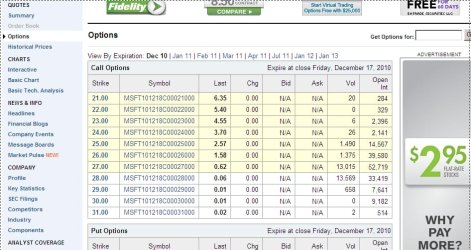
YAHOO for example gives Option prices --screenshot enc.


Cheers
jimbo
 

Attachments

  • options.jpg
    options.jpg
    88.7 KB · Views: 99
Last edited:

My Computer

Computer type
PC/Desktop
Computer Manufacturer/Model Number
Custom built, several laptops HP/ASUS
OS
Linux CENTOS 7 / various Windows OS'es and servers
CPU
Intel i7 Intel i5
Memory
8GB, 16GB
Graphics Card(s)
On Motherboard
Sound Card
Realtek HD audio
Monitor(s) Displays
Apple Cinema display, Samsung LCD
Screen Resolution
1920 X 1080
Hard Drives
4 X 1TB SATA
Mouse
Toshiba wireless laser
Internet Speed
> 20MB up
Whooaa. OK, thats a bit more than what I first envisaged. Nice to see you using Metastock....damn good software.
 

My Computer

Computer type
PC/Desktop
Computer Manufacturer/Model Number
Golden Mk. I.4
OS
Windows 10 Pro x64 ; Xubuntu x64
CPU
Intel i7 860 @ 2.80 GHz O/C'ed to 4.0GHz
Motherboard
Gigabyte P55A-UD3R Rev.1. Award BIOS F13
Memory
16GB Corsair Vengance DDR3 @ 661 MHz Dual Channel (9-9-9-24)
Graphics Card(s)
EVGA NVidia GTX 560 1024MB
Sound Card
Realtek Integrated
Monitor(s) Displays
Dual Samsung SyncMaster 2494HS
Screen Resolution
1920*1080 and 1920*1080
Hard Drives
1*Samsung 840 EVO 120GB SSD;
1*OCZ Vertex 2 60GB SSD;
2*Samsung F3 SpinPoint 1TB in RAID0;
1*Samsung F1 SpinPoint 1TB;
2*Western Digital 1TB External USB 3.0
1*Western Digital 500GB External USB 3.0
1*Seagate 500GB External USB 2.0
PSU
Thermaltake ToughPower QFan 750W
Case
Thermaltake Element S VK60001W2Z
Cooling
Corsair H60 Water Cooling, 2*230mm and 2*80mm case fans
Keyboard
Logitech G110
Mouse
Logitech MX518
Whooaa. OK, thats a bit more than what I first envisaged. Nice to see you using Metastock....damn good software.

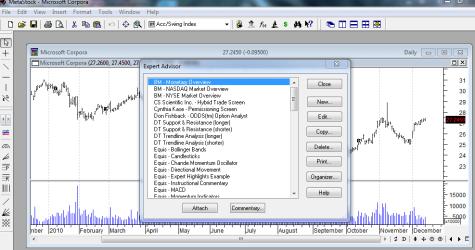
Hi again -- OK this isn't a traders Forum but METASTOCK is brilliant --am using V11.

Technical analysis from this piece of software is the BEST I've ever used and for options trading it really helps you get rid of the rubbish.

Enc screenshot and Good Trading for 2011

Cheers
jimbo
 

Attachments

  • meta.png
    meta.png
    28.4 KB · Views: 56

My Computer

Computer type
PC/Desktop
Computer Manufacturer/Model Number
Custom built, several laptops HP/ASUS
OS
Linux CENTOS 7 / various Windows OS'es and servers
CPU
Intel i7 Intel i5
Memory
8GB, 16GB
Graphics Card(s)
On Motherboard
Sound Card
Realtek HD audio
Monitor(s) Displays
Apple Cinema display, Samsung LCD
Screen Resolution
1920 X 1080
Hard Drives
4 X 1TB SATA
Mouse
Toshiba wireless laser
Internet Speed
> 20MB up
Jimbo:

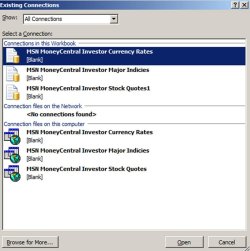
Go to data/get external data/existing connections in Excel.

Do you see something like this?

If you do, you can set that up to query MSN Money Central for quotes and have them land wherever you want in an Excel sheet.

You can then use a custom macro to copy any of those values to anywhere else in the Excel file.

I use this daily in Excel 2007.

But maybe you are already wise to this or otherwise have the situation under control?
 

Attachments

  • stock quotes.JPG
    stock quotes.JPG
    64.6 KB · Views: 29

My Computer

Computer type
PC/Desktop
Computer Manufacturer/Model Number
Ignatz Special; 4 speed manual gearbox; factory air conditioning; one of one
OS
Windows 7 Home Premium SP1, 64-bit
CPU
Intel Skylake i5-6600K, not overclocked
Motherboard
AsRock Z170M Extreme 4, micro ATX
Memory
8 GB HyperX DDR4-2666 (2 x 4 GB)
Graphics Card(s)
none; graphics are integrated on CPU
Sound Card
onboard: Realtek ALC1150; external: USB Behringer UF0-202
Monitor(s) Displays
Dell S2340M 23 inch IPS
Screen Resolution
1600 x 900
Hard Drives
System: Crucial MX100 series SSD, 128 GB;
Data: Samsung Spinpoint 103SJ, 1 TB;
Backup: WD Caviar Green WD30EZRX-00D8PB0, 3 TB
PSU
Rosewill SilentNight 500 watt fanless, semi-modular
Case
Antec Solo II
Cooling
Noctua NH-U12S; Noctua F12 intake, Noctua S12A exhaust
Keyboard
Microsoft 200 6JH-00001 USB
Mouse
Dell or Microsoft optical wired; USB
Antivirus
Microsoft Security Essentials and Malwarebytes Premium
Browser
Pale Moon
Other Info
All fans PWM; speeds at idle: CPU circa 500 rpm; intake circa 600 rpm; exhaust circa 600 rpm; CPU temps 27 idle and 47 C load in a warm room (27 C/81 F) when running Intel Extreme Tuning Utility stress test.
Back
Top