Excel 2010 not entering previously entered text automatically

tex50

New member
Local time
9:23 PM
Messages
20
Excel 2010. Win 7 ultimate. Excel will duplicate text as I type within the same session that I originally entered the text to the spreadsheet. However, if I close the file and then reopen it it won't automatically enter text as I type of previously entered cells. Can't seem to find option to turn it on always. Hope this is clear enough. Help appreciated.
 

My Computer My Computer

OS
Windows 7 Ultimate x64
Excel 2010. Win 7 ultimate. Excel will duplicate text as I type within the same session that I originally entered the text to the spreadsheet. However, if I close the file and then reopen it it won't automatically enter text as I type of previously entered cells. Can't seem to find option to turn it on always. Hope this is clear enough. Help appreciated.

Can you post a screenshot of what it looks like when it duplicates correctly?
 

My Computer My Computer

Computer Manufacturer/Model Number
Custom
OS
Windows 7 Ultimate x64
CPU
Intel Core i7 920
Motherboard
Intel DX58SO
Memory
6gb DDR3 Patriot Viper w/ XMP support
Graphics Card(s)
Nvidia Maxcore GTX295 (BFG Tech Overclocked)
Sound Card
Creative XFi
Monitor(s) Displays
21" LCD
Hard Drives
Western Digital Blue 500GB
PSU
750 Watt Corsair
Case
Antec 900
Cooling
Stock Cooling for the CPU, 8" fan on top, (3) 5" case fans
Keyboard
Logitech Wave
Mouse
Logitech MX Revolution
Internet Speed
30mbps
Other Info
Water Cooled CPU w/ Corsair H60
Excel 2010. Win 7 ultimate. Excel will duplicate text as I type within the same session that I originally entered the text to the spreadsheet. However, if I close the file and then reopen it it won't automatically enter text as I type of previously entered cells. Can't seem to find option to turn it on always. Hope this is clear enough. Help appreciated.

Can you post a screenshot of what it looks like when it duplicates correctly?

Its just a duplicate of what I typed earlier filled in automatically after I enter a couple of letters.
 

My Computer My Computer

OS
Windows 7 Ultimate x64
Hi, tex50, welcome to the Seven Forums! :)

Go to the "File" tab and the click on "Options":

ScreenShot00469.jpg

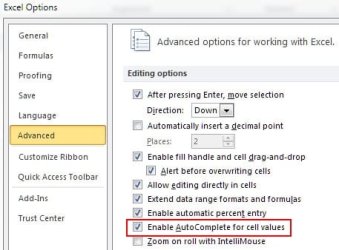
Then check this setting in the "Advanced" options section of Excel 2010:

ScreenShot00468.jpg
 

My Computer My Computer

Computer Manufacturer/Model Number
Toshiba L355D
OS
Windows 7 Ultimate x64 SP1
CPU
Core2 Duo
Motherboard
Intel
Memory
4 GB
Graphics Card(s)
GM965 on-board
Sound Card
RealTek on-board
Monitor(s) Displays
19"+17"(laptop)
Screen Resolution
1440x900 (x 2)
Hard Drives
500GB Ext. 200GB Internal
PSU
N/A
Case
N/A
Cooling
N/A
Back
Top