Solved Excel 2013 crashes after opening and using any xls/xlsx file

Rafales

New member
Local time
12:27 AM
Messages
8
Hi Members,

when I open any XLS or XLSX file after few seconds or after doing any activity in any xls/xlsx file, Excel 2013 crashes (Office 2013 is updated to latest). There are no third party plugins enabled in Office 2013.

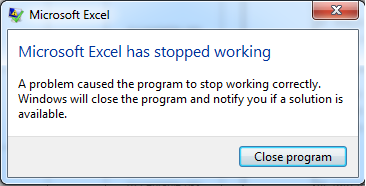
LRSV58D.png


nO793Dg.png


Note: I don't have any issues with Word 2013 or PowerPoint 2013.

My operating system is Windows 7 Ultimate with SP1 (64 bit)

Below mentioned software's are installed and with real-time enabled...
ESET NOD32 Antivirus 6.0.308.0 (64 bit)
Malwarebytes Anti-Malware 1.70
WinPatrol
Zemana AntiLogger
System Explorer 4.0
Stick Password 6.0
Hard Disk Sentinel 4.30


Application Error from Event Log
Faulting application name: EXCEL.EXE, version: 15.0.4454.1503, time stamp: 0x50b592fe
Faulting module name: EXCEL.EXE, version: 15.0.4454.1503, time stamp: 0x50b592fe
Exception code: 0xc0000005
Fault offset: 0x0127b52e
Faulting process id: 0x3e0
Faulting application start time: 0x01ce11ca85e9d41f
Faulting application path: C:\Program Files (x86)\Microsoft Office\Office15\EXCEL.EXE
Faulting module path: C:\Program Files (x86)\Microsoft Office\Office15\EXCEL.EXE
Report Id: d1ff267b-7dbd-11e2-95be-50465db76fa6

Application Log Error message
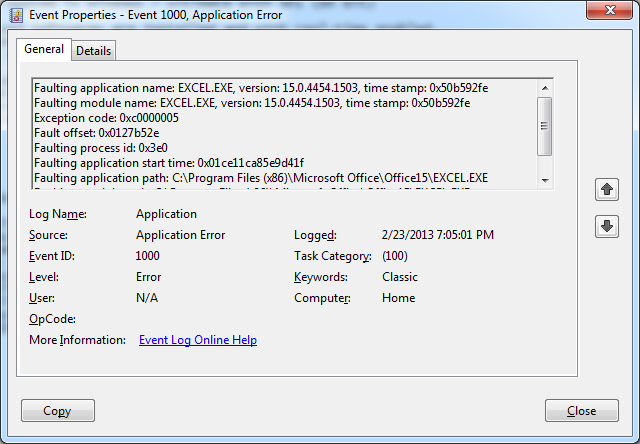
sx7fXjD.png


A64h7T7.png


I don't know what is causing Excel 2013 to crash. Requesting members to help me fix this issue.

Thanks and Regards
Rafales
 

My Computer My Computer

At a glance

Windows 7 Ultimate x64AMD A10-Series A10-5800K - AD580KWOHJBOXG.Skill RipjawsX 8GB DDR3-1866/PC3-14900 PC RAM
Computer Manufacturer/Model Number
Custom Build
OS
Windows 7 Ultimate x64
CPU
AMD A10-Series A10-5800K - AD580KWOHJBOX
Motherboard
ASUS F2A85-M Pro
Memory
G.Skill RipjawsX 8GB DDR3-1866/PC3-14900 PC RAM
Monitor(s) Displays
HP w1907
Hard Drives
WD10EADS-00L5B1
WD20EARX-008FB0
PSU
Seasonic S12II 620 Watts PSU
Case
Cooler Master Elite 431 Plus Mid Tower Cabinet
Antivirus
ESET NOD32 Antivirus 6.0.308.0 (64 bit)
Browser
Mozilla Firefox 19
Hi Rafales,

Please try start 'Excel' in 'Safe Mode' and check if it works. To start it in 'Safe mode automatically', click this link: http://go.microsoft.com/?linkid=9668693
- Click 'Run' in the 'File Download dialog box', and follow the steps in the 'Microsoft Fix it wizard'

If 'Excel' still does not work as expected, a conflict with another program is likely. Try to restart 'Windows' in 'Safe mode', and perform the previous steps again to run 'Excel in Safe mode'; and check results.

Do reply with the findings; will take it forward from there.


My Computer My Computer

At a glance

Windows 7 64bit
OS
Windows 7 64bit
  • Like
Reactions: Arc
Hi Saurabh,

Thanks for your reply.

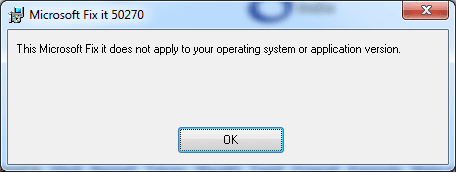
I tried as you said but I got this message...

Anyway I'm planning to re-instal Office 2013 some time later. Thanks Saurabh :)
 

Attachments

  • mic.png
    mic.png
    5.5 KB · Views: 24

My Computer My Computer

At a glance

Windows 7 Ultimate x64AMD A10-Series A10-5800K - AD580KWOHJBOXG.Skill RipjawsX 8GB DDR3-1866/PC3-14900 PC RAM
Computer Manufacturer/Model Number
Custom Build
OS
Windows 7 Ultimate x64
CPU
AMD A10-Series A10-5800K - AD580KWOHJBOX
Motherboard
ASUS F2A85-M Pro
Memory
G.Skill RipjawsX 8GB DDR3-1866/PC3-14900 PC RAM
Monitor(s) Displays
HP w1907
Hard Drives
WD10EADS-00L5B1
WD20EARX-008FB0
PSU
Seasonic S12II 620 Watts PSU
Case
Cooler Master Elite 431 Plus Mid Tower Cabinet
Antivirus
ESET NOD32 Antivirus 6.0.308.0 (64 bit)
Browser
Mozilla Firefox 19
Hi Rafales,

Looks like the 'Microsoft Fixit' could not get 'Excel' to start in 'Safe Mode'. Would suggest you could try starting 'Excel' in 'Safe Mode' manually to see if that helps. Please refer to the following 'article' to try opening Excel in 'Safe Mode' manually: Work with Office safe modes - Excel - Office.com

You may give this a shot before attempting 'Office re-install'.
Hope this helps. Do reply with the findings.


My Computer My Computer

At a glance

Windows 7 64bit
OS
Windows 7 64bit
Hi Saurabh,

I opened Excel 2013 in "Safe Mode" and opened an XLSX file and I was doing a search for a word in excel and I got the below mentioned message in "Safe Mode". No idea what is causing this issue.

Later I will re-install Office 2013. Thanks again for your kind help :)
 

Attachments

  • Untitled.png
    Untitled.png
    13.6 KB · Views: 20

My Computer My Computer

At a glance

Windows 7 Ultimate x64AMD A10-Series A10-5800K - AD580KWOHJBOXG.Skill RipjawsX 8GB DDR3-1866/PC3-14900 PC RAM
Computer Manufacturer/Model Number
Custom Build
OS
Windows 7 Ultimate x64
CPU
AMD A10-Series A10-5800K - AD580KWOHJBOX
Motherboard
ASUS F2A85-M Pro
Memory
G.Skill RipjawsX 8GB DDR3-1866/PC3-14900 PC RAM
Monitor(s) Displays
HP w1907
Hard Drives
WD10EADS-00L5B1
WD20EARX-008FB0
PSU
Seasonic S12II 620 Watts PSU
Case
Cooler Master Elite 431 Plus Mid Tower Cabinet
Antivirus
ESET NOD32 Antivirus 6.0.308.0 (64 bit)
Browser
Mozilla Firefox 19
Hi Rafales,

Thank you for the reply.

You may also try repairing 'Office' to see if that helps:
- Click Start > Control panel > Programs > Program and features > Locate & Highlight Microsoft Office > Click Change > Click Repair > Recheck results.

The issue may not necessarily point at a corruption with 'Excel'. Please check if you face similar issue while using any other 'Office Application' also.

Hope this helps. Do reply with the findings.


My Computer My Computer

At a glance

Windows 7 64bit
OS
Windows 7 64bit
Hi Saurabh,

Thanks again for your suggestion and help. I repaired Office 2013 in the method as suggested. After completion of Office 2013 repair I'm still having the same issue with Excel 2013. I tried with different excel files but the result is same as mentioned above.

But Word 2013 and PowerPoint 2013 works fine without any issues.

Thanks and Regards
Rafales
 

My Computer My Computer

At a glance

Windows 7 Ultimate x64AMD A10-Series A10-5800K - AD580KWOHJBOXG.Skill RipjawsX 8GB DDR3-1866/PC3-14900 PC RAM
Computer Manufacturer/Model Number
Custom Build
OS
Windows 7 Ultimate x64
CPU
AMD A10-Series A10-5800K - AD580KWOHJBOX
Motherboard
ASUS F2A85-M Pro
Memory
G.Skill RipjawsX 8GB DDR3-1866/PC3-14900 PC RAM
Monitor(s) Displays
HP w1907
Hard Drives
WD10EADS-00L5B1
WD20EARX-008FB0
PSU
Seasonic S12II 620 Watts PSU
Case
Cooler Master Elite 431 Plus Mid Tower Cabinet
Antivirus
ESET NOD32 Antivirus 6.0.308.0 (64 bit)
Browser
Mozilla Firefox 19
Hi Rafales,

Excel also crashed when it was used in 'Safe Mode'. Though unlikely, you may still check for the current 'add-ons' installed. Please try disabling the add-ons and see if that helps: Add or remove add-ins - Excel - Office.com

Since the repair option did not work, it may point at an issue outside excel also; may be a conflict with the anti-virus or another program (In that case, Office re-install may also not work). Would suggest an 'anti-virus scan' to check for infections. If no issues are detected, you may temporarily remove the 'security software' to see if that helps. You may also try performing a clean boot to see if the application causing conflict can be isolated: How to perform a clean boot to troubleshoot a problem in Windows Vista, Windows 7, or Windows 8

Do reply with the findings.


My Computer My Computer

At a glance

Windows 7 64bit
OS
Windows 7 64bit
Hi Saurabh,

As you told I had a PDF writer removed in add-ons from Excel 2013 and there no other third-party add-on I could find in Excel 2013. And after uninstalling all third-party add-ons I checked again but still the problem exist. Since I'm running Eset Antivirus 6, I have heard about issues of Microsoft Outlook crashing due to Eset antivirus 6. You might be right that some external software like antivirus / other third party software could be the reason for Excel 2013 crashing. Let me try uninstalling antivirus and see how excel works. Just recently I had installed Windows 7 in my desktop and I don't want to do a OS re-install again.

Thanks and Regards
Rafales
 

My Computer My Computer

At a glance

Windows 7 Ultimate x64AMD A10-Series A10-5800K - AD580KWOHJBOXG.Skill RipjawsX 8GB DDR3-1866/PC3-14900 PC RAM
Computer Manufacturer/Model Number
Custom Build
OS
Windows 7 Ultimate x64
CPU
AMD A10-Series A10-5800K - AD580KWOHJBOX
Motherboard
ASUS F2A85-M Pro
Memory
G.Skill RipjawsX 8GB DDR3-1866/PC3-14900 PC RAM
Monitor(s) Displays
HP w1907
Hard Drives
WD10EADS-00L5B1
WD20EARX-008FB0
PSU
Seasonic S12II 620 Watts PSU
Case
Cooler Master Elite 431 Plus Mid Tower Cabinet
Antivirus
ESET NOD32 Antivirus 6.0.308.0 (64 bit)
Browser
Mozilla Firefox 19
Hi Rafales,

Thank you for the reply.

It is likely that 'Eset Anti-virus' is the root cause; uninstalling it may produce decisive results. If the issue persists, please attempt a clean boot also; may help you isolate the program causing interference.

Also share if you made any 'software/hardware' change to the computer immediately before you started facing the issues. Do reply with the findings; will take it forward.


My Computer My Computer

At a glance

Windows 7 64bit
OS
Windows 7 64bit
Hi Saurabh,

Finally I could find the cause of excel crashing. I had Stick Password installed and sitting in System Tray and that had caused Excel to crash. When I removed Sticky Password from System Tray, then Excel works fine. The developer is aware of this issue and I hope they will issue a fix soon.

Thanks very much for all your kind help and guidance in trying to solve this issue :)

Regards
Rafales
 

My Computer My Computer

At a glance

Windows 7 Ultimate x64AMD A10-Series A10-5800K - AD580KWOHJBOXG.Skill RipjawsX 8GB DDR3-1866/PC3-14900 PC RAM
Computer Manufacturer/Model Number
Custom Build
OS
Windows 7 Ultimate x64
CPU
AMD A10-Series A10-5800K - AD580KWOHJBOX
Motherboard
ASUS F2A85-M Pro
Memory
G.Skill RipjawsX 8GB DDR3-1866/PC3-14900 PC RAM
Monitor(s) Displays
HP w1907
Hard Drives
WD10EADS-00L5B1
WD20EARX-008FB0
PSU
Seasonic S12II 620 Watts PSU
Case
Cooler Master Elite 431 Plus Mid Tower Cabinet
Antivirus
ESET NOD32 Antivirus 6.0.308.0 (64 bit)
Browser
Mozilla Firefox 19
Hi Rafales,

The failure of 'Office repair tool' was a strong indication that the issue resided 'outside Excel'.
Glad that you were able to isolate the root cause with a 'Clean Boot'; thank you for the confirmation.

Do reply if you have any further questions; would be glad to assist.


My Computer My Computer

At a glance

Windows 7 64bit
OS
Windows 7 64bit
Preview Pane

Since this is still the top Google result when I ran into the same problem, I'll post my result: Repairing office, disabling add-ins, removing Abbyy FineReader and disabling hardware acceleration did not work.

Disabling the preview pane in Windows Explorer (Windows 7 Pro) did the trick. This behavior confirmed on another computer in the same network.
 

My Computer My Computer

At a glance

Windows 7 Pro - 64 bit
Computer type
PC/Desktop
OS
Windows 7 Pro - 64 bit
Conradical, Welcome to the forums! And thanks you for sharing.
 

My Computer My Computer

At a glance

Windows 10 Pro X64Intel(R) Core(TM) i5-3570K CPU OC@ 4.5GHZ Turbo8.00 GB DDR3 1600MhzMSI Gaming X GTX 1070
Computer type
PC/Desktop
Computer Manufacturer/Model Number
Dude Build
OS
Windows 10 Pro X64
CPU
Intel(R) Core(TM) i5-3570K CPU OC@ 4.5GHZ Turbo
Motherboard
MSI Z77A-G45 Gaming
Memory
8.00 GB DDR3 1600Mhz
Graphics Card(s)
MSI Gaming X GTX 1070
Sound Card
Realtek High Definition
Monitor(s) Displays
Dell S23O9W, HP L1710
Screen Resolution
DELL-1920 x 1080 HP-1280 x1024
Hard Drives
Crucial m4 256 SSD, WD 7200RPM 500GB WD 1TB
PSU
Seasonic X650 GOLD
Case
Zalman Z12
Cooling
Antec Kuhler 920
Keyboard
Logitech
Mouse
MSI DS100 Interceptor
Internet Speed
50 down and 5 up
Antivirus
MSE
Browser
Chrome, IE 11
Other Info
Logitech X-620 Speakers
I also suggest that you update your office 2013 suite. Microsoft releases bug fixes and performance improvements with Office 2013 every month. Currently, I have this version below:

Capture.PNG
 

My Computer My Computer

At a glance

Windows 7 Professional x64 SP1Intel® Pentium® 4 @ 2.26 GHz, Intel Core i7-2...512MB Dual channel DDR SDRAM @ 400MHz 2.5-3-3...Intel 82865G, Nvidia GeForce 520M Graphics
Computer type
Laptop
Computer Manufacturer/Model Number
Dell Optiplex SX270, Lenovo Z470
OS
Windows 7 Professional x64 SP1
CPU
Intel® Pentium® 4 @ 2.26 GHz, Intel Core i7-2670QM @ 2.20 GH
Motherboard
Dell, Lenovo
Memory
512MB Dual channel DDR SDRAM @ 400MHz 2.5-3-3-7, 8 GB DDR3
Graphics Card(s)
Intel 82865G, Nvidia GeForce 520M Graphics
Sound Card
SoundMax Integrated Audio, Integrated HD Audio
Monitor(s) Displays
LG W1952
Screen Resolution
1440x900, 1366 x 768
Hard Drives
40 GB 2.5" IDE 4200 RPM HDD, 500 GB 5400 RPM Sata 1.5 + 32 GB SSD
PSU
Dell 145 Watt, Lenovo 120 Watt Power Adapter
Case
Optiplex SX270 Small Form Factor, Laptop
Cooling
Dell Proprietary Air Cooling, Stock laptop cooling
Keyboard
Dell SK-8125 USB Keyboard
Mouse
Dell PS/2 2 button ball mouse with wheel scroll
Internet Speed
300 Mbit down / 20 Mbps up Time Warner Cable
Antivirus
MSE, Malwarebytes Scanner
Browser
Internet (Aizawa) Explorer 11
Other Info
Running Windows Server 2012 Datacenter on a virtual machine to run Metro Apps.
After a few hours trawling, this cured the issue here

I realise this is a late post, but this thread is still high on Google's hits when searching for the Error Code so here you go.

After a few hours trawling, this cured the issue for me.

windows 7 - Excel 2007: Intermittent 0xc0000005 crashes - Super User

Hope this helps someone.
Steve B
 

My Computer My Computer

At a glance

Windows 8.1
Computer type
PC/Desktop
OS
Windows 8.1
Back
Top