Excel 2016: Displaying formulas in the formula bar

Regulus Leonis

New member
Local time
5:43 PM
Messages
16
I am using Win 7 Pro 7601 Multiprocessor Free SP1, 64-bit. Intel Core i7-4770, 16GB installed memory. Excel 2016. I have a spreadsheet with formulas, none of which display in the formula bar. All my other spreadsheets display their formulas in the bar.

I have tried the following to display the formulas in their cells: Ctrl `, Show Formulas tab in the Formula Auditing group, and Excel Options>Display options for this worksheet (checked the box for "Show formulas in cells instead..."). When I use either one of these, the cells expand but no formulas appear. I found these functions on this website:
https://www.ablebits.com/office-addins-blog/2016/01/13/show-formulas-excel/

So it's strange that I can't get the formulas to display by issuing those commands. But all I want is to display the them in the formula bar and that should happen automatically when I select the cell. Is there a way I can fix this?
 

My Computer My Computer

At a glance

MS Windows 7 Home Premium 64-bitIntel Core i5 M4504 GB Dual-channel DDR3 @548MHz (7-7-7-20)
Computer Manufacturer/Model Number
ASUS Notebook K72Jk Series
OS
MS Windows 7 Home Premium 64-bit
CPU
Intel Core i5 M450
Motherboard
ASUSTek Computer Inc. K72JK (Socket 989)
Memory
4 GB Dual-channel DDR3 @548MHz (7-7-7-20)
Hard Drives
466 GB Seagate ST9500420A5(SATA)
Other Info
Optical Drive: Matshita DVD-RAM UJ890AS
BIOS
Brand American Megatrends Inc.
Version K72Jk.205
You need to open the Excel spreadsheet in question, click the upper LH corner to Select All & then right click on a cell & select Format Cells, when that opens you should see a Tab that says Protection, select that & untick Hidden. There is also a note there that says you need to check Review tab & check on Protections.
 

My Computer My Computer

At a glance

Windows 7 Home Premium 64 bit sp1Intel i5 3570 3.4Ghz Ivy Bridge SKT 1155 quad...G-Skill Rip Jaws 16Gb (8x2) DDR3 -1600 PC3 12...Gigabyte NVIDIA GT610 1Gb DDR3 810/1200 PCI-E...
Computer type
PC/Desktop
Computer Manufacturer/Model Number
Self built using existing case
OS
Windows 7 Home Premium 64 bit sp1
CPU
Intel i5 3570 3.4Ghz Ivy Bridge SKT 1155 quad core
Motherboard
Gigabyte Z77-HD3 SKT 1155 2xSata 3, 4x USB 3.0
Memory
G-Skill Rip Jaws 16Gb (8x2) DDR3 -1600 PC3 12800 CL 10 red
Graphics Card(s)
Gigabyte NVIDIA GT610 1Gb DDR3 810/1200 PCI-E 2.0 Silent
Sound Card
NVIDIA High Definition & Realtech High Definition Audio
Monitor(s) Displays
2 x Philips 226V4L 16:9 aspect ratio
Screen Resolution
1920 x 1080 HD
Hard Drives
Samsung 840 Pro 256gb SSD, SATA 3.
Hitachi Touro Portable 1tb, USB 3.0 HDD used for image b/ups.
PSU
Corsair VS450
Case
Codeng
Cooling
PSU fan & CPU fan
Keyboard
Logitech
Mouse
Logitech Wireless trackball M570
Internet Speed
Wireless 3G. 3mg down & 550kb up.
Antivirus
Bitdefender Internet Security 2020
Browser
Opera (Current Version) & Firefox
Other Info
MS Office 2013 Pro. Davis weather station software. MGE Nova 600 avr UPS.
Sorry, I forgot to mention the cells are not hidden. I don't actually see the Protection tab when I go into Format Cells.
 

My Computer My Computer

At a glance

MS Windows 7 Home Premium 64-bitIntel Core i5 M4504 GB Dual-channel DDR3 @548MHz (7-7-7-20)
Computer Manufacturer/Model Number
ASUS Notebook K72Jk Series
OS
MS Windows 7 Home Premium 64-bit
CPU
Intel Core i5 M450
Motherboard
ASUSTek Computer Inc. K72JK (Socket 989)
Memory
4 GB Dual-channel DDR3 @548MHz (7-7-7-20)
Hard Drives
466 GB Seagate ST9500420A5(SATA)
Other Info
Optical Drive: Matshita DVD-RAM UJ890AS
BIOS
Brand American Megatrends Inc.
Version K72Jk.205
This is what I am referring to, from Excel 2013.

Excel_protect_cells_2.png

Is your spreadsheet one you created or has it been supplied from someone else. If from someone else it's possible the formulas have been hidden for a reason.

I use Excel 2013 as part of Office 2013 Pro, so it's possible Excel 2016 could be different. Have you clicked on the little ? on the top RH corner near the minimise, maximise, close buttons when in Excel. This will open the help files. When you are there you can do a search on hiding formulas & see if it provides any help.
 

My Computer My Computer

At a glance

Windows 7 Home Premium 64 bit sp1Intel i5 3570 3.4Ghz Ivy Bridge SKT 1155 quad...G-Skill Rip Jaws 16Gb (8x2) DDR3 -1600 PC3 12...Gigabyte NVIDIA GT610 1Gb DDR3 810/1200 PCI-E...
Computer type
PC/Desktop
Computer Manufacturer/Model Number
Self built using existing case
OS
Windows 7 Home Premium 64 bit sp1
CPU
Intel i5 3570 3.4Ghz Ivy Bridge SKT 1155 quad core
Motherboard
Gigabyte Z77-HD3 SKT 1155 2xSata 3, 4x USB 3.0
Memory
G-Skill Rip Jaws 16Gb (8x2) DDR3 -1600 PC3 12800 CL 10 red
Graphics Card(s)
Gigabyte NVIDIA GT610 1Gb DDR3 810/1200 PCI-E 2.0 Silent
Sound Card
NVIDIA High Definition & Realtech High Definition Audio
Monitor(s) Displays
2 x Philips 226V4L 16:9 aspect ratio
Screen Resolution
1920 x 1080 HD
Hard Drives
Samsung 840 Pro 256gb SSD, SATA 3.
Hitachi Touro Portable 1tb, USB 3.0 HDD used for image b/ups.
PSU
Corsair VS450
Case
Codeng
Cooling
PSU fan & CPU fan
Keyboard
Logitech
Mouse
Logitech Wireless trackball M570
Internet Speed
Wireless 3G. 3mg down & 550kb up.
Antivirus
Bitdefender Internet Security 2020
Browser
Opera (Current Version) & Firefox
Other Info
MS Office 2013 Pro. Davis weather station software. MGE Nova 600 avr UPS.
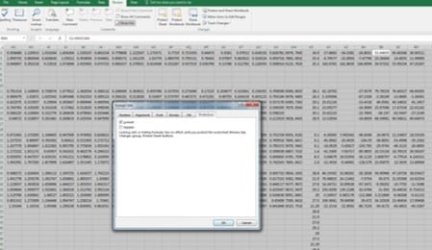
I protected and then unprotected to see what would happen. So now I see the Protection tab in Format Cells. You can see it's not hidden and the cell that is highlighted displays the result in the formula bar instead of its formula.
Also, when I copy and paste a cell to a new spreadsheet, it will display only the result in the formula bar regardless of whether I choose Paste or Paste Formula. But it will display the link in the formula bar when I choose Paste Link.
 

Attachments

  • withheld results scrnsht.jpg
    withheld results scrnsht.jpg
    17.1 KB · Views: 10

My Computer My Computer

At a glance

MS Windows 7 Home Premium 64-bitIntel Core i5 M4504 GB Dual-channel DDR3 @548MHz (7-7-7-20)
Computer Manufacturer/Model Number
ASUS Notebook K72Jk Series
OS
MS Windows 7 Home Premium 64-bit
CPU
Intel Core i5 M450
Motherboard
ASUSTek Computer Inc. K72JK (Socket 989)
Memory
4 GB Dual-channel DDR3 @548MHz (7-7-7-20)
Hard Drives
466 GB Seagate ST9500420A5(SATA)
Other Info
Optical Drive: Matshita DVD-RAM UJ890AS
BIOS
Brand American Megatrends Inc.
Version K72Jk.205
You have mentioned this is the only spreadsheet you have this problem with, so what is different about this one?.

Did you create this spreadsheet yourself. Are you on a workplace network.
 

My Computer My Computer

At a glance

Windows 7 Home Premium 64 bit sp1Intel i5 3570 3.4Ghz Ivy Bridge SKT 1155 quad...G-Skill Rip Jaws 16Gb (8x2) DDR3 -1600 PC3 12...Gigabyte NVIDIA GT610 1Gb DDR3 810/1200 PCI-E...
Computer type
PC/Desktop
Computer Manufacturer/Model Number
Self built using existing case
OS
Windows 7 Home Premium 64 bit sp1
CPU
Intel i5 3570 3.4Ghz Ivy Bridge SKT 1155 quad core
Motherboard
Gigabyte Z77-HD3 SKT 1155 2xSata 3, 4x USB 3.0
Memory
G-Skill Rip Jaws 16Gb (8x2) DDR3 -1600 PC3 12800 CL 10 red
Graphics Card(s)
Gigabyte NVIDIA GT610 1Gb DDR3 810/1200 PCI-E 2.0 Silent
Sound Card
NVIDIA High Definition & Realtech High Definition Audio
Monitor(s) Displays
2 x Philips 226V4L 16:9 aspect ratio
Screen Resolution
1920 x 1080 HD
Hard Drives
Samsung 840 Pro 256gb SSD, SATA 3.
Hitachi Touro Portable 1tb, USB 3.0 HDD used for image b/ups.
PSU
Corsair VS450
Case
Codeng
Cooling
PSU fan & CPU fan
Keyboard
Logitech
Mouse
Logitech Wireless trackball M570
Internet Speed
Wireless 3G. 3mg down & 550kb up.
Antivirus
Bitdefender Internet Security 2020
Browser
Opera (Current Version) & Firefox
Other Info
MS Office 2013 Pro. Davis weather station software. MGE Nova 600 avr UPS.
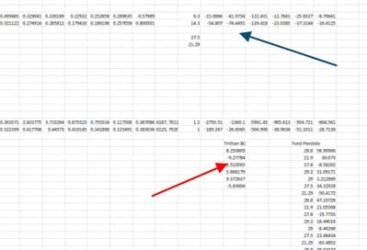
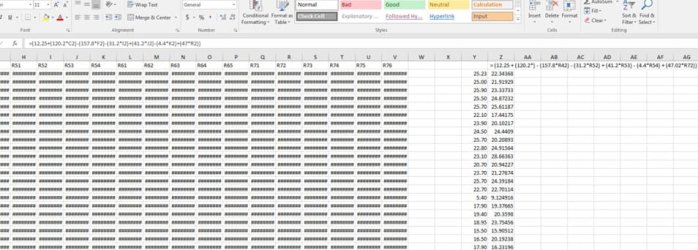
The only thing that is different in the faulty spreadsheet is I pasted the formulas in random spots, as shown at the red arrow. Blue arrow shows from where I copied the formula at the red arrow. The other image shows an example of one of my spreadsheets correctly displaying a formula in the formula bar. Cell Z2 is highlighted, right below where I have the formula entered in Z1.

I created all my spreadsheets myself and I do not work on the shared network; I'm working from a drive in my computer. However, the faulty spreadsheet was likely on the shared workplace network at some point. The spreadsheets that are on that drive display the formulas as they should.
 

Attachments

  • withheld results scrnsht2b.jpg
    withheld results scrnsht2b.jpg
    63.2 KB · Views: 1
  • withheld results scrnsht2c.jpg
    withheld results scrnsht2c.jpg
    13.9 KB · Views: 7

My Computer My Computer

At a glance

MS Windows 7 Home Premium 64-bitIntel Core i5 M4504 GB Dual-channel DDR3 @548MHz (7-7-7-20)
Computer Manufacturer/Model Number
ASUS Notebook K72Jk Series
OS
MS Windows 7 Home Premium 64-bit
CPU
Intel Core i5 M450
Motherboard
ASUSTek Computer Inc. K72JK (Socket 989)
Memory
4 GB Dual-channel DDR3 @548MHz (7-7-7-20)
Hard Drives
466 GB Seagate ST9500420A5(SATA)
Other Info
Optical Drive: Matshita DVD-RAM UJ890AS
BIOS
Brand American Megatrends Inc.
Version K72Jk.205
Probably at some point during the copying process some data has been missed or become corrupted & is not displaying properly.

Short of trying to access the original spreadsheet again & recopying it I can't suggest a solution.

I assume that the drive you refer to, that displays the formulas correctly is at your old work place & no longer accessible.
 

My Computer My Computer

At a glance

Windows 7 Home Premium 64 bit sp1Intel i5 3570 3.4Ghz Ivy Bridge SKT 1155 quad...G-Skill Rip Jaws 16Gb (8x2) DDR3 -1600 PC3 12...Gigabyte NVIDIA GT610 1Gb DDR3 810/1200 PCI-E...
Computer type
PC/Desktop
Computer Manufacturer/Model Number
Self built using existing case
OS
Windows 7 Home Premium 64 bit sp1
CPU
Intel i5 3570 3.4Ghz Ivy Bridge SKT 1155 quad core
Motherboard
Gigabyte Z77-HD3 SKT 1155 2xSata 3, 4x USB 3.0
Memory
G-Skill Rip Jaws 16Gb (8x2) DDR3 -1600 PC3 12800 CL 10 red
Graphics Card(s)
Gigabyte NVIDIA GT610 1Gb DDR3 810/1200 PCI-E 2.0 Silent
Sound Card
NVIDIA High Definition & Realtech High Definition Audio
Monitor(s) Displays
2 x Philips 226V4L 16:9 aspect ratio
Screen Resolution
1920 x 1080 HD
Hard Drives
Samsung 840 Pro 256gb SSD, SATA 3.
Hitachi Touro Portable 1tb, USB 3.0 HDD used for image b/ups.
PSU
Corsair VS450
Case
Codeng
Cooling
PSU fan & CPU fan
Keyboard
Logitech
Mouse
Logitech Wireless trackball M570
Internet Speed
Wireless 3G. 3mg down & 550kb up.
Antivirus
Bitdefender Internet Security 2020
Browser
Opera (Current Version) & Firefox
Other Info
MS Office 2013 Pro. Davis weather station software. MGE Nova 600 avr UPS.
Back
Top